
用 UICollectionView 實現廣告輪播圖(附完整源碼)
編輯:iOS 開發綜合
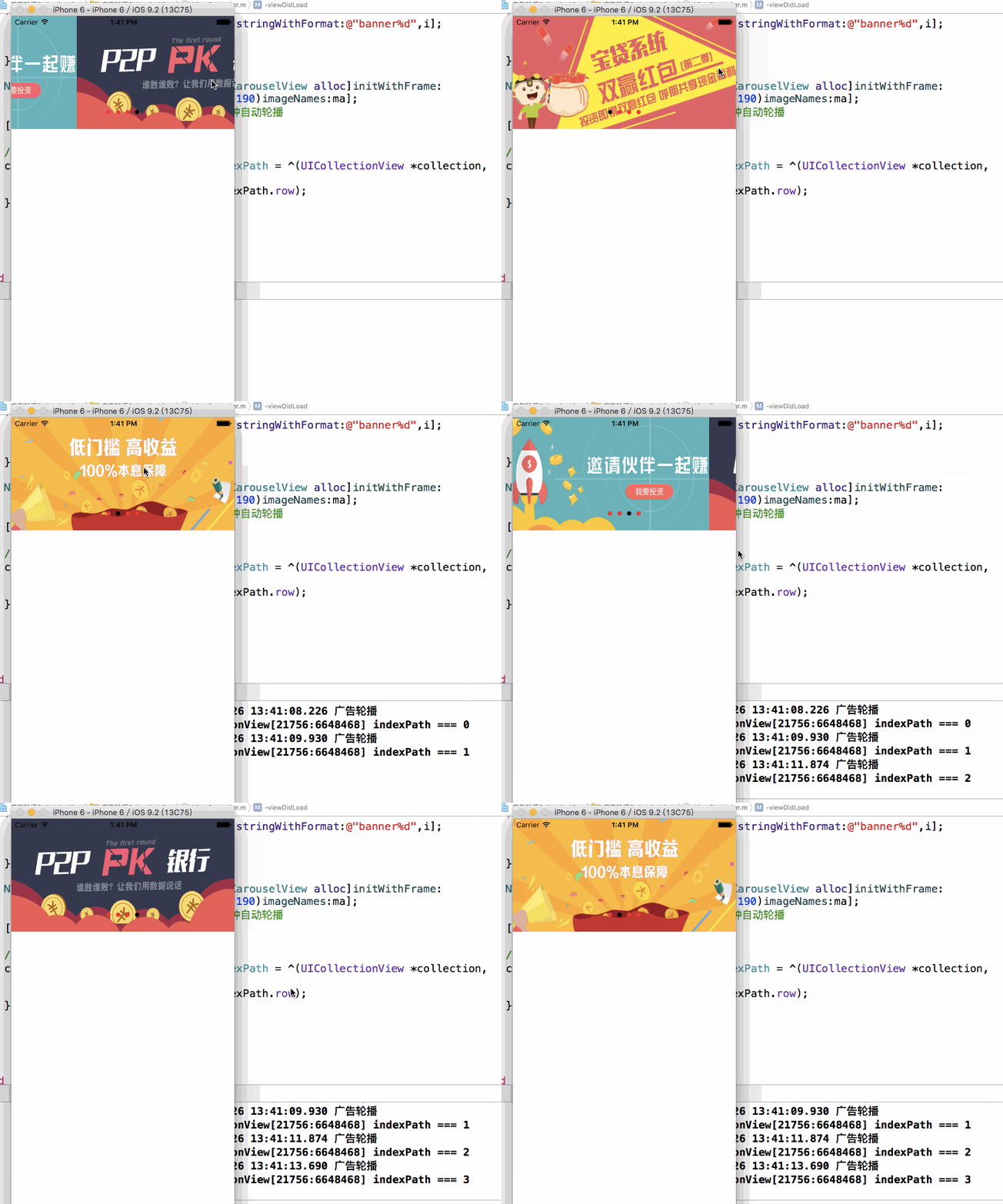
本例封裝了一個基於 UICollectionView 的輪播組件 NYCarouselView,支持自動輪播、手勢拖拽暫停、UIPageControl 頁碼同步,並對外暴露 cell 的點擊回調。
效果圖:
NYCarouselView.h
#import <UIKit/UIKit.h>

@interface NYCarouselView : UICollectionView

/** 啟動時鐘 */
- (void)startTimer;

/** 停止時鐘 */
- (void)updateTimer;

- (instancetype)initWithFrame:(CGRect)frame imageNames:(NSArray *)imageNames;

@property (nonatomic, strong) NSArray *imageNames;

/** 每個輪播圖片的點擊事件 */
@property (nonatomic, copy) void (^cellDidSelectItemAtIndexPath)(UICollectionView *collection, NSIndexPath *indexPath);

@end
NYCarouselView.m
#import "NYCarouselView.h"

@interface NYCarouselView () <UICollectionViewDataSource, UICollectionViewDelegate>
@property (nonatomic, weak) UIPageControl *carouselPageControl;
@property (nonatomic, strong) NSTimer *timer;
@end

@implementation NYCarouselView

static NSString * const carouselID = @"NYCarouselView";

- (instancetype)initWithFrame:(CGRect)frame
{
    UICollectionViewFlowLayout *carouseLayout = [[UICollectionViewFlowLayout alloc] init];
    carouseLayout.itemSize = frame.size;              // cell 尺寸與容器一致
    carouseLayout.minimumLineSpacing = 0;             // 清空行距
    carouseLayout.scrollDirection = UICollectionViewScrollDirectionHorizontal;

    [self registerClass:[UICollectionViewCell class] forCellWithReuseIdentifier:carouselID];
    self.dataSource = self;
    self.delegate = self;
    [self startTimer];

    return [super initWithFrame:frame collectionViewLayout:carouseLayout];
}

- (instancetype)initWithFrame:(CGRect)frame imageNames:(NSArray *)imageNames
{
    self.imageNames = imageNames;
    [self scrollViewDidScroll:self];
    return [self initWithFrame:frame];
}

- (void)layoutSubviews
{
    [super layoutSubviews];
    self.bounces = NO;                          // 去掉彈簧效果
    self.showsHorizontalScrollIndicator = NO;   // 去掉水平拖拽指示條
    self.pagingEnabled = YES;                   // 分頁效果
}

#pragma mark - UICollectionViewDataSource / UICollectionViewDelegate

- (NSInteger)collectionView:(UICollectionView *)collectionView numberOfItemsInSection:(NSInteger)section
{
    return self.imageNames.count;
}

- (UICollectionViewCell *)collectionView:(UICollectionView *)collectionView cellForItemAtIndexPath:(NSIndexPath *)indexPath
{
    UICollectionViewCell *cell = [collectionView dequeueReusableCellWithReuseIdentifier:carouselID
                                                                           forIndexPath:indexPath];
    UIImageView *imageView = [[UIImageView alloc] initWithImage:[UIImage imageNamed:self.imageNames[indexPath.row]]];
    cell.backgroundView = imageView;
    return cell;
}

- (void)collectionView:(UICollectionView *)collectionView didSelectItemAtIndexPath:(NSIndexPath *)indexPath
{
    if (self.cellDidSelectItemAtIndexPath) {
        self.cellDidSelectItemAtIndexPath(collectionView, indexPath);
    }
}

#pragma mark - 分頁

- (void)pageChanged:(UIPageControl *)page
{
    [self.timer invalidate];
    // 根據頁數調整 contentOffset
    CGFloat x = page.currentPage * self.bounds.size.width;
    [self setContentOffset:CGPointMake(x, 0) animated:YES];
    [self startTimer];
}

#pragma mark - 時鐘

/** 啟動時鐘 */
- (void)startTimer
{
    self.timer = [NSTimer scheduledTimerWithTimeInterval:2.0
                                                  target:self
                                                selector:@selector(updateTimer)
                                                userInfo:nil
                                                 repeats:YES];
    // 加入 RunLoop,否則在拖拽模式下計時器不會觸發
    [[NSRunLoop currentRunLoop] addTimer:self.timer forMode:NSRunLoopCommonModes];
}

- (void)updateTimer
{
    NSUInteger count = self.imageNames.count;
    if (count == 0) {
        NSLog(@"圖片個數是 0");
        return;
    }
    // (當前頁 + 1)% 總頁數
    int page = (self.carouselPageControl.currentPage + 1) % (int)count;
    self.carouselPageControl.currentPage = page;
    [self pageChanged:self.carouselPageControl];
}

/** 抓住圖片時暫停,鬆手後恢復 */
- (void)scrollViewWillBeginDragging:(UIScrollView *)scrollView
{
    // invalidate 之後 timer 不可重用,恢復時會重新實例化
    [self.timer invalidate];
}

- (void)scrollViewDidEndDragging:(UIScrollView *)scrollView willDecelerate:(BOOL)decelerate
{
    [self startTimer];
}

#pragma mark - UIScrollViewDelegate

- (void)scrollViewDidScroll:(UIScrollView *)scrollView
{
    // 依據偏移量計算當前頁
    int page = scrollView.contentOffset.x / scrollView.bounds.size.width + 0.5;
    self.carouselPageControl.currentPage = page;
}

#pragma mark - 懶加載

- (UIPageControl *)carouselPageControl
{
    if (_carouselPageControl == nil) {
        UIPageControl *carouselPageControl = [[UIPageControl alloc] init];
        carouselPageControl.numberOfPages = self.imageNames.count;

        CGSize size = [carouselPageControl sizeForNumberOfPages:self.imageNames.count];
        carouselPageControl.bounds = CGRectMake(0, 0, size.width, size.height);
        carouselPageControl.center = CGPointMake(self.center.x, self.bounds.size.height * 0.85);

        carouselPageControl.pageIndicatorTintColor = [UIColor redColor];
        carouselPageControl.currentPageIndicatorTintColor = [UIColor blackColor];

        [carouselPageControl addTarget:self
                               action:@selector(pageChanged:)
                     forControlEvents:UIControlEventValueChanged];
        [self.window addSubview:carouselPageControl];
        _carouselPageControl = carouselPageControl;
    }
    return _carouselPageControl;
}

- (NSArray *)imageNames
{
    if (_imageNames == nil) {
        _imageNames = [NSArray array];
    }
    return _imageNames;
}

@end
實現要點
布局:自定義 UICollectionViewFlowLayout,讓 itemSize 等於容器尺寸、橫向滾動、行距為 0,再配合 pagingEnabled 就能實現整屏翻頁。
計時器與 RunLoop:計時器必須加入 NSRunLoopCommonModes,否則在拖拽(UITrackingRunLoopMode)期間不會觸發,這也是很多人寫輪播時「拖完就不自動播了」的原因。
拖拽暫停:scrollViewWillBeginDragging 中 invalidate,scrollViewDidEndDragging 中重新 startTimer,避免用戶操作與自動播放互相打架。
頁碼同步:在 scrollViewDidScroll 中按 contentOffset 計算頁碼,讓手動滑動與自動輪播都能驅動 UIPageControl。