
iOS 沙盒進階:建立目錄、讀取檔名與混合資料寫入
編輯:iOS 開發綜合
在了解 iOS 沙盒基本結構後,開發者可進一步進行目錄建立、檔案列舉、刪除與混合資料寫入。以下整理常見操作。
在 Documents 建立目錄
可先取得 Documents 路徑,再使用 NSFileManager 建立子目錄:
NSFileManager *fileManager = [NSFileManager defaultManager];
NSString *testDirectory = [documentsDirectory stringByAppendingPathComponent:@"test"];
[fileManager createDirectoryAtPath:testDirectory withIntermediateDirectories:YES attributes:nil error:nil];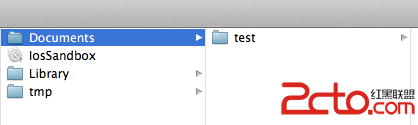
在目錄下建立檔案
使用 stringByAppendingPathComponent 拼接檔名,再呼叫 createFileAtPath:contents:attributes::
NSString *testPath = [testDirectory stringByAppendingPathComponent:@"test00.txt"];
NSString *string = @"寫入內容,writeString";
[fileManager createFileAtPath:testPath contents:[string dataUsingEncoding:NSUTF8StringEncoding] attributes:nil];
取得目錄中所有檔案
可使用 subpathsOfDirectoryAtPath:error: 或 subpathsAtPath::
NSArray *files = [fileManager subpathsOfDirectoryAtPath:testDirectory error:nil];
NSLog(@"%@", files);
切換目前操作目錄
使用 changeCurrentDirectoryPath: 後,後續檔案操作可使用相對路徑:
[fileManager changeCurrentDirectoryPath:documentsDirectory];
NSString *fileName = @"testFileNSFileManager.txt";
[fileManager createFileAtPath:fileName contents:nil attributes:nil];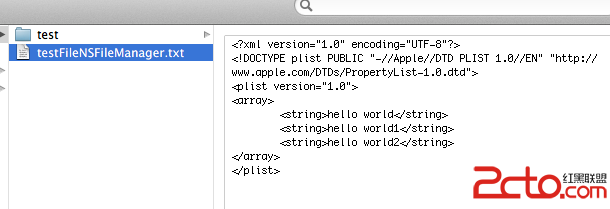
刪除檔案
刪除檔案可呼叫:
[fileManager removeItemAtPath:fileName error:nil];混合資料寫入
若需要儲存字串、整數與浮點數,可使用 NSMutableData 組裝資料,再寫入檔案。寫入時可將字串轉為 UTF-8 資料,並將其他型別的位元組附加到緩衝區。

讀取時,可依原本寫入的順序與長度,從 NSData 中取出字串、整數與浮點數。這類做法適合需要緊湊儲存或自訂格式的場景。
- 上一篇文章: iOS App 進入背景後爭取執行時間的做法
- 下一篇文章: 22 個 iOS 開發實用技巧整理