
iOS 學習筆記 38:MJExtension 全面使用指南
一、MJExtension 第三方框架
在 iOS 開發中,我們經常需要在字典(即 JSON 數據)與模型之間互相轉換,例如網絡請求返回的微博數據。如果每個字段都手動創建模型並賦值,不僅枯燥乏味、費時費力,還容易出錯。MJExtension 正是為了解決這個痛點而生的開源庫,它以 Objective-C 的運行時機制為基礎,能自動完成字典與模型的映射。
它提供了豐富的能力:
簡單字典 → 模型、JSON 字串 → 模型、包含子模型的複雜字典 → 模型、數組屬性裝模型的複雜轉換、屬性名與 key 不一致的映射、字典數組 → 模型數組、模型 → 字典、模型數組 → 字典數組、字典 → CoreData 模型、歸檔與解檔(NSCoding)、過濾字典的值等。
由於該框架較為輕量,非常適合初學者研讀源碼,對理解 OC 運行時機制大有幫助。
二、Runtime 運行時機制簡介
Runtime 簡稱運行時,是系統在運行時期的各項機制,其中最主要的是消息機制。OC 的函數調用本質上是消息發送,屬於動態調用:編譯階段並不能決定真正調用哪個函數,只有在運行時才會根據方法名找到對應實現並執行。
/* OC 方法調用 */
[obj makeTest];

/* 編譯時 Runtime 會轉為下面的消息發送 */
objc_msgSend(obj, @selector(makeTest));
iOS 頂層基類 NSObject 含有一個指向 objc_class 結構體的 isa 指標,該結構體保存了類名、成員變量、方法列表、協議等信息。
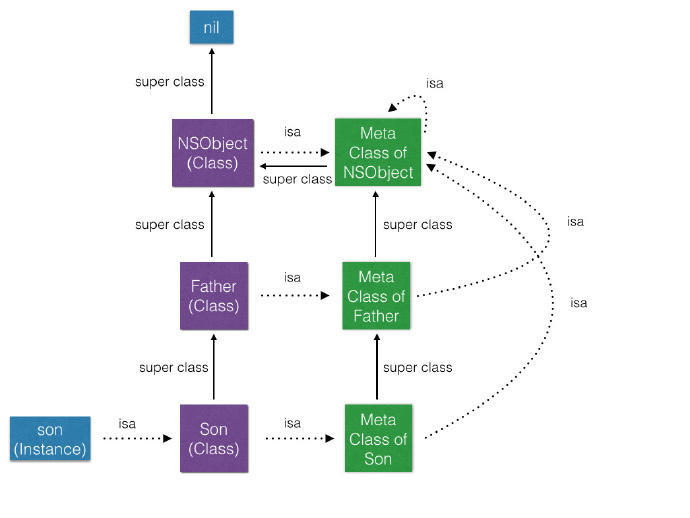
objc_msgSend 的查找過程大致如下:
先透過 isa 找到對應 Class → 在 cache 中按 SEL 查找方法 → 未命中則查 methodLists → 仍未命中則沿 superClass 遞歸查找 → 命中後加入 cache 並執行 → 若一直找到 NSObject 都沒有,則進入消息動態處理流程。
消息動態處理流程包含幾個關鍵方法:
+ (BOOL)resolveInstanceMethod:(SEL)sel;                 //動態添加方法處理
- (id)forwardingTargetForSelector:(SEL)aSelector;       //轉交給代理處理
- (NSMethodSignature *)methodSignatureForSelector:(SEL)aSelector; //返回方法簽名
- (void)forwardInvocation:(NSInvocation *)anInvocation; //對調用進行重定向
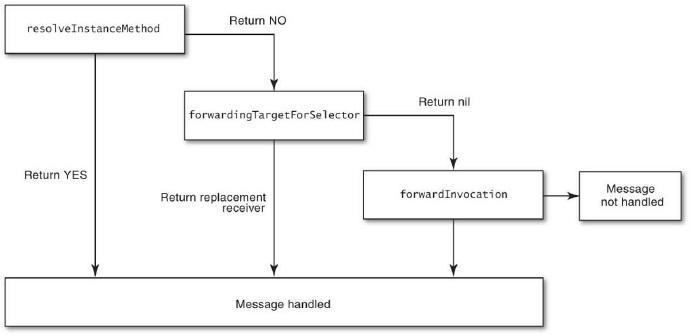
因此借助 Runtime,我們可以動態地為類添加方法或屬性:
/* 動態添加屬性 */
class_addIvar(kclass, "expression", size, alignment, "*");

/* 動態添加方法 */
class_addMethod(kclass, @selector(setExpressionFormula:), (IMP)setExpressionFormula, "v@:@");
class_addMethod(kclass, @selector(getExpressionFormula), (IMP)getExpressionFormula, "@@:");
其中 v 表示 void、@ 表示 id 類型、: 表示 SEL 類型。
三、MJExtension 使用
MJExtension 的大部分方法都集成在分類上,只需導入 MJExtension.h 即可使用。
1. 簡單的字典 → 模型
typedef enum { SexMale, SexFemale } Sex;

@interface User : NSObject
@property (copy, nonatomic) NSString *name;    /* 姓名 */
@property (copy, nonatomic) NSString *icon;    /* 頭像 */
@property (assign, nonatomic) unsigned int age;/* 年齡 */
@property (strong, nonatomic) NSNumber *money; /* 資產 */
@property (assign, nonatomic) Sex sex;         /* 性別 */
@property (assign, nonatomic, getter=isGay) BOOL gay;
@end

NSDictionary *dict = @{ @"name":@"Jack", @"icon":@"lufy.png", @"age":@20,
                        @"money":@100.9, @"sex":@(SexFemale), @"gay":@"NO" };
User *user = [User mj_objectWithKeyValues:dict];
2. JSON 字串 → 模型
NSString *jsonString = @"{\"name\":\"Jack\", \"icon\":\"lufy.png\", \"age\":20}";
User *user = [User mj_objectWithKeyValues:jsonString];
3. 複雜的字典 → 模型(模型裡包含模型)
@interface Status : NSObject
@property (copy, nonatomic) NSString *text;
@property (strong, nonatomic) User *user;              /* 其他模型 */
@property (strong, nonatomic) Status *retweetedStatus; /* 自我模型 */
@end

NSDictionary *dict = @{ @"text":@"Agree! Nice weather!",
                        @"user":@{ @"name":@"Jack", @"icon":@"lufy.png" },
                        @"retweetedStatus":@{ @"text":@"Nice weather!",
                                              @"user":@{ @"name":@"Rose", @"icon":@"nami.png" } } };
Status *status = [Status mj_objectWithKeyValues:dict];
NSLog(@"text=%@, name=%@", status.retweetedStatus.text, status.retweetedStatus.user.name);
4. 複雜的字典 → 模型(數組屬性裡裝模型)
此時需實現 mj_objectClassInArray 方法,說明數組中存儲的模型類型。
@implementation StatusResult
+ (NSDictionary *)mj_objectClassInArray{
    return @{ @"statuses":@"Status", @"ads":@"Ad" };
}
@end

NSDictionary *dict = @{ @"statuses":@[ @{@"text":@"Nice weather!", @"user":@{@"name":@"Rose"}} ],
                        @"ads":@[ @{@"image":@"ad01.png", @"url":@"https://www.ad01.com"} ],
                        @"totalNumber":@"2014" };
StatusResult *result = [StatusResult mj_objectWithKeyValues:dict];
5. 屬性名與字典 key 不一致
透過 mj_replacedKeyFromPropertyName 建立映射關係,甚至支援多級 key。
@implementation Student
+ (NSDictionary *)mj_replacedKeyFromPropertyName{
    return @{ @"ID":@"id",
              @"desc":@"desciption",
              @"oldName":@"name.oldName",
              @"nowName":@"name.newName",
              @"nameChangedTime":@"name.info[1].nameChangedTime",
              @"bag":@"other.bag" };
}
@end
6. 字典數組 → 模型數組
NSArray *dictArray = @[ @{@"name":@"Jack", @"icon":@"lufy.png"}, @{@"name":@"Rose", @"icon":@"nami.png"} ];
NSArray *userArray = [User mj_objectArrayWithKeyValuesArray:dictArray];
7. 模型 → 字典
User *user = [[User alloc] init];
user.name = @"Jack";
user.icon = @"lufy.png";
Status *status = [[Status alloc] init];
status.user = user;
status.text = @"Nice mood!";
NSDictionary *statusDict = status.mj_keyValues;
8. 模型數組 → 字典數組
NSArray *dictArray = [User mj_keyValuesArrayWithObjectArray:userArray];
9. 字典 → CoreData 模型
NSManagedObjectContext *context = nil;
User *user = [User mj_objectWithKeyValues:dict context:context];
[context save:nil];
10. 歸檔與解檔 NSCoding
只需加入宏 MJExtensionCodingImplementation,並可透過 mj_ignoredCodingPropertyNames 指定不需歸檔的屬性。
@implementation Bag
MJExtensionCodingImplementation
+ (NSArray *)mj_ignoredCodingPropertyNames{
    return @[@"name"];
}
@end

[NSKeyedArchiver archiveRootObject:bag toFile:file];
Bag *decodedBag = [NSKeyedUnarchiver unarchiveObjectWithFile:file];
11. 過濾字典的值
透過 mj_newValueFromOldValue:property: 可在轉換過程中對值進行過濾與二次轉換,例如把字串日期轉為 NSDate。
- (id)mj_newValueFromOldValue:(id)oldValue property:(MJProperty *)property {
    if (property.type.typeClass == [NSDate class]) {
        NSDateFormatter *fmt = [[NSDateFormatter alloc] init];
        fmt.dateFormat = @"yyyy-MM-dd";
        return [fmt dateFromString:oldValue];
    }
    return oldValue;
}
MJExtension 的源碼地址:CoderMJLee/MJExtension。
- 上一篇文章: iOS 開發隨手筆記:常用語法與實務技巧彙整
- 下一篇文章: 基於 UITextView 實現 UITextField 功能(含占位符)