
Xcode 7 與 iOS 9 適配踩坑全記錄
從 Xcode 6.x 升級到 Xcode 7.2 之後,發現有一堆適配工作要做,否則舊項目無法正常運行。以下是我整理的幾個關鍵適配點。
一、換庫
所有 .dylib 後綴的庫都要換成 .tbd 後綴,如下所示。
換庫前:
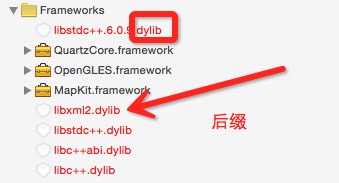
換庫後:

二、https 問題
Xcode 7.2 默認項目啟用 https(App Transport Security)。若要繼續使用 http,需要在 info.plist 中添加相應配置:

三、Bitcode 問題
真機測試時發現,模擬器沒出錯,真機卻報了類似下面的錯誤:
'/Users/**/Framework/SDKs/PolymerPay/Library/mobStat/lib**SDK.a(**ForSDK.o)' does not contain bitcode. You must rebuild it with bitcode enabled (Xcode setting ENABLE_BITCODE), obtain an updated library from the vendor, or disable bitcode for this target. for architecture arm64
報錯中包含 Bitcode 字樣。bitcode 是被編譯程序的一種中間形式代碼,包含 bitcode 配置的程序會在 App Store 上被編譯和鏈接。bitcode 允許蘋果在後期重新優化程序的二進制文件,而無需重新提交新版本。當提交程序到 App Store 時,Xcode 會將其編譯為中間表現形式(bitcode),再由 App Store 編譯為可執行的 64 位或 32 位程序。
上述錯誤提示其實已給出了處理建議:要麼讓第三方庫支持 bitcode,要麼關閉 target 的 bitcode 選項。
實際上,在 Xcode 7 中新建 iOS 工程時,bitcode 選項默認設為 YES,可在「Build Settings」→「Enable Bitcode」中查看。需要注意的是,此時要考慮三個平台:iOS、Mac OS、watchOS——其中 iOS 的 bitcode 是可選的,watchOS 是必須的,而 Mac OS 不支持 bitcode。
若開啟了 bitcode,提交包時的界面也會有一個相應的 bitcode 選項:
因此,如果工程需要支持 bitcode,就必須要求所有引入的第三方庫都支持它。
否則,按下圖所示關閉 bitcode 即可:

四、白名單問題
升級到 Xcode 7.2 後,如果項目需要跳轉到其他 App,則必須在 info.plist 中添加對應 App 的 Scheme(LSApplicationQueriesSchemes),否則無法調用或跳轉。

<key>LSApplicationQueriesSchemes</key>
<string>iosamap</string>
<string>baidumap</string>
<string>wechat</string>
<string>weixin</string>
<string>sinaweibo</string>
<string>mqqapi</string>
<string>mqq</string>
<string>mqzone</string>
<string>alipay</string>
<string>alipayshare</string>
五、打包遇到的問題
Failed to locate or generate matching signing assets. Xcode attempted to locate or generate matching signing assets and failed to do so because of the following issues. Missing iOS Distribution signing identity for ... Xcode can request one for you.
截圖如下:

原因是 Apple World Wide Developer Relations Certificate Authority 的過期時間為 2016 年 2 月 14 日。蘋果的官方回覆如下:
Thanks for bringing this to the attention of the community and apologies for the issues you've been having. This issue stems from having a copy of the expired WWDR Intermediate certificate in both your System and Login keychains. To resolve the issue, you should first download and install the new WWDR intermediate certificate (by double-clicking on the file). Next, in the Keychain Access application, select the System keychain. Make sure to select "Show Expired Certificates" in the View menu and then delete the expired version of the Apple Worldwide Developer Relations Certificate Authority Intermediate certificate (expired on February 14, 2016). Your certificates should now appear as valid in Keychain Access and be available to Xcode for submissions to the App Store.
簡單來說,就是頒發開發者證書的根證書過期了。此時打開鑰匙串查看你的發布證書,會看到:

正是這個 Apple World Wide Developer Relations Certificate Authority 過期了,導致由它頒發的證書全部失效。
解決方案如下:
1. 打開鑰匙串(Keychain),在「登錄」和「系統」中找到過期的 Apple World Wide Developer Relation Certification Authority 並刪除。注意要在鑰匙串的顯示菜單中設置「顯示過期證書」。

2. 下載新的 AppleWWDRCA.cer 證書到本地。
3. 記得打開系統鑰匙串的設置權限。

4. 把 AppleWWDRCA.cer 安裝到「登錄」和「系統」中。
設置成功後,查看你的發布證書是否已恢復正常:

- 上一篇文章: 自定義 presentViewController 轉場動畫(Swift 實戰)
- 下一篇文章: 關於 iOS 多線程,看這一篇就够了