
iOS開發實用技巧整理(一)
本文整理日常 iOS 開發中常見的實用技巧,涵蓋圖片處理、版本控制、介面調整、資料持久化、推送與上架相關問題。這些技巧多來自實際專案經驗,適合在開發過程中隨時查閱。
一、圖片與視覺處理
1. 為 UIImage 加上毛玻璃效果
可以使用 Core Image 的高斯模糊濾鏡,讓圖片呈現毛玻璃質感。
let blurFilter = CIFilter(name: "CIGaussianBlur")
blurFilter?.setValue(ciImage, forKey: KCIInputImageKey)
blurFilter?.setValue(value, forKey: "inputRadius")
其中 inputRadius 代表模糊程度,數值越大,模糊越明顯。
2. 圖片等比壓縮
若需要縮小圖片尺寸,可依原圖比例計算目標高度。
let targetHeight = targetWidth / width * height

UIGraphicsBeginImageContext(CGSizeMake(targetWidth, targetHeight))
self.draw(in: CGRect(x: 0, y: 0, width: targetWidth, height: targetHeight))
let newImage = UIGraphicsGetImageFromCurrentImageContext()
UIGraphicsEndImageContext()
3. 顏色值轉 RGB
若需要取得 UIColor 的 RGB 元件,可以透過 CGColor 取得 components。
UIColor *color = [UIColor colorWithRed:0.0 green:0.0 blue:1.0 alpha:1.0];
const CGFloat *components = CGColorGetComponents(color.CGColor);
二、版本控制與專案設定
1. SVN 與 Git 的基本流程
SVN 常見流程是 CheckOut、修改、Commit、Update。Git 常見流程則是 Pull、Commit、Push。不論使用哪一種工具,每天下班前都應確保提交內容可以編譯,上班後也應先更新最新版本。
2. 建立 PCH 檔
PCH 常用來放置全域標頭檔。建立後,需要在 Build Settings 中設定 Prefix Header 路徑。
3. 編譯架構錯誤
如果遇到 No architectures to compile for 這類錯誤,可以檢查 Build Settings 中的 Architectures 與 Valid Architectures。
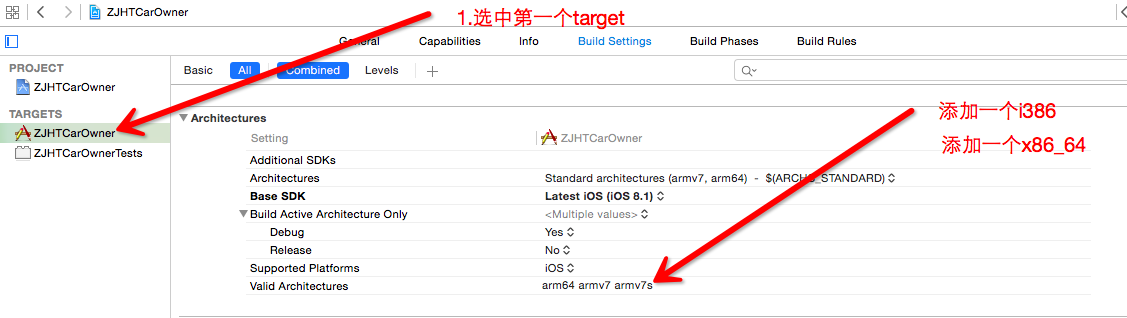
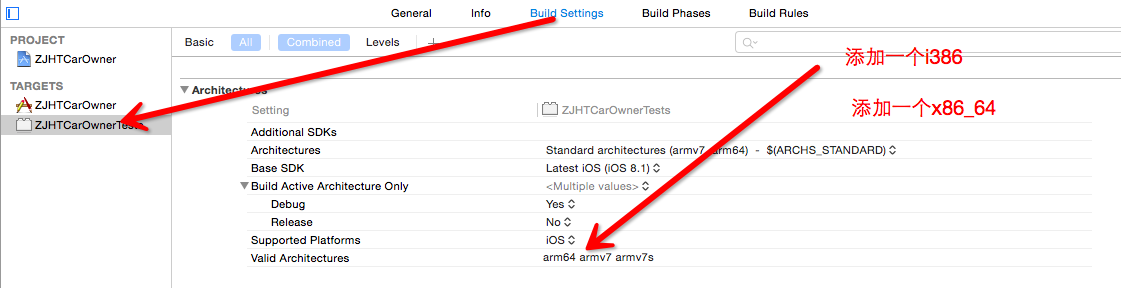
4. Version 與 Build 的差異
Version 是給使用者看的版本號,例如 1.0、2.0。Build 則是給開發者與 iTunes Connect 辨識的建置編號。若 Version 已提交過,通常可以透過調整 Build 號再次提交。
5. 簽名與 Profile
若需要清理舊的簽名檔,可以前往 Provisioning Profiles 目錄刪除。Xcode 中也可以在 Accounts 的 View Details 重新整理簽名資料。
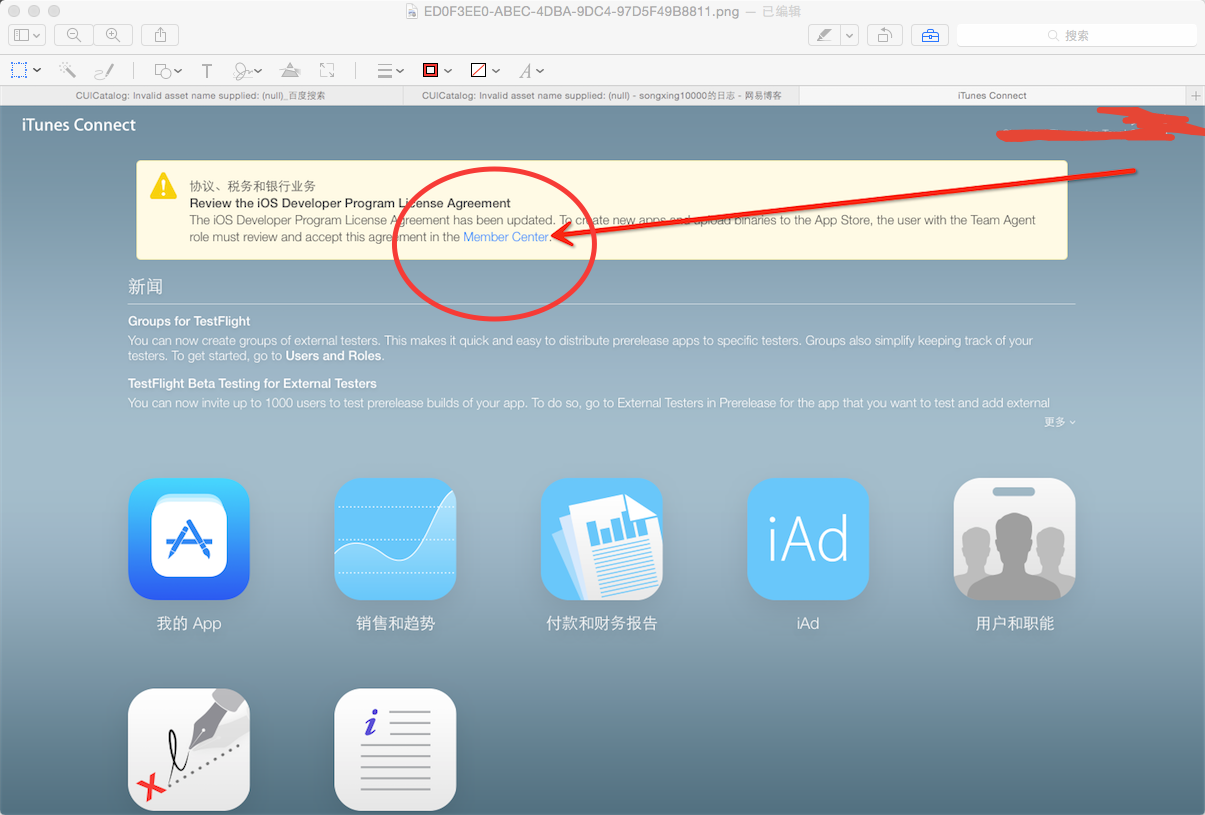
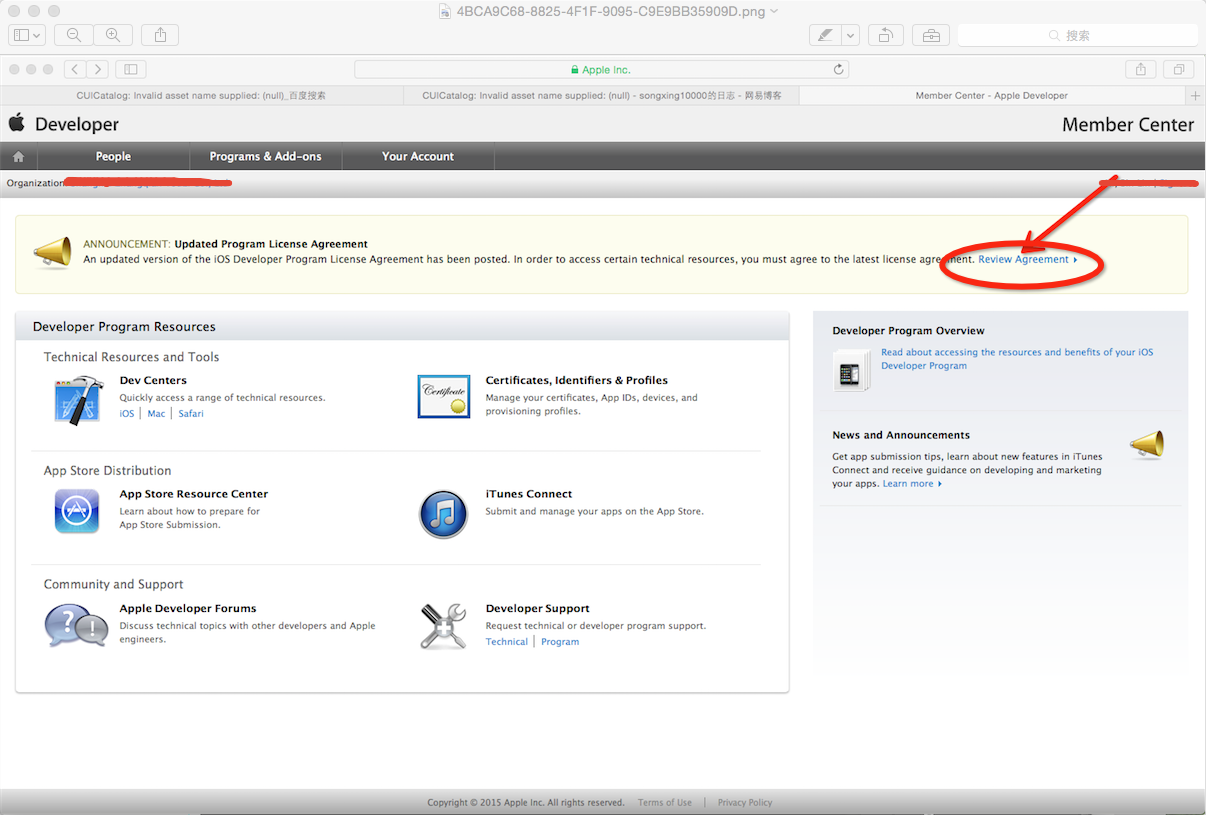
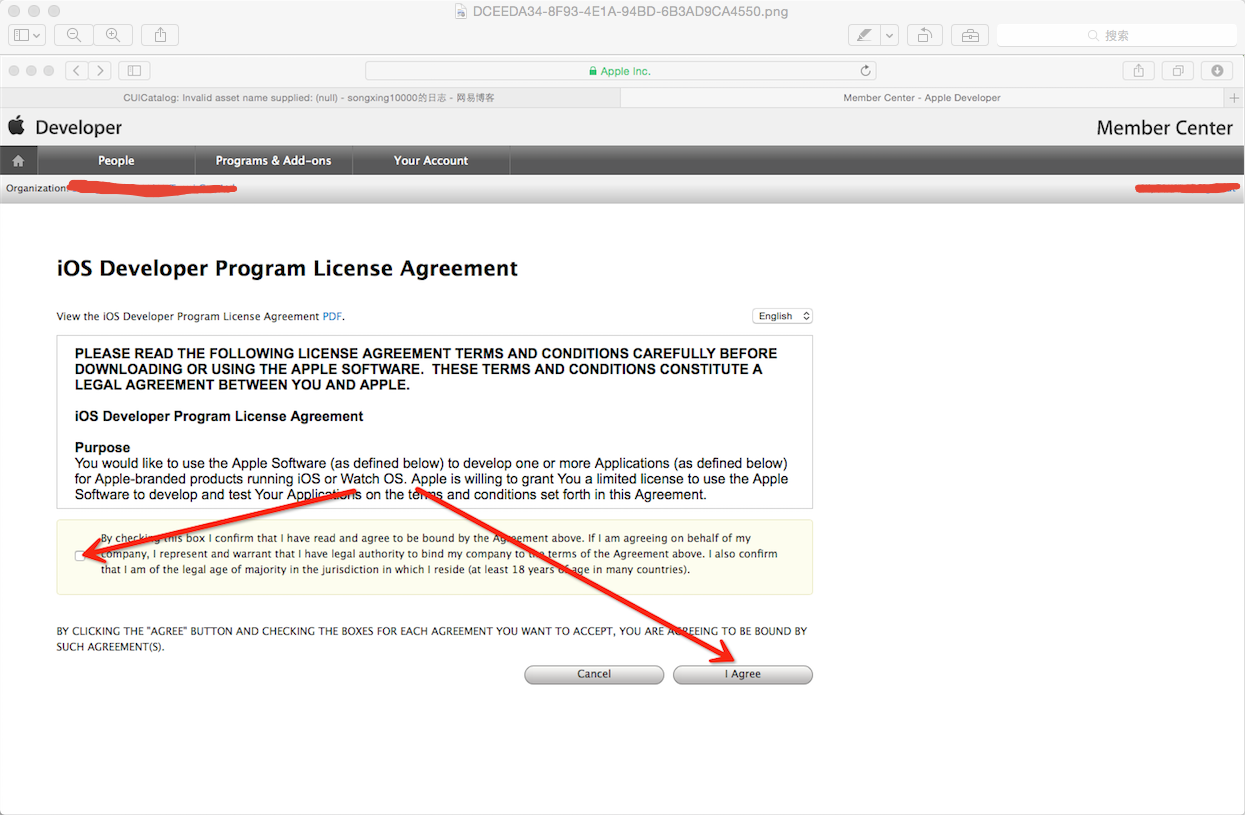
6. App Store 更新協議
當 iTunes Connect 要求接受最新協議時,可依畫面步驟完成更新。
三、介面與互動
1. 設定 UINavigationController 標題
若 rootViewController 被放入 UINavigationController,可以直接設定 title,讓 navigationItem 與 tabBarItem 一起顯示。
root.title = @"title";2. 設定返回按鈕文字
self.navigationItem.backBarButtonItem = [[UIBarButtonItem alloc]
    initWithTitle:@"返回"
            style:UIBarButtonItemStylePlain
           target:nil
           action:nil];
3. 隱藏狀態列
在 iOS 7 之後,建議在 view controller 中重寫:
- (BOOL)prefersStatusBarHidden {
    return YES;
}
4. TableView 移除多餘空白 cell
tableView.tableFooterView = [UIView new];5. 清除 cell 上的舊子視圖
NSArray *subviews = [[NSArray alloc] initWithArray:cell.contentView.subviews];

for (UIView *subview in subviews) {
    [subview removeFromSuperview];
}
6. 收起鍵盤
[[UIApplication sharedApplication] sendAction:@selector(resignFirstResponder)
                                          to:nil
                                        from:nil
                                    forEvent:nil];
7. 判斷是否插入 SIM 卡
可以透過 CoreTelephony.framework 取得 SIM 狀態。
8. 取得目前 Wi-Fi 資訊
可以透過 SystemConfiguration 與 CaptiveNetwork 相關 API 取得網路介面資訊。
9. 廣告識別碼與廠商識別碼
NSString *adId = [[[ASIdentifierManager sharedManager] advertisingIdentifier] UUIDString];
NSString *idfv = [[[UIDevice currentDevice] identifierForVendor] UUIDString];
advertisingIdentifier 用於廣告追蹤,identifierForVendor 則可辨識同一開發者的應用。
四、資料與持久化
常見的資料保存方式包括:
- FMDB 或 SQLite:適合需要增刪改查的大量資料。
- Core Data:適合物件圖管理。
- NSUserDefaults:適合偏好設定與輕量狀態。
- plist:適合城市資訊、列表資料。
- JSON:適合頁面列表或網路快取。
- Realm:適合需要 ORM 風格的資料庫操作。
FMDB 事務操作
@try {
    [database beginTransaction];
    // 執行多筆寫入
} @catch (NSException *exception) {
    [database rollback];
} @finally {
    [database commit];
}
若需要大量寫入,使用事務可以減少磁碟操作次數,提升效能。
NSPredicate 謂詞查詢
NSPredicate *predicate = [NSPredicate predicateWithFormat:@"age == %d", 15];
NSArray *result = [array filteredArrayUsingPredicate:predicate];
謂詞可以簡化集合篩選,避免撰寫大量 if 判斷。
五、推送、多媒體與其他
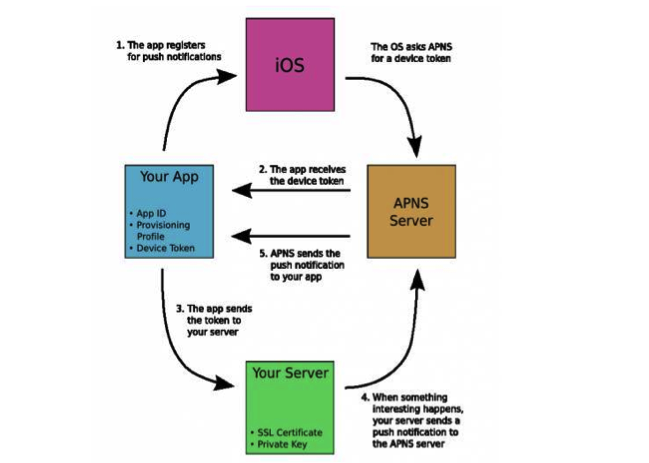
1. 推送通知機制
應用程式第一次啟動時會詢問使用者是否允許通知。若同意,系統會向 APNS 註冊並取得 DeviceToken。開發者需要將 DeviceToken 送到自己的伺服器或推送服務平台,後續即可由伺服器發送推播。
2. 從 iPod 媒體庫讀取音樂
可以使用 MPMediaQuery 查詢媒體庫中的音樂項目。
3. 設定系統音量
可以透過 MPVolumeView 內的 MPVolumeSlider 調整系統音量,並監聽音量變更通知。
4. 打開指定應用
若要判斷是否安裝特定應用,可以使用 canOpenURL。若要開啟網頁,可以使用 openURL。
NSURL *url = [NSURL URLWithString:urlString];
[[UIApplication sharedApplication] openURL:url];
5. 企業版與 App Store 版本
同一台裝置能否安裝兩個相同名稱的應用,主要取決於 bundle identifier 是否相同。App Store 不允許同名應用,但企業簽名應用可自訂名稱與 bundle id。
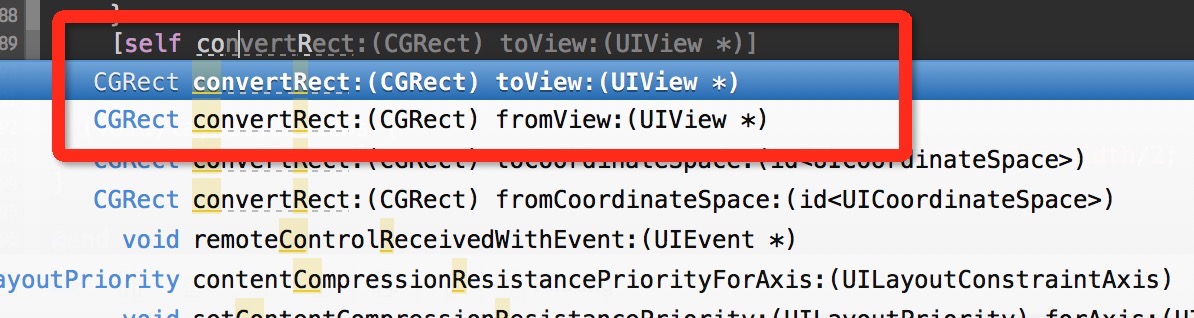
6. 座標轉換
若需要將某個 view 的座標系轉換到另一個 view,可以使用 convertRect 或 convertPoint。
7. 生成 UUID
在 macOS 命令列輸入:
uuidgen8. App Store 連結
可以透過 itunes.apple.com 的應用網址導向 App Store 頁面。
9. 審核加急
若線上版本有嚴重問題,可以透過 Apple 的 App Review Team 表單申請加急審核。
結語
這些技巧看似零散,但在實際專案中往往能節省大量除錯時間。建議依專案需求整理成自己的開發備忘,遇到問題時就能快速定位。
- 上一篇文章: iOS開發中的SQLite資料庫實務
- 下一篇文章: 為UITextView實作placeholder提示文字