
iOS開發中的SQLite資料庫實務
編輯:iOS 開發綜合
iOS 提供了 Core Data 作為持久化解決方案,但在需要處理大量結構化資料時,SQLite 仍然是相當重要的選擇。Core Data 底層雖然也會使用 SQLite,但開發者不能直接透過 SQL 操作 Core Data 管理的資料,否則可能造成資料不一致。
SQLite 是以 C 語言實作的輕量級關聯式資料庫,非常適合行動裝置。由於 Objective-C 是 C 的超集,因此可以直接在 iOS 專案中使用 SQLite API。
資料表設計
設計資料庫前,先釐清需要儲存哪些欄位。以下以人員資料為例,若直接將地區名稱寫在人員表中,會產生大量重複資料。此時可以將地區資訊獨立成另一張表,再透過關聯欄位連結。
people 表
| id | name | age | region | |
|---|---|---|---|---|
| 1 | jhon | 20 | jhon@mail | 1 |
| 2 | peter | 20 | peter@mail | 2 |
| 3 | july | 20 | july@mail | 1 |
| 4 | elev | 20 | elev@mail | 3 |
| 5 | ribet | 20 | ribet@mail | 1 |
region 表
| regionid | regioninfo | address |
|---|---|---|
| 1 | beijing | fengtai |
| 2 | shanghai | jingan |
| 3 | shenzhen | futian |
使用 SQLite 命令列建立資料庫
在終端機中切換到專案目錄後,可以輸入:
sqlite3 database.db這會建立名為 database.db 的 SQLite 資料庫,並進入 SQLite 命令列環境。常用指令包括:
.help:查看可用指令。.databases:查看目前附加的資料庫。.quit或.exit:離開命令列。
建立資料表
create table people (
    id integer primary key autoincrement not null,
    name text,
    age integer,
    email text,
    region integer
);

create table region (
    regionid integer primary key autoincrement not null,
    regioninfo text,
    address text not null
);
新增資料
insert into people (name, age, email, region)
values ('jhon', '20', 'jhon@mail', '1');
若要大量匯入資料,也可以準備文字檔,並使用 .separator 與 .import 指令。
.separator "\t"
.import "people.txt" people
查詢與關聯查詢
select * from people;

select name, regioninfo
from people, region
where people.region = region.regionid;
若只想查詢特定地區,可以加上條件:
select name, regioninfo
from people, region
where people.region = region.regionid
  and region.regioninfo = "beijing";
在 iOS 專案中使用 SQLite
首先在專案中引入 SQLite 函式庫,下圖為 Linked Frameworks and Libraries 的設定位置。
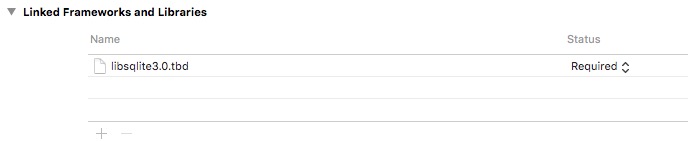
接著加入 sqlite3.h 標頭檔,並建立資料庫連線。
sqlite3 *database = NULL;

NSString *path = [[NSBundle mainBundle] pathForResource:@"database" ofType:@"db"];

if (sqlite3_open([path UTF8String], &database) == SQLITE_OK) {
    NSLog(@"資料庫開啟成功");
} else {
    sqlite3_close(database);
    NSLog(@"錯誤:%s", sqlite3_errmsg(database));
}
查詢資料
const char *sql = "select name, regioninfo from people, region where people.region = region.regionid";

sqlite3_stmt *statement = NULL;

if (sqlite3_prepare_v2(database, sql, -1, &statement, NULL) == SQLITE_OK) {
    while (sqlite3_step(statement) == SQLITE_ROW) {
        NSLog(@"name %s, region %s",
              sqlite3_column_text(statement, 0),
              sqlite3_column_text(statement, 1));
    }
}
使用完畢後,記得呼叫 sqlite3_finalize 釋放 statement,並在適當時機關閉資料庫。
參數化查詢
若查詢條件經常變化,可以使用參數化查詢,避免每次重新拼接 SQL。
const char *sql = "select name, regioninfo from people, region where people.region = region.regionid and regioninfo = ?";

sqlite3_stmt *statement = NULL;

sqlite3_prepare_v2(database, sql, -1, &statement, NULL);
sqlite3_bind_text(statement, 1, "beijing", -1, SQLITE_TRANSIENT);

while (sqlite3_step(statement) == SQLITE_ROW) {
    NSLog(@"name %s, region %s",
          sqlite3_column_text(statement, 0),
          sqlite3_column_text(statement, 1));
}
參數化查詢不僅能提升可讀性,也能降低 SQL 注入風險。實際專案中,還需要考慮連線管理、錯誤處理、事務與執行緒安全。
- 上一篇文章: iOS開發實作:瀑布流照片牆
- 下一篇文章: iOS開發實用技巧整理(一)