
iOS 手勢識別 UIGestureRecognizer 詳解
一、手勢識別簡介
從 iOS 3.2 開始,Apple 提供了手勢識別(Gesture Recognizer)能力,極大地簡化了觸摸事件的處理難度。有了 UIGestureRecognizer,識別用戶在某個 view 上的常見操作不再需要自己在 touchesBegan/Moved/Ended 裡手寫一堆位移和時間判斷。
UIGestureRecognizer 是一個抽象類,它對 iOS 的事件傳遞機制做了一層面向應用場景的封裝,把「手勢消息的傳遞」抽象成了對象。它本身只定義所有手勢的通用行為,真正處理具體手勢的是它的各個子類。
二、抽象類 UIGestureRecognizer
這個類本身並不識別任何手勢,所以實戰中我們不會直接實例化它,而是用子類。先來看它抽象出了哪些通用能力。
1. 初始化與多個觸發方法
無論什麼手勢,最終結果都是「觸發一個方法」,所以初始化方法也是統一的:
- (instancetype)initWithTarget:(nullable id)target action:(nullable SEL)action;
如果用 alloc-init 的方式,也可以事後補上 selector:
- (void)addTarget:(id)target action:(SEL)action;
- (void)removeTarget:(nullable id)target action:(nullable SEL)action;
因為有 addTarget:action:,一個手勢對象可以綁定多個方法,觸發時所有方法都會執行:
- (void)viewDidLoad {
    [super viewDidLoad];
    UITapGestureRecognizer *tap1 = [[UITapGestureRecognizer alloc] initWithTarget:self
                                                                           action:@selector(tap1:)];
    [tap1 addTarget:self action:@selector(tap2:)];
    [self.view addGestureRecognizer:tap1];
}

- (void)tap1:(UITapGestureRecognizer *)tap { NSLog(@"%s", __func__); }
- (void)tap2:(UITapGestureRecognizer *)tap { NSLog(@"%s", __func__); }
點擊屏幕後兩個方法都會打印,確認同時生效。

2. 手勢狀態機
@property(nonatomic, readonly) UIGestureRecognizerState state;
typedef NS_ENUM(NSInteger, UIGestureRecognizerState) {
    UIGestureRecognizerStatePossible,   // 默認狀態,尚未形成具體手勢
    UIGestureRecognizerStateBegan,      // 開始識別
    UIGestureRecognizerStateChanged,    // 識別過程中發生變化
    UIGestureRecognizerStateEnded,      // 識別結束,觸發方法
    UIGestureRecognizerStateCancelled,  // 識別被取消
    UIGestureRecognizerStateFailed,     // 識別失敗,方法不會被調用
    UIGestureRecognizerStateRecognized = UIGestureRecognizerStateEnded
};
3. 常用屬性與方法
@property(nullable, nonatomic, weak) id delegate;             // 手勢代理
@property(nonatomic, getter=isEnabled) BOOL enabled;          // 手勢是否生效
@property(nullable, nonatomic, readonly) UIView *view;        // 手勢所依附的視圖

// 默認 YES:識別到手勢後,向事件傳遞鏈發送 touchesCancelled,終止後續觸摸回調
@property(nonatomic) BOOL cancelsTouchesInView;

// 默認 NO:為 YES 時,在手勢被識別成功或失敗之前,都不向事件傳遞鏈發送消息
@property(nonatomic) BOOL delaysTouchesBegan;

// 默認 YES:手勢結束後稍作等待,若沒有新手勢任務再發送 touchesEnded
@property(nonatomic) BOOL delaysTouchesEnded;

- (void)requireGestureRecognizerToFail:(UIGestureRecognizer *)otherGestureRecognizer;
- (CGPoint)locationInView:(nullable UIView *)view;
- (NSUInteger)numberOfTouches;
- (CGPoint)locationOfTouch:(NSUInteger)touchIndex inView:(nullable UIView *)view;
3.1 三個關鍵 BOOL 屬性
cancelsTouchesInView、delaysTouchesBegan、delaysTouchesEnded 這三個屬性直接決定了手勢回調和 touch 回調之間的優先關係,很容易搞混,用例子說明最清楚。
- (void)viewDidLoad {
    [super viewDidLoad];
    UIPanGestureRecognizer *pan = [[UIPanGestureRecognizer alloc] initWithTarget:self
                                                                          action:@selector(pan:)];
    pan.cancelsTouchesInView = NO;
    [self.view addGestureRecognizer:pan];
}

- (void)touchesMoved:(NSSet *)touches withEvent:(UIEvent *)event {
    NSLog(@"touchMoved 觸發");
}

- (void)pan:(UIPanGestureRecognizer *)pan {
    NSLog(@"pan 觸發");
}
cancelsTouchesInView 默認是 YES,識別到手勢後系統會沿事件鏈發送 touchesCancelled:withEvent:,觸摸事件就此終止,也就是說 touch 系列方法不再被調用。把它設為 NO,兩套回調就會同時觸發。
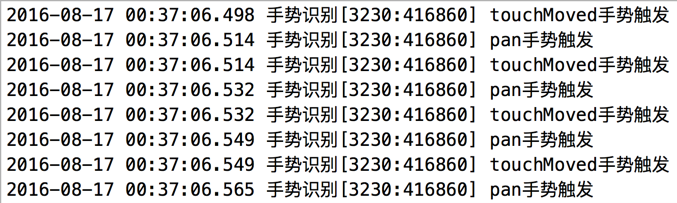
但即使把 cancelsTouchesInView 設回 YES,你可能仍然會看到最開始的幾次 touchesMoved 被調用:
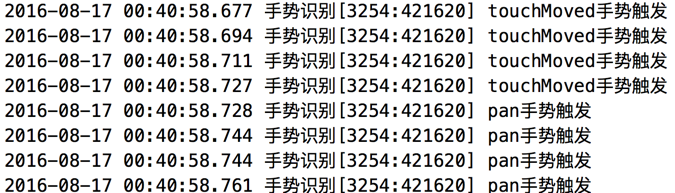
這就要說到 delaysTouchesBegan。手勢識別本身是一個過程——拖拽需要手指先移動一小段距離才會被判定為 pan,而在手勢真正識別出來之前,消息是會照常發給事件傳遞鏈的。所以前幾次 touchMoved 被調用,等 pan 識別成功,傳遞才中止。
delaysTouchesBegan 默認為 NO,改成 YES 後,在手勢識別失敗之前不會向事件鏈發送任何消息,touchesMoved 也就完全不會被調用了。
再看 delaysTouchesEnded,默認為 YES:
- (void)viewDidLoad {
    [super viewDidLoad];
    UITapGestureRecognizer *tap = [[UITapGestureRecognizer alloc] initWithTarget:self
                                                                          action:@selector(tap:)];
    tap.numberOfTapsRequired = 3;
    tap.delaysTouchesEnded = NO;
    [self.view addGestureRecognizer:tap];
}

- (void)touchesBegan:(NSSet *)touches withEvent:(UIEvent *)event { NSLog(@"touchBegan"); }
- (void)touchesEnded:(NSSet *)touches withEvent:(UIEvent *)event { NSLog(@"touchEnd"); }
- (void)tap:(UITapGestureRecognizer *)tap               { NSLog(@"tap 觸發"); }
設為 NO 時,每一下點擊都會立刻把 touchesEnded 拋給事件鏈:
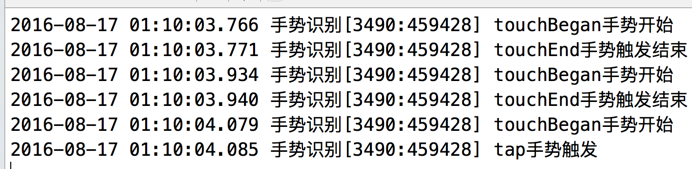
設為 YES 時,要等三下點擊都被識別完畢,才會發送消息:

3.2 手勢互斥處理
同一個 view 上可以添加多個手勢,默認它們是互斥的:一個手勢觸發後會屏蔽其他相似手勢。所以單擊和雙擊並存時,如果什麼都不做,系統只會發出單擊消息。
要讓雙擊優先,需要告訴單擊「等雙擊確定失敗了你再觸發」:
- (void)requireGestureRecognizerToFail:(UIGestureRecognizer *)otherGestureRecognizer;
[tap1 requireGestureRecognizerToFail:tap2] 的含義是:即使 tap1 已滿足條件也不立刻觸發,要等到 tap2 確定失敗之後才觸發。
- (void)viewDidLoad {
    [super viewDidLoad];

    UITapGestureRecognizer *tap1 = [[UITapGestureRecognizer alloc] initWithTarget:self
                                                                          action:@selector(tap1:)];
    tap1.numberOfTapsRequired = 1;
    [self.view addGestureRecognizer:tap1];

    UITapGestureRecognizer *tap2 = [[UITapGestureRecognizer alloc] initWithTarget:self
                                                                          action:@selector(tap2:)];
    tap2.numberOfTapsRequired = 2;
    [self.view addGestureRecognizer:tap2];

    // tap2 識別失敗後才轮到 tap1
    [tap1 requireGestureRecognizerToFail:tap2];
}
3.3 UIGestureRecognizerDelegate
通過代理回調,可以實現更複雜的手勢協作:
// 手指觸摸後回調,返回 NO 則不再進行識別
- (BOOL)gestureRecognizer:(UIGestureRecognizer *)gestureRecognizer
       shouldReceiveTouch:(UITouch *)touch;

// 開始識別時調用,返回 NO 則終止
- (BOOL)gestureRecognizerShouldBegin:(UIGestureRecognizer *)gestureRecognizer;

// 是否允許兩個手勢同時觸發
- (BOOL)gestureRecognizer:(UIGestureRecognizer *)gestureRecognizer
shouldRecognizeSimultaneouslyWithGestureRecognizer:(UIGestureRecognizer *)otherGestureRecognizer;

// 互斥控制:返回 YES 時,第一個手勢會失效
- (BOOL)gestureRecognizer:(UIGestureRecognizer *)gestureRecognizer
shouldRequireFailureOfGestureRecognizer:(UIGestureRecognizer *)otherGestureRecognizer;

// 互斥控制:返回 YES 時,第二個手勢會失效
- (BOOL)gestureRecognizer:(UIGestureRecognizer *)gestureRecognizer
shouldBeRequiredToFailByGestureRecognizer:(UIGestureRecognizer *)otherGestureRecognizer;
三、常用子類及其專屬屬性
1. 點擊 UITapGestureRecognizer
手指觸摸並抬起時觸發。
@property(nonatomic) NSUInteger numberOfTapsRequired;     // 點擊次數,默認 1
@property(nonatomic) NSUInteger numberOfTouchesRequired;  // 同時觸摸的手指數
2. 捏合 UIPinchGestureRecognizer
雙指捏合或擴張時觸發,常用於圖片縮放。
@property(nonatomic) CGFloat scale;      // 縮放比例
@property(nonatomic, readonly) CGFloat velocity;  // 捏合速度
3. 拖拽 UIPanGestureRecognizer
按住視圖慢速移動時觸發。
@property(nonatomic) NSUInteger minimumNumberOfTouches;  // 最少觸摸點,默認 1
@property(nonatomic) NSUInteger maximumNumberOfTouches;  // 最多觸摸點
- (CGPoint)translationInView:(nullable UIView *)view;   // 相對起點的位移
- (void)setTranslation:(CGPoint)translation inView:(nullable UIView *)view;
- (CGPoint)velocityInView:(nullable UIView *)view;      // 移動速度
4. 滑動 UISwipeGestureRecognizer
與拖拽的區別在於速度:滑動更快更突然,拖拽偏慢。
@property(nonatomic) NSUInteger numberOfTouchesRequired;
@property(nonatomic) UISwipeGestureRecognizerDirection direction;
typedef NS_OPTIONS(NSUInteger, UISwipeGestureRecognizerDirection) {
    UISwipeGestureRecognizerDirectionRight = 1 << 0,
    UISwipeGestureRecognizerDirectionLeft  = 1 << 1,
    UISwipeGestureRecognizerDirectionUp    = 1 << 2,
    UISwipeGestureRecognizerDirectionDown  = 1 << 3
};
5. 旋轉 UIRotationGestureRecognizer
@property(nonatomic) CGFloat rotation;             // 旋轉角度(弧度)
@property(nonatomic, readonly) CGFloat velocity;   // 旋轉速度
6. 長按 UILongPressGestureRecognizer
@property(nonatomic) NSUInteger numberOfTapsRequired;      // 長按前允許的點擊次數
@property(nonatomic) NSUInteger numberOfTouchesRequired;   // 需要的手指数
@property(nonatomic) CFTimeInterval minimumPressDuration;  // 最短長按時間
@property(nonatomic) CGFloat allowableMovement;            // 允許移動的最大距離,默認 10 點
7. 自定義手勢
繼承 UIGestureRecognizer,重寫 touches 系列方法,在其中判斷自定義手勢是否成立:
- (void)touchesBegan:(NSSet *)touches withEvent:(UIEvent *)event;
- (void)touchesMoved:(NSSet *)touches withEvent:(UIEvent *)event;
- (void)touchesEnded:(NSSet *)touches withEvent:(UIEvent *)event;
- (void)touchesCancelled:(NSSet *)touches withEvent:(UIEvent *)event;
記得在 .m 文件裡引入 #import <UIKit/UIGestureRecognizerSubclass.h>,否則無法訪問 state 等受保護成員。
結語
手勢系統的設計思路很清晰:抽象類負責統一狀態機與事件鏈協調,子類只補上各自特有的參數。實戰中真正需要反覆調的,往往不是手勢本身,而是那三個 BOOL 屬性帶來的觸發時序問題,以及多手勢並存時的互斥關係。