
第三方微信授權登入的 iOS 實作程式碼解析
微信已經滲透進每一個 App 的縫隙,最常用到的莫過於分享與登入。接下來就用程式碼的形式展開微信登入的相關說明;至於原理層級的 OAuth 2.0 認證體系,請參考微信開放平台的相關說明與流程圖。
微信登入授權開發
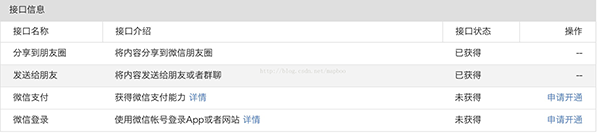
1. 到微信開發平台註冊你的 App。目前需等審核通過後才能取得對應的 key 與 secret;拿到之後還要另外申請開通登入與支付介面,如下圖。
2. 和 QQ 類似,需要填寫 Url Schemes,例如範例中的 wxd930ea5d5a258f4f,然後引入相應的 framework。
3. 在 AppDelegate 中向微信註冊並實作授權後的回呼函式,程式碼如下:
// 向微信注册
[WXApi registerApp:kWXAPP_ID withDescription:@"weixin"];

// 授权后回调 <WXApiDelegate>
- (void)onResp:(BaseReq *)resp
{
    /*
     ErrCode ERR_OK = 0       (用户同意)
     ERR_AUTH_DENIED = -4     (用户拒绝授权)
     ERR_USER_CANCEL = -2     (用户取消)
     code    用户换取 access_token 的 code,仅在 ErrCode 为 0 时有效
     state   第三方程序发送时用来标识其请求的唯一性的标志,由第三方程序调用 sendReq 时传入,
             由微信终端回传,state 字符串长度不能超过 1K
     lang    微信客户端当前语言
     country 微信用户当前国家信息
     */

    SendAuthResp *aresp = (SendAuthResp *)resp;

    if (aresp.errCode == 0) {
        NSString *code = aresp.code;
        NSDictionary *dic = @{@"code": code};
    }
}

// 和 QQ、新浪并列回调句柄
- (BOOL)application:(UIApplication *)application openURL:(NSURL *)url sourceApplication:(NSString *)sourceApplication annotation:(id)annotation
{
    return [TencentOAuth HandleOpenURL:url]
        || [WeiboSDK handleOpenURL:url delegate:self]
        || [WXApi handleOpenURL:url delegate:self];
}

- (BOOL)application:(UIApplication *)application handleOpenURL:(NSURL *)url
{
    return [TencentOAuth HandleOpenURL:url]
        || [WeiboSDK handleOpenURL:url delegate:self]
        || [WXApi handleOpenURL:url delegate:self];
}
4. 微信的登入授權比 QQ、新浪麻煩一些,多了幾步。簡單說共三步:第一步取得 code,用來換 token;第二步帶著 code 換取 token;第三步根據上一步拿到的 token 與 openid 取得使用者相關資訊。
下面用程式碼實作:
第一步:取得 code
- (IBAction)weixinLogin:(id)sender
{
    [self sendAuthRequest];
}

- (void)sendAuthRequest
{
    SendAuthReq* req = [[SendAuthReq alloc] init];
    req.scope = @"snsapi_userinfo,snsapi_base";
    req.state = @"0744";
    [WXApi sendReq:req];
}
這裡發出請求後,會觸發先前在 AppDelegate 中實作的 onResp 回呼,從中取得 code。
第二步:取得 token 與 openid
- (void)getAccess_token
{
    // https://api.weixin.qq.com/sns/oauth2/access_token?appid=APPID&secret=SECRET&code=CODE&grant_type=authorization_code

    NSString *url = [NSString stringWithFormat:@"https://api.weixin.qq.com/sns/oauth2/access_token?appid=%@&secret=%@&code=%@&grant_type=authorization_code", kWXAPP_ID, kWXAPP_SECRET, self.wxCode.text];

    dispatch_async(dispatch_get_global_queue(DISPATCH_QUEUE_PRIORITY_DEFAULT, 0), ^{
        NSURL *zoneUrl = [NSURL URLWithString:url];
        NSString *zoneStr = [NSString stringWithContentsOfURL:zoneUrl encoding:NSUTF8StringEncoding error:nil];
        NSData *data = [zoneStr dataUsingEncoding:NSUTF8StringEncoding];

        dispatch_async(dispatch_get_main_queue(), ^{
            if (data) {
                NSDictionary *dic = [NSJSONSerialization JSONObjectWithData:data options:NSJSONReadingMutableContainers error:nil];
                /*
                {
                    "access_token" = "...";
                    "expires_in" = 7200;
                    openid = "...";
                    "refresh_token" = "...";
                    scope = "snsapi_userinfo,snsapi_base";
                }
                */

                self.access_token.text = [dic objectForKey:@"access_token"];
                self.openid.text = [dic objectForKey:@"openid"];
            }
        });
    });
}
用 GCD 在背景執行緒請求,再切回主執行緒更新 UI,取得對應的 token 與 openID。
第三步:取得 userinfo
- (void)getUserInfo
{
    // https://api.weixin.qq.com/sns/userinfo?access_token=ACCESS_TOKEN&openid=OPENID

    NSString *url = [NSString stringWithFormat:@"https://api.weixin.qq.com/sns/userinfo?access_token=%@&openid=%@", self.access_token.text, self.openid.text];

    dispatch_async(dispatch_get_global_queue(DISPATCH_QUEUE_PRIORITY_DEFAULT, 0), ^{
        NSURL *zoneUrl = [NSURL URLWithString:url];
        NSString *zoneStr = [NSString stringWithContentsOfURL:zoneUrl encoding:NSUTF8StringEncoding error:nil];
        NSData *data = [zoneStr dataUsingEncoding:NSUTF8StringEncoding];

        dispatch_async(dispatch_get_main_queue(), ^{
            if (data) {
                NSDictionary *dic = [NSJSONSerialization JSONObjectWithData:data options:NSJSONReadingMutableContainers error:nil];
                /*
                {
                    city = Haidian;
                    country = CN;
                    headimgurl = "https://wx.qlogo.cn/...";
                    language = "zh_CN";
                    nickname = "xxx";
                    openid = "...";
                    privilege = ( );
                    province = Beijing;
                    sex = 1;
                    unionid = "...";
                }
                */

                self.nickname.text = [dic objectForKey:@"nickname"];
                self.wxHeadImg.image = [UIImage imageWithData:[NSData dataWithContentsOfURL:[NSURL URLWithString:[dic objectForKey:@"headimgurl"]]]];
            }
        });
    });
}
執行到這一步,整個授權登入流程就完成了,能把暱稱與頭像顯示出來。剩下的事情就是及時刷新你的 token,細節可參考官方開發文件。
以下是登入成功後 QQ、新浪微博與微信的真機運行截圖:
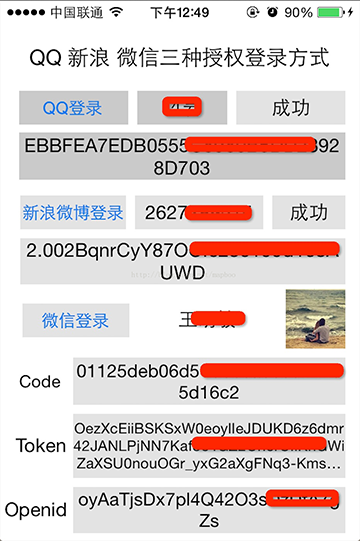
評語:微信的開發文件相對容易理解與除錯,雖然沒有提供範例專案,但文件寫得夠詳細,某種程度上減輕了開發難度。不過相比之下,微信的授權步驟確實繁瑣,需要三步才能完整取得使用者資訊,這點不如 QQ 與新浪微博簡潔,需要具備一定的閱讀與程式碼基礎。希望這篇能給大家帶來幫助。
(來自:mapboo 的部落格)