
iOS 8 與 Xcode 6 升級踩坑實錄
專案路徑之坑
模擬器的存放路徑從原本的 ~/Library/Application Support/iPhone Simulator 搬到了 ~/Library/Developer/CoreSimulator/Devices/,這實在很惱人。以前要知道哪個模擬器跑過哪個專案,直接進對應的模擬器資料夾翻一下就好。
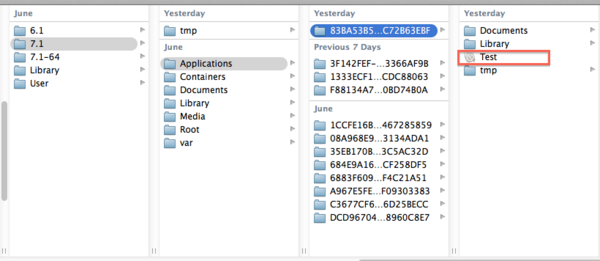
現在呢,Devices 底下完全沒標明模擬器版本,圖片上選到的那個,可能是 iPhone 5s 的 7.1。
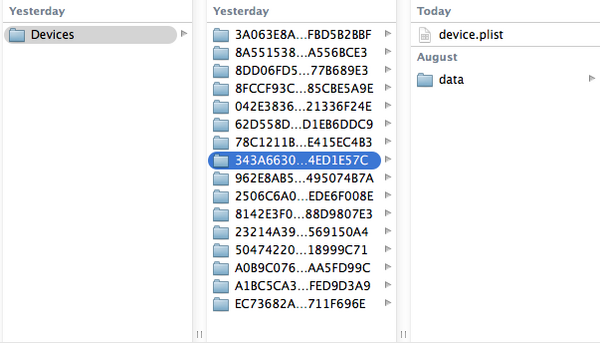
然後這些資料夾應該分別對應 iPhone 4s 7.1、iPhone 4s 8.0、iPhone 5s 7.1、iPhone 5s 8.0……但到底誰對應誰,完全猜不出來,無言以對。
NSUserDefaults 之坑
用 NSUserDefaults 存在本地的資料,在模擬器上刪掉 App 或執行 Clean 之後居然清不掉。我試著把 iPhone 4s、iPhone 5s……裡的同一個專案都刪一遍,還是一樣。這應該是個 bug,只能等蘋果修(我目前用的是 6.0)。真機倒是沒有這個問題(廢話,必須沒有)。
UITableView 之坑
帶有 UITableView 的畫面如果出現以下警告:
Warning once only: Detected a case where constraints ambiguously suggest a height of zero for a tableview cell's content view. We're considering the collapse unintentional and using standard height instead.
加上這行就能解掉:
self.tableView.rowHeight = 44.0f;
Auto Layout 之坑
典型的結構是:UITabBarController 當根視圖,點其中一個頁面的按鈕後 push 到列表頁,如下圖。
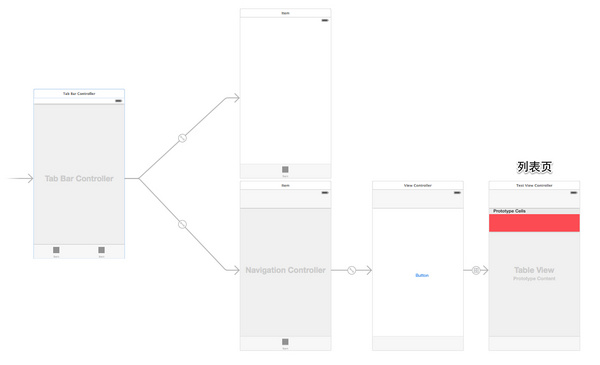
如果列表頁需要隱藏 tab bar,我習慣把該 VC 的 bottom bar 設為 none,這樣約束布局會比較好寫。
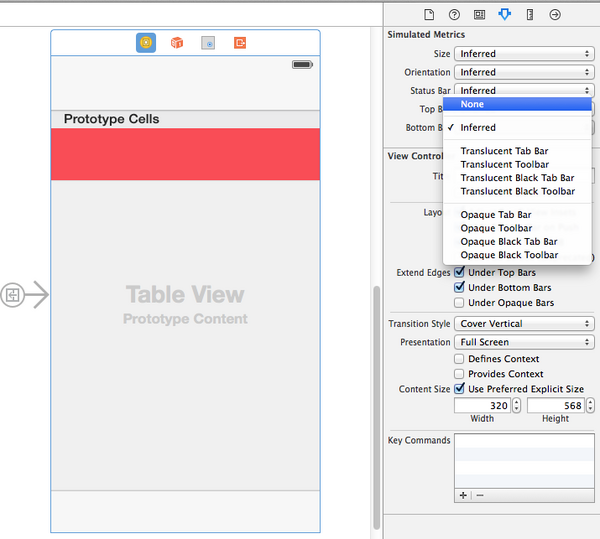
然而……除錯時你會發現,進入列表頁的瞬間底部會閃出一塊 tab bar 高度的視圖。還是乖乖用預設的 Inferred 吧。
鍵盤彈不出來
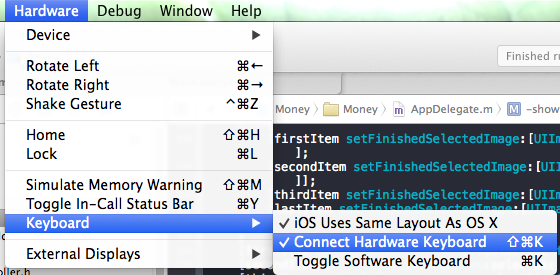
取消勾選 Connect Hardware Keyboard 即可。
detailTextLabel 不顯示
先看這段程式碼:
- (void)viewDidLoad {
    [super viewDidLoad];
    dispatch_after(dispatch_time(DISPATCH_TIME_NOW, (int64_t)(1.0 * NSEC_PER_SEC)), dispatch_get_main_queue(), ^{
        self.array = @[@"測試"];
        [self.tableView reloadData];
    });
}

- (NSInteger)tableView:(UITableView *)tableView numberOfRowsInSection:(NSInteger)section{
    return 1;
}

- (NSInteger)numberOfSectionsInTableView:(UITableView *)tableView{
    return 1;
}

- (UITableViewCell *)tableView:(UITableView *)tableView cellForRowAtIndexPath:(NSIndexPath *)indexPath{
    UITableViewCell *cell = [tableView dequeueReusableCellWithIdentifier:@"TradeRecordCell" forIndexPath:indexPath];
    cell.detailTextLabel.text = _array[indexPath.row];
    return cell;
}
程式碼本身沒問題。在 iOS 7 下,一秒後 cell 的 detailTextLabel 會顯示「測試」兩字,但 iOS 8 就是不行,文字是空的。實測發現:當 detailTextLabel 的 text 一開始是空的,iOS 8 會把這個 label 的尺寸設成 (0, 0),此後再也無法正常顯示。原因就在這裡——cell.detailTextLabel.text = _array[indexPath.row]; 第一次執行時資料還沒回來,是空的。
解法一:是空的時候就不要去設值。
if (_array[indexPath.row]) {
    cell.detailTextLabel.text = _array[indexPath.row];
}
解法二:
cell.detailTextLabel.text = _array[indexPath.row] ?: @" ";
pch 檔不見了
Xcode 6 建立的專案預設不再帶 pch 檔(舊專案倒是會保留)。想自己加回來:
· Command + N,在 Other 裡選擇 PCH File
· 到 Build Settings 裡找到 Prefix Header
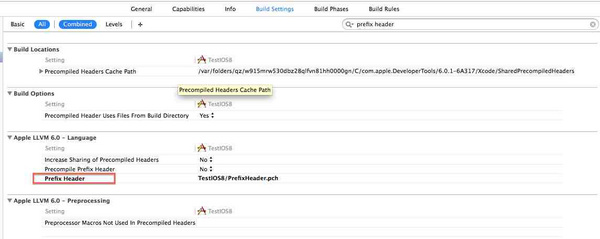
· 加入 pch 檔,填寫規則是:專案名/xxxxx.pch
UIAlertView 之坑
UIAlertView 在沒有標題、只有長段文字時會出問題:
UIAlertView *alterView = [[UIAlertView alloc] initWithTitle:nil message:@"遠端Git倉庫和標准的Git倉庫有如下差別:一個標准的Git倉庫包括了源代碼和歷史信息記錄。我們可以直接在這個基礎上修改代碼,因為它已經包含了一個工作副本。" delegate:self cancelButtonTitle:@"知道了" otherButtonTitles:nil, nil];
[alterView show];
這段程式碼在 iOS 8 下的樣子:內容整個頂到最上方,文字還莫名變粗了。
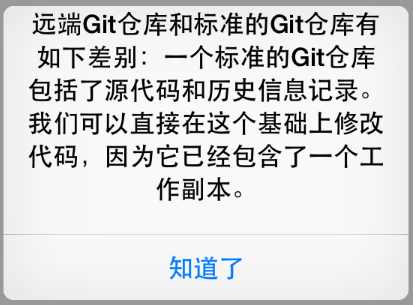
解法居然是——把 title 設成 @"":
UIAlertView *alterView = [[UIAlertView alloc] initWithTitle:@"" message:@"遠端Git倉庫和標准的Git倉庫有如下差別:一個標准的Git倉庫包括了源代碼和歷史信息記錄。我們可以直接在這個基礎上修改代碼,因為它已經包含了一個工作副本。" delegate:self cancelButtonTitle:@"知道了" otherButtonTitles:nil, nil];
[alterView show];
- 上一篇文章: iOS 8 自適應 Cell:告別手算高度
- 下一篇文章: 怎麼關掉 Xcode 專案裡某一類型的編譯警告