
五種方式實作 iOS 檔案下載:從 NSURLConnection 一路寫到 AFNetworking
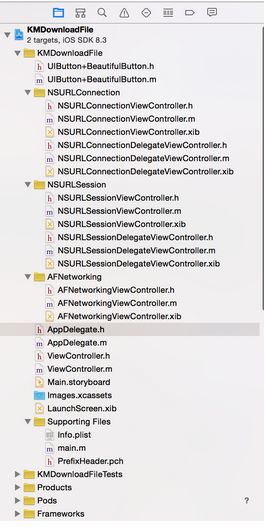
本文把 iOS 上的檔案下載寫法一次整理齊全,共五種:
- NSURLConnection 直接方式
- NSURLConnection 代理方式
- NSURLSession 直接方式
- NSURLSession 代理方式
- AFNetworking 方式
附加功能
(1)用 AFNetworking 的 AFNetworkReachabilityManager 檢查網路狀態:
- AFNetworkReachabilityStatusReachableViaWiFi:Wi-Fi 網路下
- AFNetworkReachabilityStatusReachableViaWWAN:2G/3G/4G 蜂巢行動網路下
- AFNetworkReachabilityStatusNotReachable:未連線
(2)用 AFNetworkActivityIndicatorManager 啟用網路活動指示器:
#import "AFNetworkActivityIndicatorManager.h"

// 啟用後會依網路互動情況即時顯示或隱藏指示器,
// 底層是透過「通知與訊息機制」來控制
// [UIApplication sharedApplication].networkActivityIndicatorVisible 的狀態
[AFNetworkActivityIndicatorManager sharedManager].enabled = YES;
實際效果:
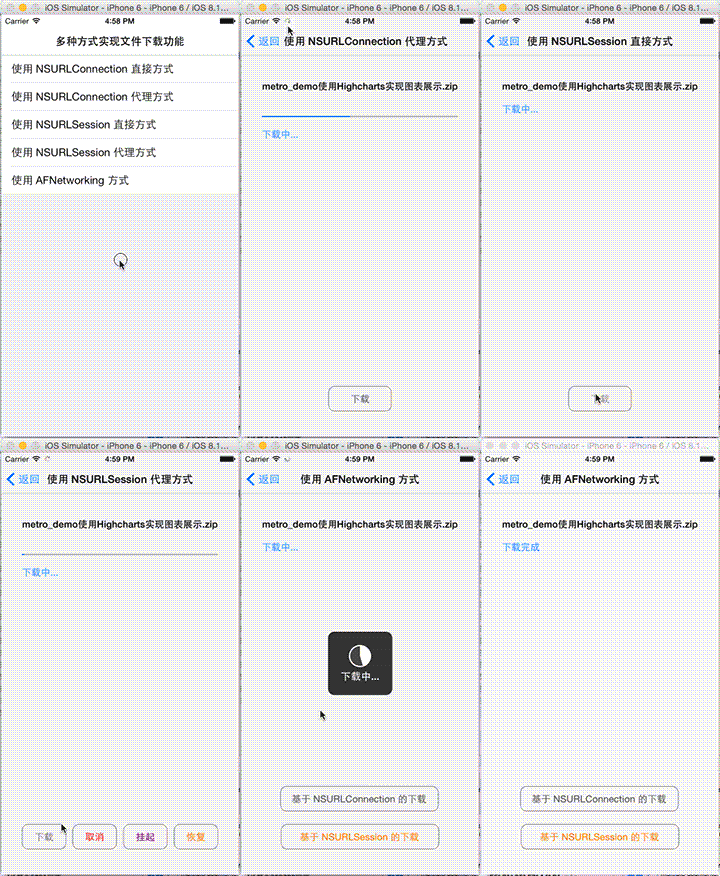
主列表頁
ViewController.h:
#import <UIKit/UIKit.h>

@interface ViewController : UITableViewController

@property (copy, nonatomic) NSArray *arrSampleName;

- (instancetype)initWithSampleNameArray:(NSArray *)arrSampleName;

@end
ViewController.m 的重點是依點擊的 row 推入對應的頁面:
- (void)tableView:(UITableView *)tableView didSelectRowAtIndexPath:(NSIndexPath *)indexPath {
    switch (indexPath.row) {
        case 0: {
            NSURLConnectionViewController *vc = [NSURLConnectionViewController new];
            [self.navigationController pushViewController:vc animated:YES];
            break;
        }
        case 1: {
            NSURLConnectionDelegateViewController *vc = [NSURLConnectionDelegateViewController new];
            [self.navigationController pushViewController:vc animated:YES];
            break;
        }
        case 2: {
            NSURLSessionViewController *vc = [NSURLSessionViewController new];
            [self.navigationController pushViewController:vc animated:YES];
            break;
        }
        case 3: {
            NSURLSessionDelegateViewController *vc = [NSURLSessionDelegateViewController new];
            [self.navigationController pushViewController:vc animated:YES];
            break;
        }
        case 4: {
            AFNetworkingViewController *vc = [AFNetworkingViewController new];
            [self.navigationController pushViewController:vc animated:YES];
            break;
        }
        default:
            break;
    }
}
共用的常數放在 PrefixHeader.pch:
#define kFileURLStr @"https://files.cnblogs.com/files/huangjianwu/metro_demo使用Highcharts實現圖表展示.zip"

#define kTitleOfNSURLConnection        @"使用 NSURLConnection 直接方式"
#define kTitleOfNSURLConnectionDelegate @"使用 NSURLConnection 代理方式"
#define kTitleOfNSURLSession           @"使用 NSURLSession 直接方式"
#define kTitleOfNSURLSessionDelegate   @"使用 NSURLSession 代理方式"
#define kTitleOfAFNetworking           @"使用 AFNetworking 方式"

#define kApplication [UIApplication sharedApplication]
另外封裝了一個 UIButton 的分類,快速做出圓角邊框按鈕:
- (void)beautifulButton:(UIColor *)tintColor {
    self.tintColor = tintColor ?: [UIColor darkGrayColor];
    self.layer.masksToBounds = YES;
    self.layer.cornerRadius = 10.0;
    self.layer.borderColor = [UIColor grayColor].CGColor;
    self.layer.borderWidth = 1.0;
}
方式一:NSURLConnection 直接方式
Apple 提供了兩種不需實作一堆 NSURLConnectionDataDelegate 方法的簡便寫法,直觀但各有取捨。
// 方法一:同步請求。不建議使用——若呼叫端是主執行緒會造成阻塞
NSURLResponse *response;
NSError *connectionError;
NSData *data = [NSURLConnection sendSynchronousRequest:request
                                    returningResponse:&response
                                                error:&connectionError];

// 方法二:非同步請求(推薦)
[NSURLConnection sendAsynchronousRequest:request
                                   queue:[NSOperationQueue mainQueue]
                         completionHandler:^(NSURLResponse *response, NSData *data, NSError *connectionError) {
    if (!connectionError) {
        [self saveDataToDisk:data];
        _lblMessage.text = @"下載完成";
    } else {
        NSLog(@"下載失敗,錯誤資訊:%@", connectionError.localizedDescription);
        _lblMessage.text = @"下載失敗";
    }
}];
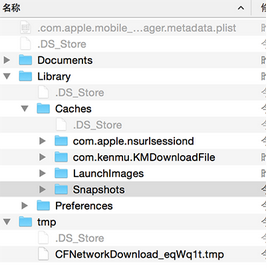
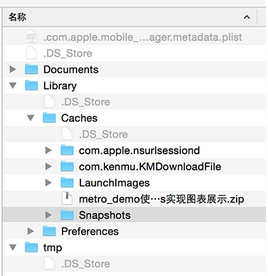
存檔時要注意,Apple 要求下載的資料只能放在快取目錄(/Library/Caches):
- (void)saveDataToDisk:(NSData *)data {
    NSString *savePath = [NSSearchPathForDirectoriesInDomains(NSCachesDirectory,
                        NSUserDomainMask, YES) lastObject];
    savePath = [savePath stringByAppendingPathComponent:_lblFileName.text];
    [data writeToFile:savePath atomically:YES];   // 若檔案已存在會直接覆寫
}
順帶一提,URL 字串若含中文,記得先做編碼,解碼則用 stringByRemovingPercentEncoding:
fileURLStr = [fileURLStr stringByAddingPercentEscapesUsingEncoding:NSUTF8StringEncoding];
NSURL *fileURL = [NSURL URLWithString:fileURLStr];
方式二:NSURLConnection 代理方式
這個寫法能拿到下載進度,但作者特別提醒它有一個致命限制:不適合大檔案。原因是代理方法在接收資料時,看似每次只讀取一部分,實際上請求只發送一次、伺服器也只回應一次;只是當資料量大時,系統會反覆呼叫資料接收方法,每次把已下載的資料切一小塊交給你。也就是說,整份資料其實早就全部拉回來了,只是分批交給開發者而已。用這種方式下載幾 GB 的檔案,不用說真機,連模擬器都撐不住。
實務上無論用代理還是同步/非同步方法,都應該分批請求資料。假設檔案 1GB,每次請求 1MB,請求 1024 次就下載完了。要讓伺服器每次只回傳 1MB,可以在請求標頭設定 Range,例如 bytes=0-1023,伺服器解析後只回傳該區間的內容。每次請求的資料必須逐步追加,直到整份檔案完成。
那怎麼知道檔案總大小?此範例是從回應標頭取得整份大小(因為它一次就請求了全部資料),這對分段下載毫無意義。所幸 HTTP 還有另一種請求方法 HEAD——伺服器只回應標頭、不傳回 body,總大小就能提前取得。
// 建立請求時可指定快取策略與逾時時間
// cachePolicy 常見值:
//   NSURLRequestUseProtocolCachePolicy        依回應的 Cache-Control 判斷是否使用快取
//   NSURLRequestReloadIgnoringLocalCacheData  忽略本地快取,直接請求新資料
//   NSURLRequestReturnCacheDataElseLoad       直接用快取(不論是否有效),無快取則重新請求
//   NSURLRequestReturnCacheDataDontLoad       直接用快取,無快取則失敗
NSURLRequest *request = [[NSURLRequest alloc] initWithURL:fileURL
                                              cachePolicy:NSURLRequestUseProtocolCachePolicy
                                          timeoutInterval:60.0];

NSURLConnection *connection = [[NSURLConnection alloc] initWithRequest:request delegate:self];
[connection start];
關鍵代理方法:
// 即將發送請求(可在此攔截重導向)
- (NSURLRequest *)connection:(NSURLConnection *)connection
             willSendRequest:(NSURLRequest *)request
            redirectResponse:(NSURLResponse *)response {
    return request;
}

// 已收到回應:從標頭的 Content-Length 取得總長度
- (void)connection:(NSURLConnection *)connection didReceiveResponse:(NSURLResponse *)response {
    _mDataReceive = [NSMutableData new];
    _progVDownloadFile.progress = 0.0;

    NSDictionary *dicHeaderField = [(NSHTTPURLResponse *)response allHeaderFields];
    _totalDataLength = [[dicHeaderField objectForKey:@"Content-Length"] integerValue];
}

// 持續接收資料並更新進度
- (void)connection:(NSURLConnection *)connection didReceiveData:(NSData *)data {
    [_mDataReceive appendData:data];
    [self updateProgress];
}

// 全部接收完畢,寫入檔案
- (void)connectionDidFinishLoading:(NSURLConnection *)connection {
    NSString *savePath = [NSSearchPathForDirectoriesInDomains(NSCachesDirectory,
                        NSUserDomainMask, YES) lastObject];
    savePath = [savePath stringByAppendingPathComponent:_lblFileName.text];
    [_mDataReceive writeToFile:savePath atomically:YES];
}

// 連線失敗(逾時或位址錯誤等)
- (void)connection:(NSURLConnection *)connection didFailWithError:(NSError *)error {
    _lblMessage.text = @"連線錯誤";
}
順帶一提,這個範例還示範了如何先檢查記憶體中是否已有對應快取,若有則改用 NSURLRequestReturnCacheDataDontLoad 策略:
- (BOOL)isExistCacheInMemory:(NSURLRequest *)request {
    NSURLCache *cache = [NSURLCache sharedURLCache];
    [cache setMemoryCapacity:1024 * 1024];   // 1MB
    return [cache cachedResponseForRequest:request] != nil;
}
方式三:NSURLSession 直接方式
用系統提供的 downloadTask 搭配 completionHandler,寫法最精簡。注意 completionHandler 是在非主執行緒呼叫的,更新 UI 前必須切回主執行緒。
NSURLSession *session = [NSURLSession sharedSession];

NSURLSessionDownloadTask *downloadTask =
    [session downloadTaskWithRequest:request completionHandler:^(NSURL *location,
                                      NSURLResponse *response, NSError *error) {
    __block void (^updateUI)();

    if (!error) {
        NSString *savePath = [NSSearchPathForDirectoriesInDomains(NSCachesDirectory,
                            NSUserDomainMask, YES) lastObject];
        savePath = [savePath stringByAppendingPathComponent:_lblFileName.text];
        NSURL *saveURL = [NSURL fileURLWithPath:savePath];

        NSError *saveError;
        NSFileManager *fileManager = [NSFileManager defaultManager];

        // 先移除舊檔,避免複製失敗
        if ([fileManager fileExistsAtPath:savePath]) {
            [fileManager removeItemAtPath:savePath error:&saveError];
        }

        if (!saveError) {
            // 方法一:copyItemAtPath(path 不能帶 file:// 前綴)
            [fileManager copyItemAtPath:[location path] toPath:savePath error:&saveError];

            // 方法二:copyItemAtURL
            [fileManager copyItemAtURL:location toURL:saveURL error:&saveError];

            updateUI = ^{ _lblMessage.text = @"下載完成"; };
        }
    } else {
        updateUI = ^{ _lblMessage.text = @"下載失敗"; };
    }

    dispatch_async(dispatch_get_main_queue(), updateUI);
}];

[downloadTask resume];   // 記得 resume,任務才會真正啟動
方式四:NSURLSession 代理方式
NSURLSession 支援三種會話配置:
- defaultSessionConfiguration:程序內會話(預設),以硬碟快取資料。
- ephemeralSessionConfiguration:臨時的程序內會話,cookie 與快取只放記憶體,App 結束後即消失。
- backgroundSessionConfiguration:後台會話,會在後台開啟一條執行緒處理網路資料。
- (NSURLSession *)defaultSession {
    NSURLSessionConfiguration *config = [NSURLSessionConfiguration defaultSessionConfiguration];
    config.timeoutIntervalForRequest = 60.0;        // 請求逾時,預設 60 秒
    config.allowsCellularAccess = YES;              // 是否允許蜂巢網路
    config.HTTPMaximumConnectionsPerHost = 4;       // iOS 預設值為 4

    return [NSURLSession sessionWithConfiguration:config delegate:self delegateQueue:nil];
}

// 後台會話:整個 App 生命週期內只建立一次
- (NSURLSession *)backgroundSession {
    static NSURLSession *session;
    static dispatch_once_t onceToken;
    dispatch_once(&onceToken, ^{
        NSURLSessionConfiguration *config =
            [NSURLSessionConfiguration backgroundSessionConfigurationWithIdentifier:
                @"KMDownloadFile.NSURLSessionDelegateViewController"];
        config.timeoutIntervalForRequest = 60.0;
        config.allowsCellularAccess = YES;
        config.HTTPMaximumConnectionsPerHost = 4;
        config.discretionary = YES;   // 自動選擇最佳網路,僅對後台會話有效

        session = [NSURLSession sessionWithConfiguration:config delegate:self delegateQueue:nil];
    });
    return session;
}

// 啟動下載
- (IBAction)downloadFile:(id)sender {
    _downloadTask = [[self defaultSession] downloadTaskWithRequest:request];
    [_downloadTask resume];
}

// 任務狀態列舉,供判斷使用
// NSURLSessionTaskStateRunning    正在執行
// NSURLSessionTaskStateSuspended  已掛起
// NSURLSessionTaskStateCanceling  正在取消
// NSURLSessionTaskStateCompleted  已完成

- (IBAction)cancel:(id)sender  { [_downloadTask cancel]; }
- (IBAction)suspend:(id)sender { [_downloadTask suspend]; }
- (IBAction)resume:(id)sender  { [_downloadTask resume]; }
下載進度與完成回呼:
- (void)URLSession:(NSURLSession *)session
      downloadTask:(NSURLSessionDownloadTask *)downloadTask
      didWriteData:(int64_t)bytesWritten
 totalBytesWritten:(int64_t)totalBytesWritten
totalBytesExpectedToWrite:(int64_t)totalBytesExpectedToWrite {
    [self updateProgress:totalBytesWritten totalDataLength:totalBytesExpectedToWrite];
}

- (void)URLSession:(NSURLSession *)session
      downloadTask:(NSURLSessionDownloadTask *)downloadTask
didFinishDownloadingToURL:(NSURL *)location {
    // 檔案會先暫存,正常流程下系統最終會自動清除。
    // 暫存路徑依會話類型而異:
    //   程序內會話 / 臨時會話 → /tmp,可用 NSTemporaryDirectory() 取得
    //   後台會話 → /Library/Caches/com.apple.nsurlsessiond/Downloads/...
    // 後續複製到快取目錄的邏輯同前一節
}

// 不論成功或失敗,最後都會呼叫一次
- (void)URLSession:(NSURLSession *)session
              task:(NSURLSessionTask *)task
didCompleteWithError:(NSError *)error {
    if (error) {
        dispatch_async(dispatch_get_main_queue(), ^{
            _lblMessage.text = [error.localizedDescription isEqualToString:@"cancelled"]
                                    ? @"下載已取消" : @"下載失敗";
            kApplication.networkActivityIndicatorVisible = NO;
            _progVDownloadFile.progress = 0.0;
        });
    }
}
方式五:AFNetworking
先檢查網路狀態,再視情況掛起佇列:
- (void)checkNetwork {
    NSURL *baseURL = [NSURL URLWithString:@"https://www.baidu.com/"];
    AFHTTPRequestOperationManager *manager =
        [[AFHTTPRequestOperationManager alloc] initWithBaseURL:baseURL];
    NSOperationQueue *operationQueue = manager.operationQueue;

    [manager.reachabilityManager setReachabilityStatusChangeBlock:^(AFNetworkReachabilityStatus status) {
        switch (status) {
            case AFNetworkReachabilityStatusReachableViaWiFi:
                [self showAlert:@"Wi-Fi 網路下"];
                [operationQueue setSuspended:NO];
                break;
            case AFNetworkReachabilityStatusReachableViaWWAN:
                [self showAlert:@"2G/3G/4G 蜂巢行動網路下"];
                [operationQueue setSuspended:YES];
                break;
            case AFNetworkReachabilityStatusNotReachable:
            default:
                [self showAlert:@"未連線"];
                [operationQueue setSuspended:YES];
                break;
        }
    }];

    [manager.reachabilityManager startMonitoring];
}
5.1 基於 AFHTTPRequestOperation(NSURLConnection 體系):
AFHTTPRequestOperation *operation =
    [[AFHTTPRequestOperation alloc] initWithRequest:request];
NSString *savePath = [[self saveURL:nil deleteExistFile:NO] path];

[operation setDownloadProgressBlock:^(NSUInteger bytesRead, long long totalBytesRead,
                                      long long totalBytesExpectedToRead) {
    [self updateProgress:totalBytesRead totalDataLength:totalBytesExpectedToRead];
}];

[operation setCompletionBlockWithSuccess:^(AFHTTPRequestOperation *operation, id responseObject) {
    // responseObject 的型別是 NSData
    NSData *data = (NSData *)responseObject;
    [data writeToFile:savePath atomically:YES];
    [self updateProgress:100 totalDataLength:100];
} failure:^(AFHTTPRequestOperation *operation, NSError *error) {
    [self updateProgress:-1 totalDataLength:-1];
}];

[operation start];
5.2 基於 AFURLSessionManager(NSURLSession 體系):
AFURLSessionManager *sessionManager =
    [[AFURLSessionManager alloc] initWithSessionConfiguration:sessionConfiguration];

NSURLSessionDownloadTask *task = [sessionManager
    downloadTaskWithRequest:request
                   progress:nil
                destination:^NSURL *(NSURL *targetPath, NSURLResponse *response) {
        // 若設定了 setDownloadTaskDidFinishDownloadingBlock 且其返回值不為 nil(優先級較高),
        // 這裡的程式碼就不會執行
        return [self saveURL:response deleteExistFile:YES];
    }
          completionHandler:^(NSURLResponse *response, NSURL *filePath, NSError *error) {
        if (!error) {
            [self updateProgress:100 totalDataLength:100];
        } else {
            [self updateProgress:-1 totalDataLength:-1];
        }
        [_hud hide:YES];
    }];

// 對應 NSURLSessionDownloadDelegate 的進度回呼
[sessionManager setDownloadTaskDidWriteDataBlock:^(
    NSURLSession *session, NSURLSessionDownloadTask *downloadTask,
    int64_t bytesWritten, int64_t totalBytesWritten, int64_t totalBytesExpectedToWrite) {
    [self updateProgress:totalBytesWritten totalDataLength:totalBytesExpectedToWrite];
}];

[sessionManager setDownloadTaskDidFinishDownloadingBlock:^NSURL *(
    NSURLSession *session, NSURLSessionDownloadTask *downloadTask, NSURL *location) {
    return [self saveURL:nil deleteExistFile:YES];
}];

[task resume];
存檔路徑也可以走 NSFileManager 的 URL API,比字串拼接更乾淨:
NSURL *saveURL = [[NSFileManager defaultManager] URLForDirectory:NSCachesDirectory
                                                       inDomain:NSUserDomainMask
                                              appropriateForURL:nil
                                                         create:NO
                                                          error:nil];
saveURL = [saveURL URLByAppendingPathComponent:fileName];
小結
五種寫法各有適用場景:NSURLConnection 的兩種已屬舊 API,但讀懂代理流程對理解網路層很有幫助;NSURLSession 是目前的標準方案,支援後台會話、暫停與恢復;AFNetworking 則在 Session 之上做了更友善的封裝,並附帶 Reachability 與網路指示器等實用小工具。真正要處理大檔案時,無論選哪一種,都應該搭配 Range 標頭做分段下載,而不是一次把整份檔案拉進記憶體。