結合實戰問題,全面解析 Bitcode 適配全流程
自 Xcode 7 問世以來,Apple 推出了 Bitcode 這項技術來支持 App 瘦身。本文將結合作者在適配 Bitcode 過程中遇到的真實問題,完整梳理支持 Bitcode 的各個環節。
Bitcode 到底是什麼
Bitcode is an intermediate representation of a compiled program. Apps you upload to iTunes Connect that contain bitcode will be compiled and linked on the store. Including bitcode will allow Apple to re-optimize your app binary in the future without the need to submit a new version of your app to the store.
Xcode hides symbols generated during build time by default, so they are not readable by Apple. Only if you choose to include symbols when uploading your app to iTunes Connect would the symbols be sent to Apple. You must include symbols to receive crash reports from Apple.
以上內容引自 Apple 官方文檔 App Thinning (iOS, tvOS, watchOS)。
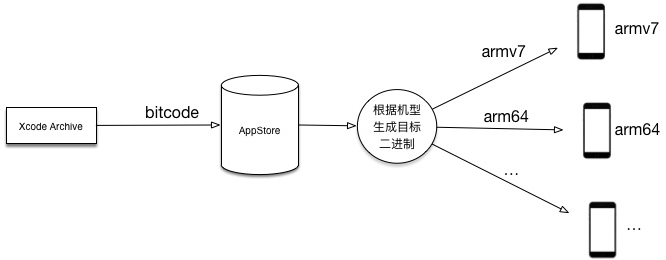
通俗地說,Bitcode 類似於一種中間碼。它被上傳到 App Store 之後,Apple 會根據下載用戶設備的指令集類型,生成只包含該指令集的二進制文件再下發,從而達到精簡安裝包體積的目的。
一點編譯原理
為了更好地理解 Bitcode,我們先簡短地回顧一下編譯器的運作流程:
Lexer:讀入源文件,並將其轉換為字符流
Parser:把字符流解析成 AST(抽象語法樹)
Semantic Analysis:對 AST 進行語義與語法檢查
Code Generation:將 AST 轉換為低層次的 IR 指令
Optimization:分析 IR 指令,消除會拖慢運行速度的冗余部分
AsmPrinter:根據 IR(中間碼)生成特定 CPU 架構的匯編代碼
Assemble:把匯編代碼轉化為二進制
Linker:程序通常會引用其他二進制文件(.a 或 framework),這些引用在代碼中只是佔位符,Linker 負責為它們填入正確的地址
更多信息可參考:The Compiler。
在真實的編譯器架構中,上述流程通常被劃分為前端與後端兩部分來處理:
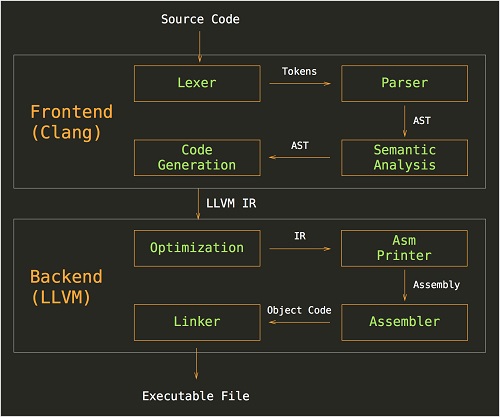
前後端之間傳遞的正是 IR(中間碼),而 Bitcode 就是一種特殊形式的中間碼。原本前後端的工作都在本地 LLVM 中完成,雖然 Apple 並未公開 Bitcode 的具體實現,但從其文檔不難推測:Apple 把一部分後端工作搬到了服務器上。Xcode 將 IR 上傳至服務器,由服務器針對不同機型執行後續處理,從而為各機型生成對應指令集的二進制,最終實現縮小包體積的目標。
打開 Bitcode 設置
實際上在 Xcode 7 中新建 iOS 工程時,Bitcode 選項默認就是 YES。你可以在「Build Settings」→「Enable Bitcode」中看到這個開關。
不過我們需要區分三個平台:iOS / Mac OS / watchOS。
iOS:Bitcode 是可選的
watchOS:Bitcode 是必須的
Mac OS:不支持 Bitcode
開啟 Bitcode 後,提交打包時的界面也會出現相應的 Bitcode 選項:
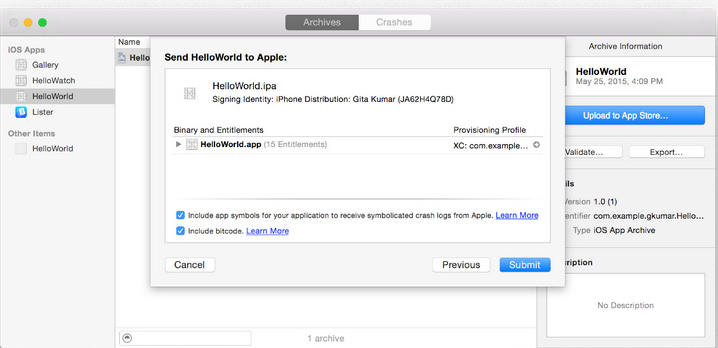
但如果依賴的第三方庫不支持 Bitcode,你就必須把「Enable Bitcode」設為 NO。這裡有一個硬性規則:只要有任意一個第三方庫不支持,就不能開啟,否則會導致鏈接錯誤。
確保打包時使用 -fembed-bitcode,而非 -fembed-bitcode-marker
You should be aware that a normal build with the -fembed-bitcode-marker option will produce minimal size embedded bitcode sections without any real content. This is done as a way of testing the bitcode-related aspects of your build without slowing down the build process. The actual bitcode content is included when you do an Archive build.
-fembed-bitcode-marker:只是簡單標記一下 archive 出來的二進制中 Bitcode 所在的位置。
-fembed-bitcode:會真正生成 Bitcode 指令並嵌入到二進制中。這個設置不僅要在 App 中開啟,編譯靜態庫時也必須使用。此外要注意,該參數系統默認只在 archive 模式下才會添加。
需要注意的是,Bitcode 默認只在 archive 下編譯,debug 和 release 模式並不會生成。如果你開發的是 App,走正常的 archive 打包流程即可;如果你開發的是 .a 靜態庫或 framework,請注意把打包方式設為 archive,或在打包腳本中加入 -fembed-bitcode 參數。必要時,還需在 Build Settings 中打開 DEPLOYMENT_POSTPROCESSING=YES,並將 Strip Style 設為 debugging。
檢測是否開啟了 Bitcode
開啟 Bitcode 後,可以借助 otool 工具檢查二進制文件中是否包含 Bitcode 段。
針對靜態鏈接庫 .a 文件:
otool -arch armv7 -l xxxx.a | grep __bitcode | wc -l
如果當前庫支持 Bitcode,該命令會輸出一個數字:
若不支持 Bitcode,則不會出現該數字。
上述命令只檢查了 armv7 架構,你同樣需要用類似命令檢查其他指令集是否包含 Bitcode,例如 arm64、armv7s 等。
檢查 App 或 framework 中是否包含 Bitcode:
由於 App 與 framework 中的二進制文件和 .a 文件存在差異,這裡需要檢查的是 __LLVM 段,出現該段即表示支持 Bitcode,否則不支持。
otool -l xxxx | grep __LLVM | wc -l
這裡 otool 有個已知 bug:當你的 framework 用過 lipo 命令進行拆分與合併後,需要指定指令集才能正確檢查。
otool -arch armv7 -l xxxx | grep __LLVM | wc -l
不過要提醒的是,即便上述檢查全部通過,也未必真的支持 Bitcode。在實際測試中就出現過檢測命令通過、但某個第三方庫依然報錯不支持的情況。因此最終結論還是要以能否成功鏈接為準。重要的事說三遍:網上流傳的檢測方法僅供參考,最終還要以實際效果為準。
最終結果檢查
如果你開發的是 App,可以直接 Archive 打包;如果是庫,建議新建一個 Demo 工程進行打包,記得打開 Bitcode 設置。
CheckPoint 1:連接是否報錯
只要有任意一個庫沒開啟 Bitcode 鏈接,就會出現類似下方的錯誤。一旦鏈接通過,基本就可以放心了。
CheckPoint 2:檢查最終效果
使用開發模式導出 ipa:
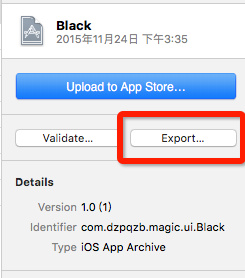
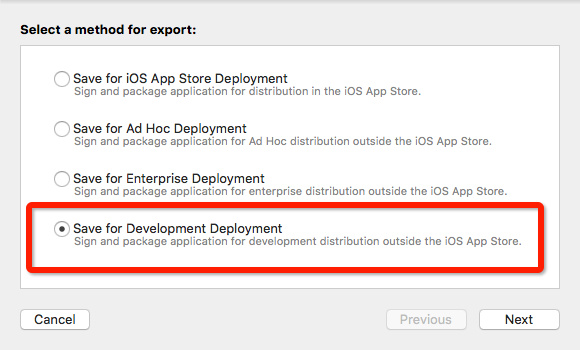
選擇出包方式。
這裡建議使用第二種,生成針對具體機型的包:
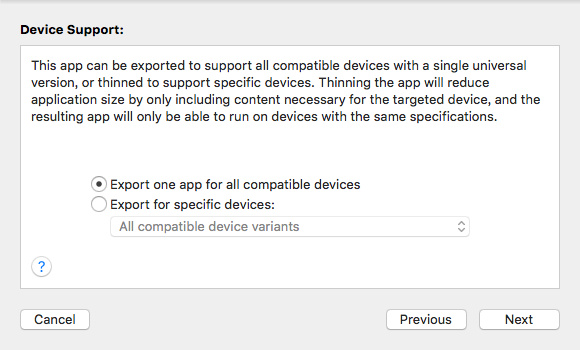
接下來就會出現 Compiling Bitcode 的過程:
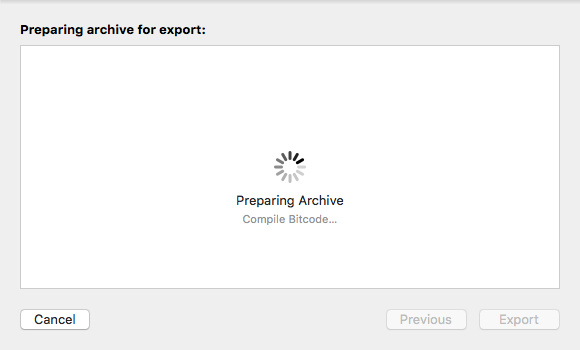
最終結果。
在最後輸出的文件中,你能看到一份 App Thinning 的結果,裡面包含針對各個機型的 ipa 包:
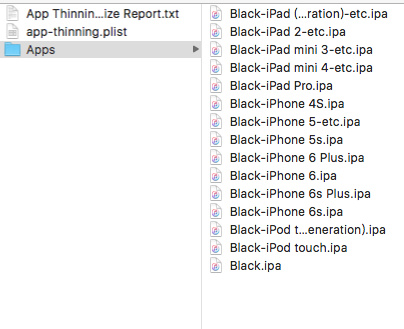
在 App Thinning Size Report 中,能明顯看到 Bitcode 等技術帶來的瘦身收益:
App Thinning Size Report for All Variants of Black
Variant: Black-iPad (4th generation)-etc.ipa
Supported devices: iPad (3rd generation) and iPad (4th generation)
App + On Demand Resources size: 368 KB compressed, 737 KB uncompressed
App size: 368 KB compressed, 737 KB uncompressed
On Demand Resources size: Zero KB compressed, Zero KB uncompressed
....
歡迎關注 iOS 開發公眾賬號 iOS_Tips,掃描下方二維碼即可關注。