
Runtime 機制與常用場景的系統性梳理

本文為投稿文章,作者:minggo。
如果說 Swift 像「凌波微步」,Objective-C 大概更像「如來神掌」。而 Runtime 常被視為這套掌法威力的來源。正因為聽起來神秘又高階,網路上到處是碎片化的片段,看過就忘,下次又得開五六個網頁重新拼。這種記不住的狀態,通常說明知識體系還沒搭起來。與其零散收集,不如自己從思想到程式碼完整走一遍。
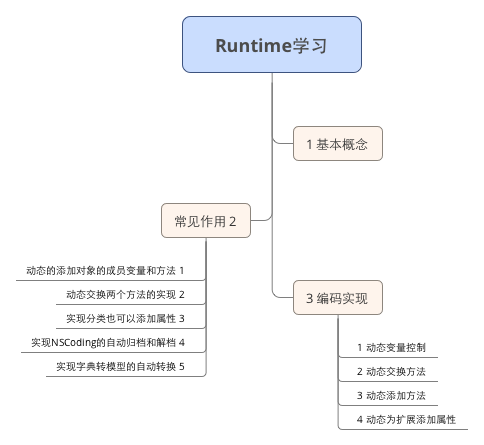
學習流程圖
一、基本概念
- Runtime 即「運行時」,指系統在執行階段的一整套機制,其中最核心的是消息機制。
- C 語言的函數呼叫在編譯期就決定目標,編譯完成後按序執行,沒有二義性。
- Objective-C 的函數呼叫被稱為「發送消息」,屬於動態派發。編譯階段無法確定真正呼叫哪個函數——事實上 OC 在編譯期可以呼叫任何函數,只要宣告過,即使沒實作也不會報錯;C 語言則會在編譯期直接報錯。
- 只有在執行時,才會依方法名稱找到對應實作並呼叫。
官方文件也區分了傳統與現代兩套 Runtime:
- In the legacy runtime, if you change the layout of instance variables in a class, you must recompile classes that inherit from it.
- In the modern runtime, if you change the layout of instance variables in a class, you do not have to recompile classes that inherit from it. In addition, the modern runtime supports instance variable synthesis for declared properties.
二、方法呼叫在 Runtime 中的真實樣貌
你寫的:
[self.loginBt login];
編譯後變成:
objc_msgSend(self.loginB, @selector(login));
三、常見用途
Runtime 的能力幾乎沒有邊界,這裡只整理實務上比較常出現的幾類:
- 動態為類添加成員變數與方法。
- 動態交換兩個方法的實作。
- 為 Category 添加屬性。
- 自動實作 NSCoding 的歸檔與解檔。
- 字典轉模型的自動映射。
四、動手寫一遍
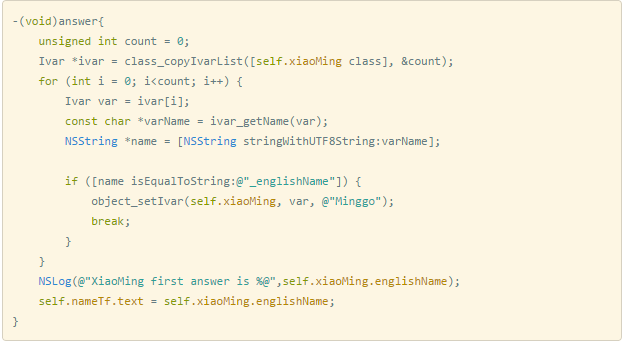
1. 動態修改變數
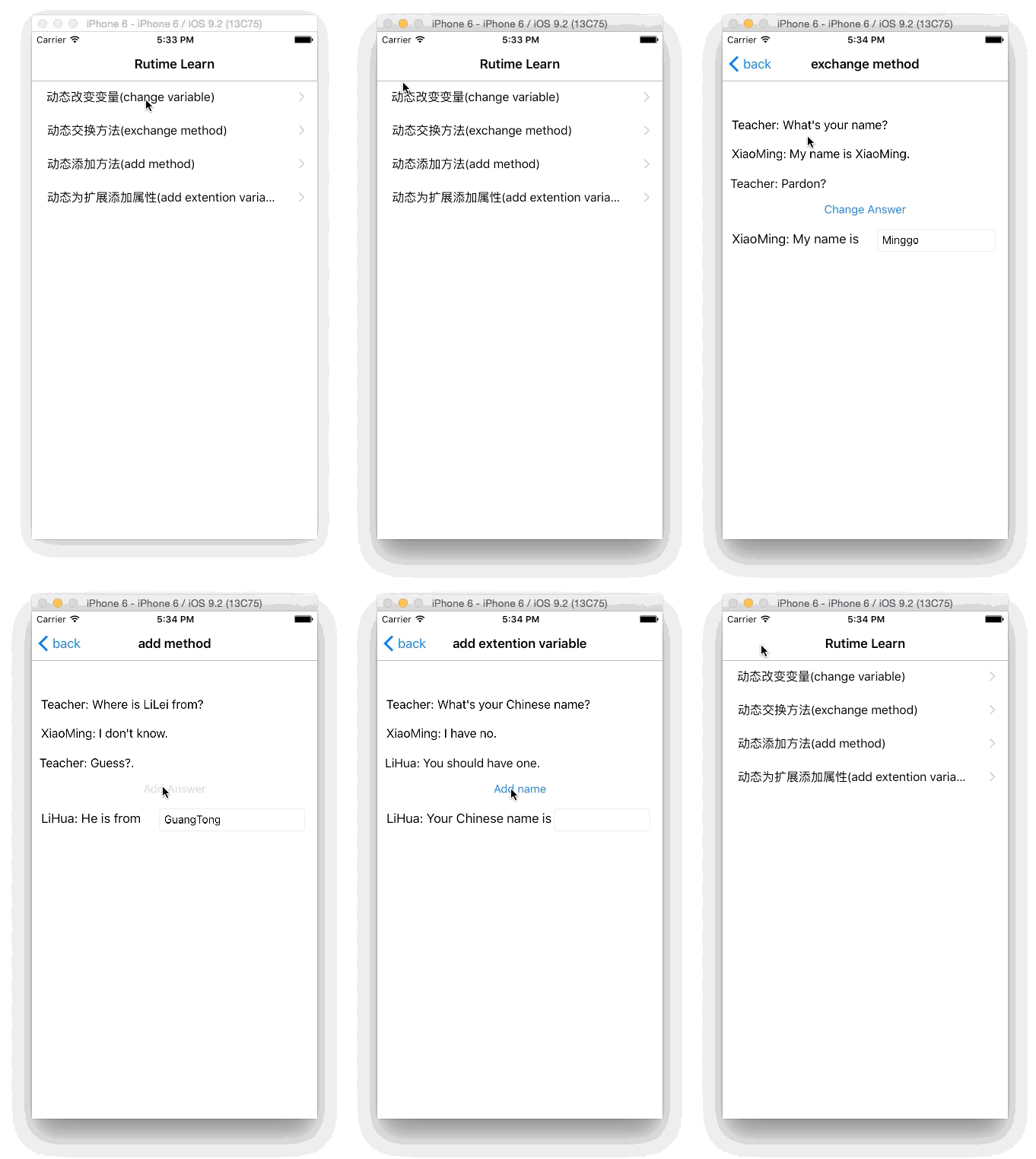
情境:小明原本的 name 是 XiaoMing,執行中被 Runtime 換成了 Minggo。
步驟一,取出所有屬性(含私有):
Ivar *ivar = class_copyIvarList([self.xiaoMing class], &count);
步驟二,遍歷找到 name:
const char *varName = ivar_getName(var);
步驟三,改寫:
object_setIvar(self.xiaoMing, var, @"Minggo");
2. 動態交換方法
情境:小明第一次回答走的是 firstSay,被 Runtime 換成 secondSay 之後,再呼叫 firstSay 實際執行的是 secondSay 的內容。
Method m1 = class_getInstanceMethod([self.xiaoMing class], @selector(firstSay));
Method m2 = class_getInstanceMethod([self.xiaoMing class], @selector(secondSay));

method_exchangeImplementations(m1, m2);
-(void)answer {
    Method m1 = class_getInstanceMethod([self.xiaoMing class], @selector(firstSay));
    Method m2 = class_getInstanceMethod([self.xiaoMing class], @selector(secondSay));

    method_exchangeImplementations(m1, m2);

    NSString *secondName = [self.xiaoMing firstSay];

    self.nameTf.text = secondName;
    NSLog(@"XiaoMing: My name is %@", secondName);
}
3. 動態添加方法
情境:小明原本沒有 guess 方法,Runtime 幫他補上一個。
class_addMethod([self.xiaoMing class], @selector(guess), (IMP)guessAnswer, "v@:");
參數說明:(IMP)guessAnswer 是實作函式的指標;"v@:" 中 v 代表無回傳值(void,若是 int 則為 i),@ 代表 id self,: 代表 SEL _cmd;例如 "v@:@@" 表示無回傳值、帶兩個物件參數。
呼叫與實作:
[self.xiaoMing performSelector:@selector(guess)];
void guessAnswer(id self, SEL _cmd) {
    NSLog(@"He is from GuangTong");
}
兩個細節要注意:函式前面沒有 + 或 -,因為它是純 C 函式;參數必須是 (id self, SEL _cmd) 兩個。
-(void)answer {
    class_addMethod([self.xiaoMing class], @selector(guess), (IMP)guessAnswer, "v@:");

    if ([self.xiaoMing respondsToSelector:@selector(guess)]) {
        [self.xiaoMing performSelector:@selector(guess)];
    } else {
        NSLog(@"Sorry, I don't know");
    }

    self.cityTf.text = @"GuangTong";
}

void guessAnswer(id self, SEL _cmd) {
    NSLog(@"He is from GuangTong");
}
4. 為 Category 添加屬性
這裡有兩件事值得強調。第一,在 Category 的 .h 裡宣告 @property 編譯能過,但執行期若沒有 Runtime 支援存取,一賦值就崩。第二,這也是 iOS 面試的高頻題:怎麼給 Category 加屬性?
先宣告:
#import "XiaoMing.h"

@interface XiaoMing (MutipleName)
@property(nonatomic, copy) NSString *chineseName;
@end
接著用關聯物件動態補上存取方法:
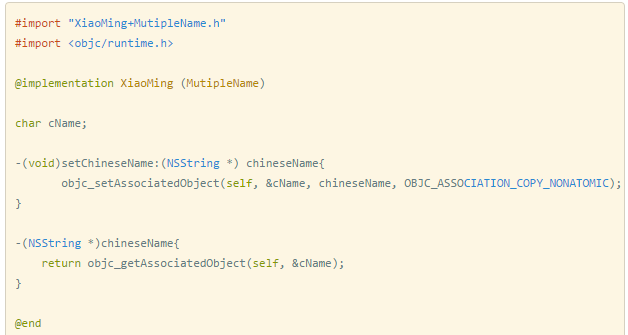
使用:
-(void)answer {
    NSLog(@"My Chinese name is %@", self.xiaoMing.chineseName);
    self.chineseNameTf.text = self.xiaoMing.chineseName;
}
五、實際效果
六、原始碼
https://github.com/minggo620/iOSRuntimeLearn.git