
iOS 藍牙開發(三):讓 App 作為外設被連接
上一篇講的是 App 作為 central 去連接外設,這一篇反過來:如何把 App 變成一個 peripheral,發布服務並等待其他 central 連接。
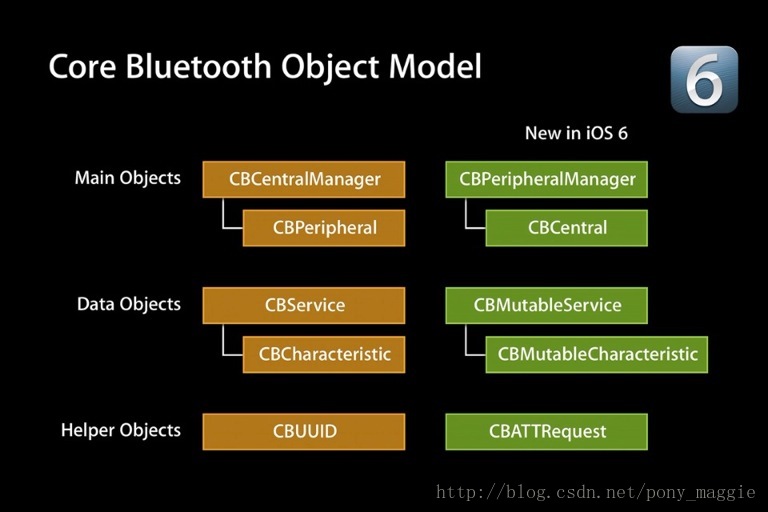
還是那張經典的架構圖:central 模式使用左側的類,peripheral 模式使用右側的類。
外圍模式的整體流程
啟動 peripheralManager 並設置其 delegate。
創建 characteristics 及其 description,組裝成 service,再把 service 添加到 peripheralManager。
開始廣播 advertising。
響應 central 的各種操作:讀取 characteristic、寫入 characteristic、訂閱與取消訂閱。
準備環境
Xcode。
開發證書與真機。藍牙程序強烈建議真機調試,模擬器也可以跑但過程相當折騰(文末會說);也可以考慮用 OS X 程序調試。
一個藍牙外設(或用另一台設備充當 central)。
實現步驟
1. 啟動並設置代理
讓當前控制器實現 CBPeripheralManagerDelegate,然後初始化實例:
@interface BePeripheralViewController : UIViewController

/* 和 CBCentralManager 類似,藍牙設備打開需要時間,成功後進入
   - (void)peripheralManagerDidUpdateState:(CBPeripheralManager *)peripheral;
   注意:模擬器永遠不會得到 CBPeripheralManagerStatePoweredOn 狀態 */
peripheralManager = [[CBPeripheralManager alloc] initWithDelegate:self queue:nil];
2. 創建 service 與 characteristics
只有在狀態回調確認藍牙已打開後,才能配置 service 和 characteristic。這裡使用的可變類型是 CBMutableService 與 CBMutableCharacteristic,關係類似可變數組與不可變數組。description 有很多種,最常用的是 CBUUIDCharacteristicUserDescriptionString。
- (void)peripheralManagerDidUpdateState:(CBPeripheralManager *)peripheral {
    switch (peripheral.state) {
        case CBPeripheralManagerStatePoweredOn:
            NSLog(@"powered on");
            [self setUp];
            break;
        case CBPeripheralManagerStatePoweredOff:
            NSLog(@"powered off");
            break;
        default:
            break;
    }
}

// 配置藍牙服務
- (void)setUp {
    CBUUID *descUUID = [CBUUID UUIDWithString:CBUUIDCharacteristicUserDescriptionString];

    // 可通知的特徵:properties = Notify,permissions = Readable
    CBMutableCharacteristic *notiyCharacteristic = [[CBMutableCharacteristic alloc] initWithType:[CBUUID UUIDWithString:notiyCharacteristicUUID] properties:CBCharacteristicPropertyNotify value:nil permissions:CBAttributePermissionsReadable];

    // 可讀寫的特徵
    CBMutableCharacteristic *readwriteCharacteristic = [[CBMutableCharacteristic alloc] initWithType:[CBUUID UUIDWithString:readwriteCharacteristicUUID] properties:CBCharacteristicPropertyWrite | CBCharacteristicPropertyRead value:nil permissions:CBAttributePermissionsReadable | CBAttributePermissionsWriteable];

    // 掛上描述
    CBMutableDescriptor *desc = [[CBMutableDescriptor alloc] initWithType:descUUID value:@"name"];
    [readwriteCharacteristic setDescriptors:@[desc]];

    // 只讀特徵
    CBMutableCharacteristic *readCharacteristic = [[CBMutableCharacteristic alloc] initWithType:[CBUUID UUIDWithString:readCharacteristicUUID] properties:CBCharacteristicPropertyRead value:nil permissions:CBAttributePermissionsReadable];

    CBMutableService *service1 = [[CBMutableService alloc] initWithType:[CBUUID UUIDWithString:ServiceUUID1] primary:YES];
    [service1 setCharacteristics:@[notiyCharacteristic, readwriteCharacteristic]];

    CBMutableService *service2 = [[CBMutableService alloc] initWithType:[CBUUID UUIDWithString:ServiceUUID2] primary:YES];
    [service2 setCharacteristics:@[readCharacteristic]];

    // 添加後觸發 - peripheralManager:didAddService:error:
    [peripheralManager addService:service1];
    [peripheralManager addService:service2];
}
3. 開始廣播
服務添加完成後再發廣播,避免 central 拿不到完整信息:
- (void)peripheralManager:(CBPeripheralManager *)peripheral didAddService:(CBService *)service error:(NSError *)error {
    if (error == nil) { serviceNum++; }
    if (serviceNum == 2) {
        [peripheralManager startAdvertising:@{
            CBAdvertisementDataServiceUUIDsKey : @[[CBUUID UUIDWithString:ServiceUUID1], [CBUUID UUIDWithString:ServiceUUID2]],
            CBAdvertisementDataLocalNameKey : LocalNameKey
        }];
    }
}

- (void)peripheralManagerDidStartAdvertising:(CBPeripheralManager *)peripheral error:(NSError *)error {
    NSLog(@"in peripheralManagerDidStartAdvertisiong");
}
4. 響應 central 的操作
訂閱與取消訂閱最典型:訂閱後可以用定時器持續推送數據,取消時記得 invalidate 掉定時器,否則會洩漏並繼續發送。
- (void)peripheralManager:(CBPeripheralManager *)peripheral central:(CBCentral *)central didSubscribeToCharacteristic:(CBCharacteristic *)characteristic {
    timer = [NSTimer scheduledTimerWithTimeInterval:1 target:self selector:@selector(sendData:) userInfo:characteristic repeats:YES];
}

- (void)peripheralManager:(CBPeripheralManager *)peripheral central:(CBCentral *)central didUnsubscribeFromCharacteristic:(CBCharacteristic *)characteristic {
    [timer invalidate];
}

- (BOOL)sendData:(NSTimer *)t {
    CBMutableCharacteristic *characteristic = t.userInfo;
    NSDateFormatter *dft = [[NSDateFormatter alloc] init];
    [dft setDateFormat:@"ss"];
    return [peripheralManager updateValue:[[dft stringFromDate:[NSDate date]] dataUsingEncoding:NSUTF8StringEncoding] forCharacteristic:(CBMutableCharacteristic *)characteristic onSubscribedCentrals:nil];
}

// 讀請求:先判斷權限再回應
- (void)peripheralManager:(CBPeripheralManager *)peripheral didReceiveReadRequest:(CBATTRequest *)request {
    if (request.characteristic.properties & CBCharacteristicPropertyRead) {
        [request setValue:request.characteristic.value];
        [peripheralManager respondToRequest:request withResult:CBATTErrorSuccess];
    } else {
        [peripheralManager respondToRequest:request withResult:CBATTErrorWriteNotPermitted];
    }
}

// 寫請求:需轉為 CBMutableCharacteristic 才能賦值
- (void)peripheralManager:(CBPeripheralManager *)peripheral didReceiveWriteRequests:(NSArray *)requests {
    CBATTRequest *request = requests[0];
    if (request.characteristic.properties & CBCharacteristicPropertyWrite) {
        CBMutableCharacteristic *c = (CBMutableCharacteristic *)request.characteristic;
        c.value = request.value;
        [peripheralManager respondToRequest:request withResult:CBATTErrorSuccess];
    } else {
        [peripheralManager respondToRequest:request withResult:CBATTErrorWriteNotPermitted];
    }
}
值得注意的是,無論讀還是寫,都必須先檢查 characteristic 的權限位,並通過 respondToRequest:withResult: 明確回覆成功或失敗,否則 central 端會一直等待。
代碼下載:https://github.com/coolnameismy/demo,本文代碼位於 BleDemo 目錄。