
Runtime 那些事兒(消息機制)

本文為投稿文章,作者:HenryCheng
一、關於 runtime
之前在項目中遇到過用 runtime 解決全局字體替換的問題,於是再一次感受到了 runtime 這門「黑魔法」的強大,趁現在有機會分享一下對 runtime 的一些理解。在 Objective-C 中調用對象方法是經常使用的功能,也就是消息的傳遞。Objective-C 是 C 的超集,與 C 不同的是,它採用動態綁定,也就是 runtime。今天主要說的是動態方法,也就是函數的調用。
二、相關的幾個函數
下面這張圖詳細概括了每個函數調用的先後順序以及執行的前提:
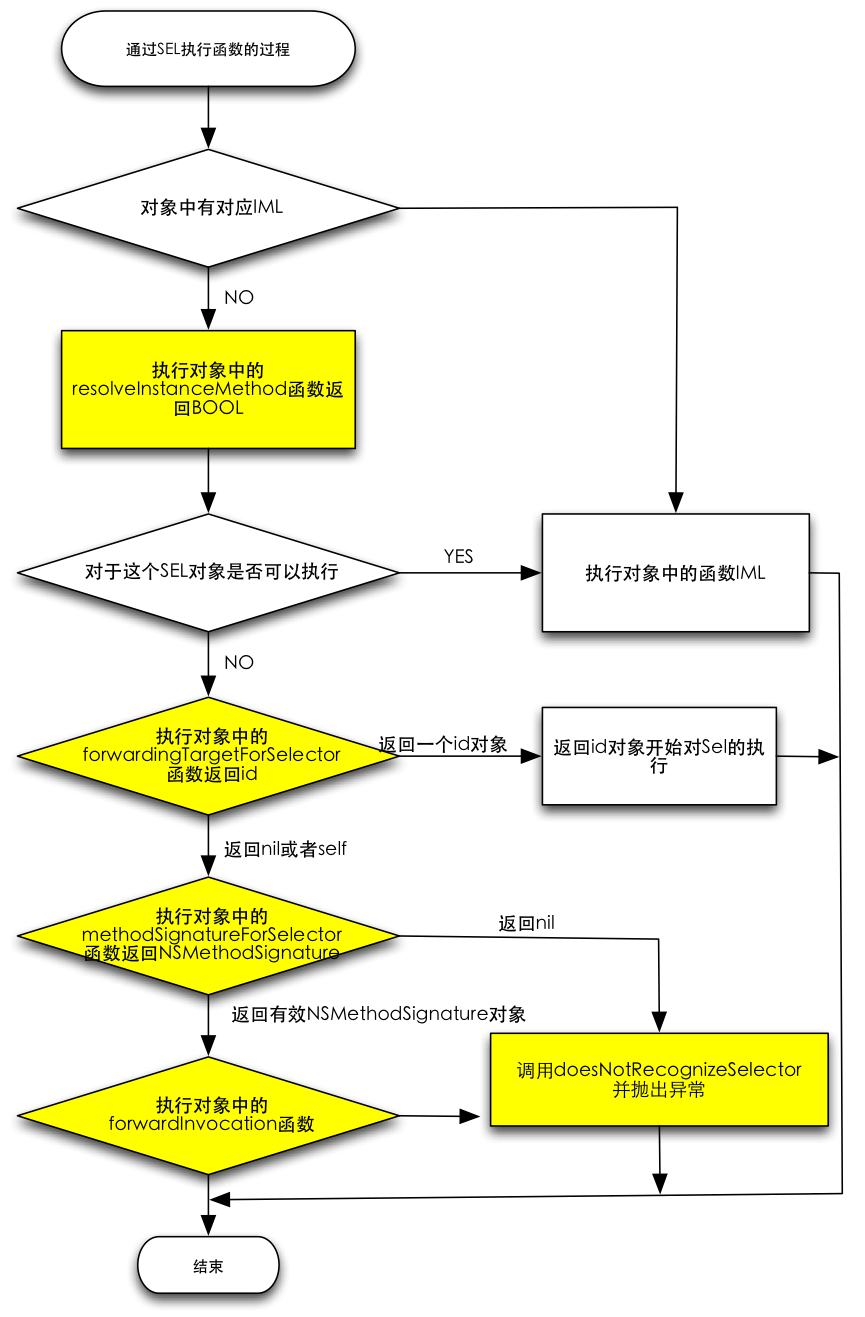
1. 對象在收到無法解讀的消息後,首先會調用所屬類的
+ (BOOL)resolveInstanceMethod:(SEL)sel
這個方法在運行時沒有找到 SEL 的 IMP 時就會執行,它給類一個用 class_addMethod 添加函數的機會。根據文檔,若實現了添加函數代碼則返回 YES,未實現返回 NO。
舉個例子:新建一個工程,首先在 ViewController 類中調用 doSomething 這個不存在的方法:
#import "ViewController.h"

@interface ViewController ()
@end

@implementation ViewController
- (void)viewDidLoad {
    [super viewDidLoad];
    [self performSelector:@selector(doSomething)];
}
@end
運行結果:
2015-12-24 10:35:37.726 RuntimeTest1[1877:337842] -[ViewController doSomething]: unrecognized selector sent to instance 0x7fe9f3736680
2015-12-24 10:35:37.729 RuntimeTest1[1877:337842] *** Terminating app due to uncaught exception 'NSInvalidArgumentException', reason: '-[ViewController doSomething]: unrecognized selector sent to instance 0x7fe9f3736680'
不出意外,程序崩潰,因為找不到 doSomething 方法。下面我們實現 + (BOOL)resolveInstanceMethod:(SEL)sel,並判斷若 SEL 是 doSomething 就輸出 add method here:
#import "ViewController.h"

@interface ViewController ()
@end

@implementation ViewController
- (void)viewDidLoad {
    [super viewDidLoad];
    [self performSelector:@selector(doSomething)];
}

+ (BOOL)resolveInstanceMethod:(SEL)sel {
    if (sel == @selector(doSomething)) {
        NSLog(@"add method here");
        return YES;
    }
    return [super resolveInstanceMethod:sel];
}
@end
繼續運行,看到 log:
2015-12-24 10:47:24.687 RuntimeTest1[2007:382077] add method here
2015-12-24 10:47:24.687 RuntimeTest1[2007:382077] -[ViewController doSomething]: unrecognized selector sent to instance 0x7f9568c331f0
2015-12-24 10:47:24.690 RuntimeTest1[2007:382077] *** Terminating app due to uncaught exception 'NSInvalidArgumentException', reason: '-[ViewController doSomething]: unrecognized selector sent to instance 0x7f9568c331f0'
可以看到程序依然崩潰了,但輸出了 add method here,說明我們的 resolveInstanceMethod: 方法執行了並進入了判斷。所以在這裡,我們可以做點操作,讓這個方法得到相應,不至於走到最後的 - (void)doesNotRecognizeSelector:(SEL)aSelector 而崩掉。繼續操作:
#import "ViewController.h" #import@interface ViewController () @end @implementation ViewController - (void)viewDidLoad { [super viewDidLoad]; [self performSelector:@selector(doSomething)]; } + (BOOL)resolveInstanceMethod:(SEL)sel { if (sel == @selector(doSomething)) { NSLog(@"add method here"); class_addMethod([self class], sel, (IMP)dynamicMethodIMP, "v@:"); return YES; } return [super resolveInstanceMethod:sel]; } void dynamicMethodIMP (id self, SEL _cmd) { NSLog(@"doSomething SEL"); } @end
導入 <objc/runtime.h>,並在 resolveInstanceMethod: 中執行 class_addMethod,然後定義了一個 void dynamicMethodIMP (id self, SEL _cmd) 函數。運行工程看 log:
2015-12-24 11:45:11.934 RuntimeTest1[2284:478571] add method here
2015-12-24 11:45:11.934 RuntimeTest1[2284:478571] doSomething SEL
這時候我們發現程序並沒有崩潰,還輸出了 doSomething SEL,說明我們已通過 runtime 成功向類中添加了一個方法。關於 class_addMethod,它是這樣定義的:
OBJC_EXPORT BOOL class_addMethod(Class cls, SEL name, IMP imp, const char *types)
cls:方法所添加到的類
name:方法名,可隨便起
imp:實現該方法的函數
types:定義返回值類型和參數類型的字符串,比如 "v@:",其中 v 代表 void(返回類型為空),@ 代表 id(self),: 代表 SEL(_cmd)。比如再定義一個函數:
int newMethod (id self, SEL _cmd, NSString *str) {
    return 100;
}
那麼添加它的方法就是 class_addMethod([self class], @selector(newMethod), (IMP)newMethod, "i@:@");
2. 如果在 resolveInstanceMethod: 中沒有找到或添加方法
消息繼續往下傳遞到 - (id)forwardingTargetForSelector:(SEL)aSelector,看看是否有對象可以執行這個方法。我們重新建個工程,新建一個叫 SecondViewController 的類,裡面有一個 - (void)secondVCMethod 方法:
#import "SecondViewController.h"

@interface SecondViewController ()
@end

@implementation SecondViewController
- (void)secondVCMethod {
    NSLog(@"This is secondVC method !");
}
@end
工程結構應該是這樣的:
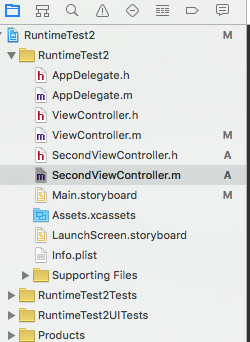
現在我想在 ViewController 中調用 secondVCMethod。我們知道兩者並無繼承關系,按正常步驟一定會崩潰:
#import "ViewController.h"
#import "SecondViewController.h"

@interface ViewController ()
@end

@implementation ViewController
- (void)viewDidLoad {
    [super viewDidLoad];
    [self performSelector:@selector(secondVCMethod)];
}
@end
運行結果:
2015-12-24 13:54:44.314 RuntimeTest2[3164:835814] -[ViewController secondVCMethod]: unrecognized selector sent to instance 0x7fc3a8535c10
2015-12-24 13:54:44.317 RuntimeTest2[3164:835814] *** Terminating app due to uncaught exception 'NSInvalidArgumentException', reason: '-[ViewController secondVCMethod]: unrecognized selector sent to instance 0x7fc3a8535c10'
現在來處理一下這個消息:
#import "ViewController.h"
#import "SecondViewController.h"

@interface ViewController ()
@end

@implementation ViewController
- (void)viewDidLoad {
    [super viewDidLoad];
    [self performSelector:@selector(secondVCMethod)];
}

- (id)forwardingTargetForSelector:(SEL)aSelector {
    Class class = NSClassFromString(@"SecondViewController");
    UIViewController *vc = class.new;
    if (aSelector == NSSelectorFromString(@"secondVCMethod")) {
        NSLog(@"secondVC do this !");
        return vc;
    }
    return nil;
}

+ (BOOL)resolveInstanceMethod:(SEL)sel {
    return [super resolveInstanceMethod:sel];
}
@end
運行結果:
2015-12-24 14:00:34.168 RuntimeTest2[3284:870957] secondVC do this !
2015-12-24 14:00:34.169 RuntimeTest2[3284:870957] This is secondVC method !
我們會發現 secondVCMethod 執行了,程序也沒崩潰,原因就是這一步:
- (id)forwardingTargetForSelector:(SEL)aSelector {
    Class class = NSClassFromString(@"SecondViewController");
    UIViewController *vc = class.new;
    if (aSelector == NSSelectorFromString(@"secondVCMethod")) {
        NSLog(@"secondVC do this !");
        return vc;
    }
    return nil;
}
在沒有找到 secondVCMethod 時,消息繼續傳遞,直到 forwardingTargetForSelector:。我在裡面創建了一個 SecondViewController 對象,並判斷若有這個方法就返回該對象。這個函數就是消息的轉發——在這兒我們成功地把消息傳給了 SecondViewController 並讓它執行,所以那個方法就被調用了。同時,這也相當於完成了一個「多繼承」!
三、最後一點
當然,還有好幾個函數,上面那張圖裡已清晰表達,有興趣的可以自己試試,看看消息的傳遞順序到底如何。上面提到的這些只是 runtime 的冰山一角,這門「黑魔法」的強大遠不止於此,比如方法調配(Method Swizzling)等,在項目實戰中還是很有用的,後面有時間會再介紹。
參考
Objective-C Runtime Reference
Objective-C Runtime Programming Guide
- 上一篇文章: 對於 AlamoFire 的幾點思考
- 下一篇文章: 源碼推薦(03.01B):Tumblr風格彈出菜單,列表全選與刪除實戰