
iOS 實現自定義彈出視圖(popView)
編輯:iOS 開發基礎
前段時間項目中有個需求:支付完成後彈出紅包,做一個發紅包的功能。最終實現的效果大致如下:
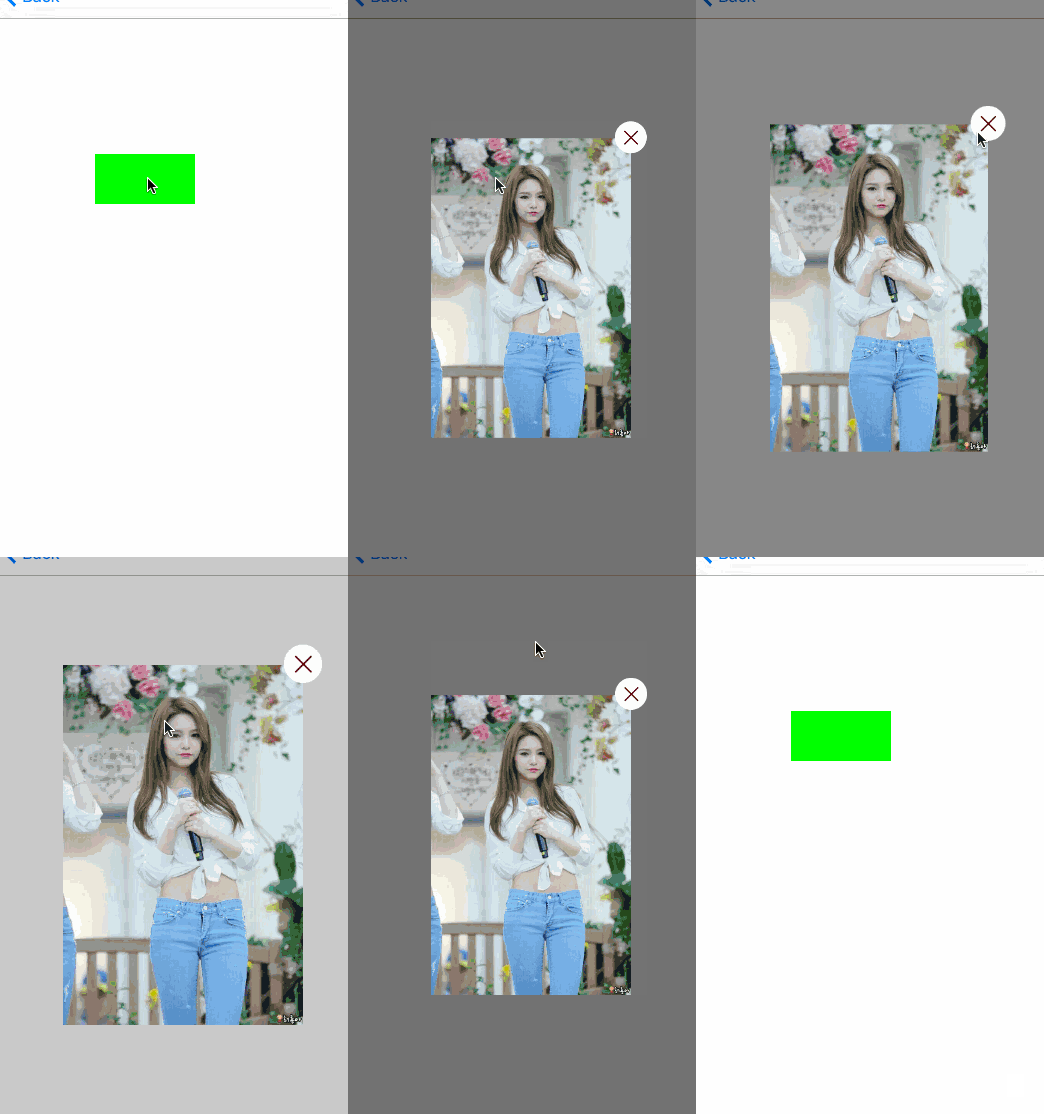
一、使用方法
整個 ViewController 的代碼大致如下:
#import "SecondViewController.h"
#import "HWPopTool.h"

@interface SecondViewController ()
@property (strong, nonatomic) UIView *contentView;
@end

@implementation SecondViewController

- (void)viewDidLoad {
    [super viewDidLoad];
    self.view.backgroundColor = [UIColor whiteColor];

    _contentView = [[UIView alloc] initWithFrame:CGRectMake(0, 0, 200, 300)];
    _contentView.backgroundColor = [UIColor clearColor];

    UIButton *btn = [UIButton buttonWithType:UIButtonTypeCustom];
    btn.frame = CGRectMake(100, 200, 100, 50);
    btn.backgroundColor = [UIColor greenColor];
    [btn addTarget:self action:@selector(popViewShow) forControlEvents:UIControlEventTouchUpInside];
    [self.view addSubview:btn];
}

- (void)popViewShow {
    UIImageView *imageV = [[UIImageView alloc] initWithFrame:_contentView.bounds];
    imageV.image = [UIImage imageNamed:@"jei"];
    [_contentView addSubview:imageV];

    [HWPopTool sharedInstance].shadeBackgroundType = ShadeBackgroundTypeSolid;
    [HWPopTool sharedInstance].closeButtonType = ButtonPositionTypeRight;
    [[HWPopTool sharedInstance] showWithPresentView:_contentView animated:YES];
}
@end
我們引入了 HWPopTool.h,創建了一個 button,點擊方法為 popViewShow,來看看其中的代碼:
- (void)popViewShow {
    UIImageView *imageV = [[UIImageView alloc] initWithFrame:_contentView.bounds];
    imageV.image = [UIImage imageNamed:@"jei"];
    [_contentView addSubview:imageV];

    [HWPopTool sharedInstance].shadeBackgroundType = ShadeBackgroundTypeSolid;
    [HWPopTool sharedInstance].closeButtonType = ButtonPositionTypeRight;
    [[HWPopTool sharedInstance] showWithPresentView:_contentView animated:YES];
}
這裡在 _contentView 上放了一個 imageView,設置好 shadeBackgroundType 和 closeButtonType 後,最後一句就把它展示出來。核心就是彈出一個 view,至於這個 view 多大、上面放什麼,都由你自己決定。
二、HWPopTool 中的一些屬性和方法
先看 HWPopTool.h:
#import#import /** 關閉按鈕的位置 */ typedef NS_ENUM(NSInteger, ButtonPositionType) { /** 無 */ ButtonPositionTypeNone = 0, /** 左上角 */ ButtonPositionTypeLeft = 1 << 0, /** 右上角 */ ButtonPositionTypeRight = 2 << 0 }; /** 蒙板的背景色 */ typedef NS_ENUM(NSInteger, ShadeBackgroundType) { /** 漸變色 */ ShadeBackgroundTypeGradient = 0, /** 固定色 */ ShadeBackgroundTypeSolid = 1 << 0 }; typedef void(^completeBlock)(void); @interface HWPopTool : NSObject @property (strong, nonatomic) UIColor *popBackgroudColor; // 彈出視圖的背景色 @property (assign, nonatomic) BOOL tapOutsideToDismiss; // 點擊蒙板是否彈出視圖消失 @property (assign, nonatomic) ButtonPositionType closeButtonType; // 關閉按鈕的類型 @property (assign, nonatomic) ShadeBackgroundType shadeBackgroundType; // 蒙板的背景色 /** 創建一個實例 */ + (HWPopTool *)sharedInstance; /** 彈出要展示的 View */ - (void)showWithPresentView:(UIView *)presentView animated:(BOOL)animated; /** 關閉彈出視圖 */ - (void)closeWithBlcok:(void (^)())complete; @end
由於之前寫得比較倉促,今天趁空閒又把代碼整理了一遍,比如關閉後的回調,之前用 delegate 實現,今天用 block 重寫,更簡潔一點。另外基本上所有方法、屬性、枚舉我都加了注釋,算是個人習慣吧。這裡有幾點需要說明:
1. ShadeBackgroundType 是蒙板背景色屬性,有固定色和漸變色(ShadeBackgroundTypeGradient)。關於漸變,有興趣的可以研究一下 CAGradientLayer,還是很有趣的,後續文章也會說到。
2. tapOutsideToDismiss 是設置點擊蒙板後 popView 是否消失的屬性,默認為 YES。
3. - (void)closeWithBlcok:(void(^)())complete 是關閉後的回調,比如發完紅包、等 popView 消失後回到上一頁的場景。
由於注釋基本都很清楚,這裡就不多說了。
三、最後
我寫博客時貼代碼喜歡貼完整的(當然非常長的除外),這樣更直觀。最後,所有代碼 demo 都可以在這裡看到。