
實戰:借助 ViewModel 規範化你的 TableView 界面開發

TableView 可以說是移動 App 中最常用的界面之一,物品與消息列表、詳情編輯、屬性設置……幾乎每個 App 都能看到它的身影。如何優雅地實現一個 TableView 界面,也就成了 iOS 開發者的必備技能。
一般來說,實現一個 UITableView 需要通過 UITableViewDataSource 和 UITableViewDelegate 這兩套協議來指定頁面內容並響應用戶操作。常用方法有:
@protocol UITableViewDataSource - (NSInteger)numberOfSectionsInTableView:(UITableView *)tableView; - (NSInteger)tableView:(UITableView *)tableView numberOfRowsInSection:(NSInteger)section; - (UITableViewCell *)tableView:(UITableView *)tableView cellForRowAtIndexPath:(NSIndexPath *)indexPath - (nullable NSString *)tableView:(UITableView *)tableView titleForHeaderInSection:(NSInteger)section; - (nullable NSString *)tableView:(UITableView *)tableView titleForFooterInSection:(NSInteger)section; ... @end @protocol UITableViewDelegate - (CGFloat)tableView:(UITableView *)tableView heightForRowAtIndexPath:(NSIndexPath *)indexPath; - (CGFloat)tableView:(UITableView *)tableView heightForHeaderInSection:(NSInteger)section; - (CGFloat)tableView:(UITableView *)tableView heightForFooterInSection:(NSInteger)section; - (void)tableView:(UITableView *)tableView didSelectRowAtIndexPath:(NSIndexPath *)indexPath; ... @end
可見,完整實現一個 UITableView 需要在眾多方法中設定 UI 邏輯。結構簡單時還好,但當它相對複雜時——比如存在多種 TableViewCell——就很容易出現界面邏輯混亂、代碼冗餘重複的情況。
讓我們看一個例子,實現一個店鋪管理界面:
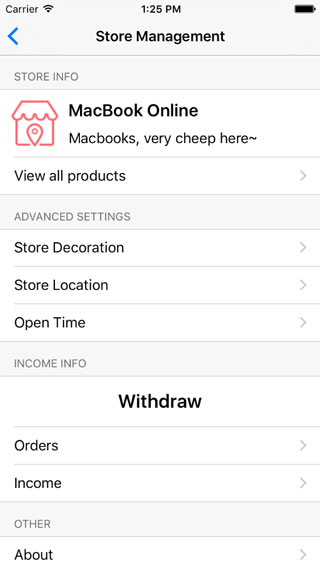
界面包含 4 個 sections(STORE INFO、ADVANCED SETTINGS、INCOME INFO、OTHER)和 3 種 cells(帶 icon 的店鋪名稱 cell、各項設置的入口 cell、較高的 Withdraw cell)。此外有兩種用戶使用該界面:經理可看到全部信息,普通職員只能看到其中一部分:
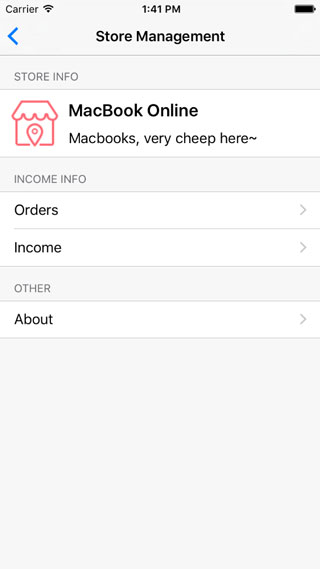
按照傳統方式直接實現這兩個協議,代碼可能會是這樣:
#pragma mark - UITableViewDataSource - (NSInteger)numberOfSectionsInTableView:(UITableView *)tableView { switch (self.type) { case MemberTypeEmployee: return 3; break; case MemberTypeManager: return 4; break; default: return 3; break; } } - (NSInteger)tableView:(UITableView *)tableView numberOfRowsInSection:(NSInteger)section { if (section == 0) { if (self.type == MemberTypeEmployee) { return 1; // only store info } else { return 2; // store info and goods entry } } else if (section == 1) { if (self.type == MemberTypeEmployee) { return 2; // order list } else { return 3; // advanced settings... } } else if (section == 2) { if (self.type == MemberTypeEmployee) { return 1; // about } else { return 3; // store income and withdraw } } else { return 1; // about } } ...
在另外幾個協議方法中還有更多這樣的 if-else 判斷,尤其是 tableView:cellForRowAtIndexPath: 方法。這樣的實現顯然很不規範:一旦界面需求變化,調整行數或移動某個 cell 的位置,修改成本極大。問題根源也很明顯——代碼中充斥著大量 hard code 值和分散在各協議方法中的重複邏輯。因此,我們需要一種方法把所有這些 UI 邏輯集中起來。
如果你了解 MVVM 模式,一定會想到用一個 ViewModel 來持有所有界面數據及邏輯。比如用一個數組持有所有 section 信息,每個 section 對象持有 sectionTitle 及其 cellArray,cellArray 中的每個 cell 對象持有高度、顯示等信息。ViewModel 的接口定義如下:
@interface TableViewModel:NSObject @property (nonatomic, strong) NSMutableArray *sectionModelArray; @end @interface TableViewSectionModel : NSObject @property (nonatomic, strong) NSMutableArray *cellModelArray; @property (nonatomic, strong) NSString *headerTitle; @property (nonatomic, strong) NSString *footerTitle; @end typedef NS_ENUM(NSInteger, CellType) { CellTypeIconText, CellTypeBigText, CellTypeDesc }; @interface TableViewCellModel : NSObject @property (nonatomic, assign) CGFloat height; @property (nonatomic, assign) CGFloat cellType; @property (nonatomic, retain) UIImage *icon; @property (nonatomic, retain) NSString *mainTitle; @property (nonatomic, retain) NSString *subTitle; @end
此時,UITableView 的那些協議方法可以這樣實現:
@implementation TableViewModel - (NSInteger)numberOfSectionsInTableView:(UITableView *)tableView { return self.sectionModelArray.count; } - (NSInteger)tableView:(UITableView *)tableView numberOfRowsInSection:(NSInteger)section { YZSTableViewSectionModel *sectionModel = self.sectionModelArray[section]; return sectionModel.cellModelArray.count; } - (UITableViewCell *)tableView:(UITableView *)tableView cellForRowAtIndexPath:(NSIndexPath *)indexPath { YZSTableViewCellModel *cellModel = [self cellModelAtIndexPath:indexPath]; UITableViewCell *cell = nil; switch (cell.cellType) { case CellTypeIconText: { ... break; } case CellTypeBigText: { ... break; } case CellTypeDesc: { ... break; } } return cell; } ... @end
在 TableViewController 中,我們只需構造 sectionModelArray 即可。這樣的實現進步明顯,所有 UI 邏輯集中到一處,基本消除了 hard code 值與重複代碼,可讀性大大增強,維護與擴展難度大幅降低。
但我們同時也發現一個問題:這個 TableViewModel 是不可重用的,它的屬性設置決定它只能用於店鋪管理界面。若需另外實現一個詳情編輯頁,就得再創建另一個 TableViewModel,這導致使用不便、推廣困難。尤其在團隊中,需要對每個成員進行培訓與代碼 review 才能保證規範,成本較高。
如何讓 TableViewModel 通用起來?造成不通用的主因是 TableViewCellModel 的定義——cellType、icon、mainTitle、subTitle 等業務邏輯被耦合進了 cell model,而並非所有界面都有這些元素。所以我們需要一種通用描述方式來取代這些屬性。歸根結底,這些屬性主要是用來實現 UITableViewCell 的,那有什麼辦法能在不指定這些內容的前提下,讓 TableViewModel 知道如何實現一個 cell 呢?答案是 block!
通過 block,我們可以把 UITableViewCell 的實現邏輯封裝起來,需要時執行 block 即可得到對應 cell。同理,cell 的點擊響應、willDisplay 等事件也都能通過 block 封裝。於是一個通用的 TableViewModel 可以這樣定義:
@interface YZSTableViewModel : NSObject @property (nonatomic, strong) NSMutableArray *sectionModelArray; @end typedef UIView * (^YZSViewRenderBlock)(NSInteger section, UITableView *tableView); @interface YZSTableViewSectionModel : NSObject @property (nonatomic, strong) NSMutableArray *cellModelArray; @property (nonatomic, strong) NSString *headerTitle; @property (nonatomic, strong) NSString *footerTitle; ... @end typedef UITableViewCell * (^YZSCellRenderBlock)(NSIndexPath *indexPath, UITableView *tableView); typedef void (^YZSCellSelectionBlock)(NSIndexPath *indexPath, UITableView *tableView); ... @interface YZSTableViewCellModel : NSObject @property (nonatomic, copy) YZSCellRenderBlock renderBlock; @property (nonatomic, copy) YZSCellSelectionBlock selectionBlock; @property (nonatomic, assign) CGFloat height; ... @end
(受限於篇幅僅列出部分接口,更多內容可參看:https://github.com/youzan/SigmaTableViewModel)
UITableView 的那些協議方法也有了通用實現:
@implementation YZSTableViewModel ... #pragma mark - UITableViewDataSource - (NSInteger)tableView:(UITableView *)tableView numberOfRowsInSection:(NSInteger)section { YZSTableViewSectionModel *sectionModel = [self sectionModelAtSection:section]; return sectionModel.cellModelArray.count; } - (UITableViewCell *)tableView:(UITableView *)tableView cellForRowAtIndexPath:(NSIndexPath *)indexPath { YZSTableViewCellModel *cellModel = [self cellModelAtIndexPath:indexPath]; UITableViewCell *cell = nil; YZSCellRenderBlock renderBlock = cellModel.renderBlock; if (renderBlock) { cell = renderBlock(indexPath, tableView); } return cell; } ... #pragma mark - UITableViewDelegate - (void)tableView:(UITableView *)tableView didSelectRowAtIndexPath:(NSIndexPath *)indexPath { YZSTableViewCellModel *cellModel = [self cellModelAtIndexPath:indexPath]; YZSCellSelectionBlock selectionBlock = cellModel.selectionBlock; if (selectionBlock) { selectionBlock(indexPath, tableView); } } ... @end
回到文章開頭的例子,用 SigmaTableViewModel 實現這個相對複雜的店鋪管理頁,我們只需要:
- (void)viewDidLoad { [super viewDidLoad]; self.viewModel = [[YZSTableViewModel alloc] init]; self.tableView.delegate = self.viewModel; self.tableView.dataSource = self.viewModel; [self initViewModel]; [self.tableView reloadData]; } - (void)initViewModel { [self.viewModel.sectionModelArray removeAllObjects]; [self.viewModel.sectionModelArray addObject:[self storeInfoSection]]; if (self.type == MemberTypeManager) { [self.viewModel.sectionModelArray addObject:[self advancedSettinsSection]]; } [self.viewModel.sectionModelArray addObject:[self incomeInfoSection]]; [self.viewModel.sectionModelArray addObject:[self otherSection]]; } - (YZSTableViewSectionModel*)storeInfoSection { YZSTableViewSectionModel *sectionModel = [[YZSTableViewSectionModel alloc] init]; ... // store info cell YZSTableViewCellModel *cellModel = [[YZSTableViewCellModel alloc] init]; [sectionModel.cellModelArray addObject:cellModel]; cellModel.height = 80; cellModel.renderBlock = ^UITableViewCell *(NSIndexPath *indexPath, UITableView *tableView) { ... }; if (self.type == MemberTypeManager) { // product list cell YZSTableViewCellModel *cellModel = [[YZSTableViewCellModel alloc] init]; [sectionModel.cellModelArray addObject:cellModel]; cellModel.renderBlock = ^UITableViewCell *(NSIndexPath *indexPath, UITableView *tableView) { ... }; cellModel.selectionBlock = ^(NSIndexPath *indexPath, UITableView *tableView) { [tableView deselectRowAtIndexPath:indexPath animated:YES]; ... }; } return sectionModel; } ...
所有的 TableView 界面實現,都統一成了初始化 SigmaTableViewModel 的過程。
註:SigmaTableViewModel 僅提供了一些常用 TableView 協議方法的實現。若需其未實現的方法,可創建它的子類並在子類中提供實現。同時由於大量使用 block,需注意通過 weak-strong dance 避免循環引用;若擔心 block 中持有過多代碼造成內存增加,可將代碼實現放到另外的方法中,在 block 內調用即可。
- 上一篇文章: ResearchKit 官方文檔詳解:創建調查(Surveys)
- 下一篇文章: PreLoader 加載動畫的實現原理詳解