
WWDC 2016 Session 419 筆記:用 struct、protocol 與泛型重構視圖布局

本文授權轉載,作者:Prayer_(微博)
這是 WWDC 2016 Session 419 的部分筆記,非常推薦去看原視頻。
設計師來需求了
做 App 時我們經常要自定義視圖,比如下面這個例子:
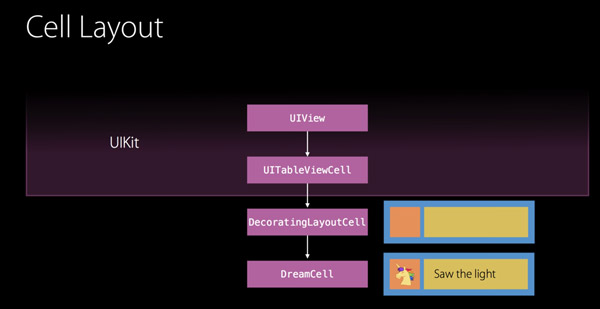
「右邊是內容、左邊有個裝飾視圖」這種樣式會在很多地方出現。為了讓代碼可複用,我們在 UITableViewCell 基礎上封裝了一層 DecoratingLayout,再讓子類去繼承它,以此實現這一類視圖。
class DecoratingLayout : UITableViewCell {
    var content: UIView
    var decoration: UIView
    // Perform layout...
}
重構
問題很明顯:一旦繼承自 UITableViewCell,其他類型的 view 就完全用不上這套布局了。於是我們開始重構。
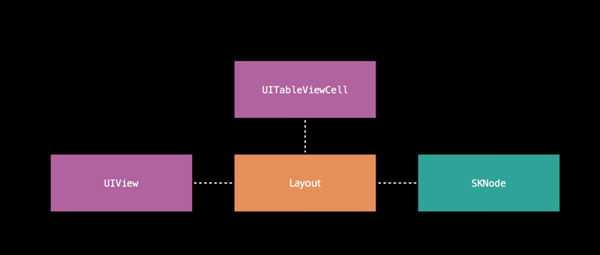
目標是讓「布局」這件事從具體的 view 類型中獨立出來——無論對象是 UITableViewCell、UIView,還是 Sprite Kit 裡的 SKNode。
struct DecoratingLayout {
    var content: UIView
    var decoration: UIView
    mutating func layout(in rect: CGRect) {
        // Perform layout...
    }
}
改成結構體之後,任何具體的視圖只需要在合適的時機創建一個 DecoratingLayout 實例,就能複用同一套布局邏輯:
class DreamCell : UITableViewCell {
    ...
    override func layoutSubviews() {
        var decoratingLayout = DecoratingLayout(content: content, decoration: decoration)
        decoratingLayout.layout(in: bounds)
    }
}

class DreamDetailView : UIView {
    ...
    override func layoutSubviews() {
        var decoratingLayout = DecoratingLayout(content: content, decoration: decoration)
        decoratingLayout.layout(in: bounds)
    }
}
注意這段代碼:無論是 UITableViewCell 還是 UIView,布局邏輯都已經和視圖本身解耦,兩者共用同一份 struct 代碼。
這樣做還有一個附帶好處——測試變得容易多了:
func testLayout() {
    let child1 = UIView()
    let child2 = UIView()
    var layout = DecoratingLayout(content: child1, decoration: decoration: child2)
    layout.layout(in: CGRect(x: 0, y: 0, width: 120, height: 40))
    XCTAssertEqual(child1.frame, CGRect(x: 0, y: 5, width: 35, height: 30))
    XCTAssertEqual(child2.frame, CGRect(x: 35, y: 5, width: 70, height: 30))
}
但我們的野心不止於此——同樣的布局方式,也想用在 SKNode 上。看下面的代碼:
struct ViewDecoratingLayout {
    var content: UIView
    var decoration: UIView
    mutating func layout(in rect: CGRect) {
        content.frame = ...
        decoration.frame = ...
    }
}

struct NodeDecoratingLayout {
    var content: SKNode
    var decoration: SKNode
    mutating func layout(in rect: CGRect) {
        content.frame = ...
        decoration.frame = ...
    }
}
仔細看,除了 content 和 decoration 的類型不同,其餘全是重復代碼。重復就是罪惡。
怎麼消掉這份重復?觀察可知,DecoratingLayout 裡唯一用到 content 和 decoration 的地方就是讀寫 frame。也就是說,只要這兩個屬性的類型都「具備 frame」,代碼就能通用——於是自然想到用 protocol 充當類型。
protocol Layout {
    var frame: CGRect { get set }
}
於是兩份重復代碼又合回一份:
struct DecoratingLayout {
    var content: Layout
    var decoration: Layout
    mutating func layout(in rect: CGRect) {
        content.frame = ...
        decoration.frame = ...
    }
}
而為了能繼續傳入 UIView 和 SKNode,只要讓它們聲明遵守 Layout 協議即可(因為二者本來就滿足了協議要求):
extension UIView: Layout {}
extension SKNode: Layout {}
這裡補一點個人理解:DreamCell 和 DreamDetailView 能共用一套布局代碼,是因為傳進去的視圖都有共同父類 UIView,它提供了 frame;而 UIView 和 SKNode 之間沒有這種關係,用 protocol 作為類型才能漂亮地解決。
引入泛型
不過目前的寫法還藏著一個問題:content 和 decoration 的實際類型可能不一致。我們只約定了兩者都提供 frame,並沒有約定它們是同一類型——比如 content 是 UIView、decoration 是 SKNode,這顯然不符合預期。
用泛型就能鎖死這一點:
struct DecoratingLayout<Child: Layout> {
    var content: Child
    var decoration: Child
    mutating func layout(in rect: CGRect) {
        content.frame = ...
        decoration.frame = ...
    }
}
泛型一上,content 與 decoration 的類型必然相同。
需求又來啦
設計師又來了:小伙子,把下面這個布局做了。

仿照前面的思路,我們寫出:
struct CascadingLayout<Child: Layout> {
    var children: [Child]
    mutating func layout(in rect: CGRect) {
        ...
    }
}
struct DecoratingLayout<Child: Layout> {
    var content: Child
    var decoration: Child
    mutating func layout(in rect: CGRect) {
        content.frame = ...
        decoration.frame = ...
    }
}
把前面那段代碼再貼出來,方便對照。
把這兩種布局組合起來,就能拼出目標效果:

組合優於繼承
那要怎麼把它們組合起來?回頭看 Layout 協議——我們真正關心的其實不是 frame,而是「這個類型能在特定上下文裡完成布局」。於是協議改成這樣:
protocol Layout {
    mutating func layout(in rect: CGRect)
}
此時 Layout 的語義變成了:該類型能夠在特定的 CGRect 中進行相應的布局。 correspondingly,實現也要調整:
extension UIView: Layout { ... }
extension SKNode: Layout { ... }
這裡省略了用 frame 完成布局的具體代碼。於是兩個結構體變成:
struct DecoratingLayout<Child : Layout> : Layout { ... }
struct CascadingLayout<Child : Layout> : Layout { ... }
看著有點暈?翻譯一下:DecoratingLayout 自己遵守 Layout 協議,而它的 content、decoration 兩個屬性同樣遵守該協議,也就是說都能在特定 CGRect 裡完成布局。結構體本身已經具備 layout 能力,只要把自己的 layout 操作分發給兩個屬性各自執行,組合就完成了,不需要任何額外代碼。
組合之後的調用方式:
let decoration = CascadingLayout(children: accessories)  // 左邊
var composedLayout = DecoratingLayout(content: content, decoration: decoration)  // 整體
composedLayout.layout(in: rect)  // 執行 layout 操作
On step further

仔細看這張圖:視圖是有層次結構的,所以布局時需要能拿到整個子視圖數組。而之前的實現只能布局單個視圖,拿不到視圖樹。
於是繼續改 Layout 協議:
protocol Layout {
    mutating func layout(in rect: CGRect)
    var contents: [Layout] { get }
}
新增一個只讀屬性,返回 Layout 數組。但這裡又有問題:contents 裡的元素可能類型各異,例如 [UIView(), SKNode()]。為了保證元素類型一致,我們引入 associatedtype:
protocol Layout {
    mutating func layout(in rect: CGRect)
    associatedtype Content
    var contents: [Content] { get }
}
相應的結構體改為:
struct ViewDecoratingLayout : Layout {
    ...
    mutating func layout(in rect: CGRect)
    typealias Content = UIView
    var contents: [Content] { get }
}

struct NodeDecoratingLayout : Layout {
    ...
    mutating func layout(in rect: CGRect)
    typealias Content = SKNode
    var contents: [Content] { get }
}
重復就是罪惡啊!可以看到,兩者唯一的差異只是 Content 的類型。繼續請出泛型:
struct DecoratingLayout<Child : Layout> : Layout {
    ...
    mutating func layout(in rect: CGRect)
    typealias Content = Child.Content
    var contents: [Content] { get }
}
當 Child 確定時,Child.Content 的類型隨之確定,重復也就被消掉了。
泛型牛逼!×3
先別激動太早,代碼裡還有一個問題。目前長這樣:
struct DecoratingLayout<Child : Layout> : Layout {
    var content: Child
    var decoration: Child
    mutating func layout(in rect: CGRect)
    typealias Content = Child.Content
    var contents: [Content] { get }
}
這裡 content 和 decoration 被迫使用同一種 layout 方式,和我們的需求不符——我們要的是左右兩側採用不同的布局方式。但同時又需要泛型來保證兩者的實際數據類型一致。解法是:引入兩個泛型參數,並約束它們的 Content 類型相同。
struct DecoratingLayout<Child : Layout, Decoration : Layout
    where Child.Content == Decoration.Content> : Layout {
    var content: Child
    var decoration: Decoration
    mutating func layout(in rect: CGRect)
    typealias Content = Child.Content
    var contents: [Content] { get }
}
以上。
最後再說一次:寫 Swift 需要定義新類型時,先把 class 拋在腦後,試著從 struct 和 protocol 開始。
Happy Hacking!