
以 AVPlayer 打造高度自訂的 iOS 播放器
如果只是單純播放影片、不在意播放器介面,那麼在 iOS 9.0 之前可以使用 MPMoviePlayerController,或內建 view 的 MPMoviePlayerViewController;iOS 9.0 之後則可使用 AVPictureInPictureController、AVPlayerViewController 或 WKWebView。
但這些系統播放器因為封裝程度很高,反而讓自訂變得很困難。所以當你需要自訂播放器樣式時,就可以採用 AVPlayer。AVPlayer 位於 AVFoundation 中,更貼近底層、也更靈活。
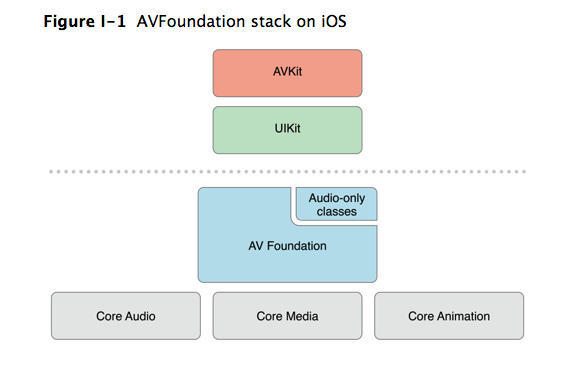
以 AVFoundation 呈現與使用媒體
AVFoundation 主要用 AVAsset 類來呈現媒體資訊,例如 title、duration、size 等。
AVAsset:儲存媒體資訊的抽象類,不能直接使用。
AVURLAsset:AVAsset 的子類,以 URL 實例化,物件包含該 URL 對應影片資源的所有資訊。
AVPlayerItem:有一個屬性為 asset,用來觀察與管理影片資訊,如 asset、tracks、status、duration、loadedTimeRange 等。
筆者的理解是:AVPlayerItem 相當於 Model 層,包含媒體資訊與播放狀態,並把這些數據提供給觀察者,例如 asset(URL 影片資訊)、loadedTimeRanges(已緩衝進度)等。
AVPlayerItem 使用
1. 初始化
使用 playerItemWithURL 或 initWithURL:。播放影片時,提供影片資訊的是 AVPlayerItem,一個 AVPlayerItem 對應一個 URL 影片資源。初始化後其屬性並非立刻可用,必須確保 AVPlayerItem 已載入完成才能使用,畢竟凡是跟網路有關的都需要時間。官方文件給出的方案是:
直到 AVPlayerItem 的
status屬性變為AVPlayerItemStatusReadyToPlay;使用 KVO 鍵值觀察來監聽該屬性。
因此使用 URL 初始化 AVPlayerItem 後,還要幫它加上觀察者。
2. 加上觀察者
觀察 status 屬性
[_playerItem addObserver:self forKeyPath:@"status" options:(NSKeyValueObservingOptionNew) context:nil]; // 觀察 status 屬性
觀察 loadedTimeRanges
[_playerItem addObserver:self forKeyPath:@"loadedTimeRanges" options:NSKeyValueObservingOptionNew context:nil]; // 觀察緩沖進度
AVPlayer 與 AVPlayerLayer
AVPlayer 有三種建立方式: init、initWithURL:、initWithPlayerItem:。使用時要特別注意,AVPlayer 本身並不能顯示影片,負責顯示的是 AVPlayerLayer。AVPlayerLayer 繼承自 CALayer,加到 view.layer 上即可使用。
AVPlayerLayer 建立方式
AVPlayerLayer *playerLayer = [AVPlayerLayer playerLayerWithPlayer:player];
[superlayer addSublayer:playerLayer];
可以這樣理解三者分工:AVPlayerLayer 負責顯示影片,AVPlayerItem 提供影片資訊,AVPlayer 負責管理與調控。這裡其實也體現了 MVC 的思想——把顯示層、資訊層、控制層三者分離,各司其職,使用起來就更得心應手。
整個播放流程大致如下:
取得影片的 URL;
根據 URL 建立 AVPlayerItem;
把 AVPlayerItem 交給 AVPlayer;
由 AVPlayerLayer 顯示影片;
AVPlayer 控制播放、暫停、跳轉等;
播放過程中取得緩衝進度與播放進度;
播放完成後決定要暫停、循環還是取最後一幀。
播放步驟
1. 佈局頁面並初始化 AVPlayer 與 AVPlayerLayer
 //  setAVPlayer
 self.player = [[AVPlayer alloc] init];
 _playerLayer = [AVPlayerLayer playerLayerWithPlayer:_player];
 [self.playerView.layer addSublayer:_playerLayer];
2. 根據 URL 取得 AVPlayerItem 並替換
初始化時 AVPlayer 還沒有 AVPlayerItem,它提供了 - (void)replaceCurrentItemWithPlayerItem:(nullable AVPlayerItem *)item; 方法,用於切換影片。
- (void)updatePlayerWithURL:(NSURL *)url {
    _playerItem = [AVPlayerItem playerItemWithURL:url]; // create item
    [_player  replaceCurrentItemWithPlayerItem:_playerItem]; // replaceCurrentItem
    [self addObserverAndNotification]; // 注冊觀察者,通知
}
3. 用 KVO 取得影片資訊、觀察緩衝進度
[_playerItem addObserver:self forKeyPath:@"status" options:(NSKeyValueObservingOptionNew) context:nil]; // 觀察 status 屬性
執行觀察者方法:
- (void)observeValueForKeyPath:(NSString *)keyPath ofObject:(id)object change:(NSDictionary *)change context:(void *)context {
    AVPlayerItem *item = (AVPlayerItem *)object;
    if ([keyPath isEqualToString:@"status"]) {
        AVPlayerStatus status = [[change objectForKey:@"new"] intValue]; // 獲取更改後的狀態
        if (status == AVPlayerStatusReadyToPlay) {
            CMTime duration = item.duration; // 獲取視頻長度
            [self setMaxDuration:CMTimeGetSeconds(duration)]; // 設置視頻時間
            [self play]; // 播放
        } else if (status == AVPlayerStatusFailed) {
            NSLog(@"AVPlayerStatusFailed");
        } else {
            NSLog(@"AVPlayerStatusUnknown");
        }
    } else if ([keyPath isEqualToString:@"loadedTimeRanges"]) {
        NSTimeInterval timeInterval = [self availableDurationRanges]; // 緩沖時間
        CGFloat totalDuration = CMTimeGetSeconds(_playerItem.duration); // 總時間
        [self.loadedProgress setProgress:timeInterval / totalDuration animated:YES]; // 更新緩沖條
    }
}
4. 播放過程中的響應:播放、暫停、跳轉
AVPlayer 提供了 play、pause 與 - (void)seekToTime:(CMTime)time completionHandler:(void (^)(BOOL finished))completionHandler。在看 seekToTime 之前,先認識一個結構體。
CMTime 是專門用來標示影片時間的結構體:
typedef struct{
    CMTimeValue     value;      // 幀數
    CMTimeScale     timescale;  // 幀率(影片每秒有幾幀)
    CMTimeFlags     flags;
    CMTimeEpoch     epoch;
} CMTime;
AVPlayerItem 的 duration 就是 CMTime 類型。若想取得影片總秒數,可用 duration.value / duration.timeScale 計算,也可直接用 CMTimeGetSeconds 函數。CMTime 通常用以下兩個函數建立:CMTimeMake(int64_t value, int32_t scale) 與 CMTimeMakeWithSeconds(Float64 seconds, int32_t scale),後者第一個參數可以是浮點數。
拖拽進度條的方法如下:
- (IBAction)playerSliderValueChanged:(id)sender {
    _isSliding = YES;
    [self pause];
    // 跳轉到拖拽秒處
    CMTime changedTime = CMTimeMakeWithSeconds(self.playProgress.value, 1.0);
    [_playerItem seekToTime:changedTime completionHandler:^(BOOL finished){
        // 跳轉完成後
    }];
}
5. 觀察播放進度
AVPlayerItem 用 KVO 觀察狀態與緩衝進度;而 AVPlayer 直接提供了更方便的播放進度觀察方法:- (id)addPeriodicTimeObserverForInterval:(CMTime)interval queue:(nullable dispatch_queue_t)queue usingBlock:(void (^)(CMTime time))block;。顧名思義就是「添加週期時間觀察者」,每隔一段時間執行 block。例如把間隔設為 1/30 秒,block 裡更新 UI,就是每秒更新 30 次。
// 觀察播放進度
- (void)monitoringPlayback:(AVPlayerItem *)item {
    __weak typeof(self) WeakSelf = self;
    // 觀察間隔,CMTime 為 30 分之一秒
    _playTimeObserver = [_player addPeriodicTimeObserverForInterval:CMTimeMake(1, 30.0) queue:dispatch_get_main_queue() usingBlock:^(CMTime time) {
        if (_touchMode != TouchPlayerViewModeHorizontal) {
            // 獲取 item 當前播放秒
            float currentPlayTime = (double)item.currentTime.value / item.currentTime.timescale;
            // 更新 slider,如果正在滑動則不更新
            if (_isSliding == NO) {
                [WeakSelf updateVideoSlider:currentPlayTime];
            }
        } else {
            return;
        }
    }];
}注意:加上 timeObserver 後,不使用時記得移除(removeTimeObserver),否則會占用大量記憶體。例如在 dealloc 中移除:
- (void)dealloc {
    [self removeObserveAndNOtification];
    [_player removeTimeObserver:_playTimeObserver]; // 移除 playTimeObserver
}
6. AVPlayerItem 通知
AVPlayerItem 播放完成後,系統會自動發送通知,定義詳見 AVPlayerItem.h。若想在某個狀態下執行某些操作,監聽對應通知即可。例如想播放完成後暫停,就監聽 AVPlayerItemDidPlayToEndTimeNotification:
 [[NSNotificationCenter defaultCenter] addObserver:self selector:@selector(playbackFinished:) name:AVPlayerItemDidPlayToEndTimeNotification object:nil];
 // 播放完成後
- (void)playbackFinished:(NSNotification *)notification {
    NSLog(@"視頻播放完成通知");
    _playerItem = [notification object];
    [_playerItem seekToTime:kCMTimeZero]; // item 跳轉到初始
    //[_player play]; // 循環播放
}
最後
使用 AVPlayer 時,一定要釐清 AVPlayer、AVPlayerLayer 與 AVPlayerItem 三者的關係:AVPlayer 負責控制播放,Layer 負責顯示,Item 提供數據(當前播放時間、已載入情況等)。Item 的幾個關鍵屬性包含 status、duration、loadedTimeRanges 與 currentTime。
最重要的還是多做總結——這個 Demo 六月就寫好了,拖到現在才整理,實在是拖延症末期了。如果你看到了最後,或許還會想要更多功能,例如橫豎屏旋轉、一些互動動畫等。筆者做了一個簡單 Demo 放在 GitHub 上,裡面仍有不足之處,歡迎多多交流。

文章轉自 Shumin_Wu的簡書
- 上一篇文章: 用巨集優雅實作 iOS 單例(ARC 篇)
- 下一篇文章: 善用 Mob 免費短信 SDK 打造驗證碼機制