
iOS 兩種方式限制拖拽手勢的活動範圍
編輯:iOS 開發基礎
UIGestureRecognizer 是定義基本手勢的抽象類,常見的子類包括:
UITapGestureRecognizer:任意次數的點按UIPinchGestureRecognizer:捏合,用於縮放UIPanGestureRecognizer:拖曳UISwipeGestureRecognizer:任意方向的快速掃動UIRotationGestureRecognizer:手指反向移動造成的旋轉UILongPressGestureRecognizer:長按
本文主要用到拖拽手勢 UIPanGestureRecognizer,目標是讓被拖動的元件不會跑出父視覺範圍。
方法一:在 UIPanGestureRecognizer 的回呼中夾住邊界
思路是每次回呼都計算「新的中心點」,再用 MAX / MIN 把它夾在合法範圍內,最後把 translation 歸零以便下次增量計算:
- (void)doMoveAction:(UIPanGestureRecognizer *)recognizer {
    // 計算使用者試圖把 view 拖到哪裡
    CGPoint translation = [recognizer translationInView:self.view];
    CGPoint newCenter = CGPointMake(recognizer.view.center.x + translation.x,
                                    recognizer.view.center.y + translation.y);

    // 限制在螢幕範圍內
    newCenter.y = MAX(recognizer.view.frame.size.height / 2, newCenter.y);
    newCenter.y = MIN(self.view.frame.size.height - recognizer.view.frame.size.height / 2, newCenter.y);
    newCenter.x = MAX(recognizer.view.frame.size.width / 2, newCenter.x);
    newCenter.x = MIN(self.view.frame.size.width - recognizer.view.frame.size.width / 2, newCenter.x);

    recognizer.view.center = newCenter;
    [recognizer setTranslation:CGPointZero inView:self.view];
}
這裡的關鍵是 setTranslation:CGPointZero——歸零之後,下次回呼拿到的才是相對於上一次的增量位移,否則位移會不斷累加。
方法二:直接用 UITouch 處理觸摸事件
手指接觸螢幕時,無論單點還是多點,事件週期就開始了,直到所有手指離開螢幕為止。期間所有 UITouch 物件都封裝在 UIEvent 中,由程式分發給處理者,並記錄這個週期內每個觸摸物件狀態的變化。
做法是在 touchesBegan 中記錄「按下的起點」並標記是否命中目標視圖,再在 touchesMoved 中把手指位置換算成元件中心點,同樣用邊界判斷夾住:
BOOL isMove;
CGPoint legend_point;

- (void)touchesBegan:(NSSet *)touches withEvent:(UIEvent *)event {
    [super touchesBegan:touches withEvent:event];
    isMove = NO;
    UITouch *touch = [touches anyObject];
    CGPoint point = [touch locationInView:self.view];
    if (CGRectContainsPoint(V2.frame, point)) {
        legend_point = [touch locationInView:V2];
        isMove = YES;
    }
}

- (void)touchesMoved:(NSSet *)touches withEvent:(UIEvent *)event {
    [super touchesMoved:touches withEvent:event];
    if (!isMove) return;

    UITouch *touch = [touches anyObject];
    CGPoint point = [touch locationInView:self.view];

    // 轉換成相對中心
    point.x += V2.frame.size.width  / 2.0f - legend_point.x;
    point.y += V2.frame.size.height / 2.0f - legend_point.y;

    // 邊界限制
    if (point.x < V2.frame.size.width / 2.0f) {
        point.x = V2.frame.size.width / 2.0f;
    }
    if (point.y < V2.frame.size.height / 2.0f) {
        point.y = V2.frame.size.height / 2.0f;
    }
    if (point.x > self.view.frame.size.width - V2.frame.size.width / 2.0f) {
        point.x = self.view.frame.size.width - V2.frame.size.width / 2.0f;
    }
    if (point.y > self.view.frame.size.height - V2.frame.size.height / 2.0f) {
        point.y = self.view.frame.size.height - V2.frame.size.height / 2.0f;
    }

    V2.center = point;
}
效果
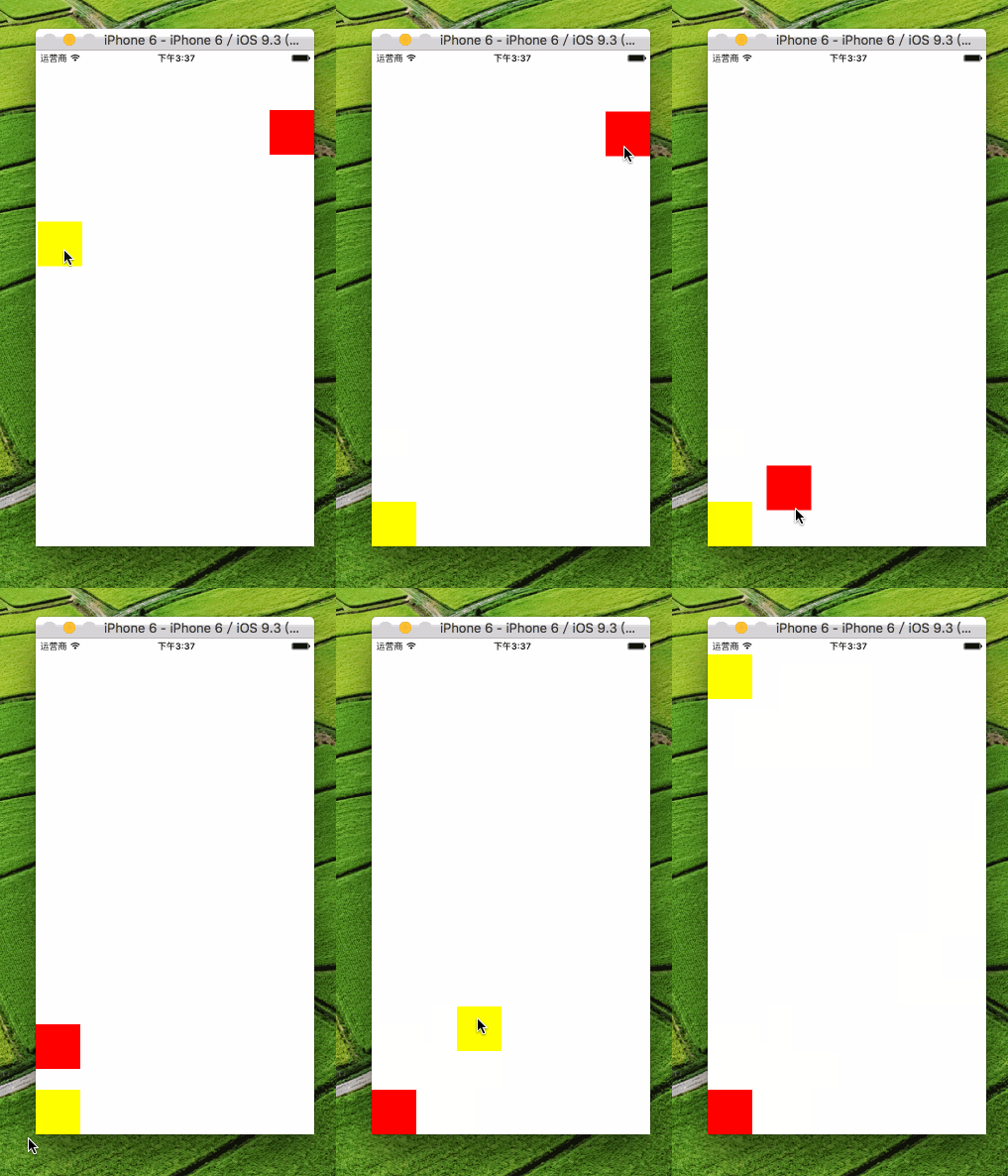
該怎麼選
如果只是單純的拖拽,用 UIPanGestureRecognizer 更省事,它天然處理了多指、取消等邊界情況;如果需要更精細地控制「從哪裡按下才算命中」,或者要與其他觸摸邏輯深度耦合,直接用 UITouch 反而更靈活。兩種方式的邊界計算本質相同,差別只在事件來源。
Demo:https://github.com/sinceresk/MoveView
本文整理自 neilbee 的簡書。
- 上一篇文章: 詳解 iOS 多圖下載的緩存機制設計
- 下一篇文章: Xcode 提速:自訂 Code Snippets 快速開發程式碼塊