
SDWebImage 原始碼剖析:快取、下載與解壓縮的完整脈絡
前言
SDWebImage 是 iOS 上最常被拿來處理圖片的框架之一:一行程式碼就能讓 UIImageView 自己去下載並顯示網路圖片,同時把結果寫進記憶體與磁碟快取。既然正好有讀原始碼的計畫,就從它開始。本文整理整個專案的架構骨架,以及背後牽涉到的 GCD、Block 等基礎知識與核心 API,並一併談談它的設計思路。
關於這個專案
This library provides a category for UIImageView with support for remote images coming from the web.
它為 UIImageView 提供了 Category,支援從遠端伺服器下載圖片並快取。
最典型的用法,就是在 UITableViewCell 裡把 URL 交給 UIImageView,剩下的下載、解碼、快取全部自動完成。官方列出的能力大致如下:
- 為 UIImageView 加上網路圖片下載與快取管理能力的 Category
- 一個非同步的圖片下載器
- 記憶體 + 磁碟的雙層非同步快取,並自動處理過期資料
- 支援 GIF 動畫與 WebP 格式
- 背景解壓縮圖片(以空間換時間,但會讓記憶體占用上升,因此框架保留了是否解壓縮的參數)
- 保證同一個 URL 不會被重複下載
- 保證失效的 URL 不會被反覆重試
- 保證主執行緒不會被阻塞
- 效能導向,全面採用 GCD 與 ARC,並支援 arm64
專案結構
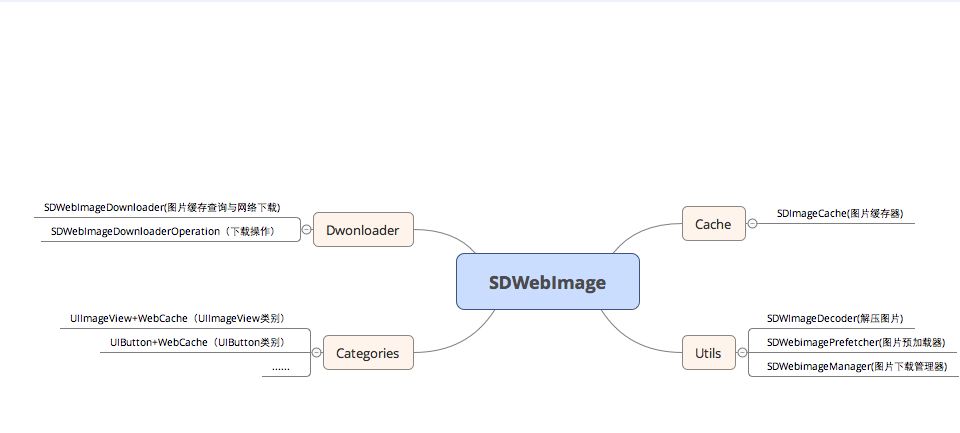
整體可以切成三大層:Cache 負責快取,Downloader 負責下載,Utils 負責解壓縮與預取。
Cache:SDImageCache
SDImageCache maintains a memory cache and an optional disk cache. Disk cache write operations are performed asynchronously so it doesn't add unnecessary latency to the UI.
SDImageCache 維護一份記憶體快取與一份「可選」的磁碟快取。磁碟寫入是非同步執行的,因此不會替 UI 帶來額外延遲。
快取來源枚舉
查詢結果會以 SDImageCacheType 標示資料究竟從哪裡來:
typedef NS_ENUM(NSInteger, SDImageCacheType) {
    // 完全沒用到快取,直接來自網路
    SDImageCacheTypeNone,
    // 來自磁碟快取
    SDImageCacheTypeDisk,
    // 來自記憶體快取
    SDImageCacheTypeMemory
};
查詢流程:queryDiskCacheForKey
這個方法是讀取路徑的核心,先問記憶體、再問磁碟,命中磁碟後順手回填記憶體:
- (NSOperation *)queryDiskCacheForKey:(NSString *)key done:(SDWebImageQueryCompletedBlock)doneBlock {
    if (!doneBlock) {
        return nil;
    }
    // key 為空則直接回呼
    if (!key) {
        doneBlock(nil, SDImageCacheTypeNone);
        return nil;
    }
    // 第一步:先查記憶體
    UIImage *image = [self imageFromMemoryCacheForKey:key];
    if (image) {
        doneBlock(image, SDImageCacheTypeMemory);
        return nil;
    }
    NSOperation *operation = [NSOperation new];
    dispatch_async(self.ioQueue, ^{
        if (operation.isCancelled) {
            return;
        }
        @autoreleasepool {
            // 第二步:查詢磁碟
            UIImage *diskImage = [self diskImageForKey:key];
            // 命中後回填記憶體,並以像素大小作為 cost
            if (diskImage) {
                CGFloat cost = diskImage.size.height * diskImage.size.width * diskImage.scale * diskImage.scale;
                [self.memCache setObject:diskImage forKey:key cost:cost];
            }
            dispatch_async(dispatch_get_main_queue(), ^{
                doneBlock(diskImage, SDImageCacheTypeDisk);
            });
        }
    });
    return operation;
}
流程可以濃縮成一句話:拿 key 先問 imageFromMemoryCacheForKey:(背後是 Apple 提供的 NSCache 物件 memCache),命中就回呼;沒命中就丟到磁碟路徑找(key 會先經過 MD5 處理),找到後先寫回記憶體,再把圖片交還呼叫方。
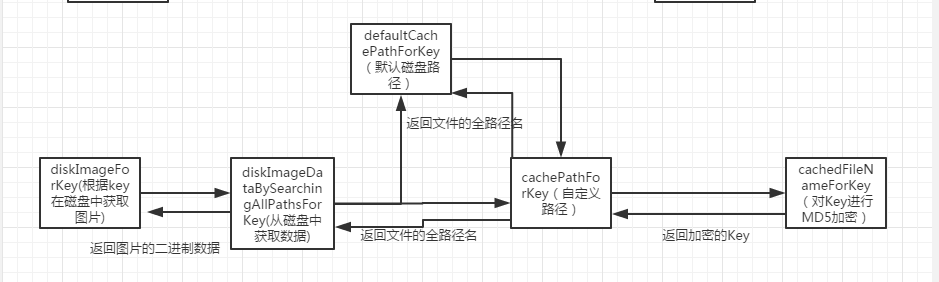
而 diskImageForKey: 在回呼之前,會把完整的圖片資料處理完畢,進行必要的縮放與解壓縮,讓 callback 拿到的就是可以直接上畫面的物件。
關於 NSCache
An NSCache object is a collection-like container, or cache, that stores key-value pairs, similar to the NSDictionary class.
NSCache 的用法與 NSMutableDictionary 極為相似,同樣是 key-value 結構,最適合存放臨時性或建構成本高昂的物件,靠重複利用來換取效能。幾個值得留意的特性:
- 內建自動刪除策略。系統發出「記憶體警告」時,快取內容會被清空。
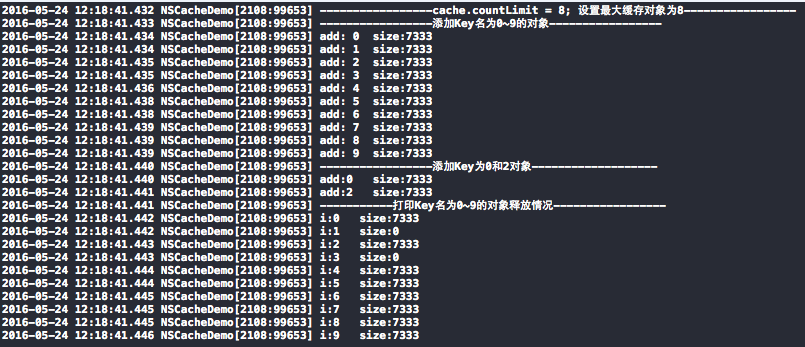
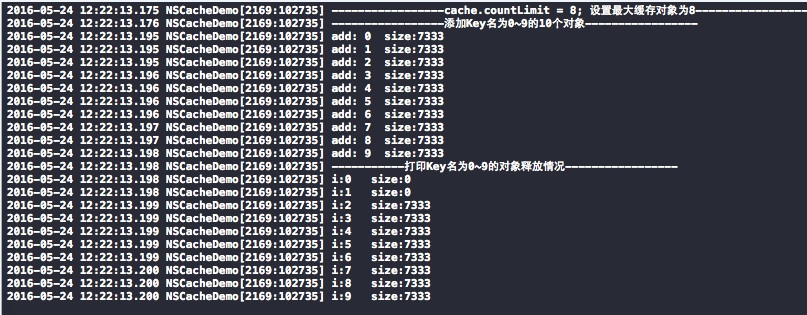
- 可以透過 countLimit 與 totalCostLimit 限制數量與總成本,超標時會依 LRU(最近最少使用)演算法釋放部分物件。
- 天生執行緒安全,可以在不同執行緒同時新增、刪除、查詢,不需要自己加鎖。
- 不會複製 key,而是強引用;物件也不需要實作 NSCopying。
磁碟讀寫:一條序列佇列搞定
SDImageCache 建立一條序列佇列,讓同一時間不會有同一個檔案同時被讀與寫的情況,因此用 dispatch_async 即可,不必動用 barrier:
// 磁碟讀寫佇列:任務逐一執行
_ioQueue = dispatch_queue_create("com.hackemist.SDWebImageCache", DISPATCH_QUEUE_SERIAL);
查詢、寫入、刪除等磁碟操作,全都是往這條 ioQueue 裡丟任務。
寫入:storeImage
圖片下載完成後,先寫進 NSCache(cost 取像素面積),若需要落地則判斷格式後寫檔,檔名是 URL 的 MD5 值:
- (void)storeImage:(UIImage *)image
recalculateFromImage:(BOOL)recalculate
       imageData:(NSData *)imageData
          forKey:(NSString *)key
          toDisk:(BOOL)toDisk {
    if (!image || !key) {
        return;
    }
    // 寫入記憶體
    [self.memCache setObject:image forKey:key
                        cost:image.size.height * image.size.width * image.scale * image.scale];
    if (toDisk) {
        dispatch_async(self.ioQueue, ^{
            NSData *data = imageData;
            if (image && (recalculate || !data)) {
#if TARGET_OS_IPHONE
                // PNG 有獨特的簽名(前 8 個位元組固定),因此比 JPEG 更容易判定
                // 若 imageData 為 nil(例如直接存 UIImage),一律視為 PNG 以免遺失透明度
                BOOL imageIsPng = YES;
                if ([imageData length] >= [kPNGSignatureData length]) {
                    imageIsPng = ImageDataHasPNGPreffix(imageData);
                }
                if (imageIsPng) {
                    data = UIImagePNGRepresentation(image);
                } else {
                    data = UIImageJPEGRepresentation(image, (CGFloat)1.0);
                }
#else
                data = [NSBitmapImageRep representationOfImageRepsInArray:image.representations
                                                             usingType:NSJPEGFileType
                                                            properties:nil];
#endif
            }
            if (data) {
                if (![_fileManager fileExistsAtPath:_diskCachePath]) {
                    [_fileManager createDirectoryAtPath:_diskCachePath
                            withIntermediateDirectories:YES
                                             attributes:nil
                                                  error:NULL];
                }
                [_fileManager createFileAtPath:[self defaultCachePathForKey:key]
                                      contents:data
                                    attributes:nil];
            }
        });
    }
}
補充一個細節:用 UIImagePNGRepresentation / UIImageJPEGRepresentation 這類 API 的好處是,若資料無法正確產生會回傳 nil,等於自帶一層校驗;反觀 [NSData dataWithContentsOfFile:] 直接讀檔,圖檔部分損壞時並不會告訴你。
刪除:removeImageForKey
- (void)removeImageForKey:(NSString *)key
                 fromDisk:(BOOL)fromDisk
           withCompletion:(SDWebImageNoParamsBlock)completion {
    if (key == nil) {
        return;
    }
    [self.memCache removeObjectForKey:key];
    if (fromDisk) {
        dispatch_async(self.ioQueue, ^{
            [_fileManager removeItemAtPath:[self defaultCachePathForKey:key] error:nil];
            if (completion) {
                dispatch_async(dispatch_get_main_queue(), ^{
                    completion();
                });
            }
        });
    } else if (completion) {
        completion();
    }
}
清理:交給系統通知觸發
SDImageCache 監聽三個通知:
- UIApplicationDidReceiveMemoryWarningNotification → 清空記憶體快取
- UIApplicationWillTerminateNotification → 清理磁碟
- UIApplicationDidEnterBackgroundNotification → 進入背景時清理磁碟
磁碟清理的規則有兩層:
- 刪除早於過期日期的檔案(預設 7 天,可透過 maxCacheAge 調整)。
- 若剩餘空間仍超過 maxCacheSize,則依最後修改時間由舊到新刪除,每輪以「砍到一半」為目標遞迴進行,直到實際大小低於上限。
- (void)cleanDiskWithCompletionBlock:(SDWebImageNoParamsBlock)completionBlock {
    dispatch_async(self.ioQueue, ^{
        NSURL *diskCacheURL = [NSURL fileURLWithPath:self.diskCachePath isDirectory:YES];
        NSArray *resourceKeys = @[NSURLIsDirectoryKey,
                                  NSURLContentModificationDateKey,
                                  NSURLTotalFileAllocatedSizeKey];
        // 預取屬性,避免後續反覆 I/O
        NSDirectoryEnumerator *fileEnumerator = [_fileManager enumeratorAtURL:diskCacheURL
                                                   includingPropertiesForKeys:resourceKeys
                                                                      options:NSDirectoryEnumerationSkipsHiddenFiles
                                                                 errorHandler:NULL];
        NSDate *expirationDate = [NSDate dateWithTimeIntervalSinceNow:-self.maxCacheAge];
        NSMutableDictionary *cacheFiles = [NSMutableDictionary dictionary];
        NSUInteger currentCacheSize = 0;
        NSMutableArray *urlsToDelete = [[NSMutableArray alloc] init];
        // 一次遍歷完成兩件事:挑出過期檔案、統計總大小
        for (NSURL *fileURL in fileEnumerator) {
            NSDictionary *resourceValues = [fileURL resourceValuesForKeys:resourceKeys error:NULL];
            if ([resourceValues[NSURLIsDirectoryKey] boolValue]) {
                continue;
            }
            NSDate *modificationDate = resourceValues[NSURLContentModificationDateKey];
            if ([[modificationDate laterDate:expirationDate] isEqualToDate:expirationDate]) {
                [urlsToDelete addObject:fileURL];
                continue;
            }
            NSNumber *totalAllocatedSize = resourceValues[NSURLTotalFileAllocatedSizeKey];
            currentCacheSize += [totalAllocatedSize unsignedIntegerValue];
            [cacheFiles setObject:resourceValues forKey:fileURL];
        }
        for (NSURL *fileURL in urlsToDelete) {
            [_fileManager removeItemAtURL:fileURL error:nil];
        }
        // 若仍超出上限,做第二輪基於大小的清理,先砍最舊的
        if (self.maxCacheSize > 0 && currentCacheSize > self.maxCacheSize) {
            const NSUInteger desiredCacheSize = self.maxCacheSize / 2;
            NSArray *sortedFiles = [cacheFiles keysSortedByValueWithOptions:NSSortConcurrent
                                                            usingComparator:^NSComparisonResult(id obj1, id obj2) {
                return [obj1[NSURLContentModificationDateKey] compare:obj2[NSURLContentModificationDateKey]];
            }];
            for (NSURL *fileURL in sortedFiles) {
                if ([_fileManager removeItemAtURL:fileURL error:nil]) {
                    NSDictionary *resourceValues = cacheFiles[fileURL];
                    NSNumber *totalAllocatedSize = resourceValues[NSURLTotalFileAllocatedSizeKey];
                    currentCacheSize -= [totalAllocatedSize unsignedIntegerValue];
                    if (currentCacheSize < desiredCacheSize) {
                        break;
                    }
                }
            }
        }
        if (completionBlock) {
            dispatch_async(dispatch_get_main_queue(), ^{
                completionBlock();
            });
        }
    });
}
Downloader:SDWebImageDownloader
這個家族有兩個成員:SDWebImageDownloader 負責統籌下載設定與快取管理,並透過 SDWebImageOptions 控制各項行為;SDWebImageDownloaderOperation 繼承自 NSOperation 並遵循 SDWebImageOperation 協定,是真正執行單一請求的單位。
Asynchronous downloader dedicated and optimized for image loading.
專為圖片載入設計並最佳化的非同步下載器。
下載選項與執行順序
typedef NS_OPTIONS(NSUInteger, SDWebImageDownloaderOptions) {
    SDWebImageDownloaderLowPriority = 1 << 0,             // 低優先權
    SDWebImageDownloaderProgressiveDownload = 1 << 1,     // 漸進式下載(可顯示進度)
    SDWebImageDownloaderUseNSURLCache = 1 << 2,           // 使用 NSURLCache 與預設快取策略
    SDWebImageDownloaderIgnoreCachedResponse = 1 << 3,    // 從 NSURLCache 讀取時,回呼傳 nil
    SDWebImageDownloaderContinueInBackground = 1 << 4,    // App 進入背景仍繼續下載
    SDWebImageDownloaderHandleCookies = 1 << 5,           // 處理 NSHTTPCookieStore 中的 cookie
    SDWebImageDownloaderAllowInvalidSSLCertificates = 1 << 6, // 允許不安全的 SSL 憑證(測試用)
    SDWebImageDownloaderHighPriority = 1 << 7,            // 放入高優先佇列
};

typedef NS_ENUM(NSInteger, SDWebImageDownloaderExecutionOrder) {
    // 先進先出(佇列),預設值
    SDWebImageDownloaderFIFOExecutionOrder,
    // 後進先出(堆疊)
    SDWebImageDownloaderLIFOExecutionOrder
};
對外公布的 Block
// 下載進度
typedef void (^SDWebImageDownloaderProgressBlock)(NSInteger receivedSize, NSInteger expectedSize);

// 下載完成
typedef void (^SDWebImageDownloaderCompletedBlock)(UIImage *image, NSData *data, NSError *error, BOOL finished);

// 過濾請求標頭
typedef NSDictionary *(^SDWebImageDownloaderHeadersFilterBlock)(NSURL *url, NSDictionary *headers);
關鍵成員變數
// 最大並行下載數,預設 6
@property (assign, nonatomic) NSInteger maxConcurrentDownloads;
// 仍待下載的數量
@property (readonly, nonatomic) NSUInteger currentDownloadCount;
// 逾時秒數,預設 15
@property (assign, nonatomic) NSTimeInterval downloadTimeout;
// 執行順序,預設 FIFO
@property (assign, nonatomic) SDWebImageDownloaderExecutionOrder executionOrder;
// 下載操作佇列
@property (strong, nonatomic) NSOperationQueue *downloadQueue;
// 最後加入的操作,用來模擬 LIFO
@property (weak, nonatomic) NSOperation *lastAddedOperation;
// 實際使用的下載類別
@property (assign, nonatomic) Class operationClass;
// URL 回呼字典:key 為 URL,value 為進度與完成 block 的陣列
@property (strong, nonatomic) NSMutableDictionary *URLCallbacks;
// HTTP 請求標頭
@property (strong, nonatomic) NSMutableDictionary *HTTPHeaders;
// 序列化處理所有下載操作網路回應的佇列
@property (SDDispatchQueueSetterSementics, nonatomic) dispatch_queue_t barrierQueue;
用 barrier 保住 URLCallbacks 的執行緒安全
因為有多個執行緒可能同時讀寫 URLCallbacks,作者刻意建立一條並行佇列,再搭配屏障,確保同一時間只有一個執行緒動這份字典:
_barrierQueue = dispatch_queue_create("com.hackemist.SDWebImageDownloaderBarrierQueue", DISPATCH_QUEUE_CONCURRENT);

// dispatch_barrier_sync 保證同一時間只有一個執行緒操作 URLCallbacks
dispatch_barrier_sync(self.barrierQueue, ^{
    BOOL first = NO;
    if (!self.URLCallbacks[url]) {
        self.URLCallbacks[url] = [NSMutableArray new];
        first = YES;
    }
    // 同一個 URL 的單次下載:把多組回呼集中管理
    NSMutableArray *callbacksForURL = self.URLCallbacks[url];
    NSMutableDictionary *callbacks = [NSMutableDictionary new];
    if (progressBlock)  callbacks[kProgressCallbackKey] = [progressBlock copy];
    if (completedBlock) callbacks[kCompletedCallbackKey] = [completedBlock copy];
    [callbacksForURL addObject:callbacks];
    self.URLCallbacks[url] = callbacksForURL;
    // 第一次請求才建立真正的下載操作
    if (first) {
        createCallback();
    }
});
核心方法:downloadImageWithURL:options:progress:completed:
它先把請求資訊塞進 URLCallbacks,接著在回呼 block 中建立 operation 並丟進 downloadQueue,最後回傳一個遵循 SDWebImageOperation 協定的物件(該協定只定義了 cancel 方法)。
- (id <SDWebImageOperation>)downloadImageWithURL:(NSURL *)url
                                       options:(SDWebImageDownloaderOptions)options
                                      progress:(SDWebImageDownloaderProgressBlock)progressBlock
                                     completed:(SDWebImageDownloaderCompletedBlock)completedBlock {
    __block SDWebImageDownloaderOperation *operation;
    __weak SDWebImageDownloader *wself = self;   // 弱引用,避免循環參考
    [self addProgressCallback:progressBlock
             andCompletedBlock:completedBlock
                        forURL:url
                createCallback:^{
        NSTimeInterval timeoutInterval = wself.downloadTimeout;
        if (timeoutInterval == 0.0) {
            timeoutInterval = 15.0;
        }
        // 若允許使用 NSURLCache,則關掉 SDImageCache,避免同一張圖被快取兩次
        NSMutableURLRequest *request =
            [[NSMutableURLRequest alloc] initWithURL:url
                                         cachePolicy:(options & SDWebImageDownloaderUseNSURLCache
                                                      ? NSURLRequestUseProtocolCachePolicy
                                                      : NSURLRequestReloadIgnoringLocalCacheData)
                                     timeoutInterval:timeoutInterval];
        request.HTTPShouldHandleCookies = (options & SDWebImageDownloaderHandleCookies);
        request.HTTPShouldUsePipelining = YES;
        if (wself.headersFilter) {
            request.allHTTPHeaderFields = wself.headersFilter(url, [wself.HTTPHeaders copy]);
        } else {
            request.allHTTPHeaderFields = wself.HTTPHeaders;
        }
        operation = [[wself.operationClass alloc] initWithRequest:request
                                                        options:options
                                                       progress:^(NSInteger receivedSize, NSInteger expectedSize) {
            SDWebImageDownloader *sself = wself;
            if (!sself) return;
            NSArray *callbacksForURL = [sself callbacksForURL:url];
            for (NSDictionary *callbacks in callbacksForURL) {
                SDWebImageDownloaderProgressBlock callback = callbacks[kProgressCallbackKey];
                if (callback) callback(receivedSize, expectedSize);
            }
        }
                                                      completed:^(UIImage *image, NSData *data, NSError *error, BOOL finished) {
            SDWebImageDownloader *sself = wself;
            if (!sself) return;
            NSArray *callbacksForURL = [sself callbacksForURL:url];
            if (finished) {
                [sself removeCallbacksForURL:url];
            }
            for (NSDictionary *callbacks in callbacksForURL) {
                SDWebImageDownloaderCompletedBlock callback = callbacks[kCompletedCallbackKey];
                if (callback) callback(image, data, error, finished);
            }
        }
                                                      cancelled:^(NSURL *url, BOOL cancelled) {
            SDWebImageDownloader *sself = wself;
            if (!sself) return;
            [sself removeCallbacksForURL:url];
        }];
        // 有帳號密碼時帶上憑證
        if (wself.username && wself.password) {
            operation.credential = [NSURLCredential credentialWithUser:wself.username
                                                            password:wself.password
                                                         persistence:NSURLCredentialPersistenceForSession];
        }
        if (options & SDWebImageDownloaderHighPriority) {
            operation.queuePriority = NSOperationQueuePriorityHigh;
        } else if (options & SDWebImageDownloaderLowPriority) {
            operation.queuePriority = NSOperationQueuePriorityLow;
        }
        [wself.downloadQueue addOperation:operation];
        // LIFO:把新操作掛成前一個操作的相依,模擬堆疊行為
        if (wself.executionOrder == SDWebImageDownloaderLIFOExecutionOrder) {
            [wself.lastAddedOperation addDependency:operation];
            wself.lastAddedOperation = operation;
        }
    }];
    return operation;
}
SDWebImageDownloaderOperation
這個類別對外只開一個初始化方法 initWithRequest:options:progress:completed:cancelled:,底層用 NSURLConnection 抓資料,並透過 NSNotificationCenter 對外廣播下載狀態。實作落在 NSURLConnectionDelegate / NSURLConnectionDataDelegate 上:
// NSURLConnectionDataDelegate
- (void)connection:(NSURLConnection *)connection didReceiveResponse:(NSURLResponse *)response;
- (void)connection:(NSURLConnection *)connection didReceiveData:(NSData *)data;
- (void)connectionDidFinishLoading:(NSURLConnection *)connection;
- (NSCachedURLResponse *)connection:(NSURLConnection *)connection willCacheResponse:(NSCachedURLResponse *)cachedResponse;

// NSURLConnectionDelegate
- (void)connection:(NSURLConnection *)connection didFailWithError:(NSError *)error;
- (BOOL)connectionShouldUseCredentialStorage:(NSURLConnection *)connection;
- (void)connection:(NSURLConnection *)connection willSendRequestForAuthenticationChallenge:(NSURLAuthenticationChallenge *)challenge;
其中 connection:didReceiveData: 最值得細看。每次收到資料,都會用「目前累積的全部資料」重建一個 CGImageSourceRef。第一次拿到資料時(width + height == 0)會先從中取出寬、高與方向資訊存起來;下載尚未結束前,則以這個 image source 產出部分圖像,經縮放與解壓縮後交給完成回呼。當然,進度回呼也在這裡觸發。
- (void)connection:(NSURLConnection *)connection didReceiveData:(NSData *)data {
    [self.imageData appendData:data];
    if ((self.options & SDWebImageDownloaderProgressiveDownload) && self.expectedSize > 0 && self.completedBlock) {
        const NSInteger totalSize = self.imageData.length;
        // 必須傳入「全部」資料,而不只是這次新增的位元組
        CGImageSourceRef imageSource = CGImageSourceCreateWithData((__bridge CFDataRef)self.imageData, NULL);
        if (width + height == 0) {
            CFDictionaryRef properties = CGImageSourceCopyPropertiesAtIndex(imageSource, 0, NULL);
            if (properties) {
                NSInteger orientationValue = -1;
                CFTypeRef val = CFDictionaryGetValue(properties, kCGImagePropertyPixelHeight);
                if (val) CFNumberGetValue(val, kCFNumberLongType, &height);
                val = CFDictionaryGetValue(properties, kCGImagePropertyPixelWidth);
                if (val) CFNumberGetValue(val, kCFNumberLongType, &width);
                val = CFDictionaryGetValue(properties, kCGImagePropertyOrientation);
                if (val) CFNumberGetValue(val, kCFNumberNSIntegerType, &orientationValue);
                CFRelease(properties);
                // 走 Core Graphics 繪製時會遺失方向資訊,
                // 由 initWithCGImage 產生的圖像方向可能出錯,因此先存起來稍後套用
                orientation = [[self class] orientationFromPropertyValue:(orientationValue == -1 ? 1 : orientationValue)];
            }
        }
        if (width + height > 0 && totalSize < self.expectedSize) {
            CGImageRef partialImageRef = CGImageSourceCreateImageAtIndex(imageSource, 0, NULL);
#ifdef TARGET_OS_IPHONE
            // 修正 iOS 上的變形圖片問題
            if (partialImageRef) {
                const size_t partialHeight = CGImageGetHeight(partialImageRef);
                CGColorSpaceRef colorSpace = CGColorSpaceCreateDeviceRGB();
                CGContextRef bmContext = CGBitmapContextCreate(NULL, width, height, 8, width * 4,
                                                               colorSpace,
                                                               kCGBitmapByteOrderDefault | kCGImageAlphaPremultipliedFirst);
                CGColorSpaceRelease(colorSpace);
                if (bmContext) {
                    CGContextDrawImage(bmContext, (CGRect){.origin = CGPointZero, .size = {width, partialHeight}}, partialImageRef);
                    CGImageRelease(partialImageRef);
                    partialImageRef = CGBitmapContextCreateImage(bmContext);
                    CGContextRelease(bmContext);
                } else {
                    CGImageRelease(partialImageRef);
                    partialImageRef = nil;
                }
            }
#endif
            if (partialImageRef) {
                UIImage *image = [UIImage imageWithCGImage:partialImageRef scale:1 orientation:orientation];
                NSString *key = [[SDWebImageManager sharedManager] cacheKeyForURL:self.request.URL];
                UIImage *scaledImage = [self scaledImageForKey:key image:image];
                image = [UIImage decodedImageWithImage:scaledImage];
                CGImageRelease(partialImageRef);
                dispatch_main_sync_safe(^{
                    if (self.completedBlock) {
                        self.completedBlock(image, nil, nil, NO);
                    }
                });
            }
        }
        CFRelease(imageSource);
    }
    if (self.progressBlock) {
        self.progressBlock(self.imageData.length, self.expectedSize);
    }
}
start:用 RunLoop 換取滑順度
start 方法把 NSURLConnection 掛在自己的執行緒上,並靠 RunLoop 把下載回呼安排在「空閒模式」,這正是快速滑動 UITableView 時圖片不會立刻冒出來的原因——滑動期間它被刻意讓位給 UITrackingRunLoopMode。
- (void)start {
    @synchronized (self) {
        if (self.isCancelled) {
            self.finished = YES;
            [self reset];
            return;
        }
#if TARGET_OS_IPHONE && __IPHONE_OS_VERSION_MAX_ALLOWED >= __IPHONE_4_0
        // 允許背景繼續下載時,向系統申請額外時間
        if ([self shouldContinueWhenAppEntersBackground]) {
            __weak __typeof__(self) wself = self;
            self.backgroundTaskId = [[UIApplication sharedApplication] beginBackgroundTaskWithExpirationHandler:^{
                __strong __typeof__(wself) sself = wself;
                if (sself) {
                    [sself cancel];
                    [[UIApplication sharedApplication] endBackgroundTask:sself.backgroundTaskId];
                    sself.backgroundTaskId = UIBackgroundTaskInvalid;
                }
            }];
        }
#endif
        self.executing = YES;
        self.connection = [[NSURLConnection alloc] initWithRequest:self.request
                                                        delegate:self
                                                startImmediately:NO];
        self.thread = [NSThread currentThread];
    }
    [self.connection start];
    if (self.connection) {
        if (self.progressBlock) {
            self.progressBlock(0, NSURLResponseUnknownLength);
        }
        dispatch_async(dispatch_get_main_queue(), ^{
            [[NSNotificationCenter defaultCenter] postNotificationName:SDWebImageDownloadStartNotification object:self];
        });
        // NSDefaultRunLoopMode 是「空閒」模式;
        // 使用者滑動 UIScrollView 時 RunLoop 會切到 UITrackingRunLoopMode,
        // 其他模式的事件全部暫停,以保證滑動優先——這也是 iOS 滑動順暢的關鍵
        if (floor(NSFoundationVersionNumber) <= NSFoundationVersionNumber_iOS_5_1) {
            // iOS 5 上 cancel 有喚醒 RunLoop 的問題,因此加上 timeout
            CFRunLoopRunInMode(kCFRunLoopDefaultMode, 10, false);
        } else {
            CFRunLoopRun();
        }
        if (!self.isFinished) {
            [self.connection cancel];
            [self connection:self.connection didFailWithError:
                [NSError errorWithDomain:NSURLErrorDomain
                                   code:NSURLErrorTimedOut
                               userInfo:@{NSURLErrorFailingURLErrorKey : self.request.URL}]];
        }
    } else {
        if (self.completedBlock) {
            self.completedBlock(nil, nil, [NSError errorWithDomain:NSURLErrorDomain code:0
                userInfo:@{NSLocalizedDescriptionKey : @"Connection can't be initialized"}], YES);
        }
    }
#if TARGET_OS_IPHONE && __IPHONE_OS_VERSION_MAX_ALLOWED >= __IPHONE_4_0
    if (self.backgroundTaskId != UIBackgroundTaskInvalid) {
        [[UIApplication sharedApplication] endBackgroundTask:self.backgroundTaskId];
        self.backgroundTaskId = UIBackgroundTaskInvalid;
    }
#endif
}
Utils:解壓縮與預取
這一層有兩個成員:SDWebImageDecoder 負責解壓縮,SDWebImagePrefetcher 負責預先抓取整批圖片。
SDWebImageDecoder
核心就是 decodedImageWithImage::把圖片畫進 CGBitmapContext,再從 bitmap 直接產生物件,避開「在 UIImageView 上顯示時才於主執行緒解碼」造成的延遲。
+ (UIImage *)decodedImageWithImage:(UIImage *)image {
    if (image.images) {
        return image;   // 動畫圖片不解壓縮
    }
    CGImageRef imageRef = image.CGImage;
    CGSize imageSize = CGSizeMake(CGImageGetWidth(imageRef), CGImageGetHeight(imageRef));
    CGRect imageRect = (CGRect){.origin = CGPointZero, .size = imageSize};
    CGColorSpaceRef colorSpace = CGColorSpaceCreateDeviceRGB();
    CGBitmapInfo bitmapInfo = CGImageGetBitmapInfo(imageRef);
    int infoMask = (bitmapInfo & kCGBitmapAlphaInfoMask);
    BOOL anyNonAlpha = (infoMask == kCGImageAlphaNone ||
                        infoMask == kCGImageAlphaNoneSkipFirst ||
                        infoMask == kCGImageAlphaNoneSkipLast);
    // CGBitmapContextCreate 不支援在 RGB 上使用 kCGImageAlphaNone
    if (infoMask == kCGImageAlphaNone && CGColorSpaceGetNumberOfComponents(colorSpace) > 1) {
        bitmapInfo = ~kCGBitmapAlphaInfoMask;
        bitmapInfo |= kCGImageAlphaNoneSkipFirst;
    } else if (!anyNonAlpha && CGColorSpaceGetNumberOfComponents(colorSpace) == 3) {
        // 有些 PNG 標示帶 alpha 但只有 3 個元件
        bitmapInfo = ~kCGBitmapAlphaInfoMask;
        bitmapInfo |= kCGImageAlphaPremultipliedFirst;
    }
    CGContextRef context = CGBitmapContextCreate(NULL,
                                                imageSize.width,
                                                imageSize.height,
                                                CGImageGetBitsPerComponent(imageRef),
                                                0,
                                                colorSpace,
                                                bitmapInfo);
    CGColorSpaceRelease(colorSpace);
    if (!context) return image;
    CGContextDrawImage(context, imageRect, imageRef);
    CGImageRef decompressedImageRef = CGBitmapContextCreateImage(context);
    CGContextRelease(context);
    UIImage *decompressedImage = [UIImage imageWithCGImage:decompressedImageRef
                                                     scale:image.scale
                                               orientation:image.imageOrientation];
    CGImageRelease(decompressedImageRef);
    return decompressedImage;
}
用 UIImage 或 CGImageSource 建立圖片時,資料並不會立刻解碼。直到圖片被設到 UIImageView 或 CALayer.contents,且 CALayer 即將提交給 GPU 之前,才會真正解碼。這一步發生在主執行緒且無法避免。繞開它的常見做法,就是在背景執行緒先把圖片畫進 CGBitmapContext,再從 bitmap 直接建立圖片。
為什麼從磁碟取出圖片後、回呼之前要先解壓縮?因為顯示時終究要解碼,而那個解碼在主執行緒上頗耗時。改到背景做,延遲消失了,但記憶體會暴增甚至有崩潰風險。這正是 SDImageCache、SDWebImageDownloader、SDWebImageDownloaderOperation 都保留 shouldDecompressImages 開關的原因——取捨留給呼叫方決定。
SDWebImagePrefetcher
以 startPrefetchingAtIndex: 為起點,一張接一張預取,並回報進度:
- (void)startPrefetchingAtIndex:(NSUInteger)index {
    if (index >= self.prefetchURLs.count) return;
    self.requestedCount++;
    [self.manager downloadImageWithURL:self.prefetchURLs[index]
                              options:self.options
                             progress:nil
                            completed:^(UIImage *image, NSError *error, SDImageCacheType cacheType, BOOL finished, NSURL *imageURL) {
        if (!finished) return;
        self.finishedCount++;
        if (image) {
            if (self.progressBlock) {
                self.progressBlock(self.finishedCount, [self.prefetchURLs count]);
            }
        } else {
            if (self.progressBlock) {
                self.progressBlock(self.finishedCount, [self.prefetchURLs count]);
            }
            self.skippedCount++;
        }
        if ([self.delegate respondsToSelector:@selector(imagePrefetcher:didPrefetchURL:finishedCount:totalCount:)]) {
            [self.delegate imagePrefetcher:self
                          didPrefetchURL:self.prefetchURLs[index]
                           finishedCount:self.finishedCount
                              totalCount:self.prefetchURLs.count];
        }
        if (self.prefetchURLs.count > self.requestedCount) {
            dispatch_async(dispatch_get_main_queue(), ^{
                [self startPrefetchingAtIndex:self.requestedCount];
            });
        } else if (self.finishedCount == self.requestedCount) {
            [self reportStatus];
            if (self.completionBlock) {
                self.completionBlock(self.finishedCount, self.skippedCount);
                self.completionBlock = nil;
            }
        }
    }];
}
值得記下的重點
- PNG 的判定靠簽名位元組(kPNGSignatureBytes),前 8 個位元組固定,因此比 JPEG 好判斷。
- SDWebImageDownloaderOperation 刻意讓 RunLoop 跑在背景執行緒,並只在「空閒模式」處理下載回呼。這解釋了快速滑動列表時圖片為何會延後出現——不是 bug,而是設計上的禮讓。
參考資料
SDWebImage 實現分析、SDWebImage 原始碼淺析。
- 上一篇文章: NSProxy 與 NSObject:打造代理類時該選哪一個?
- 下一篇文章: Auto Layout 的設計美學:把設計稿像素翻譯成約束