
直播 App 常用動畫效果的實現與性能優化
前言
記錄開發中遇到的問題,也順手做一次總結,歡迎大家一起交流。這次要談的是直播類 App 裡那些高頻出現的動畫效果,以及它們在內存與 CPU 上的代價。
效果展示
先看一個很多平台都有的入門級豪華禮物動畫——煙花。一個複雜的禮物動畫,標準流程是:美術先給出 gif 草圖與素材,技術側做動畫剖析與圖片壓縮,然後在程序中加載圖片並實現動畫,全程盯住內存與 CPU 占用。
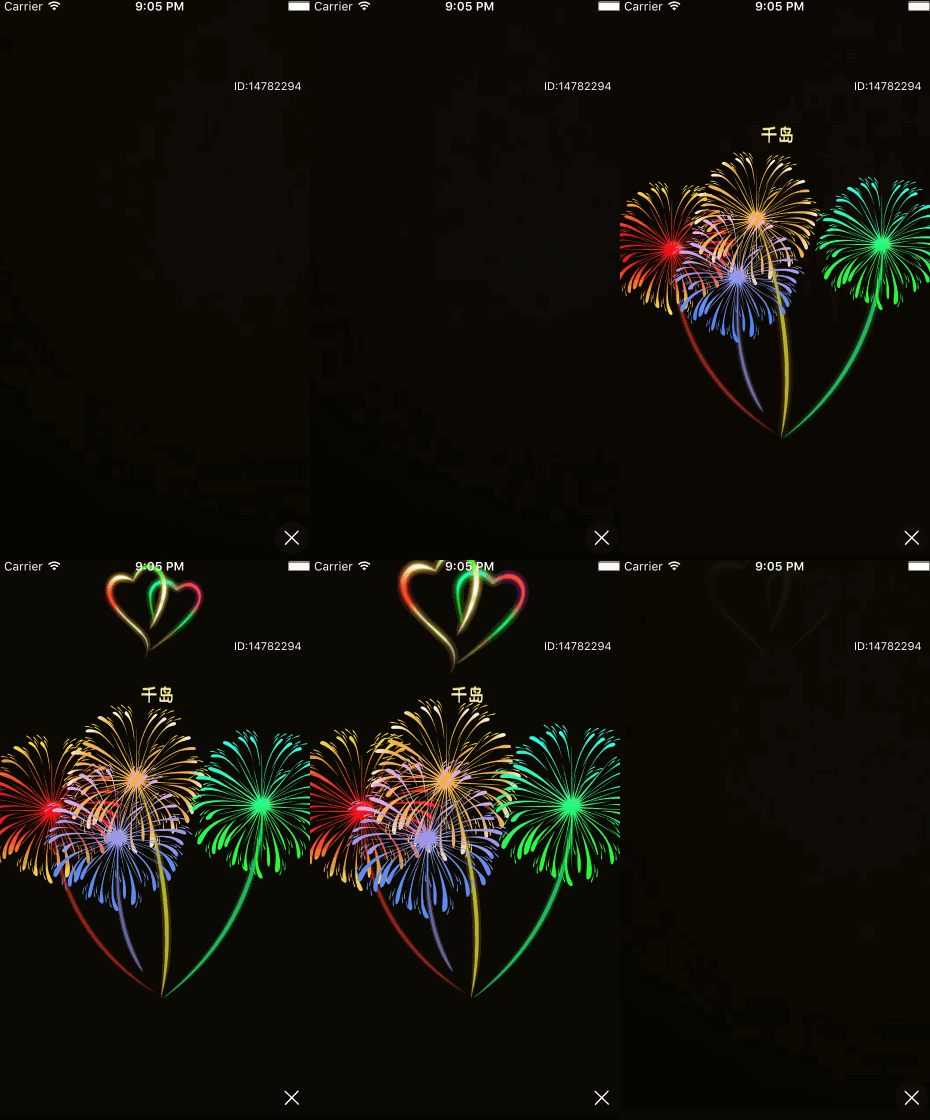
圖片壓縮、加載與裁剪
1. 壓縮
美術給出的圖片即使已經壓縮過,通常仍有可觀的優化空間,值得再走一遍資源體積優化。
2. 加載
主要有 imageNamed: 和 imageWithContentsOfFile: 兩種方式。示例中的 AnimationImageCache 是一個動畫圖片加載類,用單例實現,內部以 NSCache 持有引用。
注意:收到內存不足警告時,NSCache 會自動釋放內容。所以每次從緩存取圖,即使上一次已加載過,也要判斷返回值是否為空。
3. 裁剪
為了壓縮資源體積,有時會把多幀動畫拼成一整張連續圖,運行時再按位置裁剪出各個部分:
    UIImage *sourceImage = [UIImage imageNamed:@"image/animation/gift_boat"];
    CGSize sourceSize = sourceImage.size;

    CGImageRef cgimage = CGImageCreateWithImageInRect(sourceImage.CGImage,
            CGRectMake(0, 0, const_position_boat_x, sourceSize.height));
    gWaveFrameImage = [UIImage imageWithCGImage:cgimage];
    CGImageRelease(cgimage);

    cgimage = CGImageCreateWithImageInRect(sourceImage.CGImage,
            CGRectMake(const_position_boat_x, 0, const_position_boat_width, sourceSize.height));
    gBoatFrameImage = [UIImage imageWithCGImage:cgimage];
    CGImageRelease(cgimage);

    cgimage = CGImageCreateWithImageInRect(sourceImage.CGImage,
            CGRectMake(const_position_boat_x + const_position_boat_width, 0,
                       sourceSize.width - const_position_boat_x - const_position_boat_width,
                       sourceSize.height));
    gShadowFrameImage = [UIImage imageWithCGImage:cgimage];
    CGImageRelease(cgimage);
動畫剖析與時間軸
再看一個全屏級別的「天使」禮物動畫,先拆解它的構成:
背景變暗,星空浮現;
流星劃過,月亮出現,雲彩飄動;
兩側浮空島震動,中間浮空島出現;
背光出現,天使落下,翅膀扇動;
星星閃爍,鳳凰出現;
漸隱消失。
時間軸實現
要讓各段動畫按順序上演,可以把它們按「時間 + 對象」拆成多個方法,再用 GCD 在指定時刻調用:
    dispatch_after(dispatch_time(DISPATCH_TIME_NOW, (int64_t)(1.0 * NSEC_PER_SEC)), dispatch_get_main_queue(), ^{
        [self playMeteorAnimation];
    });
    dispatch_after(dispatch_time(DISPATCH_TIME_NOW, (int64_t)(3.0 * NSEC_PER_SEC)), dispatch_get_main_queue(), ^{
        [self playLandAnimation];
    });
    dispatch_after(dispatch_time(DISPATCH_TIME_NOW, (int64_t)(6.0 * NSEC_PER_SEC)), dispatch_get_main_queue(), ^{
        [self playLightAnimation];
    });
    dispatch_after(dispatch_time(DISPATCH_TIME_NOW, (int64_t)(7.0 * NSEC_PER_SEC)), dispatch_get_main_queue(), ^{
        [self playStarAnimation];
    });
    dispatch_after(dispatch_time(DISPATCH_TIME_NOW, (int64_t)(TOTAL_TIME * NSEC_PER_SEC)), dispatch_get_main_queue(), ^{
        @weakify(self);
        [UIView animateWithDuration:0.5 animations:^{
            self.alpha = 0;
        } completion:^(BOOL finished) {
            @strongify(self);
            [self removeFromSuperview];
            [self callBackManager];
        }];
    });
常用動畫效果
1. 視圖變暗、變大
alpha 控制透明度,把背景設為淡黑色再調整 alpha,即可得到漸變遮罩;transform 則用仿射變換矩陣實現縮放與平移。
    [UIView animateWithDuration:1.5 animations:^{
        self.mBackgroundView.alpha = 0.5;
        self.mAngelView.transform = CGAffineTransformMakeScale(1.2, 1.2);
    }];
2. 勻速運動與交錯效果
right 是封裝出來的便捷屬性,本質仍是改 frame。兩朵雲一左一右相向移動,就形成了交錯飄移的觀感。
    [UIView animateWithDuration:TOTAL_TIME delay:0
                        options:UIViewAnimationOptionCurveLinear
                     animations:^{
        self.mAngelCloudView0.right += 250;
        self.mAngelCloudView1.right -= 190;
    } completion:nil];
3. 上下往返運動
CAKeyframeAnimation 是關鍵幀動畫,這裡操作 layer 的 position.y:給出起始、經過與回到起點的三個值,即成往返。
    CAKeyframeAnimation *upDownAnimation;
    upDownAnimation = [CAKeyframeAnimation animationWithKeyPath:@"position.y"];
    upDownAnimation.values = @[@(self.mAngelLandView1.layer.position.y),
                               @(self.mAngelLandView1.layer.position.y + 5),
                               @(self.mAngelLandView1.layer.position.y)];
    upDownAnimation.duration = 2;
    upDownAnimation.fillMode = kCAFillModeBoth;
    upDownAnimation.calculationMode = kCAAnimationCubic;
    upDownAnimation.repeatCount = HUGE_VALF;
    [self.mAngelLandView1.layer addAnimation:upDownAnimation forKey:@"upDownAnimation"];
4. 閃爍效果
閃爍的本質是透明度往復變化。UIView 的 block 動畫不好表達無限重複,改用 layer 的 opacity 關鍵幀動畫更合適。
    CAKeyframeAnimation *opacityAnimation;
    opacityAnimation = [CAKeyframeAnimation animationWithKeyPath:@"opacity"];
    opacityAnimation.values = @[@(0), @(1), @(0)];
    opacityAnimation.duration = 1.5;
    opacityAnimation.fillMode = kCAFillModeBoth;
    opacityAnimation.calculationMode = kCAAnimationCubic;
    opacityAnimation.repeatCount = HUGE_VALF;
    [self.mAngelStarView.layer addAnimation:opacityAnimation forKey:@"opacityAnimation"];
5. 貝塞爾曲線運動
貝塞爾曲線對動畫質感的提升非常明顯:飄落的羽毛、上浮的氣泡、蕩著的熱氣球,都適合用它描述軌跡。實現上仍是關鍵幀動畫操作 position,只是把路徑交給 path 屬性。
    UIImage *image = [[AnimationImageCache shareInstance] getImageWithName:@"gift_castle_hot_air_balloon3.png"];
    UIImageView *hotAirBalloonView0 = [[UIImageView alloc] initWithFrame:
        CGRectMake(50, 100, image.size.width / 2, image.size.height / 2)];
    [self addSubview:hotAirBalloonView0];
    [hotAirBalloonView0 setImage:image];

    // 飄動
    CGPoint position = CGPointMake(self.width, hotAirBalloonView0.top);
    CGFloat duration = 5;
    CAKeyframeAnimation *positionAnimate = [CAKeyframeAnimation animationWithKeyPath:@"position"];
    positionAnimate.repeatCount = 1;
    positionAnimate.duration = duration;
    positionAnimate.fillMode = kCAFillModeForwards;
    positionAnimate.removedOnCompletion = NO;

    UIBezierPath *sPath = [UIBezierPath bezierPath];
    [sPath moveToPoint:position];
    [sPath addCurveToPoint:CGPointMake(-image.size.width / 2, position.y)
             controlPoint1:CGPointMake(self.width / 3 * 2, position.y - 60)
             controlPoint2:CGPointMake(self.width / 3, position.y + 60)];
    positionAnimate.path = sPath.CGPath;
    [hotAirBalloonView0.layer addAnimation:positionAnimate forKey:@"positionAnimate"];
6. 遮罩動畫
彩虹升起、煙花綻放、畫卷展開,都可以用遮罩實現:通過改變遮罩形狀,控制原圖的可見區域。做法是新建一個 CAShapeLayer 設為 layer.mask,再對它的 path 做動畫。
    UIBezierPath *maskStartPath = [UIBezierPath bezierPathWithRect:
        CGRectMake(CGRectGetWidth(rainbowView1.bounds), 0,
                   CGRectGetWidth(rainbowView1.bounds), CGRectGetHeight(rainbowView1.bounds))];
    UIBezierPath *maskFinalPath = [UIBezierPath bezierPathWithRect:rainbowView1.bounds];

    CAShapeLayer *maskLayer = [CAShapeLayer layer];
    rainbowView1.layer.mask = maskLayer;
    maskLayer.path = maskFinalPath.CGPath;

    CABasicAnimation *maskLayerAnimation = [CABasicAnimation animationWithKeyPath:@"path"];
    maskLayerAnimation.fromValue = (__bridge id)maskStartPath.CGPath;
    maskLayerAnimation.toValue = (__bridge id)maskFinalPath.CGPath;
    maskLayerAnimation.removedOnCompletion = NO;
    maskLayerAnimation.duration = 2.0;
    maskLayerAnimation.timingFunction = [CAMediaTimingFunction functionWithName:kCAMediaTimingFunctionEaseInEaseOut];
    [maskLayer addAnimation:maskLayerAnimation forKey:@"maskLayerAnimation"];
7. 旋轉效果
燈光掃動、花朵旋轉這類效果,用 transform.rotation.z 即可。同樣以關鍵幀動畫給出起始、中間、結束狀態並設置重複次數。
    CAKeyframeAnimation *rotationAnimation;
    rotationAnimation = [CAKeyframeAnimation animationWithKeyPath:@"transform.rotation.z"];
    rotationAnimation.values = @[@(M_PI / 12), @(M_PI / 3), @(M_PI / 12)];
    rotationAnimation.duration = 2.5;
    rotationAnimation.fillMode = kCAFillModeBoth;
    rotationAnimation.calculationMode = kCAAnimationCubic;
    rotationAnimation.repeatCount = HUGE_VALF;
    [self.mLightLeftView.layer addAnimation:rotationAnimation forKey:@"rotationAnimation"];
8. 幀動畫
有些複雜動畫無法靠對單張圖做變換完成,這時只能上幀動畫。實現方式有兩種:一是用 Timer 按固定間隔手動換圖;二是直接用 UIImageView 的 animationImages。
區別在於:UIImageView 的幀動畫沒有完成回調,如果需要「播到第 N 幀再串接另一段動畫」,就只能自己用定時器控制。
    NSMutableArray<UIImage *> *images = [NSMutableArray<UIImage *> array];
    for (int i = 0; i < 6; ++i) {
        UIImage *img = [[AnimationImageCache shareInstance] getDriveImageWithName:
                        [NSString stringWithFormat:@"gift_animation_angel_phoenix%d.png", i]];
        if (img) {
            [images addObject:img];
        }
    }
    self.mAngelPhoenixView.image = [[AnimationImageCache shareInstance]
                                    getDriveImageWithName:@"gift_animation_angel_phoenix0.png"];
    self.mAngelPhoenixView.animationImages = images;
    self.mAngelPhoenixView.animationDuration = 0.8;
    self.mAngelPhoenixView.animationRepeatCount = 1;
    [self.mAngelPhoenixView startAnimating];
性能優化
動畫的性能問題基本落在視圖渲染與資源管理兩塊,這裡不再展開,可參考 iOS 視圖渲染與性能優化相關資料。
總結
UIView 的 block 動畫中,completion 持有的是強引用,要防止循環引用;不過動畫執行完畢後引用會被釋放。
一組實測數據:天使動畫圖片約 900KB,運行時占用內存約 15MB,播放完畢後在收到內存警告時才釋放;煙花動畫圖片約 400KB,運行時占用約 20MB,播放完畢立即釋放。
留兩個思考題:
1. 為什麼煙花動畫的圖片體積更小,運行時內存占用反而更高?
2. 「播放完立即釋放」與「等內存警告再釋放」,兩種加載策略各自的取捨是什麼?
- 上一篇文章: iOS Widget 開發入門與 iOS 10 適配要點
- 下一篇文章: 深入理解 iOS 離屏渲染與優化取捨