
iOS 控制器瘦身:面向父類編程結合 MVVM 的實踐
本文為投稿文章。
打開你的工程看一眼:控制器有多少行?tableView 的 cellForRow 和 heightForRow 裡是不是塞滿了 switch 與大量 if-else?接手別人代碼時,看著這些沒有註釋的分支,是不是特別上火?本文提供一種思路,讓你的列表代理方法告別層層判斷,讓控制器顯著變薄,後續維護成本也隨之下降。

先回顧 MVC 與 MVVM
MVC 大家都很熟:Model 管數據,Controller 管業務邏輯,View 管展示,Model 與 View 通過 Controller 橋接,擴展性不錯。但它的通病也很明顯——控制器太胖,想在裡面定位一段邏輯非常費勁。

控制器為什麼會膨脹?因為 cell 的類型判斷邏輯全壓在代理方法裡,網絡請求也在控制器直接發起,再混上其他零散業務。MVVM 正是針對這一點的升級:Model 依然負責數據,View 依然負責展示,Controller 只負責把數據呈現到界面上;原本由 Controller 承擔的業務邏輯與網絡請求,被抽到一个新的 ViewModel 層——它夾在 Controller 與 Model 之間,Controller 只跟 ViewModel 打交道,不再直接觸碰 Model。
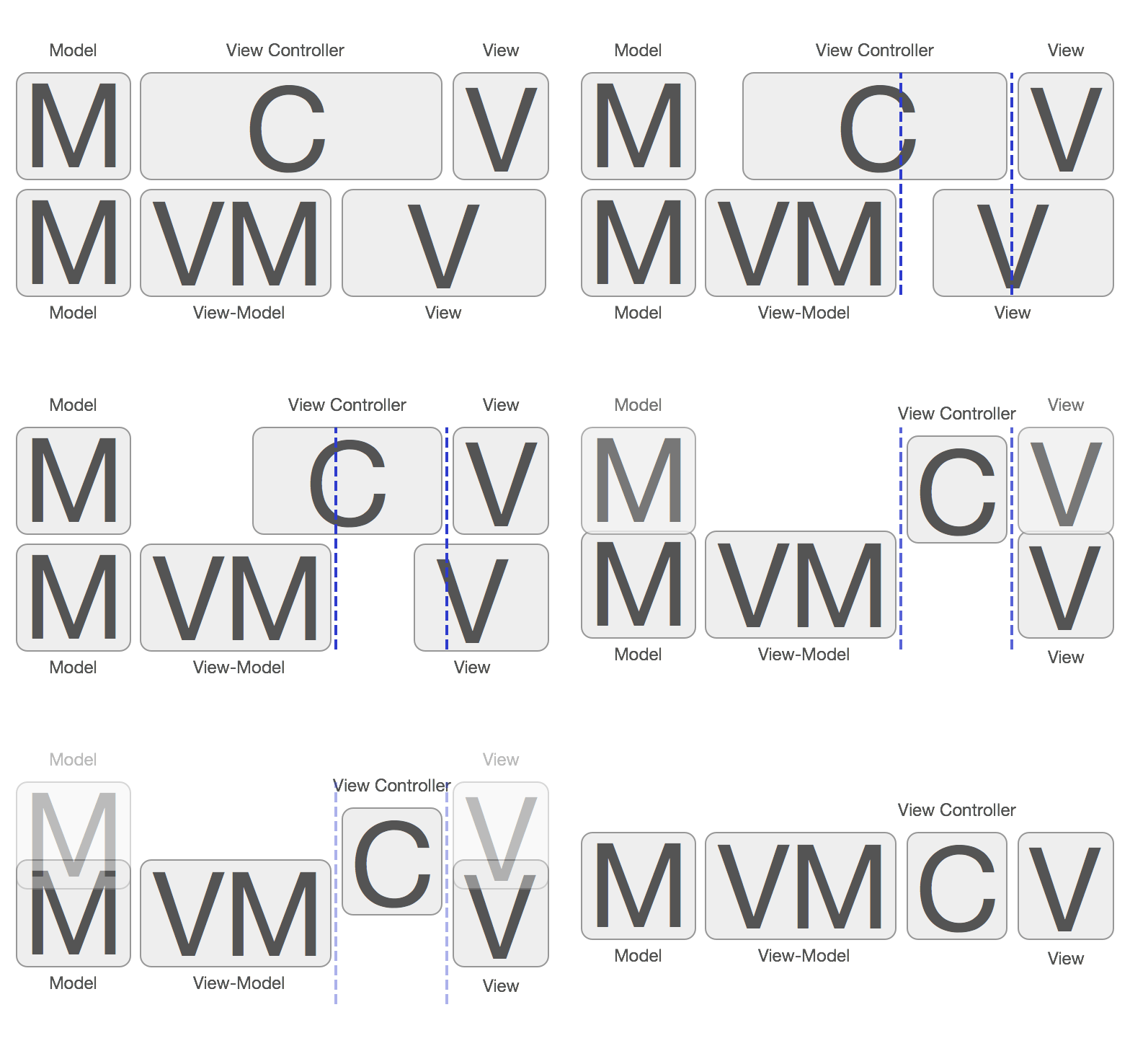
什麼是面向父類(超類)編程
說白了,就是圍繞「繼承」這一特性來組織代碼:所有子類 cell 繼承同一個父類 cell,控制器只面向父類這個類型編程,通過多態調用到具體子類的實現。配合 MVVM 抽出的 ViewModel,可以從控制器裡搬走很大一部分代碼。它不只是對 tableView 的優化,而是一種通用的瘦身思路。
先看常見的大眾寫法:在 cellForRow 裡依據 index 判斷出 cell 類型,再分別賦值,行高一樣判斷一遍。再看面向父類的寫法:
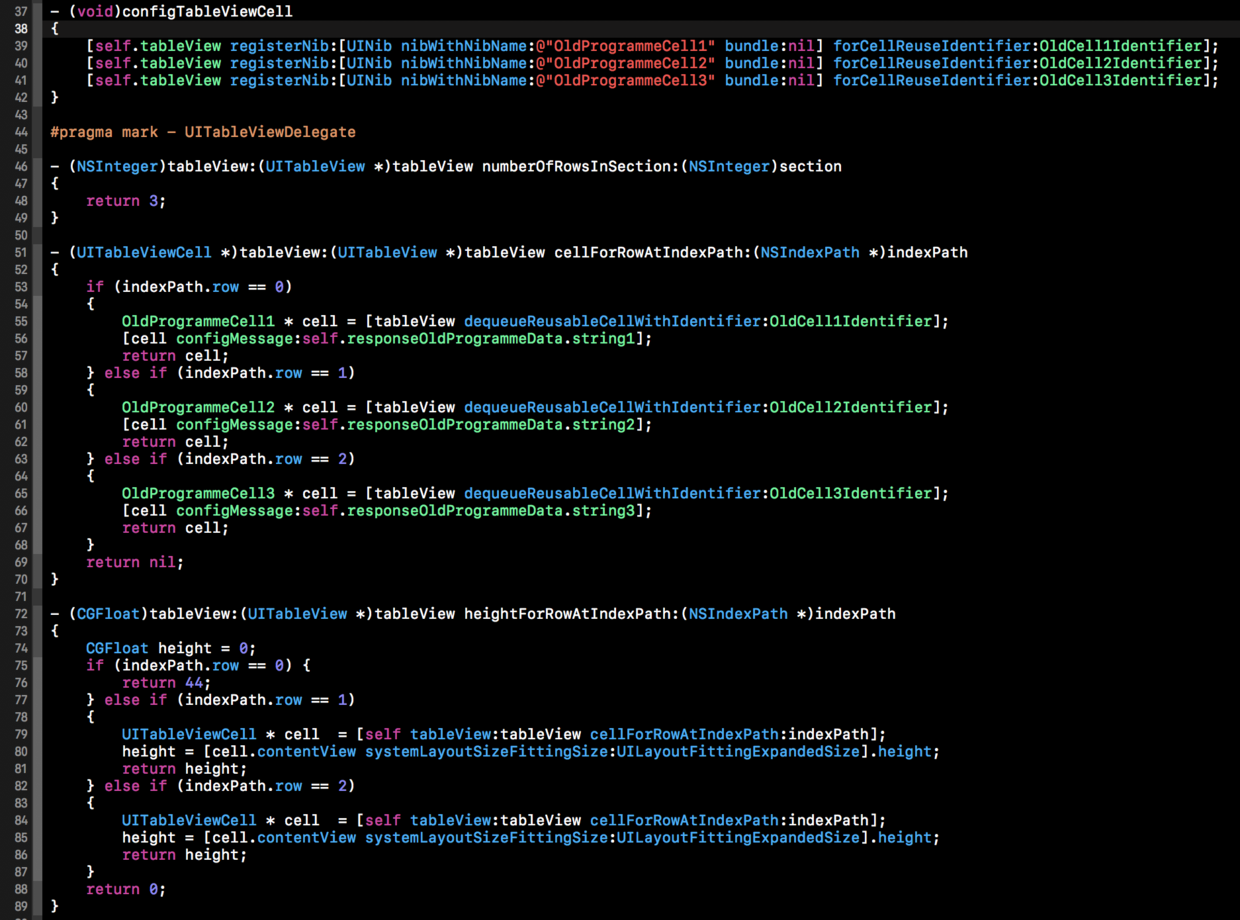
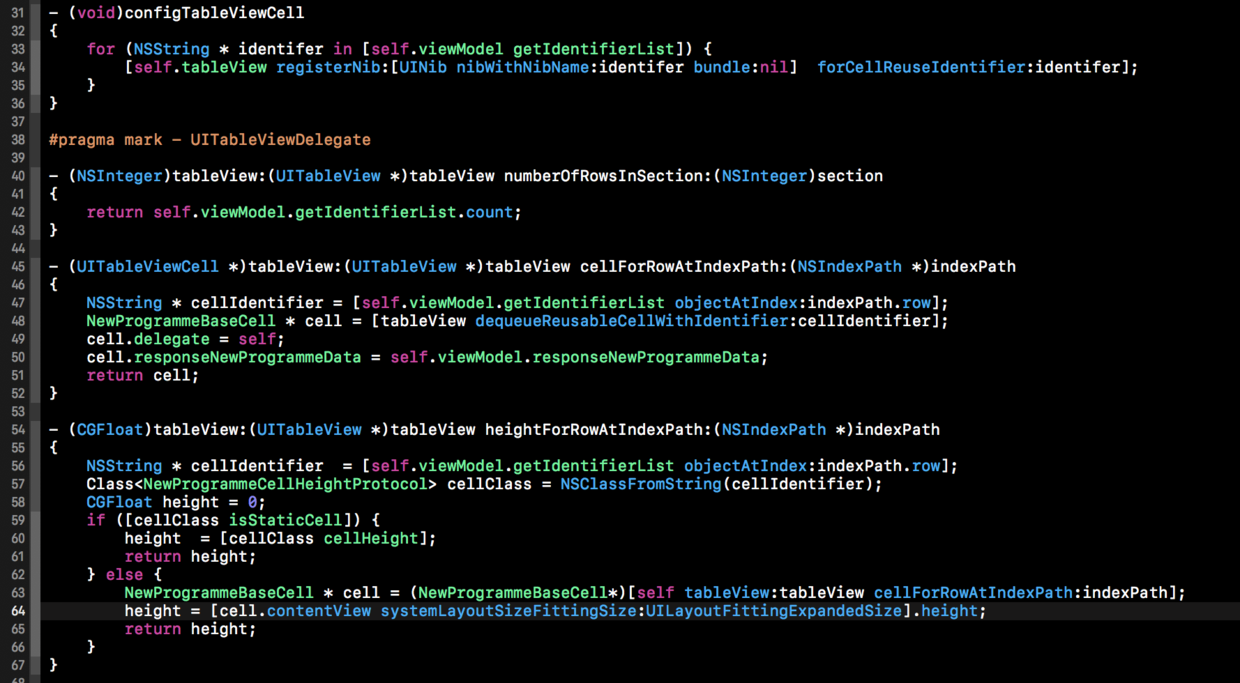
有人會吐槽:新寫法也就少十幾行?並非如此。示例裡只有三個 cell,真實項目很少只有三個;cell 越多,收益越明顯——因為後期無論增加多少 cell,控制器代理方法裡的代碼量幾乎不變,相當於搭好了一個模板,新 cell 只需在自己內部配置。何況真實業務裡 if-else 分支中還嵌套著各種邏輯,那才是列表真正臃腫的原因。
好處:
1. 控制器顯著瘦身,內部代碼量大減,邏輯更清晰。
2. 後期維護成本大幅降低。增刪 cell 時只需新建或刪除一個子類,並在 ViewModel 中增刪對應的 identifier,控制器幾乎不用改動。
代價:
會多出若干 cell 文件與一個 ViewModel 文件,包體積相應增加。
具體怎麼做
第一步:新建繼承自 UITableViewCell 的父類 cell
#import#import "ResponseNewProgrammeData.h" #import "NewProgrammeCellHeightProtocol.h" // 子類需要回調事件的代理 @protocol NewProgrammeTableViewCellProtocol - (void)cell1DidSelectedRightButton; - (void)cell2DidSelectedRightButton; - (void)cell3DidSelectedRightButton; @end @interface NewProgrammeBaseCell : UITableViewCell @property (nonatomic, weak) id delegate; @property (nonatomic, strong) ResponseNewProgrammeData *responseNewProgrammeData; @end
父類要做三件事:持有數據源(所有子類的 UI 都靠它渲染);實現用於計算高度的協議;如果子類有點擊回調需求,再預留一個代理屬性,由控制器把自己設為 delegate。
第二步:新建高度協議 NewProgrammeCellHeightProtocol
#import// 針對 cell 的高度寫的協議 @protocol NewProgrammeCellHeightProtocol @optional + (BOOL)isStaticCell; + (float)cellHeight; @end
子類若為固定高度的靜態 cell,則 isStaticCell 返回 YES 並在 cellHeight 中返回具體數值;否則返回 NO,高度交由控制器的 heightForRow 自動測算。
第三步:新建各個子類 cell,全部繼承上面的父類
#import "NewProgrammeCell1.h"

@interface NewProgrammeCell1 ()
@property (nonatomic, weak) IBOutlet UILabel *lblName;
@end

@implementation NewProgrammeCell1
@synthesize responseNewProgrammeData = _responseNewProgrammeData;

- (void)setResponseNewProgrammeData:(ResponseNewProgrammeData *)responseNewProgrammeData {
    _responseNewProgrammeData = responseNewProgrammeData;
    self.lblName.text = _responseNewProgrammeData.string1;
}

+ (BOOL)isStaticCell {
    return YES;
}

+ (float)cellHeight {
    return 44;
}

- (IBAction)didPressedPush:(id)sender {
    if (self.delegate && [self.delegate respondsToSelector:@selector(cell1DidSelectedRightButton)]) {
        [self.delegate cell1DidSelectedRightButton];
    }
}
@end
這個 cell 高度固定,所以兩個類方法直接給出答案;它通過父類的數據源拿到自己需要的字段;點擊事件則通過代理回拋給控制器。其他 cell 的配置思路完全一致。
第四步:新建 ViewModel
#import "NewProgrammeViewModel.h"

static NSString * const NewProgrammeCell1Identifier = @"NewProgrammeCell1";
static NSString * const NewProgrammeCell2Identifier = @"NewProgrammeCell2";
static NSString * const NewProgrammeCell3Identifier = @"NewProgrammeCell3";

@implementation NewProgrammeViewModel

- (NSArray *)getIdentifierList {
    return @[NewProgrammeCell1Identifier,
             NewProgrammeCell2Identifier,
             NewProgrammeCell3Identifier];
}

- (void)requestData {
    self.responseNewProgrammeData = [[ResponseNewProgrammeData alloc] init];
}
@end
ViewModel 負責兩件事:配置需要注冊的 cell 以及實際要展示的 cell(有些页面的 cell 並非固定顯示,需要按數據源動態決定),以及承擔網絡請求、數據解析等業務邏輯。它相當於 MVVM 中的「胖 Model」,把控制器裡的雜活都接走。
第五步:控制器中做相應配置
- (void)configTableViewCell {
    for (NSString *identifer in [self.viewModel getIdentifierList]) {
        [self.tableView registerNib:[UINib nibWithNibName:identifer bundle:nil]
             forCellReuseIdentifier:identifer];
    }
}

#pragma mark - UITableViewDelegate

- (NSInteger)tableView:(UITableView *)tableView numberOfRowsInSection:(NSInteger)section {
    return self.viewModel.getIdentifierList.count;
}

- (UITableViewCell *)tableView:(UITableView *)tableView cellForRowAtIndexPath:(NSIndexPath *)indexPath {
    NSString *cellIdentifier = [self.viewModel.getIdentifierList objectAtIndex:indexPath.row];
    NewProgrammeBaseCell *cell = [tableView dequeueReusableCellWithIdentifier:cellIdentifier];
    cell.delegate = self;
    cell.responseNewProgrammeData = self.viewModel.responseNewProgrammeData;
    return cell;
}

- (CGFloat)tableView:(UITableView *)tableView heightForRowAtIndexPath:(NSIndexPath *)indexPath {
    NSString *cellIdentifier = [self.viewModel.getIdentifierList objectAtIndex:indexPath.row];
    Class<NewProgrammeCellHeightProtocol> cellClass = NSClassFromString(cellIdentifier);
    if ([cellClass isStaticCell]) {
        return [cellClass cellHeight];
    } else {
        NewProgrammeBaseCell *cell = (NewProgrammeBaseCell *)[self tableView:tableView cellForRowAtIndexPath:indexPath];
        return [cell.contentView systemLayoutSizeFittingSize:UILayoutFittingExpandedSize].height;
    }
}
三段代理方法要點明確:注冊階段遍歷 ViewModel 給出的 identifier;cellForRow 中把返回的 cell 當作父類使用,只賦值,具體渲染由各子類重寫的 setter 完成,充分利用多態;heightForRow 中先按 identifier 反射出類對象,靜態 cell 直接取類方法返回的高度,動態 cell 則走 Auto Layout 的系統測算。
動態增刪 cell 怎麼辦
實際項目常遇到「最多顯示三個 cell,但某種條件下只顯示兩個」的需求。做法是在 ViewModel 裡再包一層,返回過濾後的 identifier 數組:
- (NSArray *)getNewIdentifierList {
    NSMutableArray *newList = [[self getIdentifierList] mutableCopy];
    if (/**判斷條件**/) {
        [newList removeObject:NewProgrammeCell2Identifier];
    }
    return [newList copy];
}
各項目業務差異大,寫法自然會有區別,具體問題具體分析。完整 demo 可參考 GitHub 上的 XLFaceParentClassProgrammeDemo,歡迎在自己的項目中試用。如果文中哪裡有疏漏,或者你有更好的方案,也歡迎一起探討。
- 上一篇文章: iOS 網絡模塊深度優化實踐清單
- 下一篇文章: iOS Widget 開發入門與 iOS 10 適配要點