
效能優化實戰:別再無腦 new NSDateFormatter
為什麼要優化 NSDateFormatter?
過度地建立 NSDateFormatter 來做 NSDate 與 NSString 之間的轉換,會直接造成 App 卡頓。打開 Profile 工具看一眼效能數據,你會發現這類操作的 CPU 佔比高得驚人。
官方說法寫得很明白:建立一個 NSDateFormatter 並不便宜,如果使用頻繁,強烈建議快取單一實例,而不是反覆建立與銷毀。
Creating a date formatter is not a cheap operation. If you are likely to use a formatter frequently, it is typically more efficient to cache a single instance than to create and dispose of multiple instances. One approach is to use a static variable
有哪些優化手段?
a. 延遲轉換
只有在 UI 真正需要顯示轉換結果時,才執行轉換,避免不必要的運算。
b. 記憶體快取
快取方式要依 NSDateFormatter 的執行緒安全性,按 iOS 版本區分處理。
iOS 7 之前
如果直接用靜態變數存儲,就可能踩到執行緒安全的坑。iOS 7 以前,NSDateFormatter 並非執行緒安全,一旦兩條以上執行緒同時存取同一個格式化物件,App 就會崩潰。這種情況下,應該把它快取到各執行緒自己的 threadDictionary 裡:
+ (NSDateFormatter *)cachedDateFormatter { NSMutableDictionary *threadDictionary = [[NSThread currentThread] threadDictionary]; NSDateFormatter *dateFormatter = [threadDictionary objectForKey:@"cachedDateFormatter"]; if (!dateFormatter) { dateFormatter = [[NSDateFormatter alloc] init]; [dateFormatter setLocale:[NSLocale currentLocale]]; [dateFormatter setDateFormat: @"YYYY-MM-dd HH:mm:ss"]; [threadDictionary setObject:dateFormatter forKey:@"cachedDateFormatter"]; } return dateFormatter; }iOS 7 及以後
從 iOS 7、macOS 10.9 起,NSDateFormatter 是執行緒安全的,不必再擔心格式化物件在使用中被另一條執行緒改動。因此程式碼可以大幅精簡,直接用靜態變數快取即可:
static NSDateFormatter *cachedDateFormatter = nil; + (NSDateFormatter *)cachedDateFormatter { // If the date formatters aren't already set up, create them and cache them for reuse. if (!dateFormatter) { dateFormatter = [[NSDateFormatter alloc] init]; [dateFormatter setLocale:[NSLocale currentLocale]]; [dateFormatter setDateFormat: @"YYYY-MM-dd HH:mm:ss"]; } return dateFormatter; }還有一個容易忽略的細節:如果你快取了格式化物件或其他依賴 current locale 的物件,就應該監聽 NSCurrentLocaleDidChangeNotification,在 locale 變動時及時更新快取內容。
In theory you could use an auto-updating locale (autoupdatingCurrentLocale) to create a locale that automatically accounts for changes in the user's locale settings. In practice this currently does not work with date formatters.
Apple Threading Programming Guide
c. 改用標準 C 函式庫
如果時間日期格式是固定的,直接用 C 語言的 strptime 會更簡單、更高效。
- (NSDate *) easyDateFormatter{ time_t t; struct tm tm; char *iso8601 = "2016-09-18"; strptime(iso8601, "%Y-%m-%d", &tm); tm.tm_isdst = -1; tm.tm_hour = 0;//當tm結構體中的tm.tm_hour為負數,會導致mktime(&tm)計算錯誤 /** //NSString *iso8601String = @"2016-09-18T17:30:08+08:00"; //%Y-%m-%d [iso8601String cStringUsingEncoding:NSUTF8StringEncoding] { tm_sec = 0 tm_min = 0 tm_hour = 0 tm_mday = 18 tm_mon = 9 tm_year = 116 tm_wday = 2 tm_yday = 291 tm_isdst = 0 tm_gmtoff = 28800 tm_zone = 0x00007fd9b600c31c "CST" } ISO8601時間格式:2004-05-03T17:30:08+08:00 參考Wikipedia */ t = mktime(&tm); //https://pubs.opengroup.org/onlinepubs/9699919799/functions/mktime.html //secondsFromGMT: The current difference in seconds between the receiver and Greenwich Mean Time. return [NSDate dateWithTimeIntervalSince1970:t + [[NSTimeZone localTimeZone] secondsFromGMT]]; }相關資料:
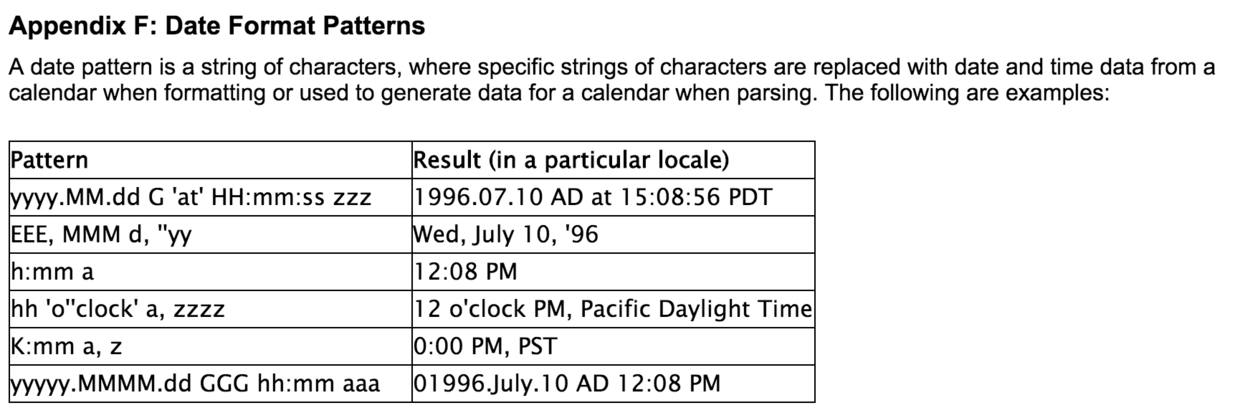
Date Format Patterns:
Standard C library、ISO_8601