
設計模式筆記(七):用組合模式統一「菜單」與「菜品」
場景分析
我們去餐廳吃飯都會看菜單點菜。今天要實現的是一個「超級菜單」:一個菜單大集合,裡面既包含單一菜品,也包含子菜單。
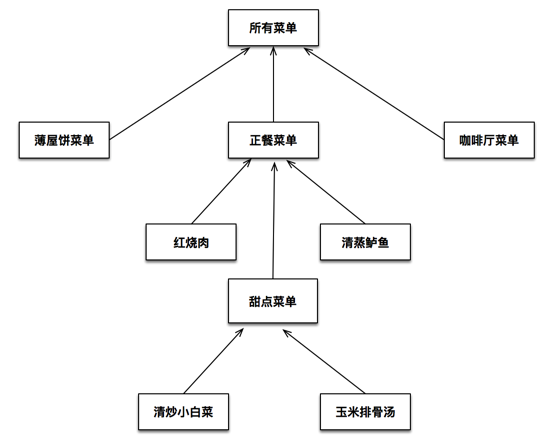
可以看到,這個菜單既包括單個的菜品項目,也包括子菜單項目,而子菜單裡又可以繼續嵌套菜品或子菜單。
現在有兩個需求:
如果是菜單項目,需要列印菜單名稱和描述,支持添加、刪除子菜單或菜品,並且能遞歸列印出所有子菜單、子菜單下的菜品、以及子菜單的子菜單,一路遞歸到最後一個菜品。
如果是菜品項目,需要拿到價格、描述、名稱、是否為素菜這些信息。
這兩個需求有共同點也有差異。常規做法是區別對待,各自寫一套邏輯。但這樣後續擴展會非常痛苦:一旦要增刪某一類節點,原有代碼就得跟著改;而且兩者很多操作其實類似,卻要維護兩份代碼。
仔細看這張圖不難發現,它其實是一棵典型的樹:菜品項目是葉節點,子菜單項目是子節點(子節點還能包含子節點或葉節點),所有菜單是根節點,這個結構可以無限延伸。
如果我們能統一對待葉節點和子節點,用一致的方式在樹上遊走處理,那後續無論新增葉節點還是子節點,原有代碼都不用動——因為它們的處理方式完全一致。
代碼實現
1、定義葉節點和子節點的父類
先定義一個抽象類作為共同父類,把兩者的所有操作方法都聲明出來,子類按需自行實現。父類每個方法的默認實現都是拋異常,等待子類覆蓋;如果子類沒覆蓋又被調用,就直接拋異常。
#import <Foundation/Foundation.h>

@interface MenuComponent : NSObject
- (void)add:(MenuComponent *)component;
- (void)remove:(MenuComponent *)component;
- (MenuComponent *)getChild:(NSInteger)position;
- (NSString *)getName;
- (NSString *)getDescription;
- (CGFloat)getPrice;
- (BOOL)isVegetarian;
- (void)print;
@end

===============

#import "MenuComponent.h"

@implementation MenuComponent
- (void)add:(MenuComponent *)component {
    NSString *reason = [NSString stringWithFormat:@"【%@】沒有實現該方法", NSStringFromClass([self class])];
    @throw ([NSException exceptionWithName:@"不支持該方法" reason:reason userInfo:nil]);
}
- (void)remove:(MenuComponent *)component {
    NSString *reason = [NSString stringWithFormat:@"【%@】沒有實現該方法", NSStringFromClass([self class])];
    @throw ([NSException exceptionWithName:@"不支持該方法" reason:reason userInfo:nil]);
}
- (MenuComponent *)getChild:(NSInteger)position {
    NSString *reason = [NSString stringWithFormat:@"【%@】沒有實現該方法", NSStringFromClass([self class])];
    @throw ([NSException exceptionWithName:@"不支持該方法" reason:reason userInfo:nil]);
}
- (NSString *)getName { /* 同上,拋出不支持該方法的異常 */ }
- (NSString *)getDescription { /* 同上 */ }
- (CGFloat)getPrice { /* 同上 */ }
- (BOOL)isVegetarian { /* 同上 */ }
- (void)print { /* 同上 */ }
@end
2、實現菜單項目
#import "MenuComponent.h"

@interface Menu : MenuComponent
@property (copy, nonatomic) NSString *name;
@property (copy, nonatomic) NSString *desc;
@property (strong, nonatomic) NSMutableArray *menuComponentArr;
- (instancetype)initMenuItemWithName:(NSString *)name withDesc:(NSString *)desc;
@end

===============

#import "Menu.h"

@implementation Menu
- (instancetype)initMenuItemWithName:(NSString *)name withDesc:(NSString *)desc {
    if (self == [super init]) {
        self.name = name;
        self.desc = desc;
        self.menuComponentArr = [NSMutableArray array];
    }
    return self;
}
- (NSString *)getDescription { return self.desc; }
- (NSString *)getName { return self.name; }

- (void)add:(MenuComponent *)component {
    [self.menuComponentArr addObject:component];
}

- (void)remove:(MenuComponent *)component {
    [self.menuComponentArr enumerateObjectsUsingBlock:^(MenuComponent * _Nonnull obj, NSUInteger idx, BOOL * _Nonnull stop) {
        if (obj == component) {
            [self.menuComponentArr removeObject:component];
        } else {
            if ([obj isKindOfClass:[Menu class]]) {
                if ([((Menu *)obj).menuComponentArr containsObject:component]) {
                    [obj remove:component];
                }
            }
        }
    }];
}

- (MenuComponent *)getChild:(NSInteger)position {
    return self.menuComponentArr[position];
}

- (void)print {
    NSLog(@"菜單名稱:%@ | 菜單描述:%@ ", self.name, self.desc);
    if (self.menuComponentArr.count) {
        for (MenuComponent *component in self.menuComponentArr) {
            [component print];
        }
    }
}
@end
3、實現菜品項目
#import "MenuComponent.h"

@interface menuItem : MenuComponent
@property (copy, nonatomic) NSString *name;
@property (copy, nonatomic) NSString *desc;
@property (assign, nonatomic) NSInteger isVegetarain;
@property (assign, nonatomic) CGFloat price;
- (instancetype)initMenuItemWithName:(NSString *)name withDesc:(NSString *)desc
                      withVegetarain:(NSInteger)isVege withPrice:(CGFloat)price;
@end

===============

#import "menuItem.h"

@implementation menuItem
- (instancetype)initMenuItemWithName:(NSString *)name withDesc:(NSString *)desc
                      withVegetarain:(NSInteger)isVege withPrice:(CGFloat)price {
    if (self == [super init]) {
        self.name = name;
        self.desc = desc;
        _isVegetarain = isVege;
        self.price = price;
    }
    return self;
}
- (CGFloat)getPrice { return self.price; }
- (NSString *)getDescription { return self.desc; }
- (NSString *)getName { return self.name; }
- (BOOL)isIsVegetarain { return self.isVegetarain; }

- (void)print {
    NSLog(@"菜品名稱:%@ | 菜品價格:%f | 菜品描述:%@ | 是否是素菜:%@",
          self.name, self.price, self.desc, self.isVegetarain ? @"是" : @"不是");
}
@end
4、客戶端調用
先按文章開頭的結構把菜單搭起來:
MenuComponent *pancakeHouseMenu = [[Menu alloc] initMenuItemWithName:@"博餅屋菜單" withDesc:@"早餐"];
MenuComponent *dinnerMenu = [[Menu alloc] initMenuItemWithName:@"正餐菜單" withDesc:@"午餐"];
MenuComponent *cafeMenu = [[Menu alloc] initMenuItemWithName:@"咖啡菜單" withDesc:@"晚餐"];
MenuComponent *dessertMenu = [[Menu alloc] initMenuItemWithName:@"甜點菜單" withDesc:@"飯後甜點"];
MenuComponent *allMenu = [[Menu alloc] initMenuItemWithName:@"所有菜單" withDesc:@"所有菜單的組合"];

[allMenu add:pancakeHouseMenu];
[allMenu add:dinnerMenu];
[allMenu add:cafeMenu];

menuItem *meatItem = [[menuItem alloc] initMenuItemWithName:@"紅燒肉" withDesc:@"祖傳紅燒肉,肥而不膩" withVegetarain:0 withPrice:177.2f];
menuItem *fishItem = [[menuItem alloc] initMenuItemWithName:@"清蒸鲈魚" withDesc:@"新鮮味美,回味無窮" withVegetarain:0 withPrice:2332.0f];
[dinnerMenu add:meatItem];
[dinnerMenu add:fishItem];

menuItem *dessertItem1 = [[menuItem alloc] initMenuItemWithName:@"清炒小白菜" withDesc:@"味美而鮮,有機綠色無污染" withVegetarain:1 withPrice:17.3f];
menuItem *dessertItem2 = [[menuItem alloc] initMenuItemWithName:@"玉米排骨湯" withDesc:@"飯後一口湯,快樂似神仙" withVegetarain:1 withPrice:243.3f];
[dessertMenu add:dessertItem1];
[dessertMenu add:dessertItem2];
[dinnerMenu add:dessertMenu];
這時列印所有菜單,只需要一句話,就能把全部菜品和子菜單遞歸打印出來:
[allMenu print];輸出大致如下:
菜單名稱:所有菜單 | 菜單描述:所有菜單的組合
菜單名稱:博餅屋菜單 | 菜單描述:早餐
菜單名稱:正餐菜單 | 菜單描述:午餐
菜品名稱:紅燒肉 | 菜品價格:177.199997 | 菜品描述:祖傳紅燒肉,肥而不膩 | 是否是素菜:不是
菜品名稱:清蒸鲈魚 | 菜品價格:2332.000000 | 菜品描述:新鮮味美,回味無窮 | 是否是素菜:不是
菜單名稱:甜點菜單 | 菜單描述:飯後甜點
菜品名稱:清炒小白菜 | 菜品價格:17.299999 | 菜品描述:味美而鮮,有機綠色無污染 | 是否是素菜:是
菜品名稱:玉米排骨湯 | 菜品價格:243.300003 | 菜品描述:飯後一口湯,快樂似神仙 | 是否是素菜:是
菜單名稱:咖啡菜單 | 菜單描述:晚餐
把 dessertMenu 從 dinnerMenu 中移除後再次列印,可以看到甜點菜單及其菜品都消失了,移除生效。
但如果我們對 dinnerMenu 這個子菜單調用菜品專屬的方法:
[dinnerMenu isVegetarian];程序會直接崩潰:
*** Terminating app due to uncaught exception '不支持該方法',
reason: '【Menu】沒有實現該方法'
這裡就牽扯出一個取捨問題:透明性和安全性,誰更重要?
上面的實現選擇了透明性,讓子節點和葉節點被統一對待,調用不支持的方法就拋異常。若選擇安全性,則需要在調用前判斷調用者身份,調用錯誤方法時靜默忽略,這樣不會崩潰,但代價是必須區分調用者。
我們使用組合模式的初衷就是保持葉節點和子節點的一致性,所以實踐中通常更偏向透明性而非安全性。
定義
將對象組合成樹形結構以表示「部分—整體」的層次結構。組合模式使得用戶對單個對象和組合對象的使用具有一致性。
它的目的就是讓客戶端不必區分自己操作的是子節點還是葉節點,而是用一種統一的方式去操作。實現這一點的關鍵,在於設計一個抽象的組件類,讓它能同時代表子節點和葉節點。
組合模式通常用樹形結構來表達,由根節點、子節點、葉節點組成一棵對象樹。這也意味著,任何能用對象樹來描述或操作的功能,都可以考慮組合模式,比如 XML 解析、層次化的菜單、iOS 中由多個子視圖組成的複雜視圖等等。
需要注意的是,為了讓客戶端統一操作,抽象類必須聲明包含子節點和葉節點的所有方法,調用者誤用時可以拋異常警告。這雖然違反了單一職責原則,但在實際開發中是合理且常見的妥協。
好處
定義了清晰的類層次結構:基本對象可以被組合成更複雜的組合對象,組合對象又能繼續被組合,如此遞歸下去。客戶代碼中任何用到基本對象的地方,都可以替換成組合對象。
簡化客戶代碼:客戶可以一致地使用組合結構和單個對象,通常不需要(也不關心)自己處理的是葉節點還是組合節點,因此不必寫滿選擇語句的分支函數。
易於增加新的組件類型:新定義的 Composite 或 Leaf 子類會自動與既有結構和客戶代碼協同工作,客戶程序不需要因為新增 Component 而修改。
讓設計更加通用:代價是較難約束組合中的組件。有時你希望某個組合只能包含特定類型的組件,此時無法依賴類型系統,只能在運行時檢查。
使用時機:當你需要表示對象的部分—整體層次結構時,可以選用組合模式把整體和部分統一起來,讓層次結構更易實現、更易從外部使用;當你希望統一對待組合結構中的所有對象時,這正是組合模式的核心價值。
文末附上組合模式的完整 Demo,建議動手跑一遍,親眼看看崩潰與遞歸列印的效果。