
JSONModel源碼解析
為什麼我們要閱讀源碼?
因為我們自己的代碼寫的夠糟糕。所以我們需要閱讀源碼。
優秀的代碼需要經過大量的驗證,這也是為什麼很多公司提倡CodeReview的原因,正常情況下,一個在github上star數超過一千的優秀開源庫都是經過無數的人使用的,不斷的有人提issue,在stackoverflow上提問等等,這就必然促使作者去改良自己的代碼,使之更穩定可靠。而普通程序猿根本沒有這種顧慮,只需要考慮項目能否運行,跑起來不會出現閃退就可以了。所以我們的日常寫的代碼80%都是shit.凡是在事業和技術上有企圖心的程序員,都應該去找優秀的代碼閱讀。
正文
廢話不多說,我們來看看JSONModel這個開源庫到底是一個什麼樣的原理?這篇BLOG有點特殊,我會把我自己的思維邏輯寫出來,你們可以參考下我是怎麼樣閱讀源碼的。
首先,文件列表是這樣的。
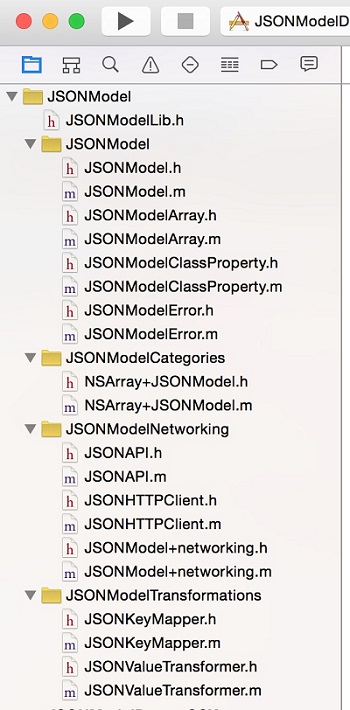
1.JSONModel這個group
從名字上看應該就是這個庫的主體文件。等下細看。
2.JSONModelCategories
應該是一些分類。
3.JSONModelNetworking
從名字上看估計是作者自己封裝的一些網絡請求庫,看到這我是有點疑惑的,要是我自己寫項目用這個庫肯定只是用來解析的,網絡請求之類的肯定會用AFNetWorking自己封裝了。
4.JSONModelTransformations
看到transformations這個單詞我腦海裡第一個念頭就是看起來好像Mantle這個庫裡面自己根據JSON返回數據進行轉換的那個功能。舉個例子,好比你的Model裡有一個@property (strong, nonatomic) NSURL* html_url;這個參數,那麼實際上你解析JSON後服務器返回給你的字段肯定是字符串類型,這時候你就需要把你的這個字段轉換成model裡的NSURL類型,所以需要transomValue。不過還不一定呢,等下細看。
閱讀DEMO
我看到有一個叫做GitHubDemo的group,點進去看。group是這樣的。
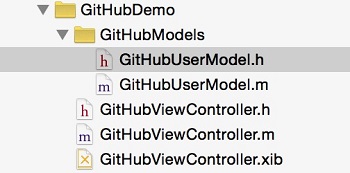
看這類非UI類的庫完全不用關心XIB之類的文件,應為作者提供的DEMO裡界面的部分肯定及其簡單,只需要關心核心代碼就行了。
打開GitHubUserModel.h這個文件。如下圖所示。
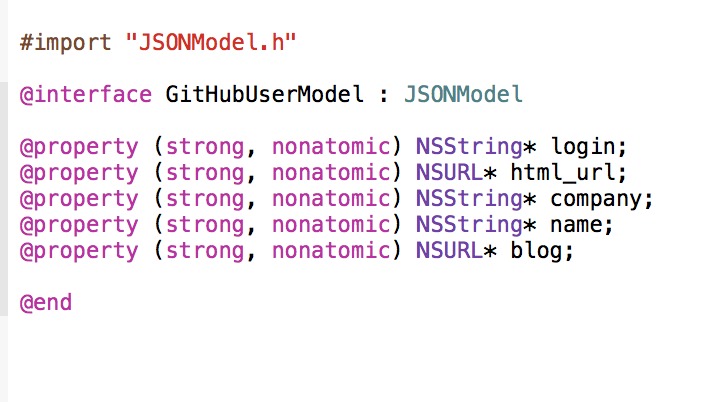
再打開.m文件,空空如也,果然比mantle簡潔。我記得Mantle還要寫mapping呢。但是我看到有URL類型的property。那麼問題來了。他不寫mapping也不寫transform value是怎麼把JSON裡面的字符串轉換成NSURL類型的?臥槽,太神奇了吧。
(我當時有點小震驚,說真的,感覺好屌。)
我看到這裡直接跑去ViewController裡看他怎麼解析的了。是這麼句話。
self.title = @"GitHub.com user lookup";
[HUD showUIBlockingIndicatorWithText:@"Fetching JSON"];
//1
dispatch_async(dispatch_get_global_queue(DISPATCH_QUEUE_PRIORITY_DEFAULT, 0), ^{
    //code executed in the background
    //2
    NSData* ghData = [NSData dataWithContentsOfURL:
                        [NSURL URLWithString:@"https://api.github.com/users/icanzilb"]
                        ];
    //3
    NSDictionary* json = nil;
    if (ghData) {
        json = [NSJSONSerialization
                JSONObjectWithData:ghData
                options:kNilOptions
                error:nil];
    }
    //4
    dispatch_async(dispatch_get_main_queue(), ^{
        //code executed on the main queue
        //5
        user = [[GitHubUserModel alloc] initWithDictionary:json error:NULL];
        items = @[user.login, user.html_url, user.company, user.name, user.blog];
        [self.tableView reloadData];
        [HUD hideUIBlockingIndicator];
    });
});
What the hell!
真的沒寫類型轉換!真的只用一個initWithDictionary就解析了!
廢話不說直接Command+右鍵,點進去。
-(id)initWithDictionary:(NSDictionary*)dict error:(NSError**)err
{
//check for nil input
if (!dict) {
    if (err) *err = [JSONModelError errorInputIsNil];
    return nil;
}
//invalid input, just create empty instance
if (![dict isKindOfClass:[NSDictionary class]]) {
    if (err) *err = [JSONModelError errorInvalidDataWithMessage:@"Attempt to initialize JSONModel object using initWithDictionary:error: but the dictionary parameter was not an 'NSDictionary'."];
    return nil;
}
//create a class instance
self = [self init];
if (!self) {
    //super init didn't succeed
    if (err) *err = [JSONModelError errorModelIsInvalid];
    return nil;
}
//check incoming data structure
if (![self __doesDictionary:dict matchModelWithKeyMapper:self.__keyMapper error:err]) {
    return nil;
}
//import the data from a dictionary
if (![self __importDictionary:dict withKeyMapper:self.__keyMapper validation:YES error:err]) {
    return nil;
}
//run any custom model validation
if (![self validate:err]) {
    return nil;
}
//model is valid! yay!
return self;
}
然後是這些代碼,其實注釋已經很清楚了,我來解釋下。
第一個if,沒的說,檢測傳進來的dict是否為nil。如果為空直接返回nil。如果參數有NSError就直接調用處理ERROR的JSONModelError類來處理。
第二個if檢測dict是否為NSDictionary類型。
第三段落調用self init方法,如果self為空返回nil。
第四個段落,看注釋意思應該是檢查傳入dict的結構。我點進去看之後是一個比較復雜的方法,等下細講。
第五個段落,看注釋應該是導入dict的數據。
第六段是驗真是否有錯誤,如果有錯誤返回nil。
第七段自然是返回self了。
Objc的runtime
Runtime相信大家都聽過。但是很少實踐過,我也沒怎麼寫過runtime的東西,所以這裡我也需要查一下資料。或者說換個思考角度,如果讓你寫這麼一個庫,你怎麼把JSON和你的model類型匹配呢?那第一步肯定是要獲取我model類型裡的每一個attribute的名字然後通過KVC來賦值咯。怎麼才能獲取一個NSObject類的屬性呢?
-(NSArray*)__properties__
{
//fetch the associated object
NSDictionary* classProperties = objc_getAssociatedObject(self.class, &kClasPropertiesKey);
NSLog(@"CLASS properties is %@",classProperties);
if (classProperties) return [classProperties allValues];
//if here, the class needs to inspect itself
[self __setup__];
//return the property list
classProperties = objc_getAssociatedObject(self.class, &kClasPropertiesKey);
return [classProperties allValues];
}
我在JSONModel裡找到了這個方法,根據注釋,這就是獲取一個類它的屬性的方法。NSDictionary* classProperties = objc_getAssociatedObject(self.class, &kClasPropertiesKey);
於是我谷歌了一下。
在蘋果的官方文檔裡找到了以下的內容。
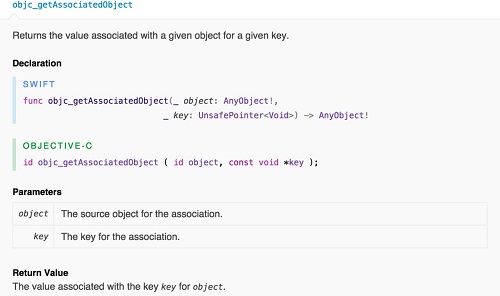
但是還是不太明白什麼意思,但是我知道了兩個參數的意思了,其實無所謂,我只要知道這個方法能幫我取到這個model裡的所有property就夠了。
現在我們已經知道了怎麼取到了這個類的方法,那麼他是怎麼把值付給他也就知道了其實就是[self setValue:@"value" forKey:@"name"];那個key就是剛才通過getAssociatedObject這個方法取到的,這時候已經存入classProperties裡了,value的話就是也很好取,因為當時我們創建這個Model的時候成員屬性的名字和json裡的key是一致的,所以我們可以先通過相同的key從json裡取值,然後再通過kvc賦值給model。這樣,一套系統就打通了,但這只是我腦海中想象的,他到底是不是這麼做的我們還得往下看。
突然發現不對了
上一篇讀到objc_getAssociateObect,我以為是獲取一個Class的property,但是當我讀到-(void)__inspectProperties 這個方法的時候我發現不對,因為這個方法才是獲取一個Class的property的方法。於是我百度了一下。看到了這篇文章。點擊查看
看這句objective-c有兩個擴展機制:category和associative。我們可以通過category來擴展方法,但是它有個很大的局限性,不能擴展屬性。於是,就有了專門用來擴展屬性的機制:associative。
實際上associative也是類擴展的一個方式,和類別不同的是,類別只能擴展一個類的方法,而associative可以擴展一個類的屬性。好比你想給NSString這個類添加一個首字母是否大寫的BOOL值,通過類別你是不行的,或者你可以說我可以繼承NSString,然後添加一個屬性不就行了,問題是你既然集成了NSString類,那你創建的只是NSString 的子類而不是它本身了。
只是長期以來,這個方法寫法略顯高端,所以使用率遠遠沒有類別高。
那麼我們來好好看看-(void)__inspectProperties這個方法,因為這個方法才是JSONModel的核心。真正看懂了這個方法,我們才知道這裡為什麼要用associate來擴展。
-(void)__inspectProperties
{
//JMLog(@"Inspect class: %@", [self class]);
NSMutableDictionary* propertyIndex = [NSMutableDictionary dictionary];
//temp variables for the loops
Class class = [self class];
NSScanner* scanner = nil;
NSString* propertyType = nil;
// inspect inherited properties up to the JSONModel class
while (class != [JSONModel class]) {
    //JMLog(@"inspecting: %@", NSStringFromClass(class));
    unsigned int propertyCount;
    objc_property_t *properties = class_copyPropertyList(class, &propertyCount);
    //loop over the class properties
    for (unsigned int i = 0; i < propertyCount; i++) {
        JSONModelClassProperty* p = [[JSONModelClassProperty alloc] init];
        //get property name
        objc_property_t property = properties[i];
        const char *propertyName = property_getName(property);
        p.name = @(propertyName);
        JMLog(@"property: %@", p.name);
        //get property attributes
        const char *attrs = property_getAttributes(property);
        NSString* propertyAttributes = @(attrs);
        NSArray* attributeItems = [propertyAttributes componentsSeparatedByString:@","];
        JMLog(@"attributes: %@",propertyAttributes);
        //ignore read-only properties
        if ([attributeItems containsObject:@"R"]) {
            continue; //to next property
        }
        //check for 64b BOOLs
        if ([propertyAttributes hasPrefix:@"Tc,"]) {
            //mask BOOLs as structs so they can have custom convertors
            p.structName = @"BOOL";
        }
        scanner = [NSScanner scannerWithString: propertyAttributes];
        //JMLog(@"attr: %@", [NSString stringWithCString:attrs encoding:NSUTF8StringEncoding]);
        [scanner scanUpToString:@"T" intoString: nil];
        [scanner scanString:@"T" intoString:nil];
        //check if the property is an instance of a class
        if ([scanner scanString:@"@\"" intoString: &propertyType]) {
            [scanner scanUpToCharactersFromSet:[NSCharacterSet characterSetWithCharactersInString:@"\"<"]
                                    intoString:&propertyType];
            //JMLog(@"type: %@", propertyClassName);
            p.type = NSClassFromString(propertyType);
            p.isMutable = ([propertyType rangeOfString:@"Mutable"].location != NSNotFound);
            p.isStandardJSONType = [allowedJSONTypes containsObject:p.type];
            //read through the property protocols
            while ([scanner scanString:@"<" intoString:NULL]) {
                NSString* protocolName = nil;
                [scanner scanUpToString:@">" intoString: &protocolName];
                if ([protocolName isEqualToString:@"Optional"]) {
                    p.isOptional = YES;
                } else if([protocolName isEqualToString:@"Index"]) {
                    p.isIndex = YES;
                    objc_setAssociatedObject(
                                             self.class,
                                             &kIndexPropertyNameKey,
                                             p.name,
                                             OBJC_ASSOCIATION_RETAIN // This is atomic
                                             );
                } else if([protocolName isEqualToString:@"ConvertOnDemand"]) {
                    p.convertsOnDemand = YES;
                } else if([protocolName isEqualToString:@"Ignore"]) {
                    p = nil;
                } else {
                    p.protocol = protocolName;
                }
                [scanner scanString:@">" intoString:NULL];
            }
        }
        //check if the property is a structure
        else if ([scanner scanString:@"{" intoString: &propertyType]) {
            [scanner scanCharactersFromSet:[NSCharacterSet alphanumericCharacterSet]
                                intoString:&propertyType];
            p.isStandardJSONType = NO;
            p.structName = propertyType;
        }
        //the property must be a primitive
        else {
            //the property contains a primitive data type
            [scanner scanUpToCharactersFromSet:[NSCharacterSet characterSetWithCharactersInString:@","]
                                    intoString:&propertyType];
            //get the full name of the primitive type
            propertyType = valueTransformer.primitivesNames[propertyType];
            if (![allowedPrimitiveTypes containsObject:propertyType]) {
                //type not allowed - programmer mistaked -> exception
                @throw [NSException exceptionWithName:@"JSONModelProperty type not allowed"
                                               reason:[NSString stringWithFormat:@"Property type of %@.%@ is not supported by JSONModel.", self.class, p.name]
                                             userInfo:nil];
            }
        }
        NSString *nsPropertyName = @(propertyName);
        if([[self class] propertyIsOptional:nsPropertyName]){
            p.isOptional = YES;
        }
        if([[self class] propertyIsIgnored:nsPropertyName]){
            p = nil;
        }
        //few cases where JSONModel will ignore properties automatically
        if ([propertyType isEqualToString:@"Block"]) {
            p = nil;
        }
        //add the property object to the temp index
        if (p) {
            [propertyIndex setValue:p forKey:p.name];
        }
    }
    free(properties);
    //ascend to the super of the class
    //(will do that until it reaches the root class - JSONModel)
    class = [class superclass];
}
//finally store the property index in the static property index
objc_setAssociatedObject(
                         self.class,
                         &kClassPropertiesKey,
                         [propertyIndex copy],
                         OBJC_ASSOCIATION_RETAIN // This is atomic
                         );
}
我們來一句一句的看
objc_property_t *properties = class_copyPropertyList(class, &propertyCount);
這句話的意思就是獲取Class 的property的數量,然後把這個數量賦值給我們自己定義的propertyCount這個變量,第一個參數class 就是[self Class].(就是自己的類) ,最後,這個函數會返回一個內容為objc_property_t的數組.
然後就是設一個for循環,把數組properties裡的objc_property_t一個一個取出來檢索.
第一步是取出來property的name,用一個函數property_getName,取出來了.
第二部,取出property的attribute,const char *attrs = property_getAttributes(property);
看到這,因為這些都是字符串,我想把它打出來看看到底是什麼.如圖
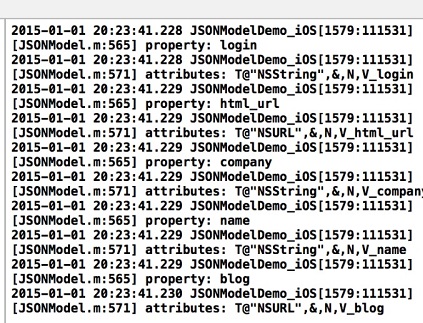
不知道大家還記不記得上一篇我用的是github的Model來做例子的.我再把.h文件弄出來讓大家看看.
看到了麼,第一張圖,我們獲取了一個5個property的name,都能和我們的githubModel裡的.h文件裡聲明的一一匹配.說明我們通過這個方法獲取的沒有問題,name屬性完全正確,但是attribute都是這種東西,T@"NSURL",&,N,V_blog.
這是什麼鬼!
不要緊我們繼續往下看.
5.NSArray* attributeItems = [propertyAttributes componentsSeparatedByString:@","];
這句很好懂哈,他把那個我們不知道是什麼鬼的東西用','符號做了個分拆,拆成了一個個字符串.拿我們上面那個東西來當例子的話attributesItems這個數組裡的內容現在應該是這樣的.@[@"T@NSURL",@"&",@"N",@"V_blog"];
if
 ([attributeItems containsObject:@"R"]) {
            continue; //to next property
        }
這句話他檢查我們的數組裡有沒有一個字符串是@"R",如果有,那麼我們的property就是個只讀的屬性,意思就是當時聲明的時候@property(readonly)這樣的,如果這個屬性是只讀的那我們還費什麼勁解析,直接跳過.
7
 //check for 64b BOOLs
        if ([propertyAttributes hasPrefix:@"Tc,"]) {
            //mask BOOLs as structs so they can have custom convertors
            p.structName = @"BOOL";
        }
如果不是只讀的話,再檢查我們的attributes字符串是不是以Tc開頭的,如果是,就給我們的p.structName賦值為@"BOOL".
這裡說一下這個p是什麼,p就是JSONModel裡專門記錄Model的property信息的一個類,你們可以去看看JSONModelClassProperty這個類.
8.然後初始化了一個NSSCanner類.
這個就厲害了,這個類我以前從來沒用過.然後我又谷歌了一下.然後,不得不佩服Raywenderlich這個網站的牛逼之處,他居然有
NSScanner Tutorial: Parsing Data in Mac OS X
所以等我先看完這篇文章再說,明天繼續.

- iOS獲得以後裝備型號等信息(全)包括iPhone7和iPhone7P
- IOS 陀螺儀開辟(CoreMotion框架)實例詳解
- 進修iOS自界說導航掌握器UINavigationController
- iOS10告訴框架UserNotification懂得與運用
- iOS設置UIButton文字顯示地位和字體年夜小、色彩的辦法
- iOS 開辟中 NavigationController常常湧現的成績緣由剖析
- iOS10 App適配權限 Push Notifications 字體Frame 碰到的成績
- iOS簡略登錄LoginViewController、注冊RegisterViewController等功效完成辦法
- iPhone/iPad開辟經由過程LocalNotification完成iOS准時當地推送功效
- iOS自界說collectionView完成毛玻璃後果
- ios開辟navigationController pushViewController 方法屢次跳轉前往到最下層前往到指定的某一層的完成辦法
- 詳解iOS中Button按鈕的狀況和點擊事宜
- iOS10添加當地推送(Local Notification)實例
- 處理JSON數據由於null招致數據加載掉敗的辦法
- iOS Remote Notification長途新聞推送處置
- Facebook開源智能代碼查錯工具Infer
- 源碼推薦(02.18):瀑布流抓取豆瓣美女圖片,D3Generator實現萬能跳轉界面
- 源碼推薦(02.18B):高仿版QQ最新版,iOS離線緩存
- 【投稿】Xcode插件XBookmark開發筆記
- 源碼推薦(03.01B):模仿tumblr的彈出菜單,編輯全選刪除
- ResearchKit官方文檔——創建調查
- 源碼推薦(8.17):閃屏效果,簡易動畫引擎,iOS UIView自定義四個邊角的圓角
- 手把手教你利用Jenkins持續集成iOS項目
- 源碼推薦(7.24):Switch 開關動畫效果,watchOS繪制自定義圖表
- Xcode概覽(Xcode 6版):循序漸進認識Xcode