在Swift中使用JavaScript的方法和技巧
本文作者Nate Cook是一位獨立的Web及移動應用開發者,是繼Mattt大神之後NSHipster的主要維護者,也是非常知名活躍的Swift博主,並且還是支持自動生成Swift在線文檔的SwiftDoc.org網站創造者。在本文中,他介紹了在Swift中使用JavaScript的方法和技巧,對於iOS和Web應用工程師有著非常實用的價值,以下為譯文:
在RedMonk發布的2015年1月編程語言排行榜中,Swift采納率排名迅速飙升,從剛剛面世時的68位躍至22位,Objective-C仍然穩居TOP
10,而JavaScript則憑借著其在iOS平台上原生體驗優勢成為了年度最火熱的編程語言。

而早在2013年蘋果發布的OS X Mavericks和iOS 7兩大系統中便均已加入了JavaScriptCore框架,能夠讓開發者輕松、快捷、安全地使用JavaScript語言編寫應用。不論叫好叫罵,JavaScript霸主地位已成事實。開發者們趨之若鹜,JS工具資源層出不窮,用於OS
X和iOS系統等高速虛擬機也蓬勃發展起來。
JSContext/JSValue
JSContext即JavaScript代碼的運行環境。一個Context就是一個JavaScript代碼執行的環境,也叫作用域。當在浏覽器中運行JavaScript代碼時,JSContext就相當於一個窗口,能輕松執行創建變量、運算乃至定義函數等的JavaScript代碼:
//Objective-C
JSContext *context = [[JSContext alloc] init];
[context evaluateScript:@"var num = 5 + 5"];
[context evaluateScript:@"var names = ['Grace', 'Ada', 'Margaret']"];
[context evaluateScript:@"var triple = function(value) { return value * 3 }"];
JSValue *tripleNum = [context evaluateScript:@"triple(num)"];
//Swift
let context = JSContext()
context.evaluateScript("var num = 5 + 5")
context.evaluateScript("var names = ['Grace', 'Ada', 'Margaret']")
context.evaluateScript("var triple = function(value) { return value * 3 }")
let tripleNum: JSValue = context.evaluateScript("triple(num)")像JavaScript這類動態語言需要一個動態類型(Dynamic Type), 所以正如代碼最後一行所示,JSContext裡不同的值均封裝在JSValue對象中,包括字符串、數值、數組、函數等,甚至還有Error以及null和undefined。
JSValue包含了一系列用於獲取Underlying Value的方法,如下表所示:
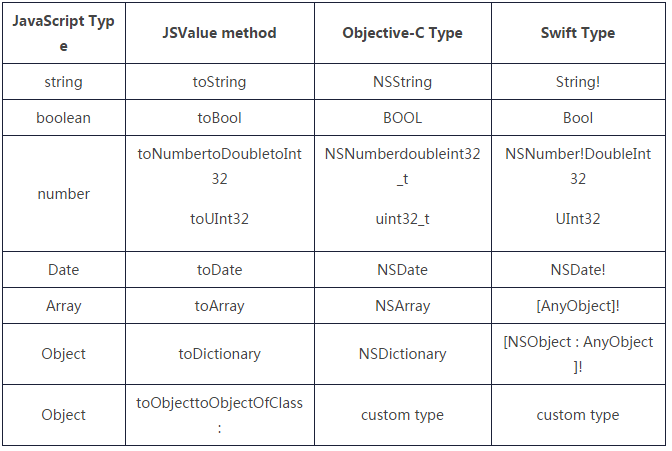
想要檢索上述示例中的tripleNum值,只需使用相應的方法即可:
//Objective-C
NSLog(@"Tripled: %d", [tripleNum toInt32]);
// Tripled: 30
//Swift
println("Tripled: \(tripleNum.toInt32())")
// Tripled: 30
下標值(Subscripting Values)
通過在JSContext和JSValue實例中使用下標符號可以輕松獲取上下文環境中已存在的值。其中,JSContext放入對象和數組的只能是字符串下標,而JSValue則可以是字符串或整數下標。
//Objective-C
JSValue *names = context[@"names"];
JSValue *initialName = names[0];
NSLog(@"The first name: %@", [initialName toString]);
// The first name: Grace
//Swift
let names = context.objectForKeyedSubscript("names")
let initialName = names.objectAtIndexedSubscript(0)
println("The first name: \(initialName.toString())")
// The first name: Grace
而Swift語言畢竟才誕生不久,所以並不能像Objective-C那樣自如地運用下標符號,目前,Swift的方法僅能實現objectAtKeyedSubscript()和objectAtIndexedSubscript()等下標。
函數調用(Calling Functions)
我們可以將Foundation類作為參數,從Objective-C/Swift代碼上直接調用封裝在JSValue的JavaScript函數。這裡,JavaScriptCore再次發揮了銜接作用。
//Objective-C
JSValue *tripleFunction = context[@"triple"];
JSValue *result = [tripleFunction callWithArguments:@[@5] ];
NSLog(@"Five tripled: %d", [result toInt32]);
//Swift
let tripleFunction = context.objectForKeyedSubscript("triple")
let result = tripleFunction.callWithArguments([5])
println("Five tripled: \(result.toInt32())")
異常處理(Exception Handling)
JSContext還有一個獨門絕技,就是通過設定上下文環境中exceptionHandler的屬性,可以檢查和記錄語法、類型以及出現的運行時錯誤。exceptionHandler是一個回調處理程序,主要接收JSContext的reference,進行異常情況處理。
//Objective-C
context.exceptionHandler = ^(JSContext *context, JSValue *exception) {
   NSLog(@"JS Error: %@", exception);
};
[context evaluateScript:@"function multiply(value1, value2) { return value1 * value2 "];
// JS Error: SyntaxError: Unexpected end of script
//Swift
context.exceptionHandler = { context, exception in
println("JS Error: \(exception)")
}
context.evaluateScript("function multiply(value1, value2) { return value1 * value2 ")
// JS Error: SyntaxError: Unexpected end of scriptJavaScript函數調用
了解了從JavaScript環境中獲取不同值以及調用函數的方法,那麼反過來,如何在JavaScript環境中獲取Objective-C或者Swift定義的自定義對象和方法呢?要從JSContext中獲取本地客戶端代碼,主要有兩種途徑,分別為Blocks和JSExport協議。
Blocks (塊)
在JSContext中,如果Objective-C代碼塊賦值為一個標識符,JavaScriptCore就會自動將其封裝在JavaScript函數中,因而在JavaScript上使用Foundation和Cocoa類就更方便些——這再次驗證了JavaScriptCore強大的銜接作用。現在CFStringTransform也能在JavaScript上使用了,如下所示:
//Objective-C
context[@"simplifyString"] = ^(NSString *input) {
   NSMutableString *mutableString = [input mutableCopy];
   CFStringTransform((__bridge CFMutableStringRef)mutableString, NULL, kCFStringTransformToLatin, NO);
   CFStringTransform((__bridge CFMutableStringRef)mutableString, NULL, kCFStringTransformStripCombiningMarks, NO);
   return mutableString;
};
NSLog(@"%@", [context evaluateScript:@"simplifyString('?????!')"]);
//Swift
let simplifyString: @objc_block String -> String = { input in
var mutableString = NSMutableString(string: input) as CFMutableStringRef
CFStringTransform(mutableString, nil, kCFStringTransformToLatin, Boolean(0))
CFStringTransform(mutableString, nil, kCFStringTransformStripCombiningMarks, Boolean(0))
return mutableString
}
context.setObject(unsafeBitCast(simplifyString, AnyObject.self), forKeyedSubscript: "simplifyString")
println(context.evaluateScript("simplifyString('?????!')"))
// annyeonghasaeyo!需要注意的是,Swift的speedbump只適用於Objective-C block,對Swift閉包無用。要在一個JSContext裡使用閉包,有兩個步驟:一是用@objc_block來聲明,二是將Swift的knuckle-whitening unsafeBitCast()函數轉換為 AnyObject。
內存管理(Memory Management)
代碼塊可以捕獲變量引用,而JSContext所有變量的強引用都保留在JSContext中,所以要注意避免循環強引用問題。另外,也不要在代碼塊中捕獲JSContext或任何JSValues,建議使用[JSContext currentContext]來獲取當前的Context對象,根據具體需求將值當做參數傳入block中。
JSExport協議
借助JSExport協議也可以在JavaScript上使用自定義對象。在JSExport協議中聲明的實例方法、類方法,不論屬性,都能自動與JavaScrip交互。文章稍後將介紹具體的實踐過程。
JavaScriptCore實踐
我們可以通過一些例子更好地了解上述技巧的使用方法。先定義一個遵循JSExport子協議PersonJSExport的Person model,再用JavaScript在JSON中創建和填入實例。有整個JVM,還要NSJSONSerialization干什麼?
PersonJSExports和Person
Person類執行的PersonJSExports協議具體規定了可用的JavaScript屬性。,在創建時,類方法必不可少,因為JavaScriptCore並不適用於初始化轉換,我們不能像對待原生的JavaScript類型那樣使用var person = new Person()。
//Objective-C
// in Person.h -----------------
@class Person;
@protocol PersonJSExports     @property (nonatomic, copy) NSString *firstName;
    @property (nonatomic, copy) NSString *lastName;
    @property NSInteger ageToday;
    - (NSString *)getFullName;
    // create and return a new Person instance with `firstName` and `lastName`
    + (instancetype)createWithFirstName:(NSString *)firstName lastName:(NSString *)lastName;
@end
@interface Person : NSObject     @property (nonatomic, copy) NSString *firstName;
    @property (nonatomic, copy) NSString *lastName;
    @property NSInteger ageToday;
@end
// in Person.m -----------------
@implementation Person
- (NSString *)getFullName {
    return [NSString stringWithFormat:@"%@ %@", self.firstName, self.lastName];
}
+ (instancetype) createWithFirstName:(NSString *)firstName lastName:(NSString *)lastName {
    Person *person = [[Person alloc] init];
    person.firstName = firstName;
    person.lastName = lastName;
    return person;
}
@end
//Swift
// Custom protocol must be declared with `@objc`
@objc protocol PersonJSExports : JSExport {
var firstName: String { get set }
var lastName: String { get set }
var birthYear: NSNumber? { get set }
func getFullName() -> String
/// create and return a new Person instance with `firstName` and `lastName`
class func createWithFirstName(firstName: String, lastName: String) -> Person
}
// Custom class must inherit from `NSObject`
@objc class Person : NSObject, PersonJSExports {
// properties must be declared as `dynamic`
dynamic var firstName: String
dynamic var lastName: String
dynamic var birthYear: NSNumber?
init(firstName: String, lastName: String) {
self.firstName = firstName
self.lastName = lastName
}
class func createWithFirstName(firstName: String, lastName: String) -> Person {
return Person(firstName: firstName, lastName: lastName)
}
func getFullName() -> String {
return "\(firstName) \(lastName)"
}
}配置JSContext
創建Person類之後,需要先將其導出到JavaScript環境中去,同時還需導入Mustache JS庫,以便對Person對象應用模板。
//Objective-C
// export Person class
context[@"Person"] = [Person class];
// load Mustache.js
NSString *mustacheJSString = [NSString stringWithContentsOfFile:... encoding:NSUTF8StringEncoding error:nil];
[context evaluateScript:mustacheJSString];
//Swift
// export Person class
context.setObject(Person.self, forKeyedSubscript: "Person")
// load Mustache.js
if let mustacheJSString = String(contentsOfFile:..., encoding:NSUTF8StringEncoding, error:nil) {
    context.evaluateScript(mustacheJSString)
}
JavaScript數據&處理
以下簡單列出一個JSON范例,以及用JSON來創建新Person實例。
注意:JavaScriptCore實現了Objective-C/Swift的方法名和JavaScript代碼交互。因為JavaScript沒有命名好的參數,任何額外的參數名稱都采取駝峰命名法(Camel-Case),並附加到函數名稱上。在此示例中,Objective-C的方法createWithFirstName:lastName:在JavaScript中則變成了createWithFirstNameLastName()。
//JSON
[
    { "first": "Grace",     "last": "Hopper",   "year": 1906 },
    { "first": "Ada",       "last": "Lovelace", "year": 1815 },
    { "first": "Margaret",  "last": "Hamilton", "year": 1936 }
]
//JavaScript
var loadPeopleFromJSON = function(jsonString) {
var data = JSON.parse(jsonString);
var people = [];
for (i = 0; i < data.length; i++) {
var person = Person.createWithFirstNameLastName(data[i].first, data[i].last);
person.birthYear = data[i].year;
people.push(person);
}
return people;
}動手一試
現在你只需加載JSON數據,並在JSContext中調用,將其解析到Person對象數組中,再用Mustache模板渲染即可:
//Objective-C
// get JSON string
NSString *peopleJSON = [NSString stringWithContentsOfFile:... encoding:NSUTF8StringEncoding error:nil];
// get load function
JSValue *load = context[@"loadPeopleFromJSON"];
// call with JSON and convert to an NSArray
JSValue *loadResult = [load callWithArguments:@[peopleJSON]];
NSArray *people = [loadResult toArray];
// get rendering function and create template
JSValue *mustacheRender = context[@"Mustache"][@"render"];
NSString *template = @"{{getFullName}}, born {{birthYear}}";
// loop through people and render Person object as string
for (Person *person in people) {
   NSLog(@"%@", [mustacheRender callWithArguments:@[template, person]]);
}
// Output:
// Grace Hopper, born 1906
// Ada Lovelace, born 1815
// Margaret Hamilton, born 1936
//Swift
// get JSON string
if let peopleJSON = NSString(contentsOfFile:..., encoding: NSUTF8StringEncoding, error: nil) {
// get load function
let load = context.objectForKeyedSubscript("loadPeopleFromJSON")
// call with JSON and convert to an array of `Person`
if let people = load.callWithArguments([peopleJSON]).toArray() as? [Person] {
// get rendering function and create template
let mustacheRender = context.objectForKeyedSubscript("Mustache").objectForKeyedSubscript("render")
let template = "{{getFullName}}, born {{birthYear}}"
// loop through people and render Person object as string
for person in people {
println(mustacheRender.callWithArguments([template, person]))
}
}
}
// Output:
// Grace Hopper, born 1906
// Ada Lovelace, born 1815
// Margaret Hamilton, born 1936
- 上一頁:iOS開發——創建你自己的Framework
- 下一頁:源碼篇:Mantle


- iOS Webview自順應現實內容高度的4種辦法詳解
- iOS獲得以後裝備WiFi信息的辦法
- iOS開辟之widget完成詳解
- Swift 同享文件操作小結(iOS 8 +)
- Swift 2.1 為 UIView 添加點擊事宜和點擊後果
- 在Swift中應用JSONModel 實例代碼
- 應用Swift代碼完成iOS手勢解鎖、指紋解鎖實例詳解
- 詳解iOS App中UISwitch開關組件的根本創立及應用辦法
- Swift完成iOS運用中短信驗證碼倒計時功效的實例分享
- iOS運用開辟中視圖控件UIWindow的根本應用教程
- iOS開辟中UISwitch按鈕的應用辦法簡介
- 深刻懂得iOS開辟中UIWindow的相干應用
- 詳解iOS設計中的UIWindow應用
- iOS開發中Swift3 監聽UITextView文字改動的辦法(三種辦法)
- 復雜理解Swift言語中的break和continue語句的用法