ViewController 瘦身的另一種解決方案

對於Massive View Controller,現在流行的解決方案是MVVM架構,把業務邏輯移入ViewModel來減少ViewController中的代碼。
這幾天又看到另一種方案,在此介紹一下。
例子
我們通過例子來說明,這裡舉的例子是一個常見的基於TableView的界面——一個通訊錄用戶信息列表。
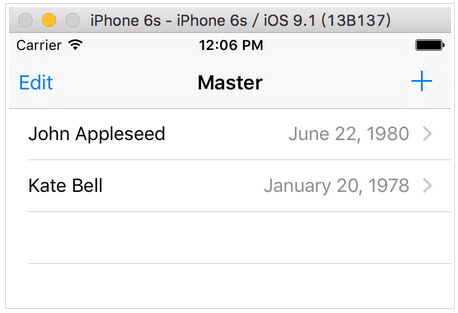
我們要實現的業務流程如下
App啟動後首先讀取本地Core Data中的數據,並展現出來,然後調用Web API來獲取到用戶數據列表,然後更新本地Core Data數據庫,只要數據更新了,UI上的展現也隨之變化。
用戶也可以在本地添加用戶數據,然後這些數據會同步到服務端。
1. 聲明協議
我們不會把所有的業務邏輯都寫到ViewController裡,而是首先聲明兩個protocol:
PeopleListDataProviderProtocol
定義了數據源對象要實現的屬性和方法
public protocol PeopleListDataProviderProtocol: UITableViewDataSource {
  var managedObjectContext: NSManagedObjectContext? { get set }
  weak var tableView: UITableView! { get set }

  func addPerson(personInfo: PersonInfo)
  func fetch()
}
APICommunicatorProtocol
定義了API請求者要實現的屬性和方法
public protocol APICommunicatorProtocol {
  func getPeople() -> (NSError?, [PersonInfo]?)
  func postPerson(personInfo: PersonInfo) -> NSError?
}
2. 編寫ViewController
我們的ViewController叫做PeopleListViewController,在其中聲明兩個屬性:
public var dataProvider: PeopleListDataProviderProtocol?
public var communicator: APICommunicatorProtocol = APICommunicator()
實現ViewDidLoad
override public func viewDidLoad() {
    super.viewDidLoad()
    // Do any additional setup after loading the view, typically from a nib.
    self.navigationItem.leftBarButtonItem = self.editButtonItem()
    let addButton = UIBarButtonItem(barButtonSystemItem: .Add, target: self, action: "addPerson")
    self.navigationItem.rightBarButtonItem = addButton
    // ViewController繼承於UITableViewController
    assert(dataProvider != nil, "dataProvider is not allowed to be nil at this point")
    tableView.dataSource = dataProvider
    dataProvider?.tableView = tableView
}
添加按鈕的事件響應方法和回調:
func addPerson() {
    let picker = ABPeoplePickerNavigationController()
    picker.peoplePickerDelegate = self
    presentViewController(picker, animated: true, completion: nil)
}
extension PeopleListViewController: ABPeoplePickerNavigationControllerDelegate {
    public func peoplePickerNavigationController(peoplePicker: ABPeoplePickerNavigationController, didSelectPerson person: ABRecord) {
        let personInfo = PersonInfo(abRecord: person)
        dataProvider?.addPerson(personInfo)
    }
}
然後再添加兩個方法來請求和同步數據:
public func fetchPeopleFromAPI() {
    let allPersonInfos = communicator.getPeople().1
    if let allPersonInfos = allPersonInfos {
        for personInfo in allPersonInfos {
            dataProvider?.addPerson(personInfo)
        }
    }
}
public func sendPersonToAPI(personInfo: PersonInfo) {
    communicator.postPerson(personInfo)
}
到此,我們的ViewController已經全部完成了,只有60行代碼,是不是很開森。
那Web API調用、Core Data操作,業務邏輯的代碼都去哪兒了呢?
OK,我們可以開始編寫實現那兩個協議的類了。
3. 實現Protocol
首先是實現了APICommunicatorProtocol的APICommunicator類:
public struct APICommunicator: APICommunicatorProtocol {
    public func getPeople() -> (NSError?, [PersonInfo]?) {
        return (nil, nil)
    }

    public func postPerson(personInfo: PersonInfo) -> NSError? {
        return nil
    }
}
與服務端的交互這裡就先省略了,就簡單實現一下。
然後再看實現了PeopleListDataProviderProtocol的PeopleListDataProvider類:
主要是以下幾個部分:
對Core Data操作的實現:
public func fetch() {
    let sortKey = NSUserDefaults.standardUserDefaults().integerForKey("sort") == 0 ? "lastName" : "firstName"
    let sortDescriptor = NSSortDescriptor(key: sortKey, ascending: true)
    let sortDescriptors = [sortDescriptor]
    fetchedResultsController.fetchRequest.sortDescriptors = sortDescriptors
    var error: NSError? = nil
    do {
      try fetchedResultsController.performFetch()
    } catch let error1 as NSError {
      error = error1
      print("error: \(error)")
    }
    tableView.reloadData()
}
對TableViewDataSource的實現:
public func numberOfSectionsInTableView(tableView: UITableView) -> Int {
    return self.fetchedResultsController.sections?.count ?? 0
}
public func tableView(tableView: UITableView, cellForRowAtIndexPath indexPath: NSIndexPath) -> UITableViewCell {
    let cell = tableView.dequeueReusableCellWithIdentifier("Cell", forIndexPath: indexPath)
    self.configureCell(cell, atIndexPath: indexPath)
    return cell
}
func configureCell(cell: UITableViewCell, atIndexPath indexPath: NSIndexPath) {
    let person = self.fetchedResultsController.objectAtIndexPath(indexPath) as! Person
    cell.textLabel!.text = person.fullname
    cell.detailTextLabel!.text = dateFormatter.stringFromDate(person.birthday)
}
對NSFetchedResultsControllerDelegate的實現:
public func controller(controller: NSFetchedResultsController, didChangeObject anObject: AnyObject, atIndexPath indexPath: NSIndexPath?, forChangeType type: NSFetchedResultsChangeType, newIndexPath: NSIndexPath?) {
    switch type {
    case .Insert:
        tableView.insertRowsAtIndexPaths([newIndexPath!], withRowAnimation: .Fade)
    case .Delete:
        tableView.deleteRowsAtIndexPaths([indexPath!], withRowAnimation: .Fade)
    case .Update:
        self.configureCell(tableView.cellForRowAtIndexPath(indexPath!)!, atIndexPath: indexPath!)
    case .Move:
        tableView.deleteRowsAtIndexPaths([indexPath!], withRowAnimation: .Fade)
        tableView.insertRowsAtIndexPaths([newIndexPath!], withRowAnimation: .Fade)
    }
}
(未列出所有代碼)
可以看到,我們把業務邏輯都放入了PeopleListDataProviderProtocol和APICommunicatorProtocol這兩個協議的實現中。在ViewController中通過屬性來引用這兩個協議的實現類,並且調用協議中定義的方法。
優勢
ViewController中的代碼就變的短小而清晰。
同MVVM一樣也實現了界面和業務邏輯的分離。
相對與MVVM,學習成本較低。
可以方便的創建Mock對象。
Mock對象
例如這個APICommunicator
public var communicator: APICommunicatorProtocol = APICommunicator()
在開發過程中或者單元測試時都可以用一個Mock對象MockAPICommunicator來替代它,來提供fake data。
class MockAPICommunicator: APICommunicatorProtocol {
    var allPersonInfo = [PersonInfo]()
    var postPersonGotCalled = false

    func getPeople() -> (NSError?, [PersonInfo]?) {
        return (nil, allPersonInfo)
    }

    func postPerson(personInfo: PersonInfo) -> NSError? {
        postPersonGotCalled = true
        return nil
    }
}
這樣在服務端API還沒有部署時,我們可以很方便的用一些假數據來幫助完成功能的開發,等API上線後換成真正的APICommunicator類。
同樣可以提供一個實現了PeopleListDataProviderProtocol的MockDataProvider類。
也可以很方便的借用Mock對象來進行單元測試。
例如:
func testFetchingPeopleFromAPICallsAddPeople() {
    // given
    let mockDataProvider = MockDataProvider()
    viewController.dataProvider = mockDataProvider

    let mockCommunicator = MockAPICommunicator()
    mockCommunicator.allPersonInfo = [PersonInfo(firstName: "firstname", lastName: "lastname", birthday: NSDate())]
    viewController.communicator = mockCommunicator

    // when
    viewController.fetchPeopleFromAPI()

    // then
    XCTAssertTrue(mockDataProvider.addPersonGotCalled, "addPerson should have been called")
}
總結
MVVM的優勢在於較為普遍,大家都懂的模式,減少了溝通成本。但是對於響應式編程、事件管道,ReactiveCocoa等概念,還是需要一定學習成本的。
在不使用MVVM的情況下,不妨試試本文介紹的結構來實現ViewController,為ViewController瘦身。
參考資料:
http://www.raywenderlich.com/101306/unit-testing-tutorial-mocking-objects
源碼下載:
http://cdn2.raywenderlich.com/wp-content/uploads/2015/04/Birthdays_Final1.zip


- IOS 開辟自界說條形ProgressView的實例
- 在uiview 的tableView中點擊cell進入跳轉到另外一個界面的完成辦法
- iOS開辟之UIScrollView控件詳解
- 進修iOS自界說導航掌握器UINavigationController
- iOS仿熱點話題熱門輪播界面tableView
- IOS中UITableView轉動到指定地位
- iOS為UIView設置暗影後果
- iOS中 LGLAlertView 提醒框的實例代碼
- iOS10語音辨認框架SpeechFramework運用詳解
- iOS開辟之UIPickerView完成城市選擇器的步調詳解
- iOS開辟中UIWebView的加載當地數據的三種方法
- iOS 開辟中 NavigationController常常湧現的成績緣由剖析
- iOS中修正UITextField占位符字體色彩的辦法總結
- iOS若何獲得以後View地點掌握器的辦法
- iOS Webview自順應現實內容高度的4種辦法詳解