UITableview代理方法與Viewcontroller分離

本文為投稿文章,作者:Resory
序
在objcio.cn中有一篇文章更輕量的 View Controllers其中有一小節,是說把UITableview的datasource和delegate分離出Viewcontroller的。我也試著實現了一下,隨便把思路總結下~
DEMO
建議先下載demo,再結合下面的分析,會好理解點。地址https://github.com/Resory/RYDatasource
邏輯
既然我們要把UITableview的協議方法分離出來,就得有一個人去接,在這裡我們把這個人叫Datasource。可以理解它為中間人。這個中間人就是以後實現UITableview協議方法的地方。
要中間人實現UITableview協議方法,就得知道UITableview的數據,復用,事件等要素。這些數據由Viewcontroller來傳。這三個要素分別定義為serverData,cellIdentifiers,configSelectedBlock
自此我們可以知道,只要Viewcontroller傳了serverData,cellIdentifiers,configSelectedBlock這三個基本參數,中間人就可以實現UITableview協議方法了。
實現
在Viewcontroller.m中。我們命名了三個全局變量,如下代碼
(configSelectedBlock不需要設置全局,到時候在函數中直接生成即可)
// Viewcontroller.m
@property (nonatomic, strong) NSMutableArray *serverData;       // 服務器返回的數據
@property (nonatomic, strong) NSMutableArray *cellIdentifiers;  // cell樣式標示
@property (nonatomic, strong) TDatasource *datasource;          // 中間人
還是在Viewcontroller.m中.我們把數據,復用,事件設置好後,看看如何調用中間人。
數據
// Viewcontroller.m
- (void)configData
{
    // 服務器返回的數據
    _serverData = [[NSMutableArray alloc] init];
    // 實體設置
    TModelOne *one = [[TModelOne alloc] init];
    TModelOne *two = [[TModelOne alloc] init];

    one.name = @"奇犽";
    one.imageName = @"001.jpg";

    two.name = @"拿尼加";
    two.imageName = @"002.jgp";

    [_serverData addObject:one];
    [_serverData addObject:two];
}
復用
// Viewcontroller.m
- (void)configIdentifier
{

    // cell復用設置
    _cellIdentifiers = [[NSMutableArray alloc] init];
    [_cellIdentifiers addObject:NSStringFromClass([TCellOne class])];
    [_tableview registerNib:[TCellOne nib] forCellReuseIdentifier:_cellIdentifiers[0]];
}
初始化"中間人"
// Viewcontroller.m
- (void)configDataSource
{
    // cell數據
    [self configData];

    // cell復用
    [self configIdentifier];

    // cell事件
    RYCellSelectedBlock cellSelectedBlock = ^(id obj){
        // cell點擊事件
        [self cellSelectedWithObj:obj];
    };

    // 初始化dataSource
    _datasource = [[TDatasource alloc] initWithServerData:_serverData
                                       andCellIdentifiers:_cellIdentifiers];
    _datasource.cellSelectedBlock = cellSelectedBlock;
}
把中間人設置為UITableview的協議方法執行者
// Viewcontroller.m
- (void)configTableView
{

    // 把_dataSource設置成_tableview的代理,以後所有代理方法都在_dataSource實現
    _tableview.delegate = _datasource;
    _tableview.dataSource = _datasource;
    _tableview.tableFooterView = [UIView new];
}
我們進去中間人看看它到底做了什麼,下面的代碼可以清晰看到。中間人除了多了初始化方法來接受數據外,其他方法都是UITableview的協議方法
// TDatasource.m

- (id)initWithServerData:(NSArray *)serverData
      andCellIdentifiers:(NSArray *)identifiers
{
    self = [super init];
    if(self)
    {
        self.serverData = serverData;           // 數據
        self.cellIdentifiers = identifiers;     // 復用
    }
    return self;
}

- (UITableViewCell *)tableView:(UITableView *)tableView cellForRowAtIndexPath:(NSIndexPath *)indexPath
{
    UITableViewCell *cell = [tableView dequeueReusableCellWithIdentifier:self.cellIdentifiers[0]
                                                            forIndexPath:indexPath];
    // cell的數據填充(cell的category方法)
    [cell configCellWithEntity:self.serverData[indexPath.row]];
    return cell;
}

- (CGFloat)tableView:(UITableView *)tableView heightForRowAtIndexPath:(NSIndexPath *)indexPath
{
    return 80.0;
}

- (void)tableView:(UITableView *)tableView didSelectRowAtIndexPath:(NSIndexPath *)indexPath
{
    // cell點擊事件
    self.cellSelectedBlock(indexPath);
}
最後我們來看下cell裡面的方法,也是一眼能看懂的代碼··
#import "TCellOne.h"
#import "TModelOne.h"

@implementation TCellOne

- (void)awakeFromNib {
    // Initialization code
}

- (void)setSelected:(BOOL)selected animated:(BOOL)animated {
    [super setSelected:selected animated:animated];
    // Configure the view for the selected state
}

- (void)configCellWithEntity:(id)entity
{
    if(entity)
    {
        TModelOne *model = entity;
        self.name.text = model.name;
        self.avartar.image = [UIImage imageNamed:model.imageName];
    }
}
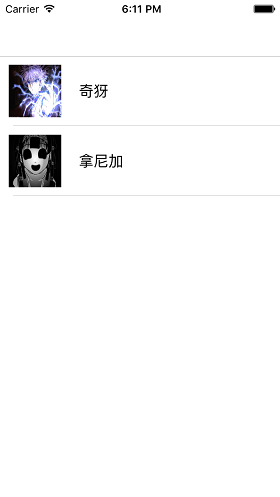
挫就挫吧,總得來張圖。
最後
UITableview協議方法分離出Viewcontroller後,Viewcontroller確實清爽了不少。但同時也帶了不便,比如說又多了一個文件,又比如說cell的點擊事件就得用一個block來回調,如果是cell裡面的子view的點擊事件就更不利索了。所以有利就有弊吧。還是得結合實際選擇最適合自己的開發方式~
如果你有疑問或者發現錯誤請留言給我
喜歡就點個贊,點個星什麼的。3Q~~

- iOS開源一個簡略的訂餐app UI框架
- 在uiview 的tableView中點擊cell進入跳轉到另外一個界面的完成辦法
- iOS開辟之UIScrollView控件詳解
- 進修iOS自界說導航掌握器UINavigationController
- iOS仿熱點話題熱門輪播界面tableView
- IOS中UITableView轉動到指定地位
- iOS為UIView設置暗影後果
- iOS設置UIButton文字顯示地位和字體年夜小、色彩的辦法
- iOS開辟之UIPickerView完成城市選擇器的步調詳解
- iOS長按UIlabel完成可復制功效
- iOS開辟中UIWebView的加載當地數據的三種方法
- iOS中修正UITextField占位符字體色彩的辦法總結
- IOS 仿時間網選票UI實例代碼
- iOS推送之當地告訴UILocalNotification
- 應用UITextField限制只可輸出中,英文,數字的辦法