兩行代碼添加啟動廣告的功能
編輯:IOS開發基礎
廣告思路:第一次進入app時沒有廣告(因為廣告的加載最好是從本地緩存獲取,如果每次都從網絡獲取有可能因網速原因加載失敗)。第一次啟動的同時,根據後台返回的數據加載廣告(一般是圖片地址和廣告鏈接),然後保存在本地。第二次啟動的時候本地存在了廣告,這個時候就可以顯示了。然後請求最新的廣告數據,如果和之前的廣告一樣則不做操作;如果有新廣告,則刪除本地的舊廣告,保存新廣告,下次啟動再顯示。
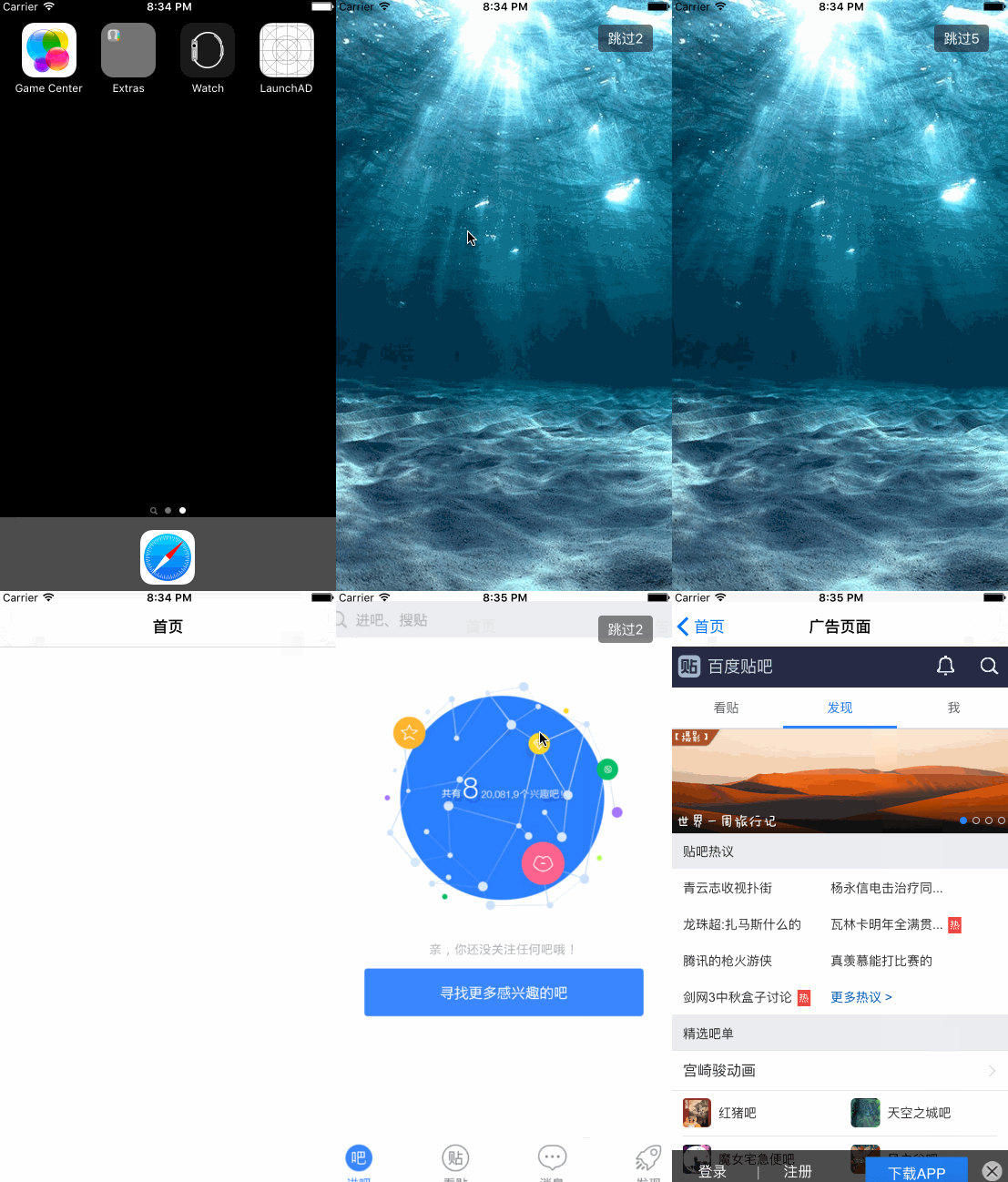
下面上代碼: ADView.h (繼承自UIView)
#import #define ScreenWidth [UIScreen mainScreen].bounds.size.width
#define ScreenHeight [UIScreen mainScreen].bounds.size.height
#define UserDefaults [NSUserDefaults standardUserDefaults]
static NSString *const adImageName = @"adImageName";
static NSString *const adUrl = @"adUrl";

@interface ADView : UIView

/** 倒計時(默認3秒) */
@property (nonatomic,assign) NSUInteger showTime;

/** 初始化方法*/
-(instancetype)initWithFrame:(CGRect)frame andImgUrl:(NSString *)imageUrl andADUrl:(NSString *)adUrl andClickBlock:(void(^)(NSString *clikImgUrl))block;

/** 顯示廣告頁面方法*/
- (void)show;

@end
ADView.m
#import "ADView.h"

@interface ADView()

@property (nonatomic, strong) UIImageView *adView;

@property (nonatomic, strong) UIButton *countBtn;

@property (nonatomic, strong) NSTimer *countTimer;


@property (nonatomic, assign) NSUInteger count;

/** 廣告圖片本地路徑 */
@property (nonatomic,copy) NSString *filePath;

/** 新廣告圖片地址 */
@property (nonatomic,copy) NSString *imgUrl;

/** 新廣告的鏈接 */
@property (nonatomic,copy) NSString *adUrl;

/** 所點擊的廣告鏈接 */
@property (nonatomic,copy) NSString *clickAdUrl;

/** 點擊回調block */
@property (nonatomic,copy) void (^clickBlock)(NSString *url);

@end

@implementation ADView

-(NSUInteger)showTime
{
    if (_showTime == 0)
    {
        return 3;
    }
    else
    {
        return _showTime;
    }
}


- (NSTimer *)countTimer
{
    if (!_countTimer) {
        _countTimer = [NSTimer scheduledTimerWithTimeInterval:1.0 target:self selector:@selector(countDown) userInfo:nil repeats:YES];
    }
    return _countTimer;
}

/**
 *  初始化
 *
 *  @param frame    坐標
 *  @param imageUrl 圖片地址
 *  @param adUrl    廣告鏈接
 *  @param block    點擊廣告回調
 *
 *  @return self
 */
-(instancetype)initWithFrame:(CGRect)frame andImgUrl:(NSString *)imageUrl andADUrl:(NSString *)adUrl andClickBlock:(void (^)(NSString *))block
{
    self = [super initWithFrame:frame];
    if (self) {
        //給屬性賦值
        _clickBlock = block;
        _imgUrl = imageUrl;
        _adUrl = adUrl;

        //廣告圖片
        _adView = [[UIImageView alloc] initWithFrame:frame];
        _adView.userInteractionEnabled = YES;
        _adView.contentMode = UIViewContentModeScaleAspectFill;
        _adView.clipsToBounds = YES;
        UITapGestureRecognizer *tap = [[UITapGestureRecognizer alloc] initWithTarget:self action:@selector(pushToAd)];
        [_adView addGestureRecognizer:tap];

        //跳過按鈕
        CGFloat btnW = 60;
        CGFloat btnH = 30;
        _countBtn = [[UIButton alloc] initWithFrame:CGRectMake(ScreenWidth - btnW - 24, btnH, btnW, btnH)];
        [_countBtn addTarget:self action:@selector(dismiss) forControlEvents:UIControlEventTouchUpInside];
        _countBtn.titleLabel.font = [UIFont systemFontOfSize:15];
        [_countBtn setTitleColor:[UIColor whiteColor] forState:UIControlStateNormal];
        _countBtn.backgroundColor = [UIColor colorWithRed:38 /255.0 green:38 /255.0 blue:38 /255.0 alpha:0.6];
        _countBtn.layer.cornerRadius = 4;

        [self addSubview:_adView];
        [self addSubview:_countBtn];

    }
    return self;
}


- (void)show
{
    //判斷本地緩存廣告是否存在,存在即顯示
    if ([self imageExist]) {
        //設置按鈕倒計時
        [_countBtn setTitle:[NSString stringWithFormat:@"跳過%zd", self.showTime] forState:UIControlStateNormal];
        //當前顯示的廣告圖片
        _adView.image = [UIImage imageWithContentsOfFile:_filePath];
        //當前顯示的廣告鏈接
        _clickAdUrl = [UserDefaults valueForKey:adUrl];
        // 倒計時方法1:GCD
        // [self startCoundown];
        // 倒計時方法2:定時器
        [self startTimer];
        UIWindow *window = [UIApplication sharedApplication].keyWindow;
        [window addSubview:self];
    }
    //不管本地是否存在廣告圖片都獲取最新圖片
    [self setNewADImgUrl:_imgUrl];
}


//判斷沙盒中是否存在廣告圖片,如果存在,直接顯示
- (BOOL)imageExist
{
    _filePath = [self getFilePathWithImageName:[UserDefaults valueForKey:adImageName]];
    BOOL isExist = [self isFileExistWithFilePath:_filePath];
    return isExist;
}


//跳轉到廣告頁面
- (void)pushToAd{
    if (_clickAdUrl)
    {
        //把所點擊的廣告鏈接回調出去
        _clickBlock(_clickAdUrl);
        [self dismiss];
    }

}

//跳過
- (void)countDown
{
    _count --;
    [_countBtn setTitle:[NSString stringWithFormat:@"跳過%zd",_count] forState:UIControlStateNormal];
    if (_count == 0) {

        [self dismiss];
    }
}


// 定時器倒計時
- (void)startTimer
{
    _count = self.showTime;
    [[NSRunLoop mainRunLoop] addTimer:self.countTimer forMode:NSRunLoopCommonModes];
}

// GCD倒計時
- (void)startCoundown
{
    __block NSUInteger timeout = self.showTime + 1; //倒計時時間 + 1
    dispatch_queue_t queue = dispatch_get_global_queue(DISPATCH_QUEUE_PRIORITY_DEFAULT, 0);
    dispatch_source_t _timer = dispatch_source_create(DISPATCH_SOURCE_TYPE_TIMER, 0, 0,queue);
    dispatch_source_set_timer(_timer,dispatch_walltime(NULL, 0),1.0 * NSEC_PER_SEC, 0); //每秒執行
    dispatch_source_set_event_handler(_timer, ^{
        if(timeout <= 0){ //倒計時結束,關閉
            dispatch_source_cancel(_timer);
            dispatch_async(dispatch_get_main_queue(), ^{

                [self dismiss];

            });
        }else{

            dispatch_async(dispatch_get_main_queue(), ^{
                [_countBtn setTitle:[NSString stringWithFormat:@"跳過%zd",timeout] forState:UIControlStateNormal];
            });
            timeout--;
        }
    });
    dispatch_resume(_timer);
}

// 移除廣告頁面
- (void)dismiss
{
    [self.countTimer invalidate];
    self.countTimer = nil;

    [UIView animateWithDuration:0.3f animations:^{

        self.alpha = 0.f;

    } completion:^(BOOL finished) {

        [self removeFromSuperview];

    }];

}

//獲取最新廣告
- (void)setNewADImgUrl:(NSString *)imgUrl
{
    //獲取圖片名字(***.png)
    NSString *imgName = [[imgUrl componentsSeparatedByString:@"/"]lastObject];
    //拼接沙盒路徑
    NSString *filePath = [self getFilePathWithImageName:imgName];
    BOOL isExist = [self isFileExistWithFilePath:filePath];
    if (!isExist){// 如果本地沒有該圖片,下載新圖片保存,並且刪除舊圖片
        [self downloadAdImageWithUrl:imgUrl imageName:imgName];
    }
}

/**
 *  下載新圖片(這裡也可以自己使用SDWebImage來下載圖片)
 */
- (void)downloadAdImageWithUrl:(NSString *)imageUrl imageName:(NSString *)imageName
{
    dispatch_async(dispatch_get_global_queue(DISPATCH_QUEUE_PRIORITY_DEFAULT, 0), ^{

        NSData *data = [NSData dataWithContentsOfURL:[NSURL URLWithString:imageUrl]];
        UIImage *image = [UIImage imageWithData:data];

        NSString *filePath = [self getFilePathWithImageName:imageName];
        if ([UIImagePNGRepresentation(image) writeToFile:filePath atomically:YES]) {// 保存成功
            NSLog(@"保存成功");
            //刪除舊廣告圖片
            [self deleteOldImage];
            //設置新圖片
            [UserDefaults setValue:imageName forKey:adImageName];
            //設置廣告鏈接
            [UserDefaults setValue:_adUrl forKey:adUrl];
            [UserDefaults synchronize];
        }else{
            NSLog(@"保存失敗");
        }

    });
}


#pragma mark - 文件操作

/**
 *  判斷文件是否存在
 */
- (BOOL)isFileExistWithFilePath:(NSString *)filePath
{
    NSFileManager *fileManager = [NSFileManager defaultManager];
    BOOL isDirectory = FALSE;
    return [fileManager fileExistsAtPath:filePath isDirectory:&isDirectory];
}

/**
 *  根據圖片名拼接文件路徑
 */
- (NSString *)getFilePathWithImageName:(NSString *)imageName
{

    if (imageName) {
        NSArray *paths = NSSearchPathForDirectoriesInDomains(NSCachesDirectory,NSUserDomainMask, YES);
        NSString *filePath = [[paths objectAtIndex:0] stringByAppendingPathComponent:imageName];

        return filePath;
    }
    return nil;
}

/**
 *  刪除舊圖片
 */
- (void)deleteOldImage
{
    NSString *imageName = [UserDefaults valueForKey:adImageName];
    if (imageName) {
        NSString *filePath = [self getFilePathWithImageName:imageName];
        NSFileManager *fileManager = [NSFileManager defaultManager];
        [fileManager removeItemAtPath:filePath error:nil];
    }
}

@end
使用方法: 在使用的地方添加如下代碼
NSString *imageUrl = @"http://img5q.duitang.com/uploads/item/201505/25/20150525223238_NdQrh.thumb.700_0.png";
NSString *adURL = @"http://tieba.baidu.com/";

//1、創建廣告
ADView *adView = [[ADView alloc] initWithFrame:[UIApplication sharedApplication].keyWindow.bounds andImgUrl:imageUrl andADUrl:adURL andClickBlock:^(NSString *clikImgUrl) {

    NSLog(@"進入廣告:%@",clikImgUrl);
}];

//2、顯示廣告
[adView show];
gitHub地址:https://github.com/xiongoahc/LaunchAD


相關文章
+