iOS後台定位:實時向服務器發送最新位置
編輯:IOS開發基礎
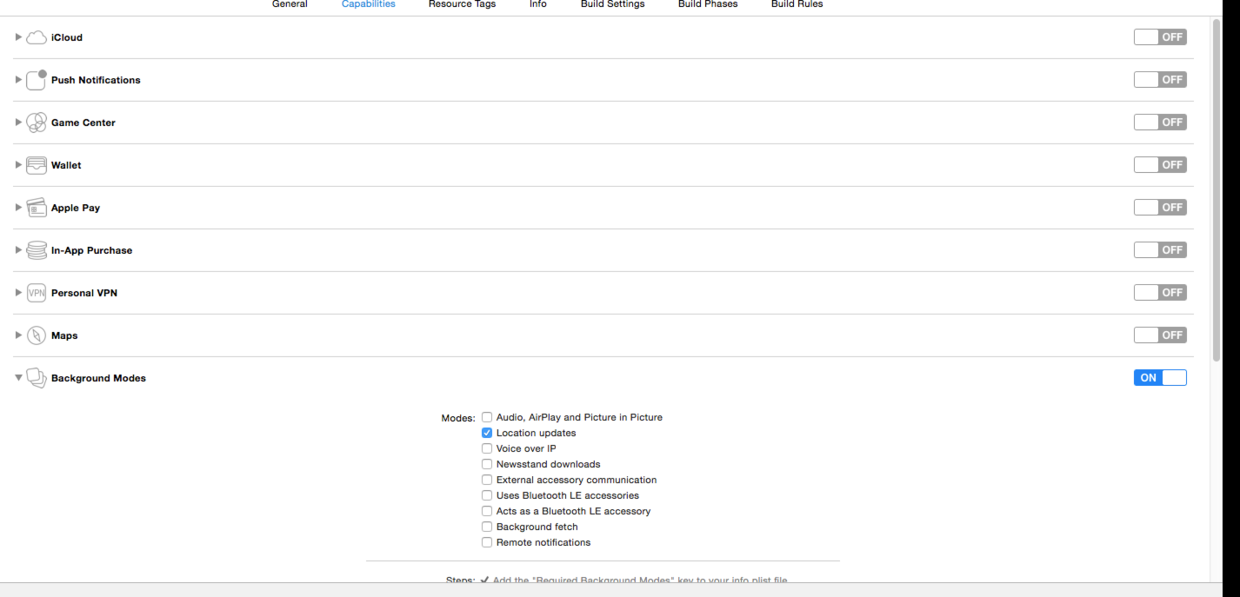
第一步,開啟後台模式,選中定位,選擇project --> capabilities-->Backgorund Modes --> Location updates 如圖:
第二步,在info.list 文件中添加如下配置:
允許 http 請求 ,ios 9 之後需要添加,便於向服務器發送請求NSAppTransportSecurity NSAllowsArbitraryLoads
添加定位權限,ios8之後需要添加,否則無法定位NSLocationWhenInUseUsageDescription YES NSLocationAlwaysUsageDescription YES
第三步,代碼如下:
#import "ViewController.h"

@interface ViewController ()

@end

@implementation ViewController

- (void)viewDidLoad {
    [super viewDidLoad];
    // Do any additional setup after loading the view, typically from a nib.

    self.view.backgroundColor = [UIColor whiteColor];
    self.title = @"後台定位";

    self.locationManager = [[CLLocationManager alloc] init];

    self.locationManager.delegate = self;

    [self.locationManager setDesiredAccuracy:kCLLocationAccuracyBest];

    if ([[UIDevice currentDevice].systemVersion floatValue] > 8)
    {
         /** 請求用戶權限:分為:只在前台開啟定位  /在後台也可定位, */

         /** 只在前台開啟定位 */
//        [self.locationManager requestWhenInUseAuthorization];

         /** 後台也可以定位 */
        [self.locationManager requestAlwaysAuthorization];
    }

    if ([[UIDevice currentDevice].systemVersion floatValue] > 9)
    {
         /** iOS9新特性:將允許出現這種場景:同一app中多個location manager:一些只能在前台定位,另一些可在後台定位(並可隨時禁止其後台定位)。 */
        [self.locationManager setAllowsBackgroundLocationUpdates:YES];
    }

     /** 開始定位 */
    [self.locationManager startUpdatingLocation];
}

#pragma mark -  定位代理方法
- (void)locationManager:(CLLocationManager *)manager didUpdateLocations:(NSArray *)locations
{
    CLLocation *loc = [locations objectAtIndex:0];

    NSLog(@"經緯度  %f  %f ",loc.coordinate.latitude,loc.coordinate.longitude);

    NSURLSession *session = [NSURLSession sharedSession];

    NSURLSessionDataTask *task = [session dataTaskWithRequest:[NSURLRequest requestWithURL:[NSURL URLWithString:@"http://ac.ybjk.com/ua.php"]] completionHandler:^(NSData * _Nullable data, NSURLResponse * _Nullable response, NSError * _Nullable error) {
//        NSLog(@"response  %@",response);

        NSString *result = [[NSString alloc] initWithData:data encoding:NSUTF8StringEncoding];

        NSLog(@"result %@",result);
    }];

    [task resume];
}


- (void)didReceiveMemoryWarning {
    [super didReceiveMemoryWarning];
    // Dispose of any resources that can be recreated.
}

@end
至此,完成後台實時定位功能,並向服務器發送請求成功
記錄點滴。
Tip
學習的路上總是曲折的,每個人都是從菜鳥過來的,遇到問題總是希望能夠與他人溝通交流,而在各種群裡問了問題就石沉大海,所以想建一個技術交流為主的群,遇到的問題可以記錄下來分享給他人,方便了自己,也造就了他人,不管怎樣,記錄點滴,但願與君共勉


相關文章
+