
控制器轉場動畫詳解
編輯:IOS開發基礎

作者:YouXianMing 授權本站轉載。
效果
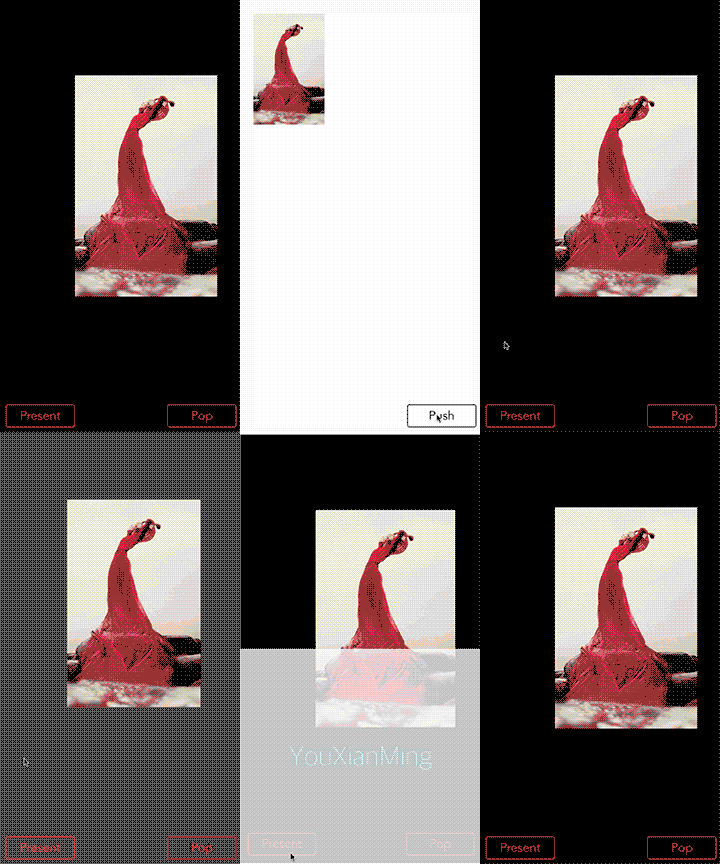
說明
1. 控制器轉場動畫包括了普通控制器的present與dismiss轉場動畫,還有NavigationController的push與pop轉場動畫.其中,NavigationController的pop動畫包含了回退百分比顯示
2. 對轉場動畫對象進行行為抽象,讓使用更加簡單
3. 即使簡化了使用,控制器轉場動畫也是屬於比較難掌握的
源碼
https://github.com/YouXianMing/ViewControllersTransition
//
//  BaseAnimator.h
//  ViewControllersTransition
//
//  Created by YouXianMing on 15/7/21.
//  Copyright (c) 2015年 YouXianMing. All rights reserved.
//
#import #import @interface BaseAnimator : NSObject /**
 *  動畫執行時間(默認值為0.5s)
 */
@property (nonatomic) NSTimeInterval  transitionDuration;
/**
 *  == 子類重寫此方法實現動畫效果 ==
 *
 *  動畫事件
 */
- (void)animateTransitionEvent;
/**
 *  == 在animateTransitionEvent使用才有效 ==
 *
 *  源頭控制器
 */
@property (nonatomic, readonly, weak) UIViewController *fromViewController;
/**
 *  == 在animateTransitionEvent使用才有效 ==
 *
 *  目標控制器
 */
@property (nonatomic, readonly, weak) UIViewController *toViewController;
/**
 *  == 在animateTransitionEvent使用才有效 ==
 *
 *  containerView
 */
@property (nonatomic, readonly, weak) UIView           *containerView;
/**
 *  動畫事件結束
 */
- (void)completeTransition;
@end
//
//  BaseAnimator.m
//  ViewControllersTransition
//
//  Created by YouXianMing on 15/7/21.
//  Copyright (c) 2015年 YouXianMing. All rights reserved.
//
#import "BaseAnimator.h"
@interface BaseAnimator ()
@property (nonatomic, weak) id  transitionContext;
@property (nonatomic, weak) UIViewController  *fromViewController;
@property (nonatomic, weak) UIViewController  *toViewController;
@property (nonatomic, weak) UIView            *containerView;
@end
@implementation BaseAnimator
#pragma mark - 初始化
- (instancetype)init {

    self = [super init];
    if (self) {

        // 默認參數設置
        [self deafultSet];
    }

    return self;
}
- (void)deafultSet {

    _transitionDuration = 0.5f;
}
#pragma mark - 動畫代理
- (NSTimeInterval)transitionDuration:(id )transitionContext {

    return _transitionDuration;
}
- (void)animateTransition:(id )transitionContext {

    self.fromViewController = [transitionContext viewControllerForKey:UITransitionContextFromViewControllerKey];
    self.toViewController   = [transitionContext viewControllerForKey:UITransitionContextToViewControllerKey];
    self.containerView      = [transitionContext containerView];
    self.transitionContext  = transitionContext;

    [self animateTransitionEvent];
}
- (void)animateTransitionEvent {

    /* == 代碼示例 ==

    UIView *tmpView  = [[UIView alloc] initWithFrame:CGRectMake(0, 0, 100, 100)];
    [self.containerView addSubview:self.toViewController.view];
    [self.containerView addSubview:tmpView];

    [UIView animateWithDuration:self.transitionDuration
                          delay:0.0f
         usingSpringWithDamping:1 initialSpringVelocity:0.f options:0 animations:^{

             tmpView.frame = CGRectMake(0, 0, 100, 100);

         } completion:^(BOOL finished) {

             [tmpView removeFromSuperview];
             [self completeTransition];
         }];
     */
}
#pragma mark -
- (void)completeTransition {
    [self.transitionContext completeTransition:!self.transitionContext.transitionWasCancelled];
}
@end
細節
導航欄控制器動畫需要做的事情(*為添加回退百分比,非必須)
1. 添加協議

2. 添加代理

3. 實現協議方法
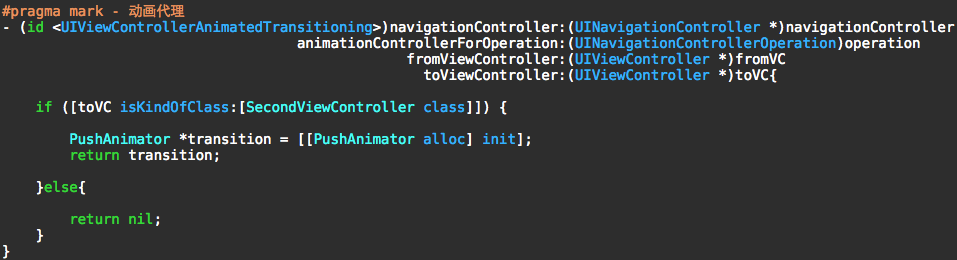
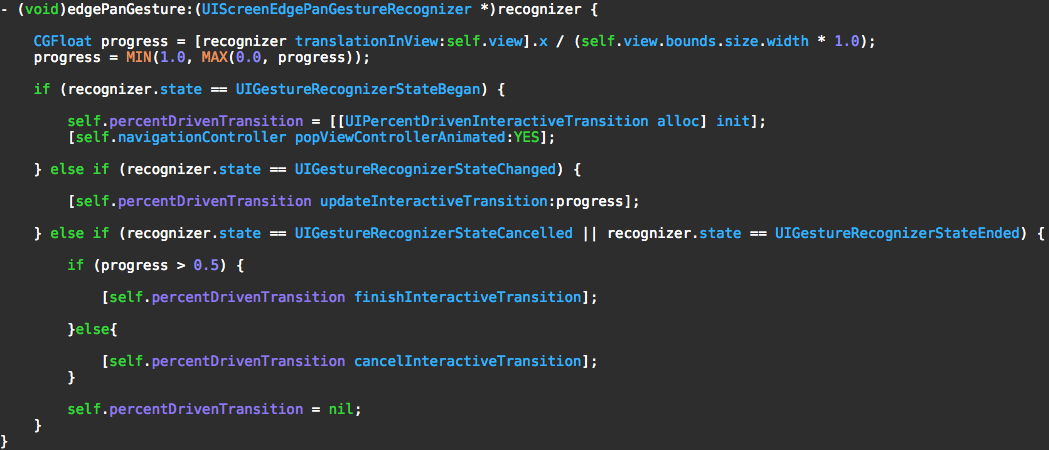
* 4. 添加UIPercentDrivenInteractiveTransition對象

* 5. 添加邊緣手勢

* 6. 實現百分比協議

* 7. 實現手勢方法
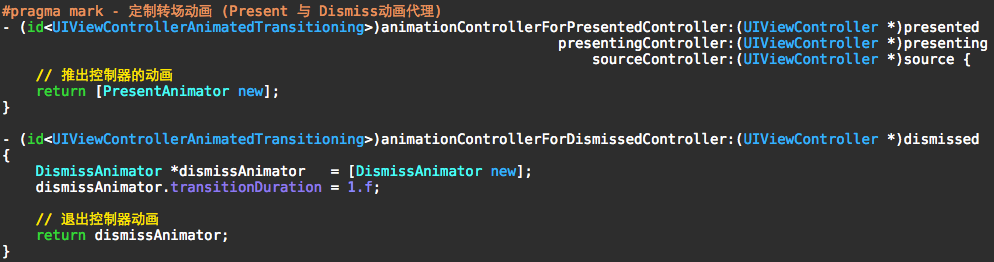
普通控制器動畫需要做的事情
1. 添加協議

2. 控制器的簡易配置
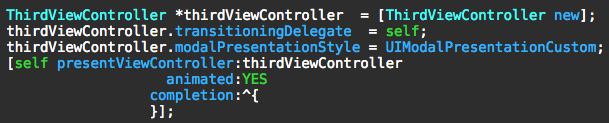
3. 實現代理協議


相關文章
+- 經由過程UIKit坐標系來周全控制iOS中的UIScrollView組件
- 簡略控制iOS運用開辟中sandbox沙盒的應用
- 實例解說iOS中的UIPageViewController翻頁視圖控制器
- 詳解iOS的UI開發中控制器的創立辦法
- unix 編程進程控制詳細引見
- iOS 容器控制器 (Container View Controller)
- iOS完成先無動畫pop再push,交換以後控制器
- IOS在控制器間跳轉完成過渡動畫
- IOS 開發之操作圖庫自定義控制器
- Swift_控制流
- iOS鎖屏頁面控制音樂播放
- iPhone7語音控制怎麼關閉?蘋果7怎麼關閉Siri?[圖]
- 蘋果iOS10概念設計:控制中心炫爆
- 不了解就懵逼:蘋果iOS10控制中心三屏都有啥功能?
- 蘋果iOS10控制中心4大新功能暢想

- 源碼篇:MBProgressHUD
- 5分鐘 搞定UIButton的文本與圖片的布局
- iPhone 6和iPhone 6 plus的AV Foundation框架特性
- 多視圖滑動點擊切換極速集成
- Xcode7升級到Xcode8之後遇到文件沖突
- 源碼推薦(01.12):自定義tabbar主框架,Tabletableviewcell上加載視頻播放器
- 源碼推薦(5.04):CDPMonitorKeyboard封裝,可解決輸入view被鍵盤遮擋問題,點燈游戲
- 源碼推薦(11.26):輕量級自定義TabBar,圖片展示
- 源碼推薦(02.01B):方便易用照片多選框架,一句代碼撥通任何電話號碼
- UIMotionEffect和Home頁背景視差效果