下拉框篩選控件
編輯:IOS開發基礎
原文
前言
數據大致是模范美團外賣數據
Demo效果:
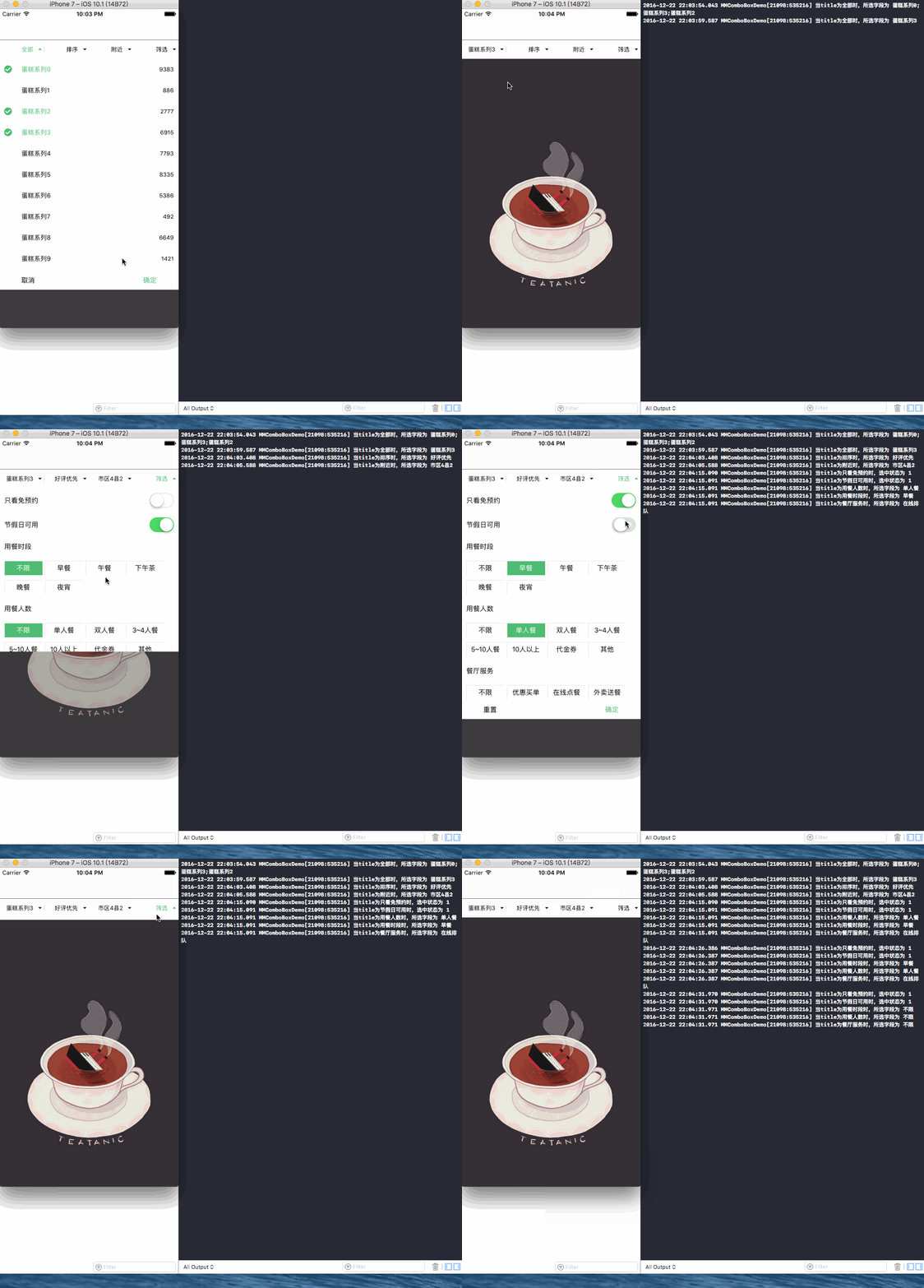
效果圖.gif
工程結構圖:
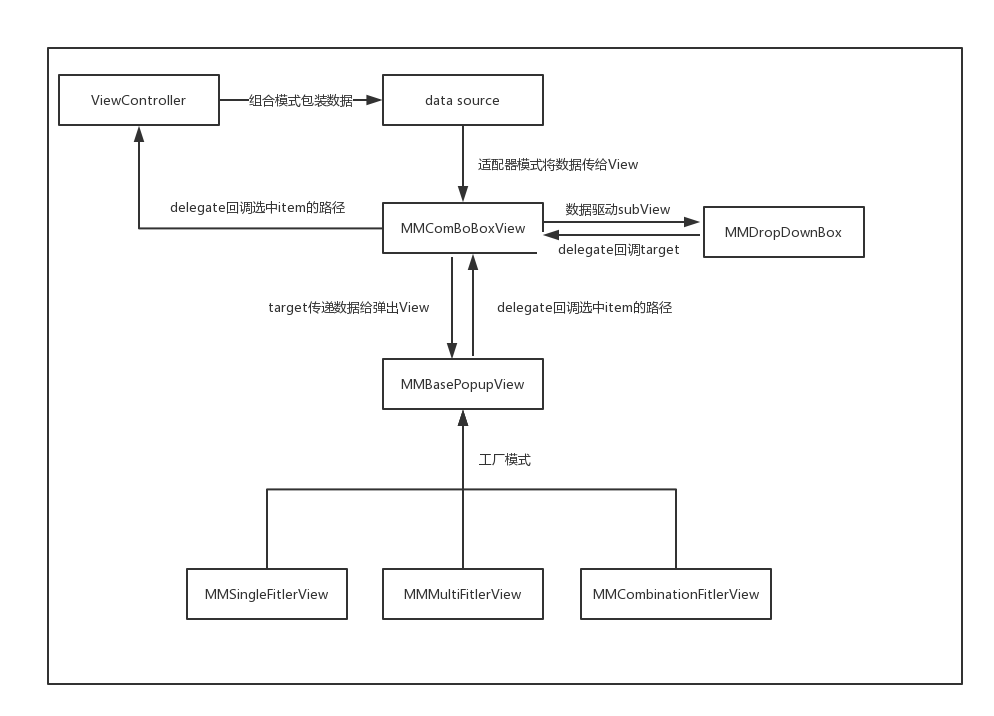
結構圖.png
1.模擬組裝數據,因為可能是多層的,所以我們這裡通過組合模式來組裝數據。在MMBaseItem裡面我們定義了三個枚舉:
//這個字段我們暫時留著以後擴展,覆蓋可能要有些選項不能選擇,顯示灰色的情況
typedef NS_ENUM(NSUInteger, MMPopupViewMarkType) {  //選中的狀態
    MMPopupViewDisplayTypeSelected = 0,      //可以選中
    MMPopupViewDisplayTypeUnselected = 1,    //不可以選中
};

typedef NS_ENUM(NSUInteger, MMPopupViewSelectedType) {     //是否支持單選或者多選
    MMPopupViewSingleSelection,                            //單選
    MMPopupViewMultilSeMultiSelection,                    //多選
};

typedef NS_ENUM(NSUInteger, MMPopupViewDisplayType) {  //分辨彈出來的view類型
    MMPopupViewDisplayTypeNormal = 0,                //一層
    MMPopupViewDisplayTypeMultilayer = 1,            //兩層
    MMPopupViewDisplayTypeFilters = 2,               //混合
};
每個MMItem都持有一個layout對象提前計算好彈出視圖的布局信息並儲存。由於MMPopupViewDisplayTypeNormal和MMPopupViewDisplayTypeMultilayer兩種類型布局比較單一簡單,所以layout對象暫時只是在MMPopupViewDisplayTypeFilters時有用。
當然我這裡是模擬數據。下面給出一種建立樹模型的思路:
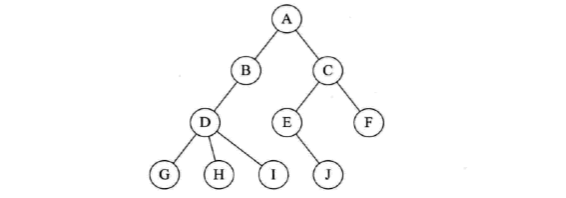
1.1 首先我們把上圖的根節點放到隊列中

1.2 根據A持有子節點的指針把B,C放進隊列,相當於把B,C添加到A的childrenNodes。然後把A給移出隊列。

1.3 然後按照上面的邏輯一個一個的遍歷每個節點。直到隊列為空的時候代表一顆建立完畢。下面圖未給全,只是部分狀態的時刻圖。


2.初始化視圖:
 MMComBoBoxView *view = [[MMComBoBoxView alloc] initWithFrame:CGRectMake(0, 64, kScreenWidth, 40)];
    view.dataSource = self;
    view.delegate = self;
    [self.view addSubview:view];
    [view reload];
3.通過datasource協議將數據傳給MMComBoBoxView,你可以聯想UITableView數據驅動方式就可以了。
#pragma mark - MMComBoBoxViewDataSource
- (NSUInteger)numberOfColumnsIncomBoBoxView :(MMComBoBoxView *)comBoBoxView {
    return self.mutableArray.count;
}
- (MMItem *)comBoBoxView:(MMComBoBoxView *)comBoBoxView infomationForColumn:(NSUInteger)column {
    return self.mutableArray[column];
}
4.我們會通過MMComBoBoxViewDelegate協議把選中的路徑回調出來,這裡我們選擇回調存儲路徑的數組的本質是在於可能開發人員上傳的不止是title,可能還有對應的code等一系列的字段。這樣方便擴展。
#pragma mark - MMComBoBoxViewDelegate
- (void)comBoBoxView:(MMComBoBoxView *)comBoBoxViewd didSelectedItemsPackagingInArray:(NSArray *)array atIndex:(NSUInteger)index {
    MMItem *rootItem = self.mutableArray[index];
    switch (rootItem.displayType) {
        case MMPopupViewDisplayTypeNormal:
        case MMPopupViewDisplayTypeMultilayer:{
            //拼接選擇項
            NSMutableString *title = [NSMutableString string];
           __block NSInteger firstPath;
            [array enumerateObjectsUsingBlock:^(MMSelectedPath * path, NSUInteger idx, BOOL * _Nonnull stop) {
                [title appendString:idx?[NSString stringWithFormat:@";%@",[rootItem findTitleBySelectedPath:path]]:[rootItem findTitleBySelectedPath:path]];
                if (idx == 0) {
                firstPath = path.firstPath;
              }
            }];
            NSLog(@"當title為%@時,所選字段為 %@",rootItem.title ,title);
            break;}

        case MMPopupViewDisplayTypeFilters:{
            [array enumerateObjectsUsingBlock:^(MMSelectedPath * path, NSUInteger idx, BOOL * _Nonnull stop) {
                //當displayType為MMPopupViewDisplayTypeFilters時有MMAlternativeItem類型和MMItem類型兩種
                if (path.isKindOfAlternative == YES) { //MMAlternativeItem類型
                    MMAlternativeItem *alternativeItem = rootItem.alternativeArray[path.firstPath];
                    NSLog(@"當title為%@時,選中狀態為 %d",alternativeItem.title,alternativeItem.isSelected);
                } else {
                    MMItem *firstItem = rootItem.childrenNodes[path.firstPath];
                    MMItem *SecondItem = rootItem.childrenNodes[path.firstPath].childrenNodes[path.secondPath];
                    NSLog(@"當title為%@時,所選字段為 %@",firstItem.title,SecondItem.title);
                }
            }];
            break;}

        default:
            break;
    }
}
如果你覺得這篇文章對你有所幫助,歡迎like或star!謝謝!
demo地址
- 上一頁:3分鐘實現iOS語言本地化
- 下一頁:iOS Crash 殺手排名

相關文章
+- IOS完成上滑隱蔽NvaigtionBar而下拉則顯示後果
- IOS完成簡略單純版的QQ下拉列表
- 一個辦法弄定iOS下拉縮小及上推減少
- IOS代碼筆記之下拉菜單後果
- iOS開辟之UITableView與UISearchController完成搜刮及上拉加載,下拉刷新實例代碼
- iOS完成頂部標簽式導航欄及下拉分類菜單
- 舉例講授iOS中延遲加載和上拉刷新/下拉加載的完成
- iOS開辟中視圖的下拉縮小和上拉隱約的後果完成
- 關於MJRefresh的下拉加載數據bug
- iOS表視圖之下拉刷新控件功用的完成辦法
- iOS完成MJRefresh下拉刷新(上拉加載)運用詳解
- iOS完成scrollView下拉刷新和上拉加載
- iOS 三級下拉菜單功能實現
- iOS下拉刷新 UIScrollVie異常閃動問題
- iOS上下拉刷新控件MJRefresh使用方法詳解