
iOS 本地持久化:用 FMDB 操作 SQLite
編輯:iOS 程式設計技術
本文以一個「保存遊戲角色屬性」的實際案例,完整演示如何在 iOS 中透過 FMDB 封裝庫操作 SQLite,實現數據的本地持久化。
需求與環境
遊戲進行一段時間後,我們需要把角色的基礎信息(如生命值、攻擊力等)存下來,以便下次能接續上次的進度。本文基於 OS X EI Capitan 10.11.4、Xcode 7.3、iOS 9.3,機型為 iPhone 6s / 6s Plus。
iOS 的四種持久化方式
iOS 中的數據持久化大致有四種:屬性列表、對象歸檔、SQLite3 與 Core Data。本文主要聚焦 SQLite3。
SQLite 是一個開源的嵌入式關系數據庫,由 D. Richard Hipp 於 2000 年發布,開銷小、可移植性好、輕量高效而可靠(官網 https://www.sqlite.org/)。FMDB 則是 iOS、macOS 上對 SQLite 操作進行封裝的第三方開源庫(https://github.com/ccgus/fmdb.git)。
引入 FMDB
下載 FMDB 後,其目錄結構如下:
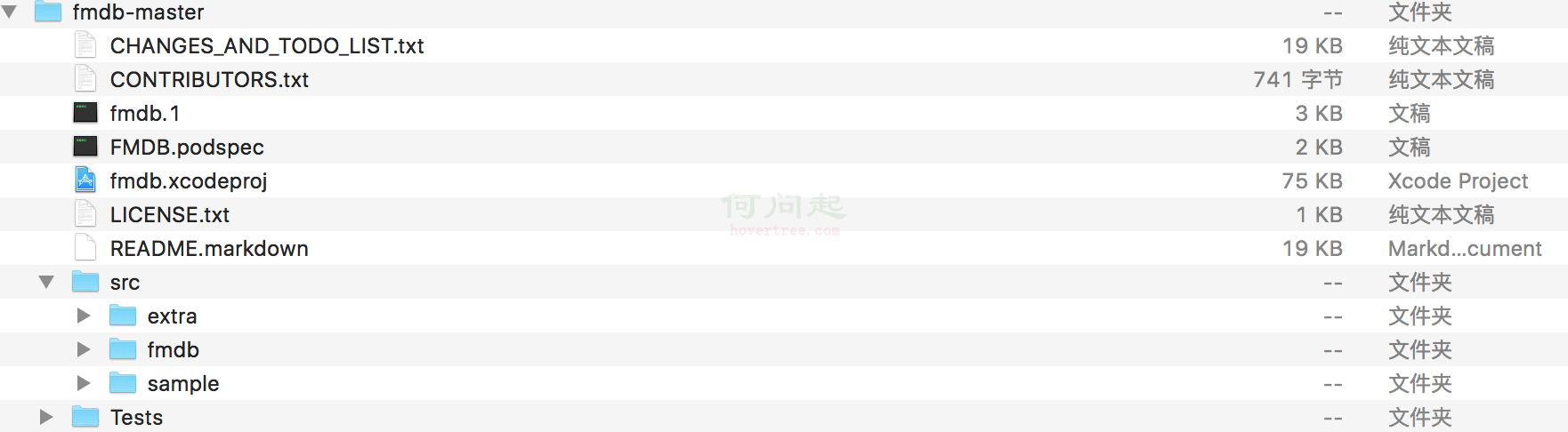
把 fmdb.xcodeproj 拖進工作區,然後在 Target 的 Build Phases 中完成三項配置:
- Target Dependencies > FMDB iOS(fmdb)
- Link Binary With Libraries > libsqlite3.0.tbd
- Link Binary With Libraries > libFMDB-iOS.a

引入頭文件:
#import <Foundation/Foundation.h>
#import "fmdb/FMDB.h"
#import <sqlite3.h>
數據庫基本操作
創建並打開數據庫:
FMDatabase *db = [FMDatabase databaseWithPath:@"/tmp/tmp.db"];
if (![db open]) {
    NSLog(@"OPEN FAIL");
    return;
}
關閉數據庫:
[db close];
創建表:
[db executeUpdate:@"CREATE TABLE IF NOT EXISTS profile(name text,val text)"];
插入記錄(建議包在事務裡以批量提交):
[db beginTransaction];
[db executeUpdate:@"INSERT INTO profile(name,val) VALUES (?,?)",@"HP",@"600"];
[db executeUpdate:@"INSERT INTO profile(name,val) VALUES (?,?)",@"MP",@"250"];
[db executeUpdate:@"INSERT INTO profile(name,val) VALUES (?,?)",@"攻擊",@"70"];
[db executeUpdate:@"INSERT INTO profile(name,val) VALUES (?,?)",@"防御",@"1"];
[db executeUpdate:@"INSERT INTO profile(name,val) VALUES (?,?)",@"攻速",@"0.3"];
[db executeUpdate:@"INSERT INTO profile(name,val) VALUES (?,?)",@"移速",@"320"];
[db commit];
讀取記錄:
FMDatabase *db = [FMDatabase databaseWithPath:@"/tmp/tmp.db"];
if (![db open]) { NSLog(@"OPEN FAIL"); return; }
NSMutableDictionary *dictionary = [NSMutableDictionary dictionary];
FMResultSet *rs = [db executeQuery:@"SELECT name,val FROM profile"];
while ([rs next]) {
    [dictionary setObject:[rs stringForColumn:@"val"] forKey:[rs stringForColumn:@"name"]];
}
[rs close];
[db close];
案例界面與運行結果


運行結果:

完整案例代碼
// ViewController.h
#import <UIKit/UIKit.h>
#import <Foundation/Foundation.h>
#import "fmdb/FMDB.h"
#import <sqlite3.h>
@interface ViewController : UIViewController
@property (weak, nonatomic) IBOutlet UILabel *label;
- (IBAction)createTable:(id)sender;
- (IBAction)initRole:(id)sender;
- (IBAction)readProfile:(id)sender;
@end
// ViewController.m
#import "ViewController.h"
@interface ViewController ()
@end
@implementation ViewController
- (IBAction)createTable:(id)sender {
    FMDatabase *db = [FMDatabase databaseWithPath:@"/tmp/tmp.db"];
    if (![db open]) { NSLog(@"OPEN FAIL"); return; }
    [db executeUpdate:@"CREATE TABLE IF NOT EXISTS profile(name text,val text)"];
    [db close];
}
- (IBAction)initRole:(id)sender {
    FMDatabase *db = [FMDatabase databaseWithPath:@"/tmp/tmp.db"];
    if (![db open]) { NSLog(@"OPEN FAIL"); return; }
    [db beginTransaction];
    [db executeUpdate:@"INSERT INTO profile(name,val) VALUES (?,?)",@"HP",@"600"];
    [db executeUpdate:@"INSERT INTO profile(name,val) VALUES (?,?)",@"MP",@"250"];
    [db executeUpdate:@"INSERT INTO profile(name,val) VALUES (?,?)",@"攻擊",@"70"];
    [db executeUpdate:@"INSERT INTO profile(name,val) VALUES (?,?)",@"防御",@"1"];
    [db executeUpdate:@"INSERT INTO profile(name,val) VALUES (?,?)",@"攻速",@"0.3"];
    [db executeUpdate:@"INSERT INTO profile(name,val) VALUES (?,?)",@"移速",@"320"];
    [db commit];
    [db close];
}
- (IBAction)readProfile:(id)sender{
    FMDatabase *db = [FMDatabase databaseWithPath:@"/tmp/tmp.db"];
    if (![db open]) { NSLog(@"OPEN FAIL"); return; }
    NSMutableDictionary *dictionary = [NSMutableDictionary dictionary];
    FMResultSet *rs = [db executeQuery:@"SELECT name,val FROM profile"];
    while ([rs next]) {
        [dictionary setObject:[rs stringForColumn:@"val"] forKey:[rs stringForColumn:@"name"]];
    }
    [rs close];
    [db close];
    [self show:dictionary];
}
-(void)show:(NSMutableDictionary *)dictionary {
    self.label.numberOfLines = 0;
    NSString * text = [[NSString alloc] init];
    for(NSString *key in dictionary) {
        text = [NSString stringWithFormat:@"%@%@:%@\n",text,key,[dictionary objectForKey:key]];
    }
    self.label.text = text;
}
@end
至此,一個基於 FMDB 的 SQLite 讀寫案例便完成了。掌握 FMDatabase 的 open、executeUpdate、executeQuery 與 FMResultSet 的遍歷,就能應付大多數本地存儲場景。
- 上一篇文章: iOS 學習筆記:核心動畫 Core Animation 全解析
- 下一篇文章: iOS、iPhone 與 Xcode 版本發展年表對照