
iOS 學習筆記:核心動畫 Core Animation 全解析
Core Animation 是 iOS 動畫開發的基石。本文從 CALayer 說起,逐一剖析基礎動畫、關鍵幀動畫、動畫組與轉場動畫的用法與注意事項。
一、CALayer
CALayer 位於 QuartzCore 框架中,具備跨平台特性。在 iOS 上使用 Core Animation 開發動畫,本質是將 CALayer 的內容轉化為位圖,再交由硬件處理。
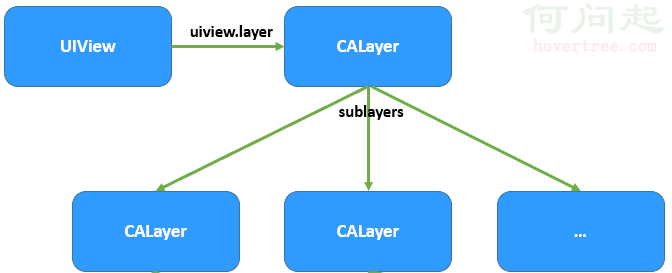
幾個常用屬性:anchorPoint 是與中心 position 重合的錨點,取值範圍 0~1;position 是圖層中心點,相當於 UIView 的 center;bounds 表示圖層大小;opacity 對應透明度,等同於 UIView 的 alpha。
創建自定義 CALayer:
//自定義圖層
CALayer *layer = [[CALayer alloc] init];
layer.bounds = CGRectMake(0, 0, PHOTO_HEIGHT, PHOTO_HEIGHT);
layer.position = CGPointMake(160, 200);
layer.backgroundColor = [UIColor redColor].CGColor;
layer.cornerRadius = PHOTO_HEIGHT/2;
//僅設圓角時,圖片無法正確顯示,需設置 masksToBounds 剪切子圖層
layer.masksToBounds = YES;
layer.borderColor = [UIColor whiteColor].CGColor;
layer.borderWidth = 2;
layer.delegate = self;
[self.view.layer addSublayer:layer];
//調用 setNeedsDisplay,否則代理方法不會被觸發
[layer setNeedsDisplay];
注意:陰影效果無法與 masksToBounds 同時使用,因為後者的目的是剪切外邊框,而陰影恰好位於外邊框之外。
二、Core Animation 類結構

CAAnimation:核心動畫基類,負責控制運行時間與速度,實現了 CAMediaTiming 協議,不可直接使用。CAPropertyAnimation:屬性動畫基類,通過可動畫屬性進行設置,不可直接使用。CAAnimationGroup:動畫組,採用組合模式,可統一控制並發的多個動畫。CATransition:轉場動畫,主要透過濾鏡實現效果。CABasicAnimation:基礎動畫,僅有初始與結束兩個狀態。CAKeyframeAnimation:關鍵幀動畫,可設置多個狀態。
1. 基礎動畫 CABasicAnimation
創建步驟為:初始化並設定動畫屬性 → 設定初始值、結束值及其他屬性 → 把動畫添加到圖層。以移動動畫為例:
#pragma mark 移動動畫
-(void)translatonAnimation:(CGPoint)location{
    CABasicAnimation *basicAnimation = [CABasicAnimation animationWithKeyPath:@"position"];
    basicAnimation.fromValue = [NSValue valueWithCGPoint:CGPointZero];
    basicAnimation.toValue = [NSValue valueWithCGPoint:location];
    basicAnimation.delegate = self;
    basicAnimation.duration = 3.0;
    //basicAnimation.repeatCount = HUGE_VALF;   //重複次數,可視為無窮大
    //basicAnimation.removedOnCompletion = NO;   //結束後不移除
    [_layer addAnimation:basicAnimation forKey:@"MYBasicAnimation_Translation"];
}執行後會發現一個現象:動畫結束後圖層回到了原來位置。這是因為圖層動畫的本質是將內部內容轉為位圖經硬件呈現,圖層本身在過程中並未真正改變。

解法是透過 CAAnimation 的代理方法,在動畫結束時把終點位置寫回圖層:
#pragma mark 動畫開始
-(void)animationDidStart:(CAAnimation *)anim{
    if( [anim isKindOfClass:[CABasicAnimation class]] ) {
        CABasicAnimation *baseAnima = (CABasicAnimation *)anim;
        [baseAnima setValue:baseAnima.toValue forKey:@"MTBasicAnimationLocation"];
    }
}
#pragma mark 動畫結束
-(void)animationDidStop:(CAAnimation *)anim finished:(BOOL)flag{
    if( flag ) {
        _layer.position = [[anim valueForKey:@"MTBasicAnimationLocation"] CGPointValue];
    }
}但這樣又會冒出另一個問題:動畫結束後會先跳回起點再移動到終點,閃現一段多餘過渡。這是隱式動畫導致的——對於非根圖層,設定可動畫屬性(如 position)會自動產生過渡效果。要消除它,可用事務 CATransaction 臨時禁用隱式動畫:
#pragma mark 動畫結束
-(void)animationDidStop:(CAAnimation *)anim finished:(BOOL)flag{
    if( flag ) {
        [CATransaction begin];
        [CATransaction setDisableActions:YES]; //禁止隱式動畫
        _layer.position = [[anim valueForKey:@"MTBasicAnimationLocation"] CGPointValue];
        [CATransaction commit];
    }
}
補充一點:既然直接改 position 就能觸發隱式動畫,為何還要大費周章用 CABasicAnimation?因為隱式動畫由系統自動完成,我們難以精細控制時間等參數。
除了位置,也能改變旋轉等形變屬性:
#pragma mark 旋轉動畫
-(void)rotationAnimation{
    CABasicAnimation *basicAnimation = [CABasicAnimation animationWithKeyPath:@"transform.rotation.z"];
    basicAnimation.fromValue = [NSNumber numberWithFloat:M_PI_2];
    basicAnimation.toValue = [NSNumber numberWithFloat:M_PI_2*3];
    basicAnimation.duration = 6.0;
    basicAnimation.autoreverses = true; //旋轉後再轉回原位
    [_layer addAnimation:basicAnimation forKey:@"MYBasicAnimation_Rotation"];
}
2. 關鍵幀動畫 CAKeyframeAnimation
關鍵幀動畫有兩種開發方式:設定不同的屬性值,或繪製路徑。
#pragma mark 方式一:設置多個關鍵幀
-(void)translationAnimation1{
    CAKeyframeAnimation *keyframeAnimation = [CAKeyframeAnimation animationWithKeyPath:@"position"];
    NSValue *key1 = [NSValue valueWithCGPoint:_layer.position];
    NSValue *key2 = [NSValue valueWithCGPoint:CGPointMake(80, 220)];
    NSValue *key3 = [NSValue valueWithCGPoint:CGPointMake(45, 300)];
    NSValue *key4 = [NSValue valueWithCGPoint:CGPointMake(55, 400)];
    keyframeAnimation.values = @[key1,key2,key3,key4];
    keyframeAnimation.duration = 8.0;
    keyframeAnimation.beginTime = CACurrentMediaTime() + 2; //延遲 2 秒
    [_layer addAnimation:keyframeAnimation forKey:@"MYKeyframeAnimation_Position1"];
}
#pragma mark 方式二:繪製貝塞爾路徑
-(void)translationAnimation2{
    CAKeyframeAnimation *keyframeAnimation = [CAKeyframeAnimation animationWithKeyPath:@"position"];
    CGPathRef path = CGPathCreateMutable();
    CGPathMoveToPoint(path, NULL, _layer.position.x, _layer.position.y);
    CGPathAddCurveToPoint(path, NULL, 160, 280, -30, 300, 55, 400);
    keyframeAnimation.path = path;
    CGPathRelease(path);
    keyframeAnimation.duration = 8.0;
    keyframeAnimation.beginTime = CACurrentMediaTime() + 2;
    [_layer addAnimation:keyframeAnimation forKey:@"MYKeyframeAnimation_Position2"];
}
3. 動畫組 CAAnimationGroup
動畫組即多個動畫的組合,可統一控制時間:
#pragma mark 創建動畫組
-(void)groupAnimation{
    CAAnimationGroup *animationGroup = [CAAnimationGroup animation];
    CABasicAnimation *basicAnimation = [self rotationAnimation];
    CAKeyframeAnimation *keyframeAnimation = [self translationAnimation];
    animationGroup.animations = @[basicAnimation,keyframeAnimation];
    animationGroup.delegate = self;
    //若組內動畫已設時間,則此處 duration 不再生效
    animationGroup.duration = 10.0;
    animationGroup.beginTime = CACurrentMediaTime() + 5; //延遲 5 秒
    [_layer addAnimation:animationGroup forKey:nil];
}
4. 轉場動畫 CATransition
使用步驟:創建轉場動畫 → 設定類型、子類型等屬性 → 換上新視圖並添加動畫。


#pragma mark 轉場動畫
-(void)transitionAnimation:(BOOL)isNext{
    CATransition *transition = [[CATransition alloc] init];
    transition.type = @"cube"; //官方未公開的類型只能用字符串
    if (isNext) {
        transition.subtype = kCATransitionFromRight;
    }else{
        transition.subtype = kCATransitionFromLeft;
    }
    transition.duration = 1.0f;
    _imageView.image = [self getImage:isNext];
    [_imageView.layer addAnimation:transition forKey:@"KCTransitionAnimation"];
}
- 上一篇文章: 用 Block 實現 iOS 頁面間數據回調
- 下一篇文章: iOS 本地持久化:用 FMDB 操作 SQLite