
iOS 開發:用 FMDB 操作 SQLite 數據庫的完整流程
編輯:iOS 程式設計技術
SQLite 是一個非常輕量的數據庫,資源占用極低,在嵌入式設備上可能只需要幾百 K 內存;處理速度也不遑多讓,比 MySQL、PostgreSQL 這類大型數據庫更適合端上場景。iOS 和 Android 應用常用它做離線緩存,比如把新聞數據存到本地。
基本操作步驟
- 引入 SQLite 開發庫
libsqlite3.dylib; - 新建或打開數據庫;
- 創建數據表;
- 插入數據;
- 查詢數據並輸出;
- 關閉數據庫。
具體實作
1. 導入頭文件
本文用 FMDB 這層封裝來操作,先導入 FMDatabase.h:
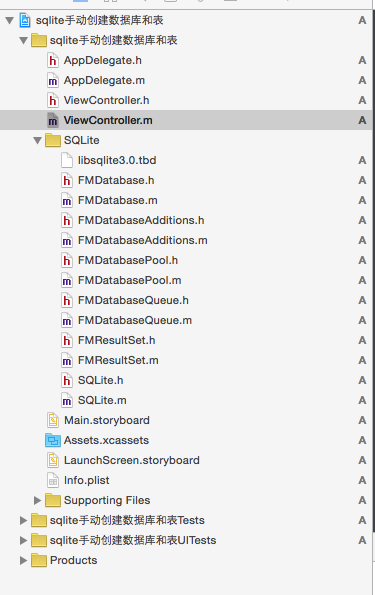
2. 完整代碼
#import "ViewController.h"
#import "FMDatabase.h"

@interface ViewController () {
    FMDatabase *mydb;
    NSString *idd;
    NSString *age;
    NSString *name;
}
@end

@implementation ViewController

- (void)viewDidLoad {
    [super viewDidLoad];

    // 1. 拼接數據庫路徑,放在沙盒的 Documents 下
    NSString *path = [NSHomeDirectory() stringByAppendingString:@"/Documents/mydb.sqlite"];
    mydb = [[FMDatabase alloc] initWithPath:path];

    // 2. 建表語句
    NSString *tablecreate = @"create table if not exists mytable(id text primary key, name text, age text)";

    // 3. 打開數據庫
    if ([mydb open]) {
        BOOL createOK = [mydb executeUpdate:tablecreate];
        if (createOK) {
            NSLog(@"數據庫創建成功");

            // 4. 插入一條記錄
            BOOL insertOK = [mydb executeUpdate:@"insert into mytable(id, age, name) values(?,?,?)",
                            @"1", @"23", @"huangweiqiang"];

            // 插入多條記錄
            BOOL insertsOK = [mydb executeUpdate:
                @"insert into mytable(id, age, name) "
                 "select '2','24','mazhongwei' union all "
                 "select '3','21','xiangyiyao' union all "
                 "select '4','34','zhanglong'"];

            // 5. 刪除符合條件的記錄
            [mydb executeUpdate:@"delete from mytable where id = '4'"];

            // 6. 更新記錄
            [mydb executeUpdate:@"update mytable set age = '100000' where id = '3'"];

            // 7. 查詢:返回的是結果集,用 next 逐行遍歷
            FMResultSet *rsset = [mydb executeQuery:@"select * from mytable where id = '3'"];
            while ([rsset next]) {
                idd  = [rsset stringForColumn:@"id"];
                age  = [rsset stringForColumn:@"age"];
                name = [rsset stringForColumn:@"name"];
            }

            // 8. 用完務必關閉
            [mydb close];
            NSLog(@"%@_%@_%@", idd, age, name);
        } else {
            NSLog(@"數據庫創建失敗");
        }
    }
}
@end
幾個容易忽略的點
- 路徑建議放在沙盒的 Documents 目錄,iTunes 同步時會一併備份;
executeUpdate:執行的是增刪改,executeQuery:執行的是查詢,兩者不要混用;- 查詢結果是
FMResultSet對象,必須靠next移動游標才能取值; - 打開數據庫後,記得在操作結束時調用
close,否則容易造成文件鎖與數據不一致。