iOS--Masonry的簡單使用
編輯:IOS編程技術
最近搭見面嘗試了下Masonry,感覺挺不錯的,比手寫frame快多了,又避免了storyboard和xib的復雜約束。
這是效果圖 ps:以前看到這樣的就愁死了,各種計算坐標,用Masonry分分鐘的事。
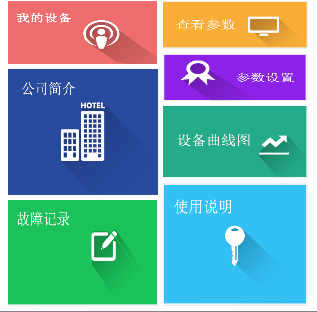
代碼:用的不是很熟練,有不少走了彎路的地方歡迎指正~~~~(>_<)~~~~
#import "HomeView.h"
#import <Masonry.h>

@implementation HomeView
@synthesize myEquipmentBtn,aboutCompanyBtn,errorRecordingBtn,equipmentStateBtn,remoteControlBtn,equipmentGraphBtn,guideBtn;

- (id)initWithFrame:(CGRect)frame {

    self = [super initWithFrame:frame];
    if (self) {
        self.backgroundColor = [UIColor whiteColor];
        [self setUpSubViews];
    }

    return self;
}

- (void)setUpSubViews {

    /**
     *  創建子視圖並添加
     */
//使用Masonry必須先把控件初始化,然後添加到共同的父視圖上
    //我的設備
    myEquipmentBtn = [UIButton buttonWithType:UIButtonTypeCustom];
//    myEquipmentBtn.backgroundColor = [UIColor redColor];
    [self addSubview:myEquipmentBtn];
    [myEquipmentBtn setBackgroundImage:[UIImage imageNamed:@"1"] forState:0];
    //關於我們
    aboutCompanyBtn = [UIButton buttonWithType:UIButtonTypeCustom];
//    aboutCompanyBtn.backgroundColor = [UIColor redColor];
    [aboutCompanyBtn setBackgroundImage:[UIImage imageNamed:@"3"] forState:0];
    [self addSubview:aboutCompanyBtn];
    //故障記錄
    errorRecordingBtn = [UIButton buttonWithType:UIButtonTypeCustom];
//    errorRecordingBtn.backgroundColor = [UIColor redColor];
    [errorRecordingBtn setBackgroundImage:[UIImage imageNamed:@"6"] forState:0];
    [self addSubview:errorRecordingBtn];
    //設備狀態
    equipmentStateBtn = [UIButton buttonWithType:UIButtonTypeCustom];
//    equipmentStateBtn.backgroundColor = [UIColor redColor];
    [equipmentStateBtn setBackgroundImage:[UIImage imageNamed:@"2"] forState:0];
    [self addSubview:equipmentStateBtn];
    //遠程控制
    remoteControlBtn = [UIButton buttonWithType:UIButtonTypeCustom];
//    remoteControlBtn.backgroundColor = [UIColor redColor];
    [remoteControlBtn setBackgroundImage:[UIImage imageNamed:@"4"] forState:0];
    [self addSubview:remoteControlBtn];

    //設備曲線圖
    equipmentGraphBtn = [UIButton buttonWithType:UIButtonTypeCustom];
//    equipmentGraphBtn.backgroundColor = [UIColor redColor];
    [equipmentGraphBtn setBackgroundImage:[UIImage imageNamed:@"5"] forState:0];
    [self addSubview:equipmentGraphBtn];
    //使用說明
    guideBtn = [UIButton buttonWithType:UIButtonTypeCustom];
//    guideBtn.backgroundColor = [UIColor redColor];
    [guideBtn setBackgroundImage:[UIImage imageNamed:@"guide"] forState:0];
    [self addSubview:guideBtn];

    /**
     *  約束
     *
     *  @param make <#make description#>
     *
     *  @return <#return value description#>
     */

    //我的設備
    [myEquipmentBtn mas_makeConstraints:^(MASConstraintMaker *make) {
     //上邊距離父視圖上邊5各單位
        make.top.equalTo(self.mas_top).with.offset(5);
     //左邊距離父視圖左邊0個單位
        make.left.equalTo(self.mas_left).with.offset(0);
     //寬等於父視圖寬的0.5倍  multipliedBy(0.5)設定比例
        make.width.equalTo(self.mas_width).with.multipliedBy(0.5);
     //高等於父視圖高的0.5倍
        make.height.equalTo(self.mas_height).with.multipliedBy(0.2);
    }];
    //關於我們
    [aboutCompanyBtn mas_makeConstraints:^(MASConstraintMaker *make) {
     //上邊距離上部控件的底邊5個單位
        make.top.equalTo(myEquipmentBtn.mas_bottom).with.offset(5);
     //左邊距離父視圖左邊0個單位
        make.left.equalTo(contentView.mas_left).with.offset(0);
     //寬和上方的控件一樣寬
        make.width.equalTo(myEquipmentBtn.mas_width);
     //高是父視圖高的0.4倍
        make.height.equalTo(self.mas_height).with.multipliedBy(0.4);
    }];
    //故障記錄
    [errorRecordingBtn mas_makeConstraints:^(MASConstraintMaker *make) {
     //上邊距離上部控件的底邊5個單位
        make.top.equalTo(aboutCompanyBtn.mas_bottom).with.offset(5);
     //左邊距離父視圖左邊0個單位
        make.left.equalTo(self.mas_left).with.offset(0);
     //等寬
        make.width.equalTo(myEquipmentBtn.mas_width);
     //下邊距離父視圖下邊-5個單位,,+5的話控件就跑出父視圖之外了,-5說明在父視圖裡面
        make.bottom.equalTo(self.mas_bottom).with.offset(-5);
    }];
    //設備狀態
    [equipmentStateBtn mas_makeConstraints:^(MASConstraintMaker *make) {
        make.top.equalTo(self.mas_top).with.offset(5);
        make.left.equalTo(myEquipmentBtn.mas_right).with.offset(5);
        make.right.equalTo(self.mas_right).with.offset(0);
        make.height.equalTo(self.mas_height).with.multipliedBy(0.15);
    }];
    //遠程控制
    [remoteControlBtn mas_makeConstraints:^(MASConstraintMaker *make) {
        make.top.equalTo(equipmentStateBtn.mas_bottom).with.offset(5);
        make.left.equalTo(myEquipmentBtn.mas_right).with.offset(5);
        make.width.equalTo(equipmentStateBtn.mas_width);
        make.height.equalTo(self.mas_height).with.multipliedBy(0.15);
    }];
    //設備曲線圖
    [equipmentGraphBtn mas_makeConstraints:^(MASConstraintMaker *make) {
        make.top.equalTo(remoteControlBtn.mas_bottom).with.offset(5);
        make.left.equalTo(myEquipmentBtn.mas_right).with.offset(5);
        make.width.equalTo(remoteControlBtn.mas_width);
        make.height.equalTo(self.mas_height).with.multipliedBy(0.23);
    }];
    //使用說明
    [guideBtn mas_makeConstraints:^(MASConstraintMaker *make) {
        make.top.equalTo(equipmentGraphBtn.mas_bottom).with.offset(5);
        make.left.equalTo(myEquipmentBtn.mas_right).with.offset(5);
        make.width.equalTo(remoteControlBtn.mas_width);
        make.bottom.equalTo(self.mas_bottom).with.offset(-5);
    }];

}

@end
相關文章
+