IOS開發-UI學習-sqlite數據庫的操作
編輯:IOS編程技術
IOS開發-UI學習-sqlite數據庫的操作
sqlite是一個輕量級的數據庫,它占用資源非常的低,在嵌入式設備中,可能只需要幾百K的內存就夠了,而且它的處理速度比Mysql、PostgreSQL這兩款著名的數據庫都還快,在ios和安卓app中常用來完成對數據進行離線緩存的處理,如新聞數據的離線緩存。
它的基本操作步驟是:
1、先加入sqlite開發庫libsqlite3.dylib,
2、新建或打開數據庫,
3、創建數據表,
4、插入數據,
5、查詢數據並打印,
6、關閉數據庫,
具體操作步驟如下:
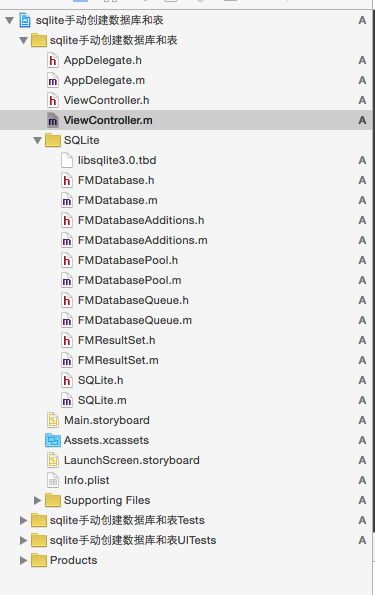
1、導入sqlite數據庫所需頭文件:
導入完成後如圖所示:
2、程序代碼的編制:
 //
 //  ViewController.m
 //  sqlite手動創建數據庫和表
 //
 //  Created by mac on 16/4/12.
 //  Copyright © 2016年 mzw. All rights reserved.
 //

 #import "ViewController.h"
 #import "FMDatabase.h"
 @interface ViewController (){
     FMDatabase *mydb;
     NSString * idd;
     NSString * age;
     NSString * name;
 }

 @end

 @implementation ViewController

 - (void)viewDidLoad {
     [super viewDidLoad];


 //    創建一個數據庫路徑path
     NSString *path =[NSHomeDirectory() stringByAppendingString:@"/Documents/mydb.sqlite"];

 //    根據創建好的路徑path生成數據庫
     mydb = [[FMDatabase alloc]initWithPath:path];

 //    創建一個在數據庫中創建表mytable的字符串
     NSString *tablecreate = @"create table if not exists mytable(id txt primary key,name text,age text)";

 //    打開數據庫
     if ([mydb open]) {

 //        使用創建好的字符串新建表mytable
         BOOL createOK = [mydb executeUpdate:tablecreate];


         if (createOK) {
 //            如果創建成果,打印創建成功的提示
             NSLog(@"數據庫創建成功");

 //            使用sql語句中的insert into語句往創建好的mytable中添加一條記錄
             BOOL insertOK = [mydb executeUpdate:@"insert into mytable(id,age,name) values(?,?,?)",@"1",@"23",@"huangweiqiang"];

 //            使用sql語句中的insert into語句往創建好的mytable中添加多條記錄
             BOOL insertsOK = [mydb executeUpdate:@"insert into mytable(id,age,name) select '2','24','mazhongwei' union all select '3','21','xiangyiyao' union all select '4','34','zhanglong'"];

 //             使用sql語句中的delete from語句刪除符合條件的語句
             [mydb executeUpdate:@"delete from mytable where id = '4'"];

 //             使用sql語句中的update更新表中的記錄
             [mydb executeUpdate:@"update mytable set age = '100000' where id = '3'"];

 //              使用sql語句中的查詢語句查詢符合條件的語句,返回結果為一個集合,使用next函數遍歷結果並賦值給idd,age,name三個變量
             FMResultSet *rsset = [mydb executeQuery:@"select * from mytable where id = '3'"];
             while ([rsset next]) {
                 idd  = [rsset stringForColumn:@"id"];
                 age  = [rsset stringForColumn:@"age"];
                 name = [rsset stringForColumn:@"name"];
             }

 //           操作完成後關閉數據庫
             [mydb close];

 //            打印查詢結果
             NSLog(@"%@_%@_%@",idd,age,name);

         }else{
 //            如果創建失敗,返回失敗提示
             NSLog(@"數據庫創建失敗");
         }
     }

 }


 @end
相關文章
+