iOS 遠程推送通知
編輯:IOS編程技術
1.什麼是推送通知
- 在某些特殊情況下,應用程序被動收到的以不同種界面形式出現的提醒信息
- 推送通知的作用:可以讓不在前台運行的app通知app發生了改變
- iOS中得推送通知種類
- 遠程推送通知(Remote Notification)
- 本地推送通知(Local Notification)
2.推送通知的5種形式
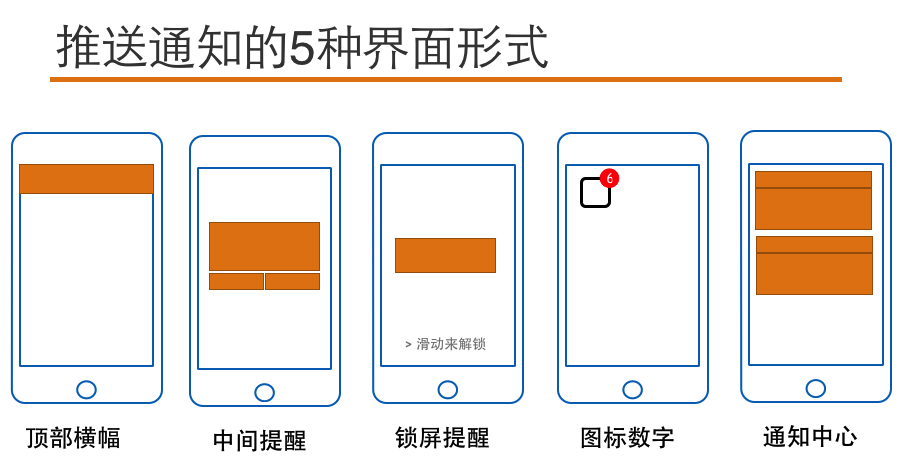
3.推送通知的特點
- App關閉時,可以接收通知並顯示
- App打開並處於後台時,通知會顯示
- App打開並處於前台時,通知不會顯示
- 點擊通知後,默認會自動打開發出通知的App
4.遠程推送通知
- 在聯網的情況下,由遠程服務器推送給客戶端的通知,又稱APNs(Apple Push Notification Services)
- 不管應用是打開還是關閉的情況下,都能接收到服務器推送的遠程通知
5.遠程通知的實現基礎
- 在聯網狀態下,所有蘋果設備都會與蘋果服務器建立長連接
- 長連接的作用:時間校准,系統升級,查找我的iPhone
- 長連接的好處:數據傳輸速度快,數據保持最新狀態
6.遠程推送的實現原理
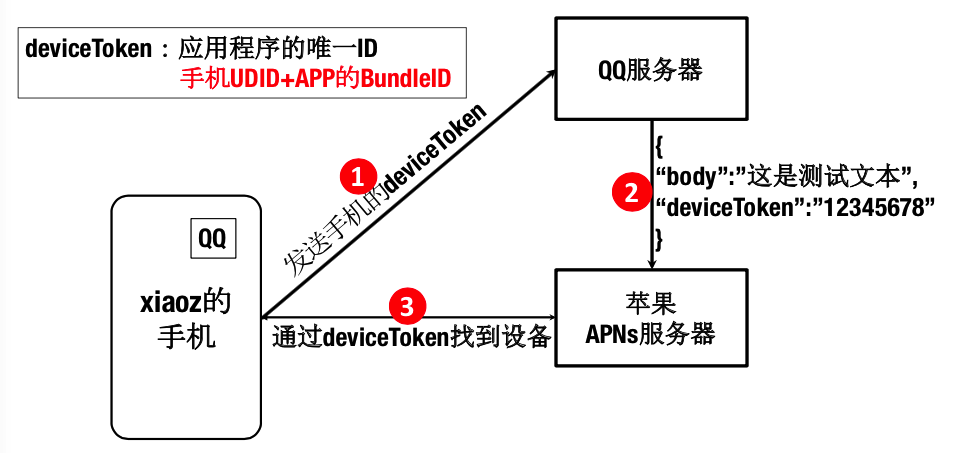
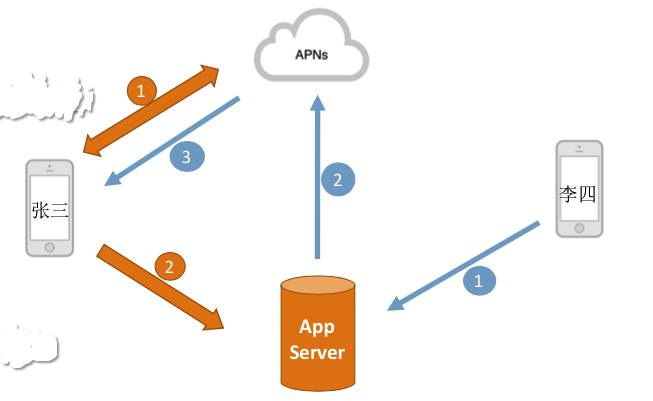
- 安裝App時
- 發送UDID和BundleID給APNs加密後返回deviceToken
- 登陸服務時,將用戶身份和deviceToken發給服務器,服務器記錄
- 李四給張三發消息
- 發送消息及張三的用戶身份
- 服務器按照張三的身份找到存儲的deviceToken,將消息和deviToken發送給APNs
- APNs通過deviceToken推送消息給張三
7.實現遠程推送功能的前提
- 真機
- 調試階段的證書
- aps_development.cer 電腦可以調試有推送功能的app的證書
- iOS_development.cer 電腦可以真機調試的證書
- xxx.mobileprovision 描述文件,其中確定了哪台手機和電腦可以進行調試
- 發布階段的證書
- aps.cer 用該證書中說明的那台電腦發布的app具有遠程推送功能時,用來使該app有推送功能的證書
- iOS_distribution.cer 電腦有發布app的能力的證書
- xxx.mobileprovision 描述文件,其中描述了哪台電腦可以發布app
8.實現遠程推送功能的步驟
- 在啟動方法中注冊通知
- 注冊成功後收到設備的deviceToken
- 實現用戶點擊通知後的響應(兩種情況)
- 程序沒有關閉,在後台實現AppDelegate中的didReceiveRemoteNotification方法
- 程序已經關閉,執行AppDelegation中的didFinishesLaunchingWithOption方法
9.遠程推送的具體實現過程
- 去開發者平台,生成兩個支持遠程推送的證書
- 先點擊App IDS添加一個准確的可以支持push功能的應用程序的BundleID
- 到生成的證書的那個節點下,先添加一個development階段的支持push功能的cer文件
- 到最後一個provision節點下添加一個development階段的支持push功能創建的那個App ID,cer文件要選擇最新生成的支持push功能的cer文件,最後生成,下載,雙擊安裝
- 為了確定cer文件和provision文件安裝成功,可以到鑰匙串和Xcode中的設備節點中分別查看(遠程推送證書的申請流程請移步http://www.cnblogs.com/czq1989/p/5311302.html)
- 新建一個工程,先修改info.plist文件中Bundle ID為第二步創建的那個ID
- 為了兼容7.0所以修改配置中的deployment target為7.0
- 在AppDelegate中,發請求,詢問是否要開通push功能,如果用戶點擊允許,則接收從服務器端發回的deviceToken(需要真機聯網)
- 配置通過點擊了通知打開應用程序後要做的事情,可以在AppDelegate中通過實現didReceiveRemoteNotification方法,就可以獲取到用戶點擊了通知這個動作
10.遠程推送過程中AppDelegate中所要響應的方法
下面的方法都是寫在AppDelegate.m文件中
/*
 1.有一種打開,叫做點擊圖標後的打開
 2.還有一種打開,叫做 點擊了 通知 之後的打開
 當通過 點擊通知  這種方法打開應用程序,執行didFinishLaunching方法時,launchOptions
 參數中,就存著通知發來的消息,也就是 類似於
 didReceiveRemote方法中的那個userInfo
*/
- (BOOL)application:(UIApplication *)application didFinishLaunchingWithOptions:(NSDictionary *)launchOptions {
    if ([UIDevice currentDevice].systemVersion.doubleValue <= 8.0) {
        //向服務器發請求,要注冊推送功能,以此獲取到服務器返回的deviceToken
        //type 用來說明 支持的通知形式
        //如 橫幅 聲音  角標
        [application registerForRemoteNotificationTypes:UIRemoteNotificationTypeBadge|UIRemoteNotificationTypeSound|UIRemoteNotificationTypeAlert];
    }else{
        UIUserNotificationSettings *settings = [UIUserNotificationSettings settingsForTypes:UIUserNotificationTypeBadge| UIUserNotificationTypeSound|UIUserNotificationTypeAlert  categories:nil];
        [application registerUserNotificationSettings:settings];
        //申請使用通知
        [application registerForRemoteNotifications];
    }
    NSDictionary *userInfo = launchOptions[UIApplicationLaunchOptionsRemoteNotificationKey];
    UILabel *label = [[UILabel alloc]init];
    label.frame = CGRectMake(0, 40, 300, 200);
    label.numberOfLines = 0;
    label.textColor = [UIColor whiteColor];
    label.font = [UIFont systemFontOfSize:24];
    label.backgroundColor = [UIColor blueColor];
    label.text =[NSString stringWithFormat:@"%@",userInfo];
    [self.window.rootViewController.view addSubview:label];
    return YES;
}

//只要獲取到用戶同意,則服務器端返回deviceToken
//會自動執行下面的方法
//1417f54c c7f0adb0 48e3558f 2b8a8bad 0a6a5152 54af017e 32137cda 8cbdb9d0
- (void)application:(UIApplication *)application didRegisterForRemoteNotificationsWithDeviceToken:(NSData *)deviceToken {
    NSLog(@"%@",deviceToken);
}

/*
 用戶點擊了通知,進入到應用程序中,需要捕獲到這個時機
 從而決定這一次的進入應用程序,到底要顯示或執行什麼動作,下面的方法就會在點擊通知時自動調用
*/
/*
 1.應用程序在前台時:通知到,該方法自動執行
 2.應用程序在後台且沒有退出時:通知到,只有點擊了通知查看時,該方法自動執行
 3.應用程序退出:通知到,點擊查看通知,不會執行下面的didReceive方法,而是只執行didFinishLauncing方法
*/
- (void)application:(UIApplication *)application didReceiveRemoteNotification:(NSDictionary *)userInfo {
    //NSLog(@"%@",userInfo);
    //為了測試在應用程序退出後,該方法是否執行
    //所以往第一個界面上添加一個label,看標簽是否會顯示一些內容
    UILabel *label = [[UILabel alloc]init];
    label.frame = CGRectMake(0, 250, 300, 200);
    label.numberOfLines = 0;
    label.textColor = [UIColor whiteColor];
    label.font = [UIFont systemFontOfSize:24];
    label.backgroundColor = [UIColor grayColor];
    label.text =[NSString stringWithFormat:@"%@",userInfo];
    [self.window.rootViewController.view addSubview:label];
}

/*
 此方法是新的用於響應遠程推送通知的方法
 1.如果應用程序在後台,則通知到,點擊查看,該方法自動執行
 2.如果應用程序在前台,則通知到,該方法自動執行
 3.如果應用程序被關閉,則通知到,點擊查看,先執行didFinish方法,再執行該方法
 4.可以開啟後台刷新數據的功能
   step1:點擊target-->Capabilities-->Background Modes-->Remote Notification勾上
   step2:在給APNs服務器發送的要推送的信息中,添加一組字符串如:
    {"aps":{"content-available":"999","alert":"bbbbb.","badge":1}}
    其中content-availabel就是為了配合後台刷新而添加的內容,999可以隨意定義
*/
- (void)application:(UIApplication *)application didReceiveRemoteNotification:(NSDictionary *)userInfo fetchCompletionHandler:(void (^)(UIBackgroundFetchResult))completionHandler {
    UILabel *label = [[UILabel alloc]init];
    label.frame = CGRectMake(0, 250, 300, 200);
    label.numberOfLines = 0;
    label.textColor = [UIColor whiteColor];
    label.font = [UIFont systemFontOfSize:24];
    label.backgroundColor = [UIColor grayColor];
    label.text =[NSString stringWithFormat:@"%@",userInfo];
    [self.window.rootViewController.view addSubview:label];
    //NewData就是使用新的數據 更新界面,響應點擊通知這個動作
    completionHandler(UIBackgroundFetchResultNewData);
}
11.PushMeBaby
- 作用:測試APNs的開源Mac項目,充當服務器,可以將內容提交給蘋果的APNs服務器,然後APNs服務器再推送內容給用戶的設備
- 使用
- 注銷報錯的代碼
- 修改ApplicationDelegate.m文件中self.deviceToken
- 添加推送證書到項目中,並改名為apns.cer
- 運行填寫信息,點擊Push按鈕完成發送
- 注意:出現SSLwrite():-36 94錯誤 http://www.cnblogs.com/czq1989/p/5314940.html
無法拿到證書的路徑:http://www.cnblogs.com/czq1989/p/5312146.html
demo:https://github.com/TigerCui/RemoteNotificationDemo.git
- 上一頁:ios 圖片截取功能 圖片拼接功能
- 下一頁:UIImageView添加圓角

- iphone文件夾名字變空白小技巧
- iOS 9.2 Beta4更新了什麼?更新內容介紹
- Code Sign error: The identity 'iPhone Developer' doesn't match any valid, non-expired certificate...
- iOS8.4 iPhone4s用流暢嗎?卡不卡?
- 雲呼如何消除回音 雲呼消除回音方法
- iOS實現兩個控制器之間數據的雙向傳遞
- iOS8.4值得升級嗎_iOS8.4怎麼樣
- 蘋果iphone4s價格各個版本!
- iOS6.1.2完美越獄教程支持iPhone5 iPad mini
- iOS長按UIlabel實現可復制功能
相關文章
+