
UIAlertView 系統提示框用法整理
編輯:iOS 技巧大全
在需要用系統樣式的彈窗提示使用者確認或輸入時,UIAlertView 是最直接的選擇。以下把初始化參數、按鈕回調與文字輸入框的取用方式整理清楚。
初始化方法
- (id)initWithTitle:(NSString *)title
            message:(NSString *)message
           delegate:(id)delegate
cancelButtonTitle:(NSString *)cancelButtonTitle
otherButtonTitles:(NSString *)otherButtonTitles, ...;
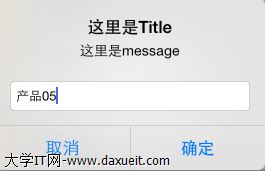
參數對應關係如下:
title:視窗上方的標題,可為 nil。
message:標題下方的說明文字。
delegate:事件監聽者,通常設為 self,並讓該 view controller 遵循 UIAlertViewDelegate 協議。
cancelButtonTitle:取消按鈕的文字。
otherButtonTitles:額外按鈕,因為是 variadic 參數,可以一路往後追加多個。
處理按鈕點擊
- (void)alertView:(UIAlertView *)alertView
clickedButtonAtIndex:(NSInteger)buttonIndex;
透過 buttonIndex 判斷使用者按了哪顆按鈕。索引從 0 開始,取消按鈕的順序會依參數排列而變動,因此實務上建議用常數對照而非硬寫數字,例如:
static const NSInteger kButtonIndexOK = 1;

- (void)alertView:(UIAlertView *)alertView clickedButtonAtIndex:(NSInteger)buttonIndex {
    if (buttonIndex == alertView.cancelButtonIndex) {
        // 使用者取消
    } else {
        // 使用者確認
    }
}
加入文字輸入框
設定 alertViewStyle 可讓提示框帶上輸入欄位,例如 UIAlertViewStylePlainTextInput(單行)或 UIAlertViewStyleSecureTextInput(密碼遮罩)。此時可透過 textFieldAtIndex: 取出對應的 UITextField 來讀值:
alertView.alertViewStyle = UIAlertViewStylePlainTextInput;

// 在 delegate 中
UITextField *input = [alertView textFieldAtIndex:0];
NSLog(@"%@", input.text);
顯示
[alertView show];
該改用什麼
UIAlertView 與 UIActionSheet 自 iOS 9 起已被標記為 deprecated,新專案請改用 UIAlertController。它的 API 更清晰,透過 action handler block 處理點擊,不必再實作 delegate,也能直接在建立時決定要不要附帶文字輸入框:
UIAlertController *alert =
[UIAlertController alertControllerWithTitle:@"提示"
                                    message:@"確定要送出嗎?"
                             preferredStyle:UIAlertControllerStyleAlert];

[alert addAction:[UIAlertAction actionWithTitle:@"取消"
                                         style:UIAlertActionStyleCancel
                                       handler:nil]];
[alert addAction:[UIAlertAction actionWithTitle:@"確定"
                                         style:UIAlertActionStyleDefault
                                       handler:^(UIAlertAction *action) {
    // 按下確定後的處理
}]];

[self presentViewController:alert animated:YES completion:nil];
另外提醒,提示框的正確使用時機是「需要使用者決策且無法自動復原」的情況。若只是想告知操作成功,用 HUD 或短暫的提示條體驗會更好,過度使用彈窗容易讓使用者產生警報疲勞。