
為頁面跳轉加上翻轉動畫
接觸到「兩個頁面之間帶動畫跳轉」的做法,效果還不錯。這裡記錄一下實作過程:關鍵在於把 pushViewController:animated: 的 animated 設為 NO,改由外層的 UIView 動畫來接管轉場視覺。
一、專案結構
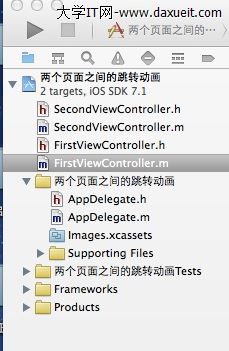
二、程式碼
AppDelegate.m
先把第一個頁面包裝進 UINavigationController,設為 window 的根視圖控制器。有了導覽控制器的堆疊,後續才能用 push 的方式切頁。
- (BOOL)application:(UIApplication *)application
didFinishLaunchingWithOptions:(NSDictionary *)launchOptions
{
    self.window = [[UIWindow alloc] initWithFrame:[[UIScreen mainScreen] bounds]];

    FirstViewController *firstView = [[FirstViewController alloc] init];
    UINavigationController *nav = [[UINavigationController alloc] initWithRootViewController:firstView];
    self.window.rootViewController = nav;
    self.window.backgroundColor = [UIColor whiteColor];

    [self.window makeKeyAndVisible];
    return YES;
}
FirstViewController.m
點擊畫面任意處,即觸發翻轉動畫並推入第二頁:
- (void)viewDidLoad
{
    [super viewDidLoad];
    self.title = @"FirstVC";
    self.view.backgroundColor = [UIColor redColor];
}

// 點擊頁面任意處跳轉到頁面二
- (void)touchesBegan:(NSSet *)touches withEvent:(UIEvent *)event
{
    SecondViewController *secondVC = [[SecondViewController alloc] init];

    [UIView beginAnimations:nil context:nil];
    [UIView setAnimationDuration:0.9];
    [UIView setAnimationTransition:UIViewAnimationTransitionFlipFromLeft
                           forView:self.view
                             cache:YES];
    [self.navigationController pushViewController:secondVC animated:NO];
    [UIView commitAnimations];
}
SecondViewController.m
- (void)viewDidLoad
{
    [super viewDidLoad];
    self.title = @"SecondVC";
    self.view.backgroundColor = [UIColor blueColor];
}
為什麼這樣能動
核心觀念是「把導覽控制器的動畫關掉,改由自己包一層動畫」。pushViewController:animated:NO 讓系統不做任何轉場,畫面瞬間切換;但這行呼叫被包在 UIView 動畫區塊裡,因此視圖的更新會被該動畫「捕捉」,套用翻轉效果。這是一段時間內常見的寫法,運作原理清楚,程式碼也很少。
cache:YES 的意思是快取動畫內容,當同一個轉場會被重複播放時能省下繪製成本;若只播放一次,設為 NO 也沒問題。
現代寫法的對照
這套 beginAnimations/commitAnimations 加上 setAnimationTransition: 的 API 已被標記為過時。在目前的專案中,達到同樣效果有兩個更推薦的方向:
做法一:用 view controller 轉場代理。 實作 UITransitioningDelegate 與 UIViewControllerAnimatedTransitioning,可以完全自訂轉場的時間、曲線與視圖層級,也更容易與手勢互動結合。這是目前最正統的方式。
做法二:用 UIViewPropertyAnimator 或 Core Animation 的轉場動畫。 若想保留「翻轉」這種較傳統的視覺效果,可以在 push 之後,對 navigationController.view 加上 CATransition(type = kCATransitionPush、subtype = kCATransitionFromLeft),程式碼同樣簡短,且不依賴已過時的 API。
最後提醒,若要在真實專案中使用自訂轉場,記得處理「返回」方向也要有對應動畫,並在互動式手勢中正確實作 interactionControllerForAnimationController:,否則使用者會覺得返回時的體驗不連貫。
- 上一篇文章: 做 iOS 開發近一年,我想分享的幾件真話
- 下一篇文章: 自製書架頁面:客製化 UITableViewCell 的三按鈕排版