
iOS 圖片拉伸技巧:端蓋(Cap Insets)三種解法
一款能在市場上站穩腳步的 App,實用功能、極致體驗、簡潔外觀三者缺一不可。華麗外觀背後是設計師的心血,但如果開發者不懂如何合理呈現這些素材,設計再好也會被糟蹋掉。
問題場景
假設設計師給了一張用來做按鈕背景的圖片 button.png,尺寸只有 24×60:

我們把它套到一個 150×50 的按鈕上:
CGSize viewSize = self.view.bounds.size;

UIButton *button = [[UIButton alloc] init];
button.bounds = CGRectMake(0, 0, 150, 50);
button.center = CGPointMake(viewSize.width * 0.5f, viewSize.height * 0.5f);

UIImage *image = [UIImage imageNamed:@"button"];
[button setBackgroundImage:image forState:UIControlStateNormal];
[self.view addSubview:button];
執行結果:
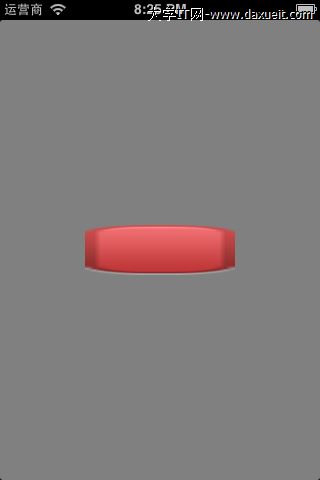
效果很差。原因很單純:原圖 24×60 被全方位拉伸成 150×50,其中受害最慘的就是四個圓角。
有人會說「叫設計師把圖做大一點不就得了」。這確實是一種解法,但不建議:圖片大會讓安裝包變大、記憶體佔用變高,而且我們有更好的辦法。
核心思路
仔細看會發現,圖片變醜完全是因為四個角被拉伸,中間區域的拉伸其實不影響外觀。因此只要指定「只拉伸中間那塊矩形區域、不動邊緣」,小圖也能任意放大而不變形。

iOS 提供了現成的 API。到 iOS 6.0 為止,一共有三種方案。
一、iOS 5.0 之前:stretchableImageWithLeftCapWidth
iOS 有個「端蓋(end cap)」的概念,用來指定圖片中哪些部分不參與拉伸。下圖中黑色代表需要被拉伸的矩形區域,上下左右不需拉伸的邊緣就是端蓋。
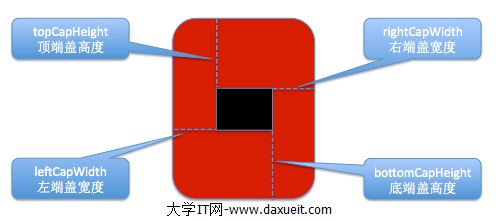
- (UIImage *)stretchableImageWithLeftCapWidth:(NSInteger)leftCapWidth
                               topCapHeight:(NSInteger)topCapHeight;
這個方法只有兩個參數:leftCapWidth 是左端蓋寬度,topCapHeight 是頂端蓋高度。系統會自動推算另外兩側:
// width 為圖片寬度
rightCapWidth  = width  - leftCapWidth  - 1;
// height 為圖片高度
bottomCapHeight = height - topCapHeight - 1;
也就是說,中間可拉伸區域固定是 1×1:
stretchWidth  = width  - leftCapWidth  - rightCapWidth  = 1;
stretchHeight = height - topCapHeight - bottomCapHeight = 1;
因此這個方法只會拉伸圖片正中央那 1×1 的像素,完全不動邊緣與圓角。使用範例:
NSInteger leftCapWidth = image.size.width * 0.5f;
NSInteger topCapHeight = image.size.height * 0.5f;
image = [image stretchableImageWithLeftCapWidth:leftCapWidth
                                    topCapHeight:topCapHeight];
注意:呼叫後原本的 image 不會改變,而是回傳一個新的 UIImage,所以必須把返回值重新賦回。
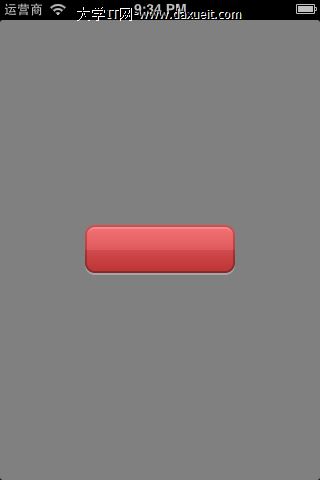
執行結果:

圖片漂亮地呈現出來了。兩點提醒:這個方法在 iOS 5.0 之後已被標記為 deprecated;而且它只能拉伸 1×1 的區域。
二、iOS 5.0:resizableImageWithCapInsets
- (UIImage *)resizableImageWithCapInsets:(UIEdgeInsets)capInsets
這個方法只收一個 UIEdgeInsets 參數,透過 left、right、top、bottom 分別指定四側的端蓋:
CGFloat top    = 25;   // 頂端蓋高度
CGFloat bottom = 25;   // 底端蓋高度
CGFloat left   = 10;   // 左端蓋寬度
CGFloat right  = 10;   // 右端蓋寬度

UIEdgeInsets insets = UIEdgeInsetsMake(top, left, bottom, right);
image = [image resizableImageWithCapInsets:insets];
執行結果:
三、iOS 6.0:加上 resizingMode 指定拉伸模式
- (UIImage *)resizableImageWithCapInsets:(UIEdgeInsets)capInsets
                            resizingMode:(UIImageResizingMode)resizingMode
相較於 iOS 5.0 的版本,只多了一個 resizingMode 參數,用來決定中間區域的填滿方式:
UIImageResizingModeStretch:拉伸模式,把 UIEdgeInsets 指定的矩形區域拉伸以填滿UIImageResizingModeTile:平鋪模式,重複鋪排該矩形區域以填滿
CGFloat top    = 25;
CGFloat bottom = 25;
CGFloat left   = 10;
CGFloat right  = 10;

UIEdgeInsets insets = UIEdgeInsetsMake(top, left, bottom, right);
image = [image resizableImageWithCapInsets:insets
                              resizingMode:UIImageResizingModeStretch];
執行結果: