
iOS 開發:讓同一個 UILabel 顯示不同字型與顏色
編輯:iOS 技巧大全
專案裡常會遇到這種需求:同一行文字中,某幾個字要用不同顏色,另外幾個字要換字型。從 iOS 6 開始,這個需求變得非常容易實現——UILabel 提供了 attributedText 屬性,搭配 NSAttributedString 與 NSMutableAttributedString 就能搞定。
核心思路
做法是先建立一個可變的屬性字串,然後針對不同的字元範圍(range)逐一加上屬性,最後把結果賦給 label 的 attributedText。
介面宣告
@interface ViewController : UIViewController

@property (nonatomic, strong) IBOutlet UILabel *attrLabel;

- (IBAction)next:(id)sender;

@end
在 viewDidLoad 中設定屬性
self.title = @"For iOS 6 & later";

NSMutableAttributedString *str =
    [[NSMutableAttributedString alloc] initWithString:@"Using NSAttributed String"];

// 設定不同區段的文字顏色
[str addAttribute:NSForegroundColorAttributeName
            value:[UIColor blueColor]
            range:NSMakeRange(0, 5)];
[str addAttribute:NSForegroundColorAttributeName
            value:[UIColor redColor]
            range:NSMakeRange(6, 12)];
[str addAttribute:NSForegroundColorAttributeName
            value:[UIColor greenColor]
            range:NSMakeRange(19, 6)];

// 設定不同區段的字型
[str addAttribute:NSFontAttributeName
            value:[UIFont fontWithName:@"Arial-BoldItalicMT" size:30.0]
            range:NSMakeRange(0, 5)];
[str addAttribute:NSFontAttributeName
            value:[UIFont fontWithName:@"HelveticaNeue-Bold" size:30.0]
            range:NSMakeRange(6, 12)];
[str addAttribute:NSFontAttributeName
            value:[UIFont fontWithName:@"Courier-BoldOblique" size:30.0]
            range:NSMakeRange(19, 6)];

attrLabel.attributedText = str;
效果如下圖:
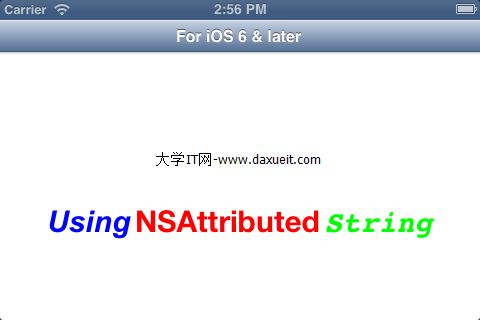
實務上的兩個提醒
第一,NSMakeRange 的位置與長度必須嚴格對應原字串,多算或少算一個字元就會導致屬性套到錯誤的位置,建議用 NSNotFound 或 rangeOfString: 的結果來計算,避免手寫數字。
第二,如果專案需要支援 iOS 6 以前的系統,attributedText 就無能為力了,此時可以引入第三方庫 TTTAttributedLabel,並額外載入 CoreText.framework 來達到類似效果。