
UILabel 設置行距與字距,並精確計算帶行間距的高度
編輯:iOS 技巧大全
設計稿給了行距和字距,UILabel 卻沒有現成屬性——這時要轉向 NSAttributedString,用 NSMutableParagraphStyle 管行距、用 NSKernAttributeName 管字距。本文記錄完整做法,順帶解決「帶行間距時如何算准 label 高度」這個配套問題。
#import "ViewController.h"

@implementation ViewController

- (void)viewDidLoad {
    [super viewDidLoad];

    NSString *conText = @"軟性的飲料 上升的氣泡 我將對你的喜好 一瓶裝全喝掉\n這裡最不缺就是熱鬧 你煽情給擁抱\n燭火在燃燒 有某種情調 眼神失焦了幾秒";

    UIFont *font = [UIFont systemFontOfSize:12];   // 字號
    CGFloat lineSpace = 8;                          // 行間距
    CGFloat paragraphSpacing = 0;                   // 段間距
    CGSize labSize = CGSizeMake(400, 1000);         // 允許的寬高範圍
    NSNumber *textLengthSpace = @0.2;               // 字間距

    // 用同一套屬性字典既算高度又設文本,保證兩者一致
    NSDictionary *dic = [self setTextLineSpaceWithString:conText
                                                withFont:font
                                            withLineSpace:lineSpace
                                       withTextlengthSpace:textLengthSpace
                                          paragraphSpacing:paragraphSpacing];

    // 計算高度
    CGSize size = [conText boundingRectWithSize:labSize
                                        options:NSStringDrawingUsesLineFragmentOrigin
                                     attributes:dic
                                        context:nil].size;
    CGFloat sizeHeight = size.height;

    // 創建 label
    UILabel *lab = [[UILabel alloc] init];
    lab.numberOfLines = 0;
    lab.backgroundColor = [UIColor yellowColor];
    lab.frame = CGRectMake(20, 20, 400, sizeHeight);
    lab.attributedText = [[NSAttributedString alloc] initWithString:conText attributes:dic];
    [self.view addSubview:lab];
}

#pragma mark - 設置行間距與字間距

- (NSDictionary *)setTextLineSpaceWithString:(NSString *)str
                                    withFont:(UIFont *)font
                                withLineSpace:(CGFloat)lineSpace
                           withTextlengthSpace:(NSNumber *)textlengthSpace
                              paragraphSpacing:(CGFloat)paragraphSpacing {

    NSMutableParagraphStyle *paraStyle = [[NSMutableParagraphStyle alloc] init];
    paraStyle.lineBreakMode = NSLineBreakByCharWrapping;
    paraStyle.alignment = NSTextAlignmentLeft;
    paraStyle.lineSpacing = lineSpace;          // 行間距
    paraStyle.paragraphSpacing = paragraphSpacing;
    paraStyle.hyphenationFactor = 1.0;
    paraStyle.firstLineHeadIndent = 0.0;
    paraStyle.paragraphSpacingBefore = 0.0;
    paraStyle.headIndent = 0;
    paraStyle.tailIndent = 0;

    return @{NSFontAttributeName: font,
             NSParagraphStyleAttributeName: paraStyle,
             NSKernAttributeName: textlengthSpace};   // 字間距
}

@end
效果圖:
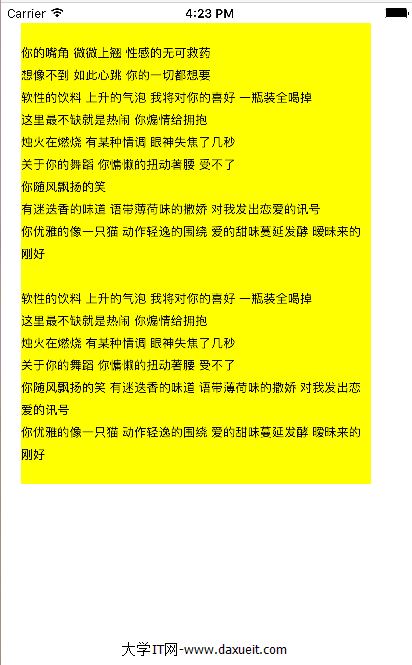
要點說明
1)NSKernAttributeName 控制的是字符間距,取值為 NSNumber,正數加寬、負數收緊,單位是點。
2)lineSpacing 是行與行之間的額外間距,並不包含文字本身高度,所以設 8 並不代表行高為 8。
3)算高度時必須傳入與設置 text 時完全相同的屬性字典,否則行距字距不同會導致 label 高度偏差、文字被裁切。
4)使用 attributedText 之後 text、font、textColor 這些屬性會失效,需要統一改到屬性字典裡配置。
5)若 boundingRectWithSize: 的結果偶爾偏大一兩點,可對結果做一次向上取整或減去末尾行距來微調。
- 上一篇文章: 為什麼 iOS App 幾乎都在異步編程
- 下一篇文章: iOS 多媒體進階:音頻與視頻播放全解