
iOS 9 全新聯絡人框架 Contacts Framework 完整解析
在 iOS 9 之前,凡是碰觸通訊錄的開發,程式碼都相當繁瑣,而且 API 設計也不是 Objective-C 的風格,寫起來格外别扭。iOS 9 推出的 Contacts Framework 徹底改善了這個問題,並取代 AddressBook,後者正式走入歷史。這是 iOS 9 新特性中最受好評的一項。
一、設計思路
新框架的核心概念是「透過 request 物件進行配置與存取」,邏輯單純、程式碼層次清楚。整體可拆成三塊:聯絡人物件、儲存請求、聯絡人儲存庫。
二、新增一位聯絡人
1. 聯絡人物件 CNContact
CNContact 用來承載聯絡人資訊,另有可變版本 CNMutableContact 供建立與修改使用,兩者的分工是「讀取」與「建立」。
CNMutableContact *contact = [[CNMutableContact alloc] init];

// 頭像
contact.imageData = UIImagePNGRepresentation([UIImage imageNamed:@"Icon-114.png"]);

// 姓名
contact.givenName  = @"jaki";
contact.familyName = @"zhang";
2. 以 CNLabeledValue 標記用途
信箱、電話等屬性都是 CNLabeledValue 陣列,透過 label 標示用途,系統會依此自動格式化顯示:
CNLabeledValue *homeEmail = [CNLabeledValue labeledValueWithLabel:CNLabelHome
                                                           value:@"316045346@qq.com"];
CNLabeledValue *workEmail = [CNLabeledValue labeledValueWithLabel:CNLabelWork
                                                           value:@"316045346@qq.com"];
contact.emailAddresses = @[homeEmail, workEmail];
常見 label 有:CNLabelHome(家庭)、CNLabelWork(工作)、CNLabelOther(其他)、CNLabelEmailiCloud、CNLabelURLAddressHomePage、CNLabelDateAnniversary。
contact.phoneNumbers = @[[CNLabeledValue labeledValueWithLabel:CNLabelPhoneNumberiPhone
                                                       value:[CNPhoneNumber phoneNumberWithStringValue:@"12344312321"]]];
// 其他:CNLabelPhoneNumberMobile / Main / HomeFax / WorkFax / OtherFax / Pager
CNPhoneNumber 是 iOS 9 新增的電話號碼類別:
@interface CNPhoneNumber : NSObject <NSCopying, NSSecureCoding>
+ (instancetype)phoneNumberWithStringValue:(NSString *)stringValue;
- (instancetype)initWithStringValue:(NSString *)string;
@property (readonly, copy) NSString *stringValue;
@end
3. 地址與生日
CNMutablePostalAddress *homeAdress = [[CNMutablePostalAddress alloc] init];
homeAdress.street     = @"貝克街";
homeAdress.city       = @"倫敦";
homeAdress.state      = @"英國";
homeAdress.postalCode = @"221B";
contact.postalAddresses = @[[CNLabeledValue labeledValueWithLabel:CNLabelHome value:homeAdress]];

NSDateComponents *birthday = [[NSDateComponents alloc] init];
birthday.day = 7; birthday.month = 5; birthday.year = 1992;
contact.birthday = birthday;
2. 儲存請求 CNSaveRequest
這個類別可以批次建立、修改、刪除聯絡人與群組:
CNSaveRequest *saveRequest = [[CNSaveRequest alloc] init];
[saveRequest addContact:contact toContainerWithIdentifier:nil];
可用方法包含:addContact:、updateContact:、deleteContact:、addGroup:、updateGroup:、deleteGroup:、addSubgroup:toGroup:、removeSubgroup:fromGroup:、addMember:toGroup:、removeMember:fromGroup:。
3. 執行寫入 CNContactStore
CNContactStore 是存取通訊錄的橋梁:
CNContactStore *store = [[CNContactStore alloc] init];
[store executeSaveRequest:saveRequest error:nil];
執行後在模擬器中開啟通訊錄,就能看到剛新增的聯絡人。
聯絡人清單:
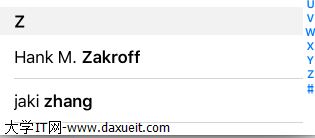
聯絡人詳情:

三、格式化輸出
新框架貼心地提供了格式化器,不必自己拼字串。
// 姓名
NSString *name = [CNContactFormatter stringFromContact:contact
                                                 style:CNContactFormatterStyleFullName];
// 風格另有 CNContactFormatterStylePhoneticFullName(拼音全名)

// 地址
NSString *addr = [CNPostalAddressFormatter stringFromPostalAddress:homeAdress
                                                             style:CNPostalAddressFormatterStyleMailingAddress];

四、查詢聯絡人
實務上「讀取」的使用頻率遠高於「新增」。查詢方式近似資料庫檢索,先設定條件再取資料:
CNContactStore *store = [[CNContactStore alloc] init];

// 檢索名字中包含 zhang 的聯絡人
NSPredicate *predicate = [CNContact predicateForContactsMatchingName:@"zhang"];

NSArray *contacts = [store unifiedContactsMatchingPredicate:predicate
                                              keysToFetch:@[CNContactGivenNameKey]
                                                    error:nil];
keysToFetch 用來指定要取回哪些欄位,只取需要的部分能有效降低耗時。
也可以用請求物件遍歷:
CNContactFetchRequest *request =
    [[CNContactFetchRequest alloc] initWithKeysToFetch:@[CNContactPhoneticFamilyNameKey]];

[store enumerateContactsWithFetchRequest:request
                                   error:nil
                              usingBlock:^(CNContact *contact, BOOL *stop) {
    NSLog(@"%@", contact);
}];
五、內建的聯絡人 UI
iOS 9 也封裝了兩個現成的控制器:CNContactPickerViewController(聯絡人清單)與 CNContactViewController(聯絡人詳情)。
CNContactPickerViewController *picker = [[CNContactPickerViewController alloc] init];
[self presentViewController:picker animated:YES completion:nil];

回呼邏輯寫在 CNContactPickerDelegate:
- (void)contactPickerDidCancel:(CNContactPickerViewController *)picker;
- (void)contactPicker:(CNContactPickerViewController *)picker
     didSelectContact:(CNContact *)contact;
- (void)contactPicker:(CNContactPickerViewController *)picker
didSelectContactProperty:(CNContactProperty *)contactProperty;
- (void)contactPicker:(CNContactPickerViewController *)picker
     didSelectContacts:(NSArray<CNContact *> *)contacts;
- (void)contactPicker:(CNContactPickerViewController *)picker
didSelectContactProperties:(NSArray<CNContactProperty *> *)contactProperties;
顯示某位聯絡人的詳情:
CNContactViewController *vc = [CNContactViewController viewControllerForContact:contact];
[self presentViewController:vc animated:YES completion:nil];
- (BOOL)contactViewController:(CNContactViewController *)viewController
shouldPerformDefaultActionForContactProperty:(CNContactProperty *)property;
- (void)contactViewController:(CNContactViewController *)viewController
         didCompleteWithContact:(CNContact *)contact;
整體來說,Contacts Framework 把過去需要大量 C 風格 API 才能完成的事,收斂成「物件 + 請求 + 儲存庫」三件事,Objective-C 體系在這塊也變得更完整了。