
iOS 中獲取 App 圖標與啟動圖片的文件名稱
某些業務場景下,我們需要拿到 App 自身的圖標或啟動圖片名稱。
比如:App 在前台時收到遠程通知,但這時通知欄不會有系統提醒,於是你想自己做一個模擬的橫幅提示,就需要用到 icon;再比如:加載某個控制器時希望把啟動圖作為背景圖鋪上去,也需要啟動圖的文件名。
麻煩的地方在於——icon 放在系統的 AppIcon 目錄裡,啟動圖放在 LaunchImage 目錄裡,取名的規則跟普通資源圖片完全不同,直接用 imageNamed: 拿不到。

先從簡單情況開始
假設當前項目只支持 iPhone、只支持豎屏,並且 AppIcon 和啟動圖都已經配置好了。
/** 獲取 app 的 icon 圖標名稱 */
- (void)getAppIconName {
    NSDictionary *infoDict = [[NSBundle mainBundle] infoDictionary];

    // 拿到所有 icon 名字數組
    NSArray *iconsArr = infoDict[@"CFBundleIcons"][@"CFBundlePrimaryIcon"][@"CFBundleIconFiles"];

    // 取最後一個(通常是尺寸最大的那張)
    NSString *iconLastName = [iconsArr lastObject];

    NSLog(@"iconsArr: %@", iconsArr);
    NSLog(@"iconLastName: %@", iconLastName);

    /* 打印結果:
       iconsArr: (
           AppIcon29x29,
           AppIcon40x40,
           AppIcon60x60
       )
       iconLastName: AppIcon60x60
     */
}

/** 獲取啟動圖片名稱,並設為本控制器背景圖 */
- (void)getLaunchImageName {
    NSString *launchImageName = @"";
    CGFloat screenHeight = [UIScreen mainScreen].bounds.size.height;

    if (screenHeight == 480) {
        // 4、4S
        launchImageName = @"LaunchImage-700";
    } else if (screenHeight == 568) {
        // 5、5C、5S、iPod
        launchImageName = @"LaunchImage-700-568h";
    } else if (screenHeight == 667) {
        // 6、6S
        launchImageName = @"LaunchImage-800-667h";
    } else if (screenHeight == 736) {
        // 6 Plus、6S Plus
        launchImageName = @"LaunchImage-800-Portrait-736h";
    }

    if (launchImageName.length < 1) return;

    UIImage *img = [UIImage imageNamed:launchImageName];
    self.view.backgroundColor = [UIColor colorWithPatternImage:img];
}
也可以直接把所有啟動圖信息打印出來看一眼:
/** 打印 app 中所有啟動圖片信息 */
- (void)printAllLaunchImageInfo {
    NSDictionary *infoDict = [[NSBundle mainBundle] infoDictionary];
    NSArray *launchImagesArr = infoDict[@"UILaunchImages"];
    NSLog(@"launchImagesArr: %@", launchImagesArr);

    /* 打印結果(名字是系統約定的固定值):
    (
        { UILaunchImageMinimumOSVersion = "8.0";
          UILaunchImageName = "LaunchImage-800-Portrait-736h";
          UILaunchImageOrientation = Portrait;
          UILaunchImageSize = "{414, 736}"; },

        { UILaunchImageMinimumOSVersion = "8.0";
          UILaunchImageName = "LaunchImage-800-Landscape-736h";
          UILaunchImageOrientation = Landscape;
          UILaunchImageSize = "{414, 736}"; },

        { UILaunchImageMinimumOSVersion = "8.0";
          UILaunchImageName = "LaunchImage-800-667h";
          UILaunchImageOrientation = Portrait;
          UILaunchImageSize = "{375, 667}"; },

        { UILaunchImageMinimumOSVersion = "7.0";
          UILaunchImageName = "LaunchImage-700";
          UILaunchImageOrientation = Portrait;
          UILaunchImageSize = "{320, 480}"; },

        { UILaunchImageMinimumOSVersion = "7.0";
          UILaunchImageName = "LaunchImage-700-568h";
          UILaunchImageOrientation = Portrait;
          UILaunchImageSize = "{320, 568}"; }
    )
    */
}
可以看到,圖標與啟動圖的信息全部來自 [[NSBundle mainBundle] infoDictionary]。順帶一提,這個字典裡還存着版本號、App 名稱、支持設備類型、支持方向等大量配置信息:
/** 打印 app 的完整工程配置信息 */
- (void)printInfoDictionary {
    NSDictionary *infoDict = [[NSBundle mainBundle] infoDictionary];
    NSLog(@"%@", infoDict);

    /* 打印結果(部分):
    {
        CFBundleExecutable = TanTest;
        CFBundleIcons = {
            CFBundlePrimaryIcon = {
                CFBundleIconFiles = ( AppIcon29x29, AppIcon40x40, AppIcon60x60 );
            };
        };
        CFBundleIdentifier = "net.tan.xxx";
        CFBundleName = TanTest;
        CFBundleShortVersionString = "1.0";
        CFBundleVersion = 1;
        UIDeviceFamily = ( 1 );
        UILaunchImageFile = LaunchImage;
        UILaunchImages = ( ... );
        UISupportedInterfaceOrientations = ( UIInterfaceOrientationPortrait );
    }
    */
}
再來看同時支持 iPhone / iPad、橫屏 / 豎屏的情況
一旦支持設備和方向都放開,圖標與啟動圖的組閤會明顯變多。先後兩張配置截圖:
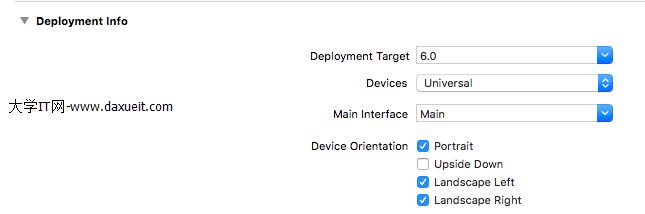
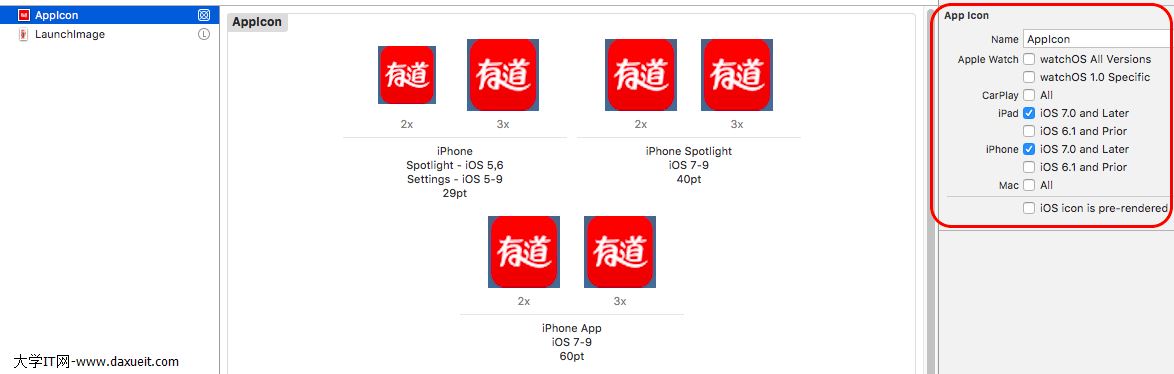
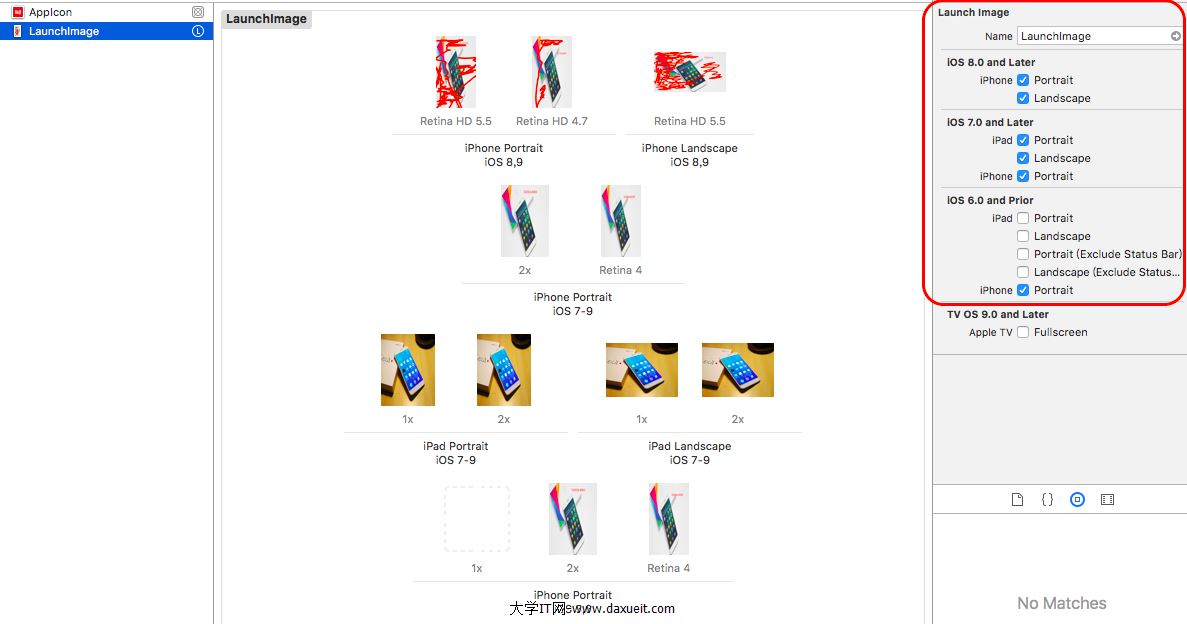
1. 獲取所有 icon 名稱
/** 同時支持 iPhone 和 iPad 時,獲取所有 icon 名稱 */
- (void)getAppIconName {
    NSDictionary *infoDict = [[NSBundle mainBundle] infoDictionary];
    NSArray *iconsArr = infoDict[@"CFBundleIcons"][@"CFBundlePrimaryIcon"][@"CFBundleIconFiles"];
    NSString *iconLastName = [iconsArr lastObject];

    NSLog(@"iconsArr: %@", iconsArr);
    NSLog(@"iconLastName: %@", iconLastName);

    /* 打印結果
       (29pt 和 40pt 由 iPhone、iPad 共用;
         60pt 用於 iPhone,76pt 與 83.5pt 用於 iPad):
       iconsArr: (
           AppIcon29x29,
           AppIcon40x40,
           AppIcon60x60,
           AppIcon76x76,
           "AppIcon83.5x83.5"
       )
       iconLastName: AppIcon83.5x83.5
     */
}
2. 獲取匹配當前設備與方向的啟動圖
(iPhone 只有 Plus 系列即 5.5 英寸机型才有橫豎兩套圖,4、5、6 英寸機型橫豎屏共用同一張。)
/** 支持 iPhone 和 iPad、支持橫豎屏時,獲取啟動圖並設為背景 */
- (void)getLaunchImageName {
    NSString *launchImageName = @"";

    CGFloat screenHeight = [UIScreen mainScreen].bounds.size.height;
    CGFloat screenWidth  = [UIScreen mainScreen].bounds.size.width;

    UIInterfaceOrientation orientation = [UIApplication sharedApplication].statusBarOrientation;
    BOOL isPortrait  = UIInterfaceOrientationIsPortrait(orientation);
    BOOL isLandscape = UIInterfaceOrientationIsLandscape(orientation);

    // 4、4S
    if ((isPortrait && screenHeight == 480) || (isLandscape && screenWidth == 480)) {
        launchImageName = @"LaunchImage-700";
    }
    // 5、5C、5S、iPod
    else if ((isPortrait && screenHeight == 568) || (isLandscape && screenWidth == 568)) {
        launchImageName = @"LaunchImage-700-568h";
    }
    // 6、6S
    else if ((isPortrait && screenHeight == 667) || (isLandscape && screenWidth == 667)) {
        launchImageName = @"LaunchImage-800-667h";
    }
    // 6 Plus、6S Plus 豎屏
    else if (isPortrait && screenHeight == 736) {
        launchImageName = @"LaunchImage-800-Portrait-736h";
    }
    // 6 Plus、6S Plus 橫屏
    else if (isLandscape && screenWidth == 736) {
        launchImageName = @"LaunchImage-800-Landscape-736h";
    }
    // iPad 豎屏
    else if (isPortrait && screenHeight == 1024) {
        launchImageName = @"LaunchImage-700-Portrait";
    }
    // iPad 橫屏
    else if (isLandscape && screenWidth == 1024) {
        launchImageName = @"LaunchImage-700-Landscape";
    }

    if (launchImageName.length < 1) return;

    UIImage *img = [UIImage imageNamed:launchImageName];
    self.view.backgroundColor = [UIColor colorWithPatternImage:img];
}這裡的判斷要點是:豎屏看 height、橫屏看 width。之所以要結合方向判斷,是因為旋轉之後屏幕的 width 和 height 會互換,單純比較某一個值會誤判。
3. 打印全部啟動圖信息
- (void)printAllLaunchImageInfo {
    NSDictionary *infoDict = [[NSBundle mainBundle] infoDictionary];
    NSArray *launchImagesArr = infoDict[@"UILaunchImages"];
    NSLog(@"launchImagesArr: %@", launchImagesArr);

    /* 打印結果:
    (
        { UILaunchImageName = "LaunchImage-800-Portrait-736h";
          UILaunchImageOrientation = Portrait;  UILaunchImageSize = "{414, 736}"; },
        { UILaunchImageName = "LaunchImage-800-Landscape-736h";
          UILaunchImageOrientation = Landscape; UILaunchImageSize = "{414, 736}"; },
        { UILaunchImageName = "LaunchImage-800-667h";
          UILaunchImageOrientation = Portrait;  UILaunchImageSize = "{375, 667}"; },
        { UILaunchImageName = "LaunchImage-700";
          UILaunchImageOrientation = Portrait;  UILaunchImageSize = "{320, 480}"; },
        { UILaunchImageName = "LaunchImage-700-568h";
          UILaunchImageOrientation = Portrait;  UILaunchImageSize = "{320, 568}"; },
        { UILaunchImageName = "LaunchImage-700-Portrait";
          UILaunchImageOrientation = Portrait;  UILaunchImageSize = "{768, 1024}"; },
        { UILaunchImageName = "LaunchImage-700-Landscape";
          UILaunchImageOrientation = Landscape; UILaunchImageSize = "{768, 1024}"; }
    )
    */
}
補充說明
這種依賴屏幕尺寸硬編碼匹配的做法,缺點很明顯:每出一款新機型就要補一個分支。在 iOS 8 之後,更推薦的方式是改用 LaunchScreen.storyboard 或 Asset Catalog 中的 LaunchImage 資源集,讓系統自動挑選合適的圖片,同時也能拿到更乾淨的 infoDictionary。
但如果你確實需要在運行時拿到啟動圖的 UIImage 對象(比如做背景圖),那麼從 UILaunchImages 中讀取名稱仍然是目前最直接的路徑——上面的判斷邏輯可以直接沿用,只需要隨着新機型補充分支即可。
原文鏈接:https://www.cnblogs.com/tandaxia/p/5820217.html