
UICollectionViewFlowLayout 實戰:自訂排序與拖曳手勢的完整封裝
用過 UICollectionView 的人都知道,真正決定 Cell 排布的是 UICollectionViewLayout。它給了開發者近乎全部的掌控權,但也意味著你得自己算完所有 frame,日常需求寫起來過於繁重。所以絕大多數專案最後都落在 UICollectionViewFlowLayout 上。
FlowLayout 除了沿用 UITableView 那套資料源與代理方法,還多提供了一個 UICollectionViewDelegateFlowLayout(繼承自 UICollectionViewDelegate),可以回傳 Cell 尺寸、行間距、item 間距、section 的 insets,以及 header 與 footer 的尺寸。從 iOS 9 起,UICollectionViewDelegate 又補上了 Cell 移動相關的方法。不過要注意:不同尺寸 Cell 的排序效果,系統並不會幫你搞定,仍得自己實作。
為了同時支援 iOS 7 以上、又要讓不同尺寸的 Cell 能有規則地排列,實作方式是寫一個 FlowLayout 子類,再搭配一個 UICollectionViewLayout 的分類來掛載自訂拖曳手勢。
網路上關於「不同尺寸 Cell 自訂排序」的文章不算少,但多數只處理沒有 header 與 footer 的單一 section,而且往往把 FlowLayout 原本的種種特性弄丟了。因此這裡的目標很明確:在完整保留父類功能的基礎上,額外加上 section 背景色與全 section 規則排序這兩個擴充能力。基於篇幅,下面只記錄關鍵環節。
一、為 section 加上背景色
如果只設定了 UICollectionView 整體的背景色,卻希望每個 section 各自不同,就得自己動手。
先釐清 UICollectionView 的內容可以分成三類:
- SupplementaryView:也就是 header 與 footer。
- Cell:即每個 item。
- DecorationView:裝飾視圖,通常墊在 Cell 下層。
section 背景色的關鍵就在 DecorationView 上。FlowLayout 提供了註冊方法:
- (void)registerClass:(nullable Class)viewClass forDecorationViewOfKind:(NSString *)elementKind;
在子類的 init 中註冊一個 UICollectionReusableView 的子類(此處命名為 ALWCollectionReusableView)作為裝飾視圖。接著在該子類中覆寫:
- (void)applyLayoutAttributes:(UICollectionViewLayoutAttributes *)layoutAttributes {
    [super applyLayoutAttributes:layoutAttributes];
    if ([layoutAttributes isMemberOfClass:[ALWCollectionViewLayoutAttributes class]]) {
        self.backgroundColor = ((ALWCollectionViewLayoutAttributes *)layoutAttributes).backgroundColor;
    }
}
這裡遇到一個有趣的矛盾:傳進來的 layoutAttributes 什麼屬性都有,偏偏沒有一個 UIColor。解法自然是再寫一個 UICollectionViewLayoutAttributes 的子類,自行補上名為 backgroundColor 的屬性並給定預設值。
不過走到這裡,只是完成了註冊與上色,裝飾視圖的 frame 還沒算,也還沒在正確的時機生效。而所謂正確的時機,就是這兩個方法:
- (void)prepareLayout;
- (NSArray<UICollectionViewLayoutAttributes *> *)layoutAttributesForElementsInRect:(CGRect)rect;
前者是設定屬性的時機,後者是讓設定生效的時機。具體做法如下:
A. 開放動態設定每個 section 的背景色,對外提供一個 delegate 方法:
- (UIColor *)collectionView:(UICollectionView *)collectionView
                     layout:(UICollectionViewLayout *)collectionViewLayout
     backgroundColorForSectionAtIndex:(NSInteger)section;
B. 計算裝飾視圖尺寸時,可以依每個 section 首尾 item 的 frame 加上 sectionInset 推算出來;若 header 與 footer 同時存在,也可以由兩者決定範圍。這裡有個容易踩的坑:當某個 section 只實作了 header 而沒實作 footer(或反之),取到的布局屬性物件會是 nil,必須先判空。
C. 取得布局屬性物件。在 FlowLayout 子類中,可以直接呼叫這幾個實例方法:
- (nullable UICollectionViewLayoutAttributes *)layoutAttributesForItemAtIndexPath:(NSIndexPath *)indexPath;
- (nullable UICollectionViewLayoutAttributes *)layoutAttributesForSupplementaryViewOfKind:(NSString *)elementKind atIndexPath:(NSIndexPath *)indexPath;
- (nullable UICollectionViewLayoutAttributes *)layoutAttributesForDecorationViewOfKind:(NSString *)elementKind atIndexPath:(NSIndexPath *)indexPath;
但在 UICollectionViewLayout 層級呼叫時它們會回傳 nil,這時改用類方法自行產生實例:
+ (instancetype)layoutAttributesForCellWithIndexPath:(NSIndexPath *)indexPath;
+ (instancetype)layoutAttributesForSupplementaryViewOfKind:(NSString *)elementKind withIndexPath:(NSIndexPath *)indexPath;
+ (instancetype)layoutAttributesForDecorationViewOfKind:(NSString *)decorationViewKind withIndexPath:(NSIndexPath *)indexPath;
二、讓不同尺寸的 item 規則排序
FlowLayout 對「等尺寸 item」的排列已經做得很好,但尺寸不一時就會顯得零亂。若希望在完整沿用父類能力的前提下,讓每一排的 item 維持固定間距,可以照下面的思路做。
前提條件是:固定橫向或豎向其中一個方向上,每排的 item 數量與邊長都相同。下圖是填充式排序的效果:
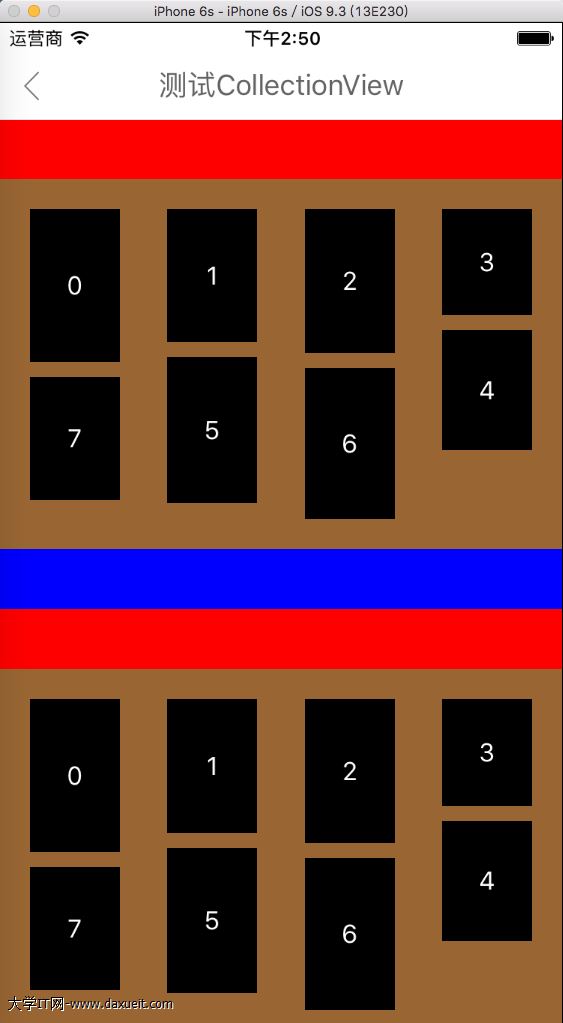
實作步驟大致如下:
A. 覆寫 - (void)prepareLayout,在裡頭取得 item、header、footer 的布局屬性陣列(NSMutableArray<UICollectionViewLayoutAttributes *>):
a. 以縱向滑動為例,逐一累加每個 section 的 header、item、footer 高度。
b. 依每行 item 數量決定「高度占用陣列」的元素個數,用來記錄每一列在垂直方向上目前已占用的內容高度。
c. 以填充排序為例:每個 item 的 y 偏移量由高度占用陣列中的最小值決定;x 座標則由 sectionInset、item 固定寬度、橫向間距與列的索引共同算出;尺寸部分只需取 itemSize 協議方法回傳結果中的高度即可。
B. 覆寫 - (NSArray<UICollectionViewLayoutAttributes *> *)layoutAttributesForElementsInRect:,回傳包含 items、header、footer 與 decorationView 的完整屬性陣列。
C. 覆寫 - (CGSize)collectionViewContentSize,回傳步驟 A 中記錄到的最大內容尺寸。
D. 一個必須避開的錯誤:不要在 super 方法回傳的陣列上「追加」header 與 footer 的布局屬性。否則很可能看到這則錯誤:
layout attributes for supplementary item at index path (<NSIndexPath>) changed from <UICollectionViewLayoutAttributes> to <UICollectionViewLayoutAttributes> without invalidating the layout
原因就在於最終陣列裡出現了兩個 indexPath 相同的布局屬性物件,系統無法判定該信任哪一個。
三、UICollectionViewLayout (DragGesture) 分類
這部分提供支援 iOS 7 以上的拖曳手勢,且適用於所有子類。iOS 9 之後系統已內建 move 相關方法,只要加上手勢去觸發呼叫即可。分類另外提供了同類的方法介面,並附上啟用開關(預設關閉),避免與系統行為混淆。
實作要點:
1. 交換 init 方法,在其中為 collectionView 屬性加上 KVO 觀察——原因是 UICollectionView 的實例化時機通常晚於 layout 物件。
2. 待 collectionView 完成實例化後,依啟用開關為它加上長按手勢與拖動手勢。
3. 一旦選中某個 item,就持續追蹤拖動位置;進入另一個 item 的範圍時交換兩者,同時完成動畫與資料對調。核心使用的是:
- (void)performBatchUpdates:(void (^ __nullable)(void))updates
                 completion:(void (^ __nullable)(BOOL finished))completion;
4. 加上一個 CADisplayLink,依拖動方向與 item 所在位置,以螢幕刷新頻率與預設移動速度自動調整 contentOffset,讓內容在手指靠近邊緣時持續滾動。
效果如下:
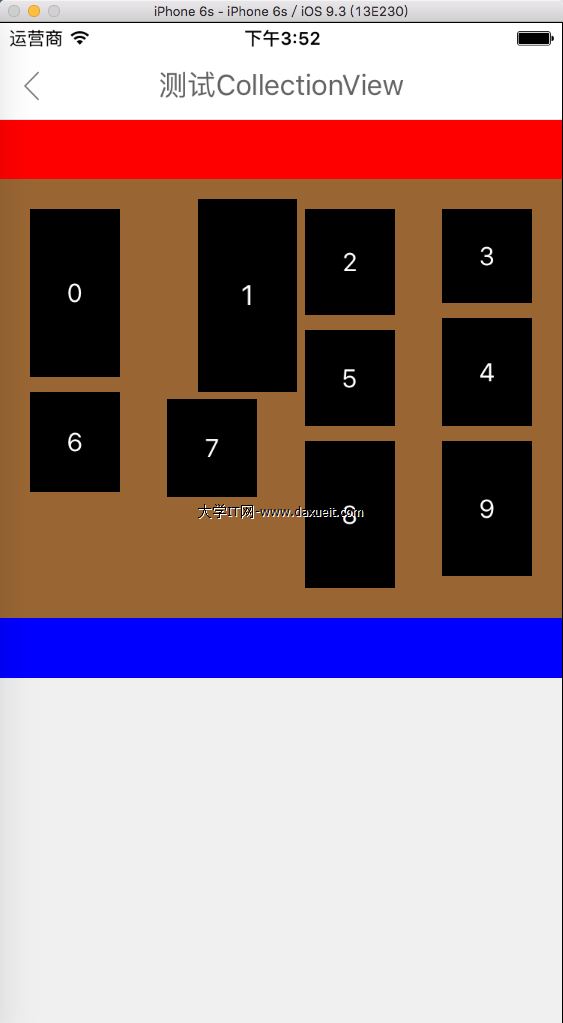
目前待解的問題
自訂排序之後,拖曳手勢仍會出現短暫閃爍。推測問題出在覆寫回傳屬性陣列的那段邏輯裡,因為使用 FlowLayout 預設排序時拖曳完全正常。若有人找到根因,歡迎指教。
此分類已更新至 Base 專案:https://github.com/ALongWay/base.git