
iOS 上架打包錯誤 Missing 64-bit support 解法
編輯:iOS 技巧大全
在提交 App 到 App Store 時,若出現 Missing 64-bit support 錯誤,通常代表目前建置的 App 尚未支援 64 位元架構。Apple 已要求提交的应用程式必須支援 64 位元,因此需要調整 Build Settings。

解法
進入專案的 target,找到 Build Settings 中的 Architectures 相關選項,確認有包含 arm64 或對應的 64 位元架構。若使用 Standard Architectures,也要確保目前的 Xcode 與 SDK 支援。
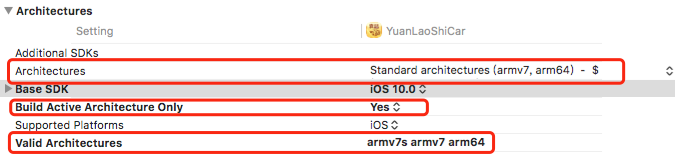
修正後重新 archive 並上傳。如果仍出現錯誤,也要檢查第三方 framework 或 library 是否已提供 64 位元版本。
- 上一篇文章: iOS UIKeyboardType 11 種鍵盤類型圖片展示
- 下一篇文章: NSURLSession HTTPS 雙向認證實作筆記