
iTunes 無法驗證伺服器?試試修改 Hosts 這個辦法
編輯:iPhone 刷機與越獄教學
iOS 10 推送之後,不少用戶會在 Mac 上透過 DFU 模式或 iTunes 重刷系統,結果撞上一連串錯誤:iTunes 無法驗證「s.mzstatic.com」的身分、無法連線至更新伺服器、伺服器憑證無效等等。
對此,有網友 kevix21 分享了一個解法。他指出,問題根源在於國內 DNS 服務商對 s.mzstatic.com 進行了劫持,只要修改 Hosts 檔、補上正確的 IP 即可。
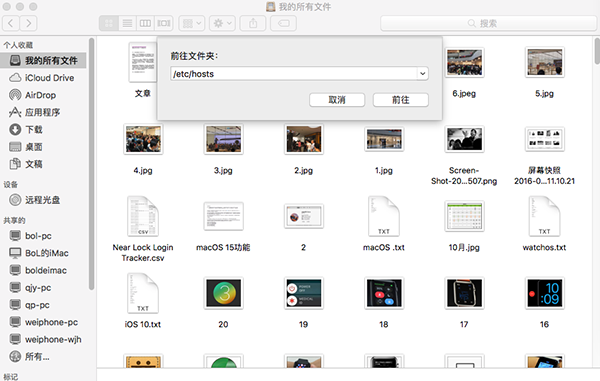
1. 開啟 Mac 的 Finder,按下 Shift + Command + G,輸入 Hosts 檔的路徑:/etc/hosts,隨後即可在 Finder 視窗中看到該檔案。
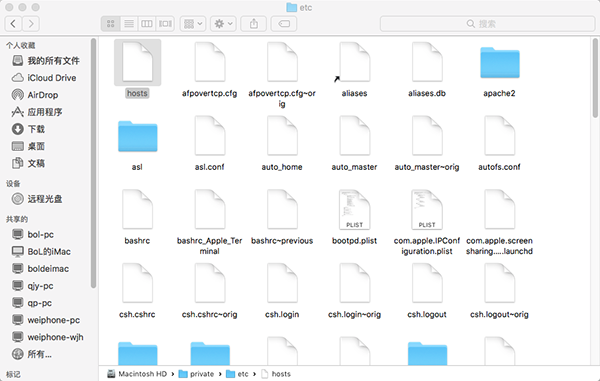
2. 建議先把 Hosts 檔複製到桌面等位置再編輯,改好並存檔後,拖回原資料夾覆蓋原檔即可。
以下是一份修改後可正常使用的 Hosts 內容:
##
# Host Database
#
# localhost is used to configure the loopback interface
# when the system is booting. Do not change this entry.
##
127.0.0.1 localhost
255.255.255.255 broadcasthost
::1 localhost
23.214.233.166 s.mzstatic.com
- 上一篇文章: iOS 10 常見問題與解法整理 升完再看也不遲
- 下一篇文章: iPhone 7的小毛病你能接受嗎?看完還想剁手就是真愛