
iOS 8.3 越獄後刪除 Apple Watch 等預裝 App(含路徑清單)
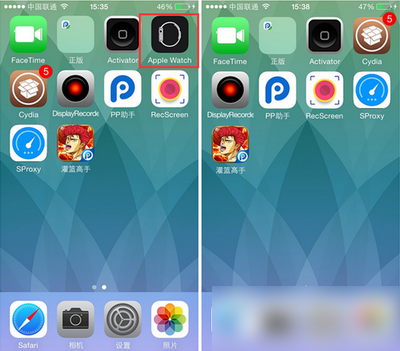
iOS 8.2 加入的 Watch 應用無法刪除,讓不少小容量機型的用戶相當困擾。iOS 8.3 完美越獄推出後,這個限制就能繞過了。以下不只教你刪 Watch,還附上 Facebook、Twitter、iBooks 等其他預裝程式的完整檔案路徑。
工具:太極越獄助手 2.1.2 官方綠色版(大小約 75.03MB,更新日期 2015-06-27)
步驟一:先完成 iOS 8.3 完美越獄
參考太極越獄工具 iOS 8.1.3–8.3 完美越獄教學。
步驟二:進入越獄檔案系統刪除檔案
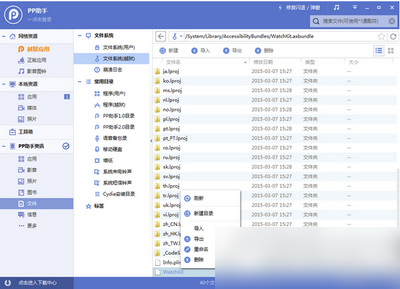
用 PP 助手等同步工具連上裝置,進入「檔案系統(越獄)」,依下列路徑刪除。
1. Apple Watch
/Applications/Bridge.app
/private/var/mobile/Library/SpringBoard/PushStore/com.apple.Bridge.pushstore
/System/Library/AccessibilityBundles/Bridge.axbundle
/private/var/mobile/Library/Preferences/com.apple.Bridge.plist
/System/Library/AccessibilityBundles/WatchKit.axbundle
/System/Library/Frameworks/WatchKit.framework
/System/Library/LocationBundles/AppleWatchFaces.bundle
/System/Library/PrivateFrameworks/BridgePreferences.framework
2. Facebook
/Applications/SocialUIService.app/PlugIns/com.apple.social.FacebookComposeService.appex
/Applications/FacebookAccountMigrationDialog.app
/System/Library/AccessibilityBundles/FacebookSettings.axbundle
/System/Library/PreferenceBundles/FacebookSettings.bundle
/System/Library/Accounts/Authentication/FacebookAuthenticationPlugin.bundle
/System/Library/Accounts/Access/FacebookAccessPlugin.bundle
/System/Library/Frameworks/Social.framework/XPCServices/com.apple.facebook.xpc
3. Flickr
/Applications/SocialUIService.app/PlugIns/com.apple.social.FlickrComposeService.appex
/System/Library/PreferenceBundles/FlickrSettings.bundle
/System/Library/Accounts/Authentication/FlickrAuthenticationPlugin.bundle
/System/Library/Frameworks/Social.framework/XPCServices/com.apple.flickr.xpc
/System/Library/PrivateFrameworks/VUSocialUpload.framework
4. Vimeo
/Applications/SocialUIService.app/PlugIns/com.apple.social.VimeoComposeService.appex
/System/Library/PreferenceBundles/VimeoSettings.bundle
/System/Library/Accounts/Authentication/VimeoAuthenticationPlugin.bundle
/System/Library/Frameworks/Social.framework/XPCServices/com.apple.vimeo.xpc
/System/Library/PrivateFrameworks/VUSocialUpload.framework
5. iBooks
/Applications/iBooks.app
/Applications/Setup.app/AppleIDiBooks@2x.png
/System/Library/SyncBundles/Books.syncBundle
/var/mobile/Media/Books
6. Podcasts
/Applications/Podcasts.app
/private/var/mobile/Library/SpringBoard/PushStore/com.apple.podcasts.pushstore
/System/Library/AccessibilityBundles/Podcasts.axbundle
/System/Library/Assistant/Plugins/Podcasts.assistantBundle
7. Tips
/Applications/Tips.app
/etc/asl/com.apple.tips
/etc/asl/com.apple.tipsd
/private/var/mobile/Library/Preferences/com.apple.tipsd.plist
/System/Library/AccessibilityBundles/Tips.axbundle
/System/Library/LaunchDaemons/com.apple.tipsd.plist 或 /Library/LaunchDaemons/com.apple.tipsd.plist
/System/Library/PrivateFrameworks/Tips.framework
/usr/libexec/tipsd
8. Twitter
/Applications/SocialUIService.app/PlugIns/com.apple.social.TwitterComposeService.appex
/System/Library/AccessibilityBundles/TwitterFramework.axbundle
/System/Library/AccessibilityBundles/TwitterSettings.axbundle
/System/Library/Frameworks/Twitter.framework
/System/Library/PreferenceBundles/TwitterSettings.bundle
/System/Library/Accounts/Authentication/TwitterAuthenticationPlugin.bundle
/System/Library/Frameworks/Social.framework/XPCServices/com.apple.twitter.xpc
/System/Library/PrivateFrameworks/MobileSync.framework/
步驟三:替換 Preferences 的陣列檔
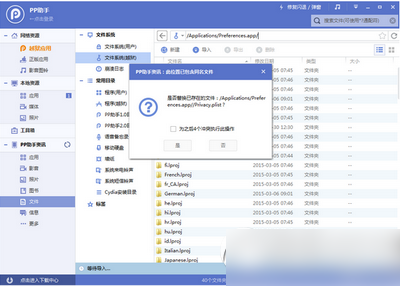
下載對應的陣列檔,解壓後放到「/Applications/Preferences.app/」路徑覆蓋。之所以要做這步,是因為「設定」裡某些頁面仍會參照上述 App,把相關陣列一併清掉才不會殘留。
步驟四:清快取並重啟
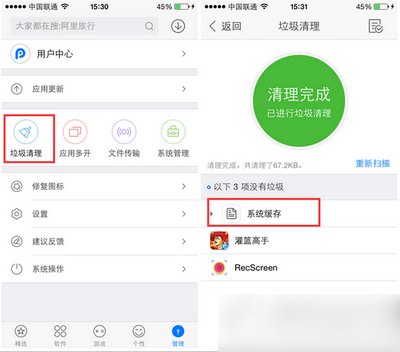
完成以上操作後清理手機快取,重啟即可發現 Watch 等應用都消失了。
風險提醒:刪除系統目錄檔案屬於高風險操作,萬一刪錯可能導致無法開機。建議先把整份清單抄好、逐項確認路徑無誤,並在越獄前完成資料備份。
- 上一篇文章: iPhone 6s 何時上市?發表時間與規格預測
- 下一篇文章: iOS 藏了哪些神細節?字體適配、暗喻設計與隱藏手勢