iTunes 未知錯誤 -50 怎麼解?重置偏好設定與家長控制排查
編輯:蘋果手機教程
iTunes 出現「發生未知錯誤 -50」時,常見原因與偏好設定檔或參數異常有關。最直接的處理方式,是重置 iTunes 的偏好設定檔。
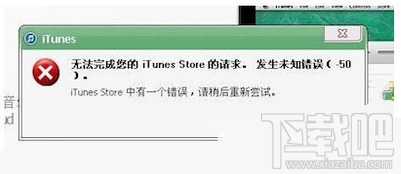
方法一:刪除 iTunesPrefs.xml
Windows XP 可前往 Documents and Settings 中的 Apple Computer 的 iTunes 資料夾,刪除 iTunesPrefs.xml。Windows 7 以上版本則可前往使用者的 AppData 中的 Apple Computer 的 iTunes 資料夾刪除該檔案。
刪除後建議重新開機,再啟動 iTunes。若系統要求重新設定,依畫面完成即可。
方法二:切換家長控制
若問題仍在,可進入 iTunes 的「編輯」到「偏好設定」再到「家長控制」,先停用 iTunes Store,保留 iTunes U 存取權,重新啟動 iTunes 後再恢復 iTunes Store 權限,有時也能排除錯誤。